
Last updated on
Oct 19, 2026

Get the free Friends Provident International Pension Trustee Application Form
We are not affiliated with any brand or entity on this form

Fill out
Complete the form online in a simple drag-and-drop editor.

eSign
Add your legally binding signature or send the form for signing.

Share
Share the form via a link, letting anyone fill it out from any device.

Export
Download, print, email, or move the form to your cloud storage.
Why pdfFiller is the best tool for your documents and forms


End-to-end document management
From editing and signing to collaboration and tracking, pdfFiller has everything you need to get your documents done quickly and efficiently.
Accessible from anywhere
pdfFiller is fully cloud-based. This means you can edit, sign, and share documents from anywhere using your computer, smartphone, or tablet.
Secure and compliant
pdfFiller lets you securely manage documents following global laws like ESIGN, CCPA, and GDPR. It's also HIPAA and SOC 2 compliant.
What is Pension Trustee Application
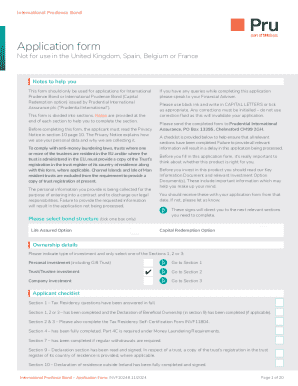
The Friends Provident International Pension Trustee Application Form is a personal finance document used by financial advisers, trustees, and lives assured to set up a pension trustee policy for QROPS SIPP products.
pdfFiller scores top ratings on review platforms




Who needs Pension Trustee Application?
Explore how professionals across industries use pdfFiller.

Pension Trustee Application is needed by:
-
Financial advisers assisting clients with pension setups
-
Members serving as trustees for pension policies
-
Individuals identified as lives assured in a pension application
-
Companies offering pension trustee services
-
Organizations managing pension schemes
-
Individuals applying for pension policy benefits
Comprehensive Guide to Pension Trustee Application
What is the Friends Provident International Pension Trustee Application Form?
The Friends Provident International Pension Trustee Application Form is essential for setting up a pension trustee policy for products such as QROPS SIPP. This form facilitates interaction between key players in the pension setup process. Each signer—financial adviser, member as trustee, and lives assured—plays a critical role in ensuring the application is valid and compliant.
Why Use the Friends Provident International Pension Trustee Application Form?
The use of the Friends Provident International Pension Trustee Application Form offers significant advantages, including streamlined pension management and adherence to regulatory standards. Accurate and complete submission is crucial for the successful establishment of your pension policy.
Key Features of the Friends Provident International Pension Trustee Application Form
This form includes unique attributes such as fillable fields that simplify the input of information. Additionally, there are language requirements specified for completion in English. Security is paramount; users must verify their identity and address before submission.
-
Fillable fields for ease of use
-
Requires completion in English
-
Identity verification for security
-
Essential for regulatory compliance
Who Needs the Friends Provident International Pension Trustee Application Form?
The form is relevant for various stakeholders involved in the pension process. Specifically, financial advisers, trustees, and lives assured must all participate to ensure a comprehensive approach to pension application. Understanding eligibility criteria is essential for effective use of this form.
How to Fill Out the Friends Provident International Pension Trustee Application Form Online
To complete the Friends Provident International Pension Trustee Application Form online using pdfFiller’s platform, follow these steps:
-
Access the form on the pdfFiller website.
-
Enter the company name in the designated field.
-
Fill in details for the adviser or consultant.
-
Include contact information such as phone number and email address.
-
Provide the policy number as required.
Completing these key fields accurately will facilitate the form submission process.
Common Errors and How to Avoid Them When Filling Out the Form
Users often encounter typical mistakes when completing this form. Common errors can lead to processing delays, so here are tips to help ensure all sections are filled out correctly:
-
Double-check spelling and completeness of entries.
-
Ensure all required fields are filled before submitting.
-
Review the form for necessary signatures.
Submission Methods: How to Submit the Friends Provident International Pension Trustee Application Form
Submission of the Friends Provident International Pension Trustee Application Form can be done through various methods. Users can choose between digital submissions via pdfFiller or traditional paper submissions. Be aware of any state-specific rules regarding submission to ensure compliance.
What Happens After You Submit the Friends Provident International Pension Trustee Application Form?
After submitting the form, the processing timeline varies based on regulatory requirements. Users should expect confirmation of receipt and details regarding follow-up communications regarding the application status.
Security and Compliance When Using the Friends Provident International Pension Trustee Application Form
pdfFiller prioritizes user security by implementing robust measures such as 256-bit encryption and ensuring compliance with relevant regulations like GDPR and HIPAA. These measures protect sensitive information throughout the form-filling process.
Why Choose pdfFiller for Filling Out the Friends Provident International Pension Trustee Application Form
Choosing pdfFiller simplifies the form-filling experience while enhancing user satisfaction. The platform offers powerful capabilities for completing and securely managing forms, ensuring clients can handle their pension application with ease and security.
How to fill out the Pension Trustee Application
-
1.To begin, visit pdfFiller and search for the Friends Provident International Pension Trustee Application Form within their library.
-
2.Once located, select the document to open it in the pdfFiller editor interface.
-
3.Familiarize yourself with the form structure, including designated sections for personal details and policy information.
-
4.Before you start filling out the form, gather necessary information including the company name, adviser details, member as trustee information, lives assured details, contact information, and policy number.
-
5.Utilize the editing tools in pdfFiller to input information into each fillable field, ensuring you complete the form in English and follow specific instructions, like using block capitals.
-
6.Review the completed form for accuracy; check that all fields are filled correctly and that you have included any required supporting documents.
-
7.Once you are satisfied with the form, use the provided options in pdfFiller to save, download, or directly submit the application through the platform.

Who is eligible to fill out the Friends Provident International Pension Trustee Application Form?
Eligibility includes financial advisers, members acting as trustees, and individuals designated as lives assured. Ensure that you understand your role when completing the form.
What supporting documents are required when submitting this form?
Typically, you will need identification verification documents, proof of address, and possibly additional information related to the pension scheme. Ensure all documents are ready before submission.
What is the process for submitting the completed form?
The completed form can be submitted electronically through pdfFiller, or you may print it out for physical submission according to your organization's requirements.
Are there any common mistakes to avoid when filling out this form?
Common mistakes include leaving fields blank, not signing the document where required, and failing to provide supporting documents. Double-check all entries before submission.
How long does it take to process the application after submission?
Processing times can vary, but it generally takes a few weeks. You may contact your financial adviser for updates regarding your application status.
What should I know about deadlines for submitting this form?
Deadlines can depend on your specific pension scheme or financial adviser's guidance. It's best to check with them to ensure timely submission.
How can I access the Friends Provident International Pension Trustee Application Form?
You can access the form via pdfFiller by searching for its official name. Register if you haven't already to view and edit the document.
Related Forms






Get the latest insights from our blog


If you believe that this page should be taken down, please follow our DMCA take down process
here
.
This form may include fields for payment information. Data entered in these fields is not covered by PCI DSS compliance.