
Last updated on
Oct 31, 2026

Get the free Application for SIPP/SSAS Pension Trustees
We are not affiliated with any brand or entity on this form

Fill out
Complete the form online in a simple drag-and-drop editor.

eSign
Add your legally binding signature or send the form for signing.

Share
Share the form via a link, letting anyone fill it out from any device.

Export
Download, print, email, or move the form to your cloud storage.
Why pdfFiller is the best tool for your documents and forms


End-to-end document management
From editing and signing to collaboration and tracking, pdfFiller has everything you need to get your documents done quickly and efficiently.
Accessible from anywhere
pdfFiller is fully cloud-based. This means you can edit, sign, and share documents from anywhere using your computer, smartphone, or tablet.
Secure and compliant
pdfFiller lets you securely manage documents following global laws like ESIGN, CCPA, and GDPR. It's also HIPAA and SOC 2 compliant.
What is SIPP/SSAS Application
The Application for SIPP/SSAS Pension Trustees is a personal finance document used by individuals in the UK to apply for a Self-Invested Personal Pension (SIPP) or Small Self-Administered Scheme (SSAS).
pdfFiller scores top ratings on review platforms




Who needs SIPP/SSAS Application?
Explore how professionals across industries use pdfFiller.

SIPP/SSAS Application is needed by:
-
Trustees managing pension funds
-
Beneficiaries of pension schemes
-
Financial advisers assisting clients with pensions
-
Individuals seeking personal pensions in the UK
-
Financial institutions offering pension products
Comprehensive Guide to SIPP/SSAS Application
What is the Application for SIPP/SSAS Pension Trustees?
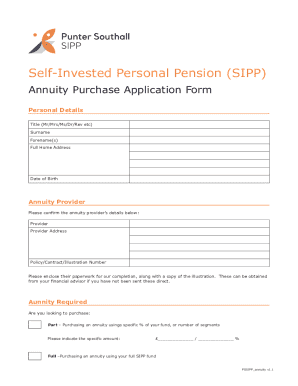
The Application for SIPP/SSAS Pension Trustees refers to a form utilized in the United Kingdom for applying for a Self-Invested Personal Pension (SIPP) or a Small Self-Administered Scheme (SSAS). This application process is essential for pension fund management as it formally collects necessary data about the pension scheme, including details on trustees and beneficiaries. Understanding the SIPP application form and the SSAS application form is critical for those involved in UK pensions.
Purpose and Benefits of the Application for SIPP/SSAS Pension Trustees
This application form serves multiple purposes, primarily ensuring compliance with financial regulations while facilitating effective pension fund management. One significant benefit is its ability to streamline the onboarding of pension trustees, which improves the oversight of pension assets. Furthermore, the form holds regulatory importance, emphasizing the need for precise financial planning and adherence to UK tax legislation.
Key Features of the Application for SIPP/SSAS Pension Trustees
The form contains key sections that are crucial for its completion, including:
-
Trustee and beneficiary details
-
Compliance requirements
-
Signature fields
-
Multiple blank fields for user input
Providing accurate information is essential to ensure that the application is processed without delays or rejections.
Who Needs the Application for SIPP/SSAS Pension Trustees?
The primary users of this application include trustees and financial advisers. Trustees play a vital role in managing pension schemes, while financial advisers assist clients in understanding the implications of these forms. Specific scenarios in which someone might need this form include setting up a new pension scheme or transferring funds to a SIPP or SSAS.
How to Fill Out the Application for SIPP/SSAS Pension Trustees Online (Step-by-Step)
Filling out the Application for SIPP/SSAS Pension Trustees online can be straightforward if you follow these steps:
-
Access the form on the pdfFiller platform.
-
Enter the required trustee and beneficiary details.
-
Upload any necessary supporting documents.
-
Review all entries for accuracy.
-
Sign the form electronically using the eSigning feature.
Data accuracy is critical; therefore, double-check all information before submission to avoid common pitfalls.
Review and Validation Checklist for the Application for SIPP/SSAS Pension Trustees
Before submitting your application, use this checklist to ensure completeness:
-
All fields in the form are filled out accurately.
-
Documentation is complete and uploaded as needed.
-
Signatures are present where required.
Paying attention to these details can help avoid common errors such as missing signatures or incorrect information.
How to Submit the Application for SIPP/SSAS Pension Trustees
Once your application is ready, there are several methods to submit it:
-
Mail it to Arcus Partners Ltd, PO Box 13717, Dunmow, CM7 0RE.
-
Submit the form electronically via the pdfFiller platform.
Be aware of submission deadlines and any associated fees, and track your submission status after filing.
Security and Compliance for the Application for SIPP/SSAS Pension Trustees
Handling sensitive documents requires robust security measures. pdfFiller employs 256-bit encryption and complies with SOC 2 Type II, HIPAA, and GDPR regulations. These features ensure that your application for SIPP/SSAS Pension Trustees is safeguarded against unauthorized access while meeting compliance standards in UK tax legislation.
How pdfFiller Can Help with Your Application for SIPP/SSAS Pension Trustees
Using pdfFiller offers numerous advantages when filling out your application:
-
Easily edit and annotate the form.
-
Utilize eSigning for fast and secure submission.
-
Access secure storage for your completed documents.
This tool simplifies online form management, making the application process more efficient.
Ready to Get Started with Your Application for SIPP/SSAS Pension Trustees?
Start using pdfFiller today to take control of your pension management. The platform’s user-friendly interface ensures that all users can navigate the process with ease.
How to fill out the SIPP/SSAS Application
-
1.Access the Application for SIPP/SSAS Pension Trustees form by navigating to pdfFiller's website and searching for the form title in the search bar.
-
2.Click on the form to open it in the pdfFiller editor, where you can view all available fields needing your input.
-
3.Before you begin filling out the form, gather necessary details such as scheme information, trustee information, beneficiary data, and details about payments and investments.
-
4.Use the toolbar in the pdfFiller interface to click on each field that requires your information, filling out text entries and checking relevant boxes as instructed.
-
5.Once all fields are completed, review your entries for accuracy. Ensure that all required sections are filled out, as incomplete forms may cause delays.
-
6.Follow any specific instructions indicated on the form, particularly those focusing on where to sign and how to submit.
-
7.When satisfied with your completed form, save your work using the 'Save' option. You can also download a copy or submit directly through pdfFiller by following on-screen instructions.

Who is eligible to use the Application for SIPP/SSAS Pension Trustees?
Any individual looking to apply for a Self-Invested Personal Pension or a Small Self-Administered Scheme in the UK, including trustees and financial advisers, can use this form.
What documents do I need to complete this application?
You will need details regarding the pension scheme, information about trustees and beneficiaries, and specifics about payment and investment plans. Gather these documents before starting the application to streamline the process.
How do I submit the completed Application for SIPP/SSAS Pension Trustees?
The completed form must be signed and returned to Arcus Partners Ltd at the provided address. Ensure to follow the instructions on the form regarding submission.
What are common mistakes to avoid when filling out this form?
Common mistakes include leaving fields blank, failing to sign the form, and not providing the required supporting documents. Double-check all entries before submission.
Is there a deadline for submitting this application?
While the form does not specify a deadline, it is best to submit your application as soon as possible to avoid any issues with your pension setup. Check with your adviser for specific timelines.
How long does it take to process the application?
Processing times can vary, but it generally takes several weeks. For the most accurate estimate, consult with Arcus Partners Ltd after submission.
Do I need to notarize the Application for SIPP/SSAS Pension Trustees?
No, this application does not require notarization, but it does need to be signed by the relevant parties as indicated.
Related Forms




Get the latest insights from our blog


If you believe that this page should be taken down, please follow our DMCA take down process
here
.
This form may include fields for payment information. Data entered in these fields is not covered by PCI DSS compliance.