
Last updated on
Oct 19, 2026

Get the free 457(b) Plan Contribution Change Form
We are not affiliated with any brand or entity on this form

Fill out
Complete the form online in a simple drag-and-drop editor.

eSign
Add your legally binding signature or send the form for signing.

Share
Share the form via a link, letting anyone fill it out from any device.

Export
Download, print, email, or move the form to your cloud storage.
Why pdfFiller is the best tool for your documents and forms


End-to-end document management
From editing and signing to collaboration and tracking, pdfFiller has everything you need to get your documents done quickly and efficiently.
Accessible from anywhere
pdfFiller is fully cloud-based. This means you can edit, sign, and share documents from anywhere using your computer, smartphone, or tablet.
Secure and compliant
pdfFiller lets you securely manage documents following global laws like ESIGN, CCPA, and GDPR. It's also HIPAA and SOC 2 compliant.
What is 457(b) Contribution Form
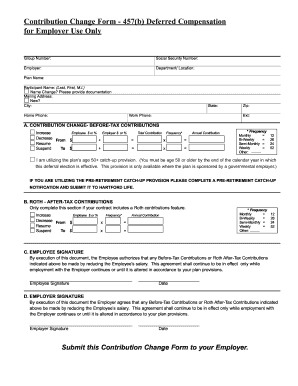
The 457(b) Plan Contribution Change Form is a document used by employees to authorize catch-up contributions to their 457(b) Deferred Compensation Plan account.
pdfFiller scores top ratings on review platforms




Who needs 457(b) Contribution Form?
Explore how professionals across industries use pdfFiller.

457(b) Contribution Form is needed by:
-
Employees participating in a 457(b) plan
-
HR professionals managing employee benefits
-
Payroll personnel handling contribution changes
-
Compliance officers ensuring IRS regulations are met
-
Financial advisors assisting clients with retirement plans
Comprehensive Guide to 457(b) Contribution Form
What is the 457(b) Plan Contribution Change Form?
The 457(b) Plan Contribution Change Form is a crucial document for employees participating in a 457(b) Deferred Compensation Plan, such as those offered by MissionSquare. This form allows employees to modify their contribution amounts, enhancing their retirement savings strategy. Understanding the significance of the 457(b) plan as a retirement savings tool can help employees make informed decisions regarding their contributions.
This clear and structured form enables employees to specify their desired contribution changes, ensuring they stay on target for their retirement goals. The terms "457(b) plan contribution form" and "mission square 457(b) form" are commonly associated with this important document.
Purpose and Benefits of the 457(b) Plan Contribution Change Form
The primary purpose of the 457(b) Plan Contribution Change Form is to empower employees with the ability to adjust their contributions according to their financial circumstances. Using this form can bring several benefits:
-
Authorization of catch-up contributions allows for increased savings, particularly beneficial for those nearing retirement.
-
Employees can specify their contribution types, choosing between pre-tax and Roth contributions for better tax management.
-
Understanding and adhering to contribution limits set by IRS guidelines is essential to maximizing tax benefits.
Consequently, this form is essential for employees aiming to strengthen their retirement savings.
Key Features of the 457(b) Plan Contribution Change Form
This form includes various fillable fields requiring specific information from the employee. Key features of the form include:
-
Employer name and plan number identification for accurate processing.
-
Options for selecting pre-tax and Roth contributions through checkboxes.
-
Signature requirements to validate the authenticity of the form submission.
These features ensure a comprehensive collection of necessary information for processing contributions efficiently.
Who Needs the 457(b) Plan Contribution Change Form?
The target audience for the 457(b) Plan Contribution Change Form primarily consists of employees who are enrolled in a 457(b) Deferred Compensation Plan. Important considerations include:
-
Eligibility criteria include active participation in the plan and the ability to make changes to contribution amounts.
-
This form is especially relevant for employees nearing retirement age who might be looking to increase their savings.
It’s vital for employees to recognize when they may benefit from using this form to optimize their retirement savings strategy.
How to Fill Out the 457(b) Plan Contribution Change Form Online
Filling out the 457(b) Plan Contribution Change Form online is straightforward. Here’s a step-by-step guide:
-
Access the form via pdfFiller’s platform, ensuring you have all personal information readily available.
-
Enter the required details, including employer name and plan number, into the appropriate fields.
-
Select your desired contribution amounts for both pre-tax and Roth options using the provided checkboxes.
-
Review all entries for accuracy to avoid common processing issues.
-
Sign the form electronically to finalize your submission.
This streamlined process emphasizes ease of use while ensuring all necessary information is captured accurately.
Common Errors to Avoid When Submitting the 457(b) Plan Contribution Change Form
Avoiding common errors is crucial for successful submissions of the 457(b) Plan Contribution Change Form. Here are frequent mistakes to watch for:
-
Missing critical information, such as employer details and contribution amounts.
-
Entering incorrect amounts which might lead to discrepancies in retirement planning.
Prior to submission, it’s beneficial to conduct a thorough review of the form to minimize delays in processing.
Submission Methods for the 457(b) Plan Contribution Change Form
After completing the 457(b) Plan Contribution Change Form, it’s essential to choose an appropriate submission method:
-
Submit via email, ensuring you adhere to your employer's guidelines.
-
Hand-deliver the form in person to ensure it reaches the right department.
-
Utilize an online portal if your employer provides an electronic submission option.
Keeping a copy of the submitted form is advised for personal records, along with being aware of processing times associated with each method.
Security and Compliance When Handling the 457(b) Plan Contribution Change Form
Handling sensitive information is paramount when completing the 457(b) Plan Contribution Change Form. pdfFiller ensures comprehensive data security through:
-
256-bit encryption to protect user information during the filling process.
-
Compliance with regulations such as HIPAA and GDPR, safeguarding your privacy.
This commitment to security allows users to complete and submit forms without concern over data protection.
How pdfFiller Can Help You with the 457(b) Plan Contribution Change Form
pdfFiller provides an efficient solution for managing the 457(b) Plan Contribution Change Form:
-
Advanced features offer easy editing, filling, and signing of the form.
-
User testimonials demonstrate the platform's reliability and efficiency in form management.
Utilizing pdfFiller simplifies the completion process, making it a valuable resource for employees.
How to fill out the 457(b) Contribution Form
-
1.To access the 457(b) Plan Contribution Change Form on pdfFiller, head over to their website and use the search feature to locate the form by its name.
-
2.Once located, click on the form to open it in the pdfFiller interface.
-
3.Before filling out the form, gather necessary information such as your employer name, plan number, social security number, date of birth, full name, and contribution amounts.
-
4.Begin completing the form by entering your employer name and plan number in the designated fields. Be sure to double-check the accuracy of the information you provide.
-
5.Fill in your last four digits of your social security number and your date of birth in the respective fields, ensuring that all entries are correct.
-
6.In the contribution section, specify the amount you would like to contribute for both pre-tax and Roth contributions by adjusting the corresponding fields.
-
7.Make sure to check the boxes for the types of contributions you intend to make, ensuring to follow IRS guidelines.
-
8.After populating all required fields, carefully review the entire form for any errors or omissions, correcting them as necessary.
-
9.Finally, once everything is accurate, save your work and choose to either download the completed form or submit it directly through pdfFiller if your employer accepts digital submissions.

Who is eligible to use the 457(b) Plan Contribution Change Form?
Employees enrolled in a 457(b) Deferred Compensation Plan are eligible to use this form to authorize contribution changes.
When should I submit the 457(b) Plan Contribution Change Form?
It is best to submit the form as soon as you decide to change your contributions, ensuring your employer processes it before your next paycheck.
How do I submit the completed form?
The completed form should be submitted directly to your employer, either in person or electronically, depending on your company's submission method.
What supporting documents are needed with the form?
Typically, no additional documents are required with the 457(b) Plan Contribution Change Form, but it's wise to check with your employer for specific requirements.
What common mistakes should I avoid when completing this form?
Avoid common mistakes such as providing incorrect social security numbers, incomplete fields, and not checking the contribution type boxes.
How long does it take for the contribution changes to process?
Processing times can vary by employer, but typically it takes one to two pay cycles for the changes to reflect in your paycheck.
Can I change my contributions multiple times throughout the year?
Yes, you can submit the 457(b) Plan Contribution Change Form to adjust your contributions more than once a year, depending on your employer's policies.
Related Forms



Get the latest insights from our blog


If you believe that this page should be taken down, please follow our DMCA take down process
here
.
This form may include fields for payment information. Data entered in these fields is not covered by PCI DSS compliance.