
Last updated on
Oct 3, 2026

Get the free Patient Self-Declaration of Income
We are not affiliated with any brand or entity on this form

Fill out
Complete the form online in a simple drag-and-drop editor.

eSign
Add your legally binding signature or send the form for signing.

Share
Share the form via a link, letting anyone fill it out from any device.

Export
Download, print, email, or move the form to your cloud storage.
Why pdfFiller is the best tool for your documents and forms


End-to-end document management
From editing and signing to collaboration and tracking, pdfFiller has everything you need to get your documents done quickly and efficiently.
Accessible from anywhere
pdfFiller is fully cloud-based. This means you can edit, sign, and share documents from anywhere using your computer, smartphone, or tablet.
Secure and compliant
pdfFiller lets you securely manage documents following global laws like ESIGN, CCPA, and GDPR. It's also HIPAA and SOC 2 compliant.
What is Income Declaration
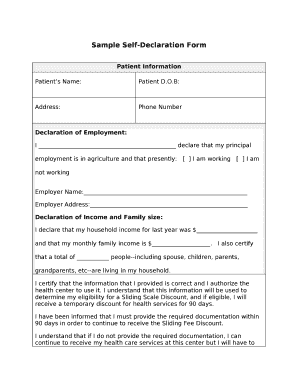
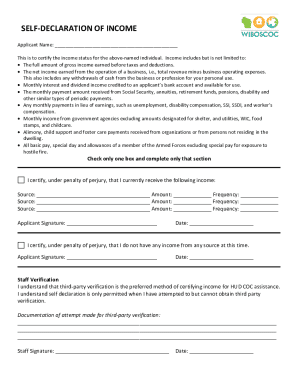
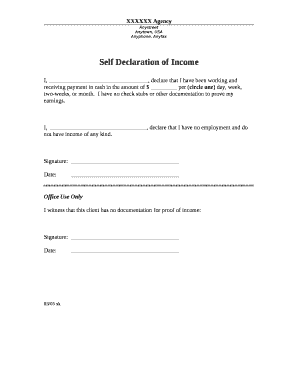
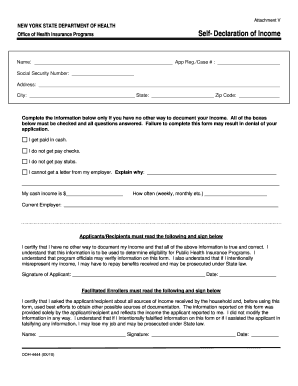
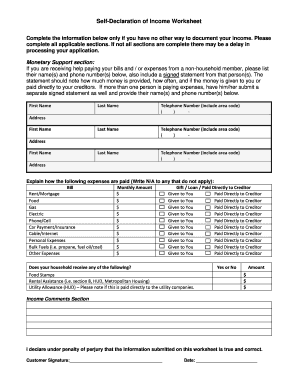
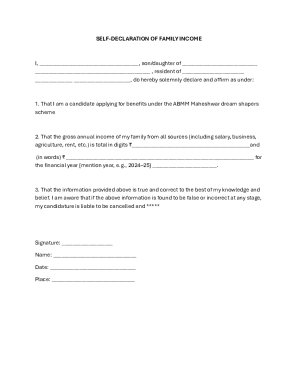
The Patient Self-Declaration of Income is a healthcare form used by patients in the US to certify their income status for sliding fee discount applications.
pdfFiller scores top ratings on review platforms




Who needs Income Declaration?
Explore how professionals across industries use pdfFiller.

Income Declaration is needed by:
-
Patients seeking financial assistance for healthcare services
-
Parents or guardians of minor patients completing income declarations
-
Healthcare providers verifying patient income for billing purposes
-
Staff members involved in processing sliding fee discounts
-
Individuals applying for sliding fee discounts at medical facilities
Comprehensive Guide to Income Declaration
What is the Patient Self-Declaration of Income?
The Patient Self-Declaration of Income is a key healthcare form used in the United States to certify a patient's income status for sliding fee discount applications. This document is vital as it enables healthcare providers to verify income details, ensuring patients receive the appropriate financial assistance. Completing this form accurately is crucial, as it is verified by Share Ourselves staff, helping to maintain the integrity of the sliding fee discount process.
Benefits of the Patient Self-Declaration of Income
Utilizing the Patient Self-Declaration of Income offers several advantages for patients seeking financial assistance in healthcare:
-
It facilitates access to sliding fee discounts, making medical care more affordable.
-
This form simplifies the documentation required for financial qualification.
-
It empowers patients by promoting transparency in income reporting, fostering trust within the healthcare system.
Who Needs to Complete the Patient Self-Declaration of Income?
This form is essential for various groups of people:
-
Patients applying for sliding fee discounts based on their income.
-
Parents or guardians may need to complete the form on behalf of minor children.
-
Share Ourselves staff members involved in the verification of submitted information.
How to Fill Out the Patient Self-Declaration of Income Online
Filling out the Patient Self-Declaration of Income online can streamline the process. Follow these steps for a complete submission:
-
Visit the designated online platform and access the form.
-
Gather necessary information, including personal, employment, and income details.
-
Fill in the required fields accurately.
-
Review the information to ensure validity.
-
Submit the completed form electronically.
Common Errors to Avoid When Completing the Patient Self-Declaration of Income
To ensure a successful submission, it's essential to avoid typical mistakes:
-
Common errors include incomplete fields, misreported income, and incorrect signatures.
-
Reviewing entries carefully can prevent complications during the verification process.
-
Implementing double-checking strategies helps enhance accuracy and completeness.
How to Sign the Patient Self-Declaration of Income
Signing the form requires understanding the differences between digital and wet signatures. Here’s how to sign the form online effectively:
-
Use a PDF editor like pdfFiller to add your digital signature.
-
Ensure that you understand the legal implications of signing under penalty of perjury.
Submission Methods for the Patient Self-Declaration of Income
Users have several options for submitting the completed Patient Self-Declaration of Income, which include:
-
Online submission through the designated platform.
-
Mailing the completed form to the appropriate address.
After submitting, it is advisable to confirm submission and track the application for updates.
What Happens After You Submit the Patient Self-Declaration of Income?
Once the form is submitted, the verification process initiates:
-
The Share Ourselves staff will review the provided information.
-
Expect communication regarding processing times and any needed feedback.
-
If corrections or amendments are necessary, follow the provided guidelines to rectify the information.
Protecting Your Information: Security and Compliance
Maintaining the security of personal data during the form-filling process is paramount. pdfFiller employs:
-
256-bit encryption to safeguard sensitive information.
-
Compliance with HIPAA and GDPR regulations to ensure data privacy.
-
Best practices for users to help secure their personal information.
Getting Started with pdfFiller for the Patient Self-Declaration of Income
pdfFiller enhances the user experience by providing a seamless platform for form completion:
-
Utilize pdfFiller’s robust PDF editing capabilities to efficiently fill out the form.
-
Read testimonials from satisfied users who have benefited from this platform in their form-filling tasks.
How to fill out the Income Declaration
-
1.Access the Patient Self-Declaration of Income form by visiting pdfFiller and searching for the form name.
-
2.Open the form once you find it, ensuring all sections are viewable in the pdfFiller interface.
-
3.Before filling out the form, gather necessary documents including personal identification, employment information, and household income details.
-
4.Begin by entering your personal information in the designated fields, ensuring accuracy for verification.
-
5.Move on to the household income section, declaring the total income and any relevant financial details.
-
6.Use the checkboxes provided to confirm the declaration accuracy and confirm understanding of the form's legal implications.
-
7.If you are a minor, ensure that a parent or guardian is present to complete their required fields and sign on your behalf.
-
8.Review the completed form carefully for any missed fields or errors to ensure all information is correct.
-
9.Once satisfied with the information entered, save your progress on pdfFiller using the save option.
-
10.You can download the final version to your device or submit it directly through pdfFiller according to the specific submission guidelines provided.

Who is eligible to complete the Patient Self-Declaration of Income?
Patients seeking sliding fee discounts based on their income are eligible to complete this form. If the patient is a minor, a parent or guardian must also sign it.
What information is required to fill out the form?
You will need personal identification details, employment information, and an overview of your household income. It's important to have accurate financial documents on hand.
How do I submit the completed form?
The completed form can be submitted electronically through pdfFiller or printed and submitted in-person or via mail, depending on the healthcare provider's requirements.
Are there any common mistakes to avoid while filling the form?
Ensure all information is accurate, complete all required fields, and avoid leaving blank spaces. Double-check numbers and signatures, especially for household income declarations.
What happens after I submit the form?
After submission, the form will be reviewed by Share Ourselves staff for accuracy and to determine eligibility for any sliding fee discounts. Processing times may vary.
Can I get assistance while filling out this form?
Yes, assistance can be provided by healthcare staff or online resources that guide users through the process of completing the Patient Self-Declaration of Income.
Is notarization required for the form?
No, notarization is not required for the Patient Self-Declaration of Income. However, signatures from the patient and parent or guardian are mandatory.




Get the latest insights from our blog


If you believe that this page should be taken down, please follow our DMCA take down process
here
.
This form may include fields for payment information. Data entered in these fields is not covered by PCI DSS compliance.