
Last updated on
Oct 17, 2026

Get the free Maryland Supplemental Retirement Plans Beneficiary Claim and Distribution Form
We are not affiliated with any brand or entity on this form

Fill out
Complete the form online in a simple drag-and-drop editor.

eSign
Add your legally binding signature or send the form for signing.

Share
Share the form via a link, letting anyone fill it out from any device.

Export
Download, print, email, or move the form to your cloud storage.
Why pdfFiller is the best tool for your documents and forms


End-to-end document management
From editing and signing to collaboration and tracking, pdfFiller has everything you need to get your documents done quickly and efficiently.
Accessible from anywhere
pdfFiller is fully cloud-based. This means you can edit, sign, and share documents from anywhere using your computer, smartphone, or tablet.
Secure and compliant
pdfFiller lets you securely manage documents following global laws like ESIGN, CCPA, and GDPR. It's also HIPAA and SOC 2 compliant.
What is Maryland Beneficiary Claim Form
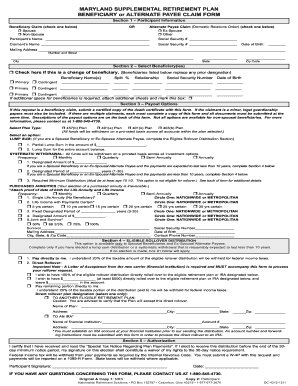
The Maryland Supplemental Retirement Plans Beneficiary Claim and Distribution Form is a tax document used by beneficiaries to claim a deceased participant's account and select distribution options.
pdfFiller scores top ratings on review platforms




Who needs Maryland Beneficiary Claim Form?
Explore how professionals across industries use pdfFiller.

Maryland Beneficiary Claim Form is needed by:
-
Beneficiaries of deceased participants in Maryland retirement plans
-
Surviving spouses eligible for distribution options
-
Designated beneficiaries entitled to Required Minimum Distributions (RMD)
-
Financial advisors assisting beneficiaries with claims
-
Tax professionals handling retirement account tax issues
Comprehensive Guide to Maryland Beneficiary Claim Form
What is the Maryland Supplemental Retirement Plans Beneficiary Claim and Distribution Form?
The Maryland Supplemental Retirement Plans Beneficiary Claim and Distribution Form serves to facilitate the claims process for beneficiaries of deceased participants in Maryland's retirement plans. This form is essential for ensuring that the rightful beneficiaries can claim retirement benefits without complications. Proper completion of this form is critical as it allows beneficiaries to elect their status concerning Required Minimum Distributions (RMD).
Purpose and Benefits of the Maryland Beneficiary Claim Form
This form plays a significant role in helping users efficiently claim retirement benefits. By correctly executing the Maryland Beneficiary Claim Form, beneficiaries can define their distribution preferences and manage tax implications efficiently. Moreover, the form assists in selecting appropriate payout options and establishing tax withholding elections, ensuring that beneficiaries maximize their inherited assets.
Who Needs the Maryland Beneficiary Distribution Form?
The target audience for the Maryland Beneficiary Distribution Form includes various beneficiary types, such as surviving spouses and eligible designated beneficiaries. To utilize the form, beneficiaries must meet specific eligibility criteria based on the deceased participant's account status. There are also definitive scenarios where the completion of this form is mandatory, ensuring compliance with retirement plan rules.
When and How to File the Maryland Beneficiary Claim Form
Beneficiaries should file the Maryland Beneficiary Claim Form promptly to avoid missing important deadlines that could impact their entitlements. Submissions can be made through various methods, including online uploads or traditional mail options, making the process accessible for all users.
Step-by-Step Instructions for Completing the Form Online
To successfully fill out the Maryland Beneficiary Claim Form online, follow these detailed steps:
-
Access the form on pdfFiller’s platform.
-
Enter your personal information in fields marked 'Name:', 'SSN/TIN:', and 'Mailing Address:'.
-
Provide details about the deceased participant's account.
-
Select relevant options for distribution preferences using the checkboxes provided.
-
Review all information carefully to avoid common errors, such as omitting required fields or incorrect entries.
-
Sign and date the form as required before submission.
Security and Compliance for the Maryland Beneficiary Claim Form
When using pdfFiller to complete the Maryland Beneficiary Claim Form, users can rest assured that their sensitive data is protected through state-of-the-art security measures. The platform adheres to stringent compliance standards, including HIPAA and GDPR, ensuring that user privacy is maintained throughout the form submission process.
What Happens After You Submit the Maryland Claim Form?
Once you submit the Maryland Beneficiary Claim Form, beneficiaries will receive confirmation of their submission through specified channels. Beneficiaries can track their submissions for accountability and are advised on what processing time to expect, including potential delays that may arise.
How pdfFiller Simplifies the Maryland Beneficiary Distribution Process
pdfFiller enhances the form-filling experience significantly by offering an intuitive platform where users can create, edit, and eSign the Maryland Beneficiary Claim Form with ease. The user-friendly features streamline the process while additional support services assist in managing retirement documents efficiently.
Explore Other Related Forms and Resources
There are numerous other forms that may be relevant for individuals dealing with retirement and beneficiary claims. Exploring these additional resources can provide further insights and assistance regarding Maryland retirement benefits, helping beneficiaries make informed decisions.
Get Started with Filling Out Your Form Today
Utilize pdfFiller to conveniently complete your Maryland Supplemental Retirement Plans Beneficiary Claim and Distribution Form today. With features like eSigning and editing, pdfFiller ensures a swift and secure process, allowing you to focus on your important financial matters with confidence.
How to fill out the Maryland Beneficiary Claim Form
-
1.To access the Maryland Supplemental Retirement Plans Beneficiary Claim and Distribution Form, visit pdfFiller and search for the form using its official name.
-
2.Once located, click on the form to open it in the pdfFiller interface, where you'll find fillable fields for your information.
-
3.Before filling out the form, gather necessary documents including the deceased participant's details, your identification, and any required beneficiary designations.
-
4.Begin by entering personal information in the designated fields like your 'Name', 'SSN/TIN', 'Mailing Address', and 'Date of Birth'.
-
5.Use pdfFiller’s tools to check for any additional checkboxes regarding distribution preferences and review instructions like 'Please complete this form'.
-
6.Ensure all information is accurate, and review the form carefully, including any instructions for signing and dating your submission.
-
7.Once completed, navigate to the save options in pdfFiller. You can choose to save, download, or directly submit the form electronically through their submission process.

Who is eligible to use the Maryland Beneficiary Claim Form?
The form is intended for beneficiaries of deceased participants in Maryland Supplemental Retirement Plans, including surviving spouses and designated beneficiaries who need to claim retirement accounts and elect distribution options.
What deadlines should I be aware of for submitting this form?
While specific deadlines can vary, it is advisable to submit the form as soon as possible after the participant’s death to avoid delays in distribution and tax implications. Check with the retirement plan administrator for precise timelines.
How do I submit the completed form?
You can submit the completed Maryland Beneficiary Claim Form through pdfFiller's submission process or print it out to mail directly to the retirement plan administrator. Always follow specific instructions provided by your retirement plan.
What supporting documents might I need to provide?
Typically, you may need to provide a copy of the death certificate, proof of your identity, and any documentation confirming your beneficiary status. Check with the plan administrator for any specific requirements.
What are common mistakes to avoid when filling out the form?
Common mistakes include leaving required fields blank, providing incorrect participant details, and failing to sign or date the form. Always double-check your entries for accuracy.
How long does it take to process this claim once submitted?
Processing times can vary but generally take several weeks. Contact your retirement plan administrator for specific processing timelines and to follow up on your claim status.
Can I make changes to the form after submission?
Once submitted, changes may be challenging. Always review the form thoroughly before submission. If updates are required afterward, consult the plan administrator for guidance on how to proceed.
Related Forms





Get the latest insights from our blog


If you believe that this page should be taken down, please follow our DMCA take down process
here
.
This form may include fields for payment information. Data entered in these fields is not covered by PCI DSS compliance.