
Last updated on
Oct 2, 2026

TX TDLR AB042 2012 free printable template
pdfFiller is not affiliated with any government organization

Fill out
Complete the form online in a simple drag-and-drop editor.

eSign
Add your legally binding signature or send the form for signing.

Share
Share the form via a link, letting anyone fill it out from any device.

Export
Download, print, email, or move the form to your cloud storage.
Why pdfFiller is the best tool for your documents and forms


End-to-end document management
From editing and signing to collaboration and tracking, pdfFiller has everything you need to get your documents done quickly and efficiently.
Accessible from anywhere
pdfFiller is fully cloud-based. This means you can edit, sign, and share documents from anywhere using your computer, smartphone, or tablet.
Secure and compliant
pdfFiller lets you securely manage documents following global laws like ESIGN, CCPA, and GDPR. It's also HIPAA and SOC 2 compliant.
What is TX TDLR AB042
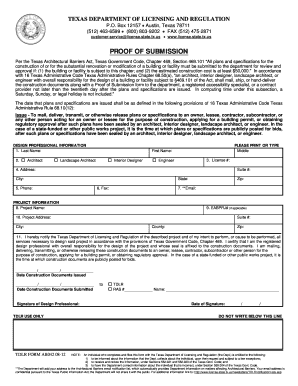
The Texas Proof of Submission Form is a regulatory document used by design professionals to notify the Texas Department of Licensing and Regulation of their intent to perform design services under the Texas Architectural Barriers Act.
pdfFiller scores top ratings on review platforms




Who needs TX TDLR AB042?
Explore how professionals across industries use pdfFiller.

TX TDLR AB042 is needed by:
-
Architects needing regulatory compliance for projects in Texas.
-
Interior designers submitting designs related to the Texas Architectural Barriers Act.
-
Landscape architects notifying about their design services.
-
Engineers engaged in construction projects that require state approval.
-
Texas contractors seeking necessary permits.
-
Local government entities requiring oversight on construction documentation.
Comprehensive Guide to TX TDLR AB042
What is the Texas Proof of Submission Form?
The Texas Proof of Submission Form is essential for design professionals, including architects, engineers, and landscape architects, who need to inform the Texas Department of Licensing and Regulation (TDLR) of their intent to undertake design services. This form plays a pivotal role in compliance with the Texas Architectural Barriers Act, ensuring that projects meet state regulations.
This form captures key details such as the design professional's name, license number, and project specifications. Accurate submission of this form is critical for regulatory approval and supports the architectural integrity of Texas construction projects.
Purpose and Benefits of the Texas Proof of Submission Form
Completing the Texas Proof of Submission Form correctly is vital for design professionals. This form ensures compliance with state regulations, which is crucial for all construction projects. Timely submission not only facilitates regulatory approval but also maintains accountability among design professionals.
-
Ensures adherence to the Texas Architectural Barriers Act.
-
Prevents delays in project approval and construction timelines.
-
Supports transparent communication with the TDLR.
Who Needs the Texas Proof of Submission Form?
Eligibility to submit the Texas Proof of Submission Form primarily includes licensed design professionals such as architects and engineers. These roles are responsible for notifying the TDLR when undertaking design services for projects that are subject to the Texas Architectural Barriers Act.
Typically, projects requiring submission include residential and commercial developments that involve architectural design. Design professionals must also ensure they fulfill their responsibilities by submitting the form within the designated timeline, usually within 20 days after plans are issued.
How to Fill Out the Texas Proof of Submission Form Online (Step-by-Step)
Filling out the Texas Proof of Submission Form on pdfFiller is straightforward. Follow these steps for a smooth process:
-
Access the Texas Proof of Submission Form on pdfFiller.
-
Complete the fields including 'Last Name', 'First Name', and 'License #'.
-
Enter the 'Project Name' and ensure all relevant information is accurate.
-
Review the form for any common errors, ensuring required fields are filled in.
-
Submit the form electronically via pdfFiller or prepare it for physical submission.
Digital Signing of the Texas Proof of Submission Form
The signing process for the Texas Proof of Submission Form can be completed digitally or with a wet signature. Digital signatures are acceptable and provide a convenient alternative, especially through platforms like pdfFiller, which meet the necessary legal requirements.
Understanding the distinction between digital and wet signatures is crucial, as each serves to officially validate the form. Finalizing the signing process is essential for compliance with state regulations, ensuring the document is legally binding.
Where and How to Submit the Texas Proof of Submission Form
Once completed, the Texas Proof of Submission Form can be submitted through various methods. Here are the available options:
-
Online submission through pdfFiller.
-
Mail submission to the appropriate TDLR office.
It's important to track your submission to confirm receipt. Pay attention to any associated fees and deadlines to avoid penalties or delays in regulatory approval.
Consequences of Not Filing or Late Filing the Texas Proof of Submission Form
Failing to file the Texas Proof of Submission Form, or submitting it late, can lead to significant repercussions. Design professionals may face penalties that impact project timeliness and approval processes.
Understanding the filing deadlines is essential to avoid complications that could hinder construction projects. Adherence to submission timelines is not only a regulatory requirement but also a component of responsible project management.
Security and Compliance When Using the Texas Proof of Submission Form
When using pdfFiller to complete the Texas Proof of Submission Form, users can feel confident about security. The platform employs 256-bit encryption and complies with regulations such as HIPAA and GDPR.
Data protection is paramount, as pdfFiller ensures safe storage and controlled access for sensitive documents, maintaining user privacy throughout the submission process.
Utilizing pdfFiller for Your Texas Proof of Submission Form Needs
pdfFiller simplifies the management of the Texas Proof of Submission Form with a user-friendly interface. The platform offers features that streamline the editing, filling, and electronic signing of the form.
-
Fillable fields streamline data entry.
-
eSigning capabilities add convenience for legal compliance.
Leveraging pdfFiller for your form-related tasks enhances efficiency and accuracy, making it an excellent tool for design professionals navigating regulatory submissions.
How to fill out the TX TDLR AB042
-
1.Access and open the Texas Proof of Submission Form on pdfFiller. Use the search bar to quickly find the form you need.
-
2.Once you have the form open, familiarize yourself with the fillable fields. Ensure you are prepared with your contact information and project details before starting.
-
3.Begin by entering your last name, first name, and middle name in the designated fields. Proceed to input your License # and Project Name.
-
4.Use the checkbox options to indicate any relevant certifying details. These selections help clarify your role and responsibilities in the project.
-
5.Review the instructions at the beginning of the form, ensuring you know to 'PLEASE PRINT OR TYPE' all the information clearly.
-
6.Sign the form where indicated for the 'Signature of Design Professional'. Ensure your signature matches your printed name.
-
7.After filling out all the fields, review the completed form for accuracy. Verify that all required information is provided.
-
8.Save your work frequently to avoid losing any data. After final review, utilize pdfFiller's options to download a copy of the form for your records.
-
9.To submit the form, use the online submission feature within pdfFiller, or print the document to mail it to the appropriate address.

Who is eligible to use the Texas Proof of Submission Form?
The Texas Proof of Submission Form is intended for licensed architects, interior designers, landscape architects, and engineers who are notifying the Texas Department of Licensing and Regulation about their design services.
What is the deadline for submitting the form?
The Texas Proof of Submission Form must be submitted within 20 days after the plans and specifications are issued to ensure compliance with state regulations.
How can I submit the form once completed?
You can submit the completed Texas Proof of Submission Form online through pdfFiller or print it out and send it via traditional mail to the Texas Department of Licensing and Regulation.
Are there any specific supporting documents required?
While the Texas Proof of Submission Form itself is a primary document, providing supporting project plans or specifications may be required during submission to ensure full compliance.
What are common mistakes to avoid when filling out the form?
Common mistakes include incorrect or incomplete license numbers, missing signatures, or failing to submit within the required timeframe. Double-check all entries for accuracy.
How long does it take to process the Texas Proof of Submission?
Processing times can vary, but it often takes several weeks from the date of submission for the Texas Department of Licensing and Regulation to review and approve the form.
Is notarization required for this form?
No, the Texas Proof of Submission Form does not require notarization, but it must be signed by the design professional completing the document.
TX TDLR AB042 Form Versions
Related Content
Related Forms



Get the latest insights from our blog


If you believe that this page should be taken down, please follow our DMCA take down process
here
.
This form may include fields for payment information. Data entered in these fields is not covered by PCI DSS compliance.