
Last updated on
Oct 31, 2026

Form 283129 2015 free printable template
pdfFiller is not affiliated with any government organization

Fill out
Complete the form online in a simple drag-and-drop editor.

eSign
Add your legally binding signature or send the form for signing.

Share
Share the form via a link, letting anyone fill it out from any device.

Export
Download, print, email, or move the form to your cloud storage.
Why pdfFiller is the best tool for your documents and forms


End-to-end document management
From editing and signing to collaboration and tracking, pdfFiller has everything you need to get your documents done quickly and efficiently.
Accessible from anywhere
pdfFiller is fully cloud-based. This means you can edit, sign, and share documents from anywhere using your computer, smartphone, or tablet.
Secure and compliant
pdfFiller lets you securely manage documents following global laws like ESIGN, CCPA, and GDPR. It's also HIPAA and SOC 2 compliant.
What is Form 283129
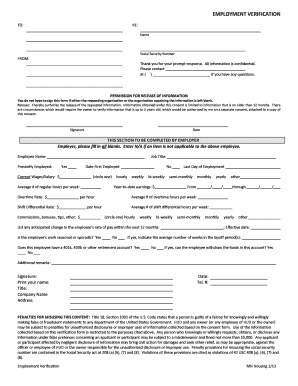
The Wage Verification Form is a document used by Harris Health System to verify an employee's gross income and employment status for assistance applications.
pdfFiller scores top ratings on review platforms




Who needs Form 283129?
Explore how professionals across industries use pdfFiller.

Form 283129 is needed by:
-
Employees seeking assistance based on income verification
-
Employers needing to confirm employee income for assistance
-
HR representatives managing employee verification processes
-
Government agencies evaluating assistance applications
-
Family members of employees submitting income verification
-
Financial institutions requiring income verification for loans
Comprehensive Guide to Form 283129
What is the Wage Verification Form?
The Wage Verification Form is essential within the Harris Health System for confirming an individual's gross income and employment status. This Texas employment form plays a significant role in assisting employees and their families in accessing various assistance programs. The form requires participation from both employees and employers, who must sign to validate the information provided.
Employees are tasked with requesting the verification, while employers must supply accurate details to ensure compliance with state regulations. Both parties must clearly understand their responsibilities to avoid any complications during the verification process.
Purpose and Benefits of the Wage Verification Form
This form serves multiple purposes that provide benefits to employees and employers alike. It is a vital tool that aids employees in qualifying for financial assistance programs by confirming their income. Additionally, it supports employers in fulfilling compliance obligations mandated by Texas laws regarding employee documentation.
Utilizing this employee income verification process not only streamlines assistance applications for employees but also provides employers with a structured means to maintain accurate records related to wage verification.
Key Features of the Wage Verification Form
The Wage Verification Form contains several essential components designed to ease the verification process. Key fillable fields include the employee’s name, address, and Social Security Number, which are critical for identifying the individual.
-
Checkboxes for employment status
-
Payment details
-
Signature lines for both the employee and the employer
These features ensure that all necessary information is collected for accurate income verification, making it easier for both employees and employers to complete their obligations.
Who Needs the Wage Verification Form?
Various groups may require the Wage Verification Form, especially employees applying for assistance and their family members. Understanding eligibility criteria is crucial for those seeking to utilize this form effectively.
-
Employees looking for financial aid
-
Family members of these employees
-
Employers who need to certify employment details
Both employees and employers hold responsibilities in completing the form, underscoring the collaborative nature of the process.
How to Fill Out the Wage Verification Form Online (Step-by-Step)
Completing the Wage Verification Form online is a straightforward process that can be done efficiently using pdfFiller. Here’s a step-by-step guide to ensure accuracy:
-
Access the form through pdfFiller.
-
Fill out the employee's name, address, and Social Security Number.
-
Choose the appropriate checkboxes regarding employment status.
-
Enter payment details as required.
-
Both parties must sign the form digitally.
After filling out each field, it’s essential to review and validate all entered details before submission to avoid any errors that could delay the process.
Submission Methods and Delivery for the Wage Verification Form
Once completed, the Wage Verification Form can be submitted through various methods. Users can opt for physical or electronic submission based on their preference and convenience.
-
Submit electronically via email or through an online portal
-
Mail the form to the designated office address
-
Utilize fax services if permitted
It's advisable to track submissions to ensure delivery and confirm receipt, which helps in maintaining clear communication between all parties involved.
Security and Compliance for the Wage Verification Form
Handling sensitive information requires a strong commitment to data security. The Wage Verification Form adheres to stringent compliance measures to safeguard personal data during the verification process.
-
Utilization of 256-bit encryption for data security
-
Adherence to HIPAA and GDPR compliance standards
-
Implementation of robust privacy policies
These security features ensure that users can trust the platform, and pdfFiller’s management practices further enhance document safety.
Common Errors and How to Avoid Them
Recognizing and addressing common mistakes when filling out the Wage Verification Form can prevent complications. Here are some tips to ensure accuracy:
-
Double-check all filled fields before submission
-
Ensure both parties have signed the form
-
Follow the outlined steps carefully
Creating a checklist of do’s and don’ts can provide additional guidance during the filling process, further minimizing the risk of errors that could lead to delays.
Post-Submission: What Happens Next?
After submitting the Wage Verification Form, users can expect a specific process and timeline for handling their request. Outcomes can vary and may include confirmation of receipt or follow-up regarding any outstanding issues.
-
Typical timelines for processing
-
Advice on how to handle rejections or required resubmissions
-
Understanding potential outcomes post-submission
Having clarity on these points can greatly assist employees in navigating the system more effectively and addressing any unexpected challenges quickly.
Enhance Your Document Management with pdfFiller
Utilizing pdfFiller for managing the Wage Verification Form offers numerous advantages. The platform excels in providing an efficient, user-friendly experience where users can easily create, edit, and eSign documents.
-
Seamless document storage solutions
-
Enhanced security measures for sensitive information
-
Comprehensive editing capabilities for PDF documents
Exploring pdfFiller can significantly simplify document management, making form completion and submission a streamlined process for all users.
How to fill out the Form 283129
-
1.To begin, access pdfFiller and enter your login credentials. If you don’t have an account, create one to use the platform.
-
2.Next, search for the Wage Verification Form using the search bar in pdfFiller. Select the form from the search results to open it.
-
3.Before completing the form, gather all necessary information, including the employee's name, address, Social Security number, and details of wages and employment status.
-
4.Carefully navigate through the form fields. Use pdfFiller's fillable fields to enter the required information. Ensure you double-check the accuracy of the data provided.
-
5.Complete the Employee information section, ensuring that all mandatory fields are filled out completely.
-
6.Proceed to the employer section, where you'll need to enter hours worked, wage details, and payment frequency, as well as any benefits provided.
-
7.After filling in all fields, locate any checkboxes indicating employment status and ensure these are marked correctly.
-
8.Both the employee and employer signature lines need to be signed. If you're using pdfFiller, you can use the e-signature feature to sign electronically.
-
9.Once all sections are completed, review the form to verify that all information is accurate and complete.
-
10.To finalize the process, save your work by clicking on the save option. You can also download the completed form directly from pdfFiller.
-
11.Lastly, submit the form as required by your assistance application process, or process it according to your employer's instructions.

Who is eligible to use the Wage Verification Form?
The Wage Verification Form is typically used by employees applying for assistance and their employers who need to verify the employment status and income of the employee.
What documents do I need to complete the form?
Before filling out the Wage Verification Form, gather necessary documents such as the employee's pay stubs, Social Security number, and any relevant employment details.
How do I submit the Wage Verification Form?
The Wage Verification Form can be submitted directly to the requesting agency, such as Harris Health System, through their specified submission methods, either online or via physical mail.
Is notarization required for this form?
No, the Wage Verification Form does not require notarization. However, it must be completed accurately to meet legal standards.
What are common errors to avoid when filling out the form?
Common errors include incorrect Social Security numbers, incomplete fields, and mistaken employment details. Always double-check all entries for accuracy.
What is the processing time for the Wage Verification Form?
Processing times can vary based on the agency reviewing the form but generally take a few weeks. Check with the specific agency for their timelines.
Can I edit the form after submitting?
Once submitted, alterations usually cannot be made directly. If changes are needed, contact the agency to see how to submit a revised form.
Form 283129 Form Versions
Related Forms




Get the latest insights from our blog


If you believe that this page should be taken down, please follow our DMCA take down process
here
.
This form may include fields for payment information. Data entered in these fields is not covered by PCI DSS compliance.