
Last updated on
Nov 6, 2026

PG NASFUND Member Online & Text-Bal Service Form 2020-2026 free printable template
We are not affiliated with any brand or entity on this form

Fill out
Complete the form online in a simple drag-and-drop editor.

eSign
Add your legally binding signature or send the form for signing.

Share
Share the form via a link, letting anyone fill it out from any device.

Export
Download, print, email, or move the form to your cloud storage.
Why pdfFiller is the best tool for your documents and forms


End-to-end document management
From editing and signing to collaboration and tracking, pdfFiller has everything you need to get your documents done quickly and efficiently.
Accessible from anywhere
pdfFiller is fully cloud-based. This means you can edit, sign, and share documents from anywhere using your computer, smartphone, or tablet.
Secure and compliant
pdfFiller lets you securely manage documents following global laws like ESIGN, CCPA, and GDPR. It's also HIPAA and SOC 2 compliant.
What is PG NASFUND Member Online & Text-Bal Service Form
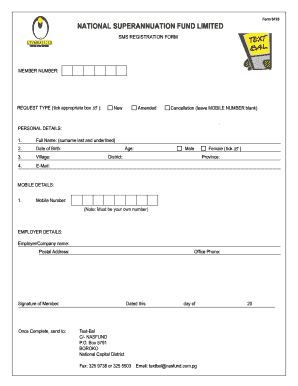
The NASFUND Member Online & Text-Bal Service Form is a financial document used by members to access their membership details via the NASFUND Text Bal Service or Member Online Portal.
pdfFiller scores top ratings on review platforms




So easy ro create documents, fill documents for others, sign, initial, highlight, etc. PDFfiller is my extra secretary! Thank you!
I would like to be able to combine documents. Otherwise , its great.
Who needs PG NASFUND Member Online & Text-Bal Service Form?
Explore how professionals across industries use pdfFiller.

PG NASFUND Member Online & Text-Bal Service Form is needed by:
-
NASFUND members seeking online access
-
Individuals wanting text balance service
-
Financial planners assisting NASFUND members
-
Human resource professionals in Papua New Guinea
-
Individuals filing personal finance documents
Comprehensive Guide to PG NASFUND Member Online & Text-Bal Service Form
What is the NASFUND Member Online & Text-Bal Service Form?
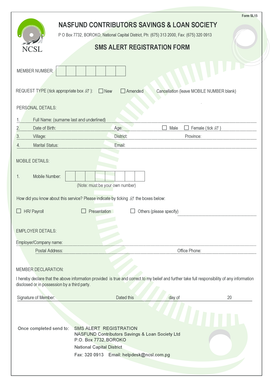
The NASFUND Member Online & Text-Bal Service Form is designed for NASFUND members to access important membership details efficiently. This form facilitates the use of the NASFUND Text Bal Service and the NASFUND Member Online Portal, enabling users to monitor their financial information with ease. Members are required to complete relevant personal information such as member number, name, and contact details to utilize these services.
This form plays a critical role in managing membership information while ensuring that members have secure access to their financial details.
Purpose and Benefits of the NASFUND Member Online & Text-Bal Service Form
The primary purpose of the NASFUND Member Online & Text-Bal Service Form is to provide a streamlined method for members to access their account information. Leveraging this form offers significant benefits, including:
-
Secure and easy access to financial details.
-
Improved management of membership information.
-
Efficient registration for NASFUND services.
These advantages underscore the necessity for members to utilize the NASFUND service registration effectively.
Who Needs the NASFUND Member Online & Text-Bal Service Form?
The NASFUND Member Online & Text-Bal Service Form is crucial for various users, particularly:
-
New NASFUND members seeking access to their accounts.
-
Existing members wishing to update their membership details.
Understanding eligibility criteria is essential for members to ensure they can fully leverage the benefits of the text bal service. This form is tailored for individuals who require immediate account access and management.
How to Fill Out the NASFUND Member Online & Text-Bal Service Form Online (Step-by-Step)
To complete the NASFUND Member Online & Text-Bal Service Form online, follow these steps:
-
Start by entering your member number in the designated field.
-
Provide personal information such as your name and date of birth.
-
Fill in your contact details accurately.
-
Select your preferences for text balance access and online access.
-
Review the information filled in before submission.
Pay close attention to essential fields, ensuring accuracy to avoid processing delays.
Common Errors When Completing the NASFUND Member Online & Text-Bal Service Form
Filling out the NASFUND Member Online & Text-Bal Service Form may come with challenges. Some common errors to avoid include:
-
Incorrectly entering the member number.
-
Falling to sign the form where required.
-
Leaving mandatory fields blank.
To minimize errors, take the time to review your form carefully prior to submission, ensuring all the necessary information is correctly filled out.
Submission Methods for the NASFUND Member Online & Text-Bal Service Form
Once the NASFUND Member Online & Text-Bal Service Form is completed, there are several methods for submission:
-
Mail the form directly to NASFUND.
-
Email the completed form as an attachment.
Expect processing times for submissions, and be sure to seek confirmation of receipt to verify that your form has been received and is being processed.
What Happens After You Submit the NASFUND Member Online & Text-Bal Service Form?
After submitting the NASFUND Member Online & Text-Bal Service Form, the review process begins. Members can anticipate the following:
-
A review of the submitted information by NASFUND.
-
Tracking options to check the status of your submission.
-
Expected timelines for when notifications will be received.
Understanding these steps can help members stay informed about their application status.
The Importance of Security When Using the NASFUND Member Online & Text-Bal Service Form
Security is a paramount concern when handling sensitive information through the NASFUND Member Online & Text-Bal Service Form. Key security measures include:
-
Ensuring the protection of personal data through stringent security protocols.
-
Compliance with legal regulations such as HIPAA and GDPR.
Members can feel assured that NASFUND prioritizes data protection, enabling secure service registration.
Utilizing pdfFiller for an Easy NASFUND Member Online & Text-Bal Service Form Experience
To enhance your experience with the NASFUND Member Online & Text-Bal Service Form, taking advantage of pdfFiller can simplify the process. Some beneficial features include:
-
Editable text and image insertion for customization.
-
eSigning capabilities to streamline submission.
-
Cloud access to edit and manage forms efficiently.
Accessing the form via pdfFiller can lead to a smoother, more user-friendly experience when filling out your member form.
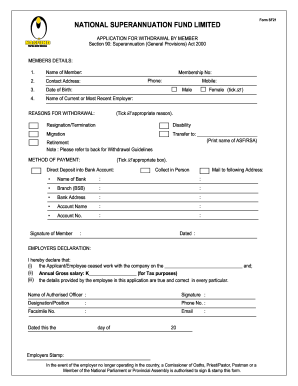
Sample Completed NASFUND Member Online & Text-Bal Service Form
For those who prefer a visual reference, examining a sample completed NASFUND Member Online & Text-Bal Service Form can be incredibly helpful. When reviewing this example, pay attention to:
-
A correctly filled member number section.
-
Proper completion of signature areas.
-
Highlighting of key options to ensure clarity on preferences.
This visual guide serves to clarify common questions and assists users in submitting accurate forms.
How to fill out the PG NASFUND Member Online & Text-Bal Service Form
-
1.To access the NASFUND Member Online & Text-Bal Service Form on pdfFiller, visit the official pdfFiller website and log in or create an account. Use the search bar to locate the form by entering its name.
-
2.Once you have opened the form, familiarize yourself with its structure. You will see fields for personal information including your member number, name, date of birth, and contact details that you'll need to fill in.
-
3.Gather all necessary information before beginning the form. This includes your NASFUND member number, personal identification details, and any preferences regarding text balance access and online access.
-
4.As you navigate the form, click on each field to enter your information. Use the 'Checklist' feature on pdfFiller to ensure you complete each section accurately.
-
5.After filling in all required fields, review the form carefully. Check for errors and make sure all the necessary information is included, especially your preferences and signature as this is a signing document.
-
6.Once you are satisfied with the completed form, look for the 'Save' option to keep a copy on your device. You can also utilize the 'Download' feature to save it in your preferred format, or directly email it from pdfFiller to the designated NASFUND contact.

Who is eligible to use the NASFUND Member Online & Text-Bal Service Form?
Any NASFUND member wishing to gain access to their online account or use the text balance service can complete this form. It requires personal identification details to confirm membership.
What details do I need to complete the form?
You will need your NASFUND member number, full name, date of birth, and contact details. Additionally, preference for text balance updates and online access must be indicated.
How do I submit the completed form?
After filling out the form, you should either email or mail it to NASFUND in Papua New Guinea. Ensure you have included all required information and your signature.
Are there any deadlines for submitting the form?
While specific deadlines may vary, it is advisable to submit the NASFUND Member Online & Text-Bal Service Form as soon as possible to avoid delays in gaining access to services.
What common mistakes should be avoided while filling out the form?
Common mistakes include leaving fields blank, misspelling your name or member number, and not signing the document where required. Double-check your information before submission.
How long does it take to process the form after submission?
Processing times can vary; however, members should expect to receive confirmation or access instructions within a few business days after submitting the form.
Is notarization required for this form?
No, notarization is not required for the NASFUND Member Online & Text-Bal Service Form. You only need to provide your signature and the required information.
PG NASFUND Member Online & Text-Bal Service Form Form Versions
Related Forms



Get the latest insights from our blog


If you believe that this page should be taken down, please follow our DMCA take down process
here
.
This form may include fields for payment information. Data entered in these fields is not covered by PCI DSS compliance.