
Last updated on
Nov 9, 2026

Canada T5 2021 free printable template
We are not affiliated with any brand or entity on this form

Fill out
Complete the form online in a simple drag-and-drop editor.

eSign
Add your legally binding signature or send the form for signing.

Share
Share the form via a link, letting anyone fill it out from any device.

Export
Download, print, email, or move the form to your cloud storage.
Why pdfFiller is the best tool for your documents and forms


End-to-end document management
From editing and signing to collaboration and tracking, pdfFiller has everything you need to get your documents done quickly and efficiently.
Accessible from anywhere
pdfFiller is fully cloud-based. This means you can edit, sign, and share documents from anywhere using your computer, smartphone, or tablet.
Secure and compliant
pdfFiller lets you securely manage documents following global laws like ESIGN, CCPA, and GDPR. It's also HIPAA and SOC 2 compliant.
What is Canada T5
The T5 Return of Investment Income is a Canadian tax form used by financial institutions to report investment income to the Canada Revenue Agency (CRA).
pdfFiller scores top ratings on review platforms




Who needs Canada T5?
Explore how professionals across industries use pdfFiller.

Canada T5 is needed by:
-
Financial institutions reporting dividends and interest
-
Individuals receiving investment income in Canada
-
Tax professionals assisting clients with investment income
-
Companies paying dividends or interest to shareholders
-
Residents of Canada needing to declare investment income
Comprehensive Guide to Canada T5
What is the T5 Return of Investment Income?
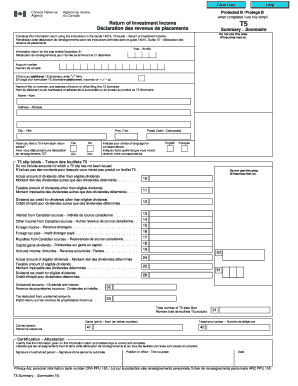
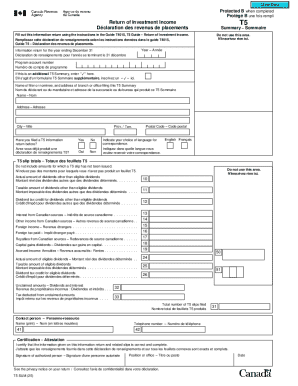
The T5 Return of Investment Income is a vital Canadian tax form utilized for reporting investment income to the Canada Revenue Agency (CRA). This form plays a crucial role in ensuring compliance with tax regulations and aids in documenting various income types such as dividends, interest, and foreign income.
Completion of the T5 form is typically the responsibility of financial institutions and other payers who distribute investment income. By accurately reporting this information, stakeholders can maintain transparency in their financial dealings.
Purpose and Benefits of the T5 Return of Investment Income
Filing the T5 form is a legal requirement for individuals and financial institutions to report income to the CRA. Accurate reporting offers numerous benefits, including avoiding potential penalties and ensuring compliance with tax laws. Furthermore, it helps individuals effectively track their investment income for tax purposes.
By submitting the T5 return, taxpayers can simplify their overall tax filing process and enhance their financial planning strategies.
Who Needs to Complete the T5 Return of Investment Income?
The T5 Return is primarily completed by financial institutions issuing dividends or interest payments. Additionally, individuals and entities who receive investment income are required to fill out this form. Some circumstances may exempt certain filers from this requirement, making it essential to understand the conditions that apply.
-
Financial institutions paying dividends or interest
-
Individuals receiving various forms of investment income
-
Entities involved in investment activities
When and How to File the T5 Return of Investment Income
Filing the T5 return must adhere to strict deadlines set forth by the CRA. Taxpayers should ensure they are familiar with these timelines to avoid penalties. The process for submission can be completed either electronically or by mail, depending on the preference of the filer.
Failure to file the T5 form on time can result in significant consequences, including fines or further complications with tax matters.
-
Understand CRA filing deadlines
-
Follow submission steps for electronic or mail filing
-
Be aware of consequences for late or non-filing
How to Fill Out the T5 Return of Investment Income Online
Completing the T5 form online is straightforward, especially with tools like pdfFiller. Users can access step-by-step instructions for filling out the necessary fields, which include identifying information such as name, address, and signature of the authorized person. Ensuring accuracy in these sections is imperative to avoid processing issues.
Additionally, users are encouraged to double-check each field to maintain compliance and present a complete submission.
Common Errors and How to Avoid Them on the T5 Return of Investment Income
While filing the T5 form, users frequently encounter mistakes that can lead to processing delays. Common errors include incorrect details and missed signatures, both of which can hinder the submission process. To minimize these risks, implementing validation and review techniques before submission is beneficial.
Maintaining compliance with CRA regulations further reinforces the necessity of accuracy in filing the T5 return.
-
Double-check for incorrect information
-
Ensure all required signatures are included
-
Utilize a review checklist for validation
Security and Compliance for the T5 Return of Investment Income
Handling sensitive information in the T5 form requires adherence to robust security measures. Most document management systems implement 256-bit encryption to protect personal data. Compliance with laws like GDPR and HIPAA further emphasizes the importance of safeguarding information submitted through the T5 form.
Users should also adopt best practices to secure their data when completing tax forms, minimizing the risk of unauthorized access.
How pdfFiller Can Simplify Your T5 Return of Investment Income Filing
pdfFiller offers streamlined solutions for completing the T5 return, ensuring a user-friendly experience. Key features include fillable form capabilities, eSignature options, and secure document management, making it easier for users to handle their tax filings efficiently. Numerous testimonials illustrate the successful utilization of pdfFiller for T5 submissions.
This platform's intuitive interface reduces the complexity often associated with tax document preparation.
Sample of a Completed T5 Return of Investment Income
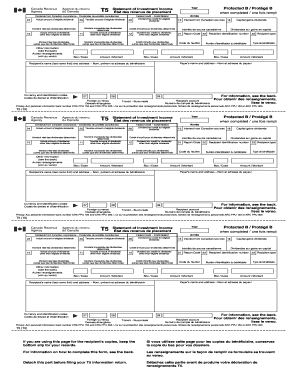
Providing a visual representation of a completed T5 form can greatly assist users in understanding the appropriate way to fill out their own. Such samples usually include annotations that highlight important fields, guiding filers through what information is required in each section. This resource serves as a practical reference for individuals looking to achieve accuracy in completing their T5 returns.
Next Steps After Submitting the T5 Return of Investment Income
After submitting the T5 form, it is crucial for users to learn how to track their submission effectively. Understanding the expected processing times for their return also helps manage their expectations during the tax assessment phase. In the event of necessary corrections or amendments, knowing the appropriate steps to take will facilitate a smoother resolution process.
How to fill out the Canada T5
-
1.Access the T5 Return of Investment Income form by visiting pdfFiller and searching for the form name.
-
2.Open the form in the pdfFiller interface once located, which will allow you to begin filling it out digitally.
-
3.Gather necessary information before starting, including your personal details, the investment income amounts, and any required documents for validation.
-
4.Navigate through the form fields using your cursor. Click on the blank fields to input necessary data such as name, address, and investment details.
-
5.Utilize the checkboxes and dropdowns provided to accurately select or confirm the information as required by the form.
-
6.Complete the certification section by ensuring an authorized person signs as required before submission.
-
7.Review the filled form to ensure all fields are accurate and complete, verifying that you've not left any sections empty.
-
8.Once satisfied with your entries, save your progress and finalize the form. You may choose to download it as a PDF file.
-
9.You can submit the T5 form directly via pdfFiller's submission options or print it for mailing to the CRA.

Who is required to fill out the T5 form?
The T5 Return of Investment Income must be filled out by financial institutions and other payers who provide investment income to individuals, including dividends, interest, and foreign income.
What is the deadline for submitting the T5 form?
The T5 form must be filed annually by the deadline set by the Canada Revenue Agency. It's essential to check the CRA website for the specific due date to avoid penalties.
How can I submit the T5 Return of Investment Income?
You can submit the T5 form through pdfFiller by online submission options or by printing and mailing the completed form to the Canada Revenue Agency.
What supporting documents do I need for the T5 form?
While filling in the T5 form, gather supporting documents that include details of the investment income earned, such as statements from financial institutions and any relevant tax information.
What are common mistakes to avoid when completing the T5 form?
Common mistakes include omitting required fields, inaccuracies in reported income amounts, and failing to obtain the authorized signature. Always review the form before submission.
How long does processing the T5 form take?
Processing times for the T5 Return of Investment Income can vary, but it typically takes a few weeks for the CRA to process submitted forms and update tax records.
Is there a fee to file the T5 form?
Filing the T5 Return of Investment Income is generally free when filed electronically through the CRA or using services like pdfFiller. However, check if your financial institution charges any fees for processing.
Canada T5 Form Versions
Related Forms




Get the latest insights from our blog


If you believe that this page should be taken down, please follow our DMCA take down process
here
.
This form may include fields for payment information. Data entered in these fields is not covered by PCI DSS compliance.