
Last updated on
Oct 31, 2026
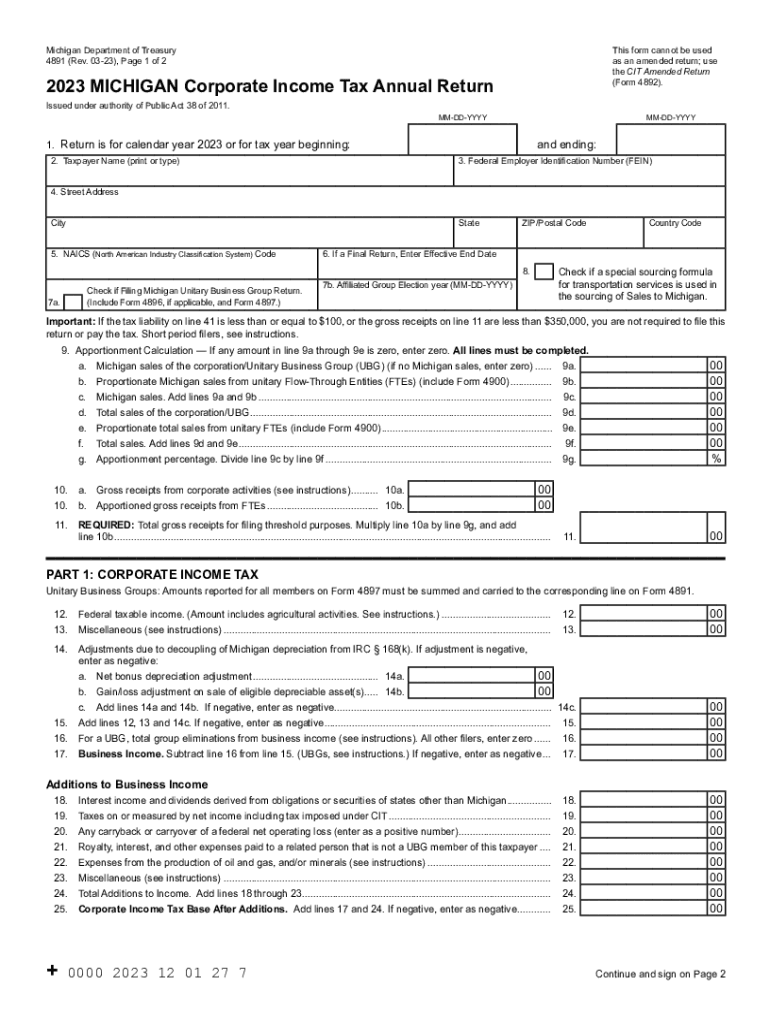
MI DoT 4891 2023 free printable template
pdfFiller is not affiliated with any government organization

Fill out
Complete the form online in a simple drag-and-drop editor.

eSign
Add your legally binding signature or send the form for signing.

Share
Share the form via a link, letting anyone fill it out from any device.

Export
Download, print, email, or move the form to your cloud storage.
Why pdfFiller is the best tool for your documents and forms


End-to-end document management
From editing and signing to collaboration and tracking, pdfFiller has everything you need to get your documents done quickly and efficiently.
Accessible from anywhere
pdfFiller is fully cloud-based. This means you can edit, sign, and share documents from anywhere using your computer, smartphone, or tablet.
Secure and compliant
pdfFiller lets you securely manage documents following global laws like ESIGN, CCPA, and GDPR. It's also HIPAA and SOC 2 compliant.
What is MI DoT 4891
The Michigan Corporate Income Tax Annual Return (Form 4891) is a tax document used by corporations and unitary business groups to report their annual income tax in Michigan.
pdfFiller scores top ratings on review platforms




Who needs MI DoT 4891?
Explore how professionals across industries use pdfFiller.

MI DoT 4891 is needed by:
-
Michigan corporations operating and earning income.
-
Unitary business groups in Michigan.
-
Tax professionals preparing corporate tax returns.
-
Accountants managing corporate finances.
-
Business owners seeking to comply with state tax regulations.
Comprehensive Guide to MI DoT 4891
Understanding the Michigan Corporate Income Tax Annual Return (Form 4891)
The Michigan Corporate Income Tax Annual Return (Form 4891) is a crucial document used by corporations and unitary business groups in Michigan to report their annual income tax obligations. This form serves as a key instrument for tax compliance within the state, ensuring businesses fulfill their financial responsibilities accurately. Failure to adhere to these requirements can lead to penalties, making understanding this form vital for all applicable entities.
Purpose and Benefits of Filing Form 4891
The primary purpose of the Michigan Corporate Income Tax Form 4891 is to determine the tax liability based on the net income and gross receipts of the business. Timely and accurate filing of this return can significantly benefit corporations by avoiding late fees and ensuring they maintain compliance with state tax laws. Additionally, using a reliable Michigan CIT annual return template can streamline the process and reduce the risk of errors.
Who Needs to File the Michigan Corporate Income Tax Annual Return?
Entities required to file Form 4891 include corporations operating in Michigan and unitary business groups. Special conditions or exemptions may apply, particularly for smaller businesses or those classified as pass-through entities. Understanding who needs to file is essential to avoid unnecessary complications and potential penalties.
When and How to Submit Form 4891
The filing deadline for the Michigan Corporate Income Tax Annual Return is typically April 30 or the last day of the fourth month following the close of the tax year. Submissions can be made through various methods, including electronic mail or online through pdfFiller. Familiarizing yourself with these submission methods can enhance the efficiency of your filing process.
Gathering Required Information for Your Form 4891
Before filing, it is essential to gather specific information needed for Form 4891. Key details include:
-
Federal Employer Identification Number (FEIN)
-
Gross receipts from the prior tax year
-
Apportionment numbers if applicable
A pre-filing checklist can also be a valuable tool for ensuring all necessary documents are prepared, making the submission process smoother.
Step-by-Step Guide to Filling Out Form 4891 Online
When filling out Form 4891 via pdfFiller, following a detailed, field-by-field guide is crucial. Pay close attention to common mistakes to avoid, such as miscalculating gross receipts or omitting required signatures. These steps are essential for ensuring that your submission is complete and accurate, thereby preventing delays in processing.
Reviewing and Validating Your Completed 4891 Form
Before submitting Form 4891, it is important to adhere to a review checklist to ensure completeness and accuracy. Common errors include forgotten signatures or incorrect financial data. By validating each section thoroughly, you can significantly reduce the chance of issues arising after submission.
Handling Signatures for Form 4891
Form 4891 requires that both the taxpayer and the preparer sign the document. Understanding the signing requirements is vital to avoid rejections due to missing confirmations. Digital signature options available through pdfFiller make the signing process convenient and secure, allowing for prompt submission.
What Happens After You Submit the Michigan Corporate Income Tax Annual Return?
After submitting Form 4891, you should track the status of your submission to ensure it has been received and processed correctly. Be prepared for potential follow-ups or additional information requests from the Michigan Department of Treasury. It’s also crucial to understand the consequences of late filing, as penalties can accumulate without proper management.
Utilizing pdfFiller for Your Michigan Corporate Income Tax Return
pdfFiller offers a range of capabilities essential for securely filling out, signing, and managing the Michigan Corporate Income Tax Annual Return. Its features enhance document safety and simplify the filing process, making it easier for users to manage their tax obligations effectively. The benefits of utilizing pdfFiller include enhanced editing options, secure document handling, and streamlined workflows.
How to fill out the MI DoT 4891
-
1.Access the Michigan Corporate Income Tax Annual Return (Form 4891) on pdfFiller by using the search bar or navigating through the tax forms category.
-
2.Once you find the form, click on it to open it in the pdfFiller interface.
-
3.Make sure to gather all necessary financial documents, such as gross receipts, apportionment calculations, and tax liability information, before starting the form.
-
4.Use the toolbar on pdfFiller to click into each field where you need to enter information.
-
5.Be sure to fill in your Taxpayer Name and Federal Employer Identification Number (FEIN) with accurate details.
-
6.If the form displays checkboxes, select the applicable options using your mouse or trackpad.
-
7.After completing all the fields, review each entry for accuracy to ensure everything is filled out correctly.
-
8.Utilize the print preview feature on pdfFiller to check how the form will look once finalized.
-
9.Once satisfied, save your work and decide whether to download the completed form or submit it directly through pdfFiller.
-
10.If submitting online, follow the prompts provided by pdfFiller to finalize and send your return to the appropriate Michigan tax authority.

What are the eligibility requirements for filing Form 4891?
Filing Form 4891 is required for all corporations and unitary business groups operating in Michigan that have an income tax obligation. Ensure that you have the necessary financial data, including gross receipts, before filing.
What is the deadline for submitting the Michigan Corporate Income Tax Annual Return?
The deadline for submitting Form 4891 is April 30 or the last day of the fourth month after the close of your tax year. Late submissions may incur penalties.
How should I submit the Michigan Corporate Income Tax Annual Return?
You can submit Form 4891 either electronically through pdfFiller or by mailing a printed copy to the Michigan Department of Treasury. Ensure to keep a copy for your records.
What supporting documents do I need for Form 4891?
When completing Form 4891, gather all relevant financial documents including your gross receipts, apportionment calculations, and prior tax return information to ensure accurate reporting.
What common mistakes should I avoid when filling out this form?
Ensure that all fields are completed accurately, particularly your FEIN and tax liability figures. Double-check that you have signed the form, as both the taxpayer and preparer are required to sign.
How long does it take to process Form 4891 once submitted?
Processing times for Form 4891 can vary but typically take several weeks. You can check the status of your return by contacting the Michigan Department of Treasury.
Can I amend my Michigan Corporate Income Tax Annual Return after submission?
Yes, if you discover an error after submitting Form 4891, you can file an amended return. Ensure to follow the state guidelines on how to properly amend the form.
MI DoT 4891 Form Versions
Related Content
Related Forms






Get the latest insights from our blog


If you believe that this page should be taken down, please follow our DMCA take down process
here
.
This form may include fields for payment information. Data entered in these fields is not covered by PCI DSS compliance.