
Last updated on
Nov 9, 2026
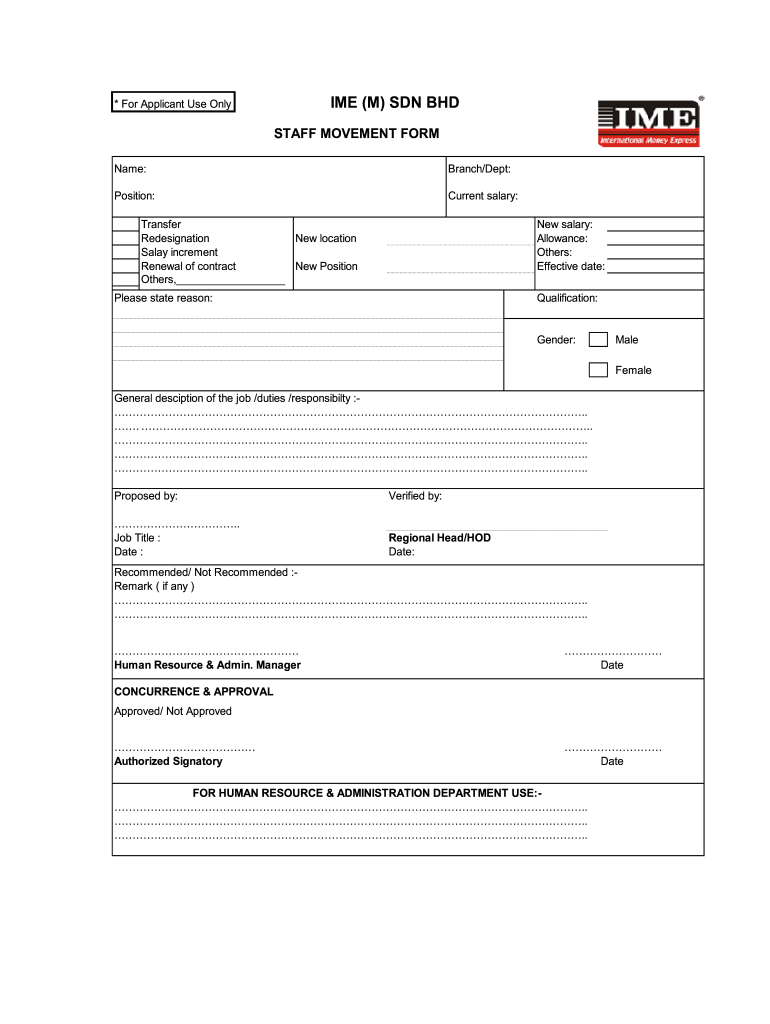
MY IME Staff Movement Form 2012-2026 free printable template
We are not affiliated with any brand or entity on this form

Fill out
Complete the form online in a simple drag-and-drop editor.

eSign
Add your legally binding signature or send the form for signing.

Share
Share the form via a link, letting anyone fill it out from any device.

Export
Download, print, email, or move the form to your cloud storage.
Why pdfFiller is the best tool for your documents and forms


End-to-end document management
From editing and signing to collaboration and tracking, pdfFiller has everything you need to get your documents done quickly and efficiently.
Accessible from anywhere
pdfFiller is fully cloud-based. This means you can edit, sign, and share documents from anywhere using your computer, smartphone, or tablet.
Secure and compliant
pdfFiller lets you securely manage documents following global laws like ESIGN, CCPA, and GDPR. It's also HIPAA and SOC 2 compliant.
What is MY IME Staff Movement Form
The Staff Movement Form is a business document used by IME (M) SDN BHD to document staff transfers, redesignations, contract renewals, and other movements.
pdfFiller scores top ratings on review platforms




Happy so far.
I have used this program for only one day but so far I'm happy with it. It will save me a lot of time in the future.
Good Service
Quick. To the point. Easy to figure out
Who needs MY IME Staff Movement Form?
Explore how professionals across industries use pdfFiller.

MY IME Staff Movement Form is needed by:
-
Human Resource Managers
-
Department Heads
-
Employees undergoing transfer or redesignation
-
Administrative Staff
-
Internal Auditors
-
Compliance Officers
Comprehensive Guide to MY IME Staff Movement Form
What is the Staff Movement Form?
The Staff Movement Form is an essential document used by IME (M) SDN BHD to manage employee movements efficiently. This form serves as a structured approach for handling transfers, contract renewals, and redesignations within the organization. Its significance lies in enhancing the process of tracking staff movements, leading to better management of human resources.
The form encompasses various aspects related to employee movements, including the employee's details and the rationale behind the changes. By utilizing the Staff Movement Form, the organization ensures that all necessary information is captured and documented, streamlining operations within HR. Additionally, this form is pivotal for compliance and maintaining clear records.
Purpose and Benefits of the Staff Movement Form
The primary purpose of the Staff Movement Form is to facilitate seamless transitions for employees during transfers, redesignations, and contract renewals. This structured approach not only simplifies the HR approval process but also helps maintain organized records of each movement.
Utilizing the form provides numerous benefits for both staff and human resources. For employees, it ensures that all movements are documented formally, providing clarity regarding their new positions and responsibilities. Furthermore, it aids HR in improving overall efficiency in processing requests related to transfers and renewals, thereby fostering a smoother workflow.
Key Features of the Staff Movement Form
The Staff Movement Form comprises several critical sections that are vital for its effective use. Key sections include:
-
Employee details, including name and position
-
Salary adjustments reflecting new pay or allowances
-
Reasons for movement for clear documentation
Additional features of the form include fillable fields that allow for easy completion, signature requirements for different roles, and a straightforward approval process. Each party involved in the process, such as the applicant and HR Manager, plays a crucial role in signing and approving the form.
Who Needs the Staff Movement Form?
The Staff Movement Form is primarily utilized by various stakeholders, including applicants, HR personnel, and authorized signatories. Each party plays a vital role in ensuring the accuracy and completeness of the form before submission.
This form is necessary in specific circumstances, such as when an employee is seeking a transfer to a different department or is undergoing a redesignation. Understanding who needs to engage with the form ensures that all relevant personnel are adequately informed and equipped to handle their responsibilities.
How to Fill Out the Staff Movement Form Online
Filling out the Staff Movement Form online can be accomplished easily by following these steps:
-
Access the form using a preferred PDF editor, such as pdfFiller.
-
Complete essential sections, including personal information and the proposed salary.
-
Provide a comprehensive job description and reason for the staff movement.
Using pdfFiller makes editing and signing the form straightforward. Users may encounter specific fields that require careful attention, so it is advisable to double-check entries for accuracy before submission.
Submission Methods and Delivery of the Staff Movement Form
Upon completing the Staff Movement Form, users have multiple submission methods available. Submissions can be made online via HR software, or by delivering a physical copy directly to the HR department.
It's essential to be aware of any submission deadlines and the consequences of late submissions. Additionally, users should ensure that all necessary documents or attachments accompany the form to facilitate processing.
Key Compliance and Security Information
Ensuring the security and compliance of data submitted through the Staff Movement Form is critical. The organization employs robust data protection measures, including 256-bit encryption, to safeguard sensitive information.
Furthermore, compliance with regulations such as HIPAA and GDPR underscores the importance of confidentiality and data retention practices, ensuring that user information remains secure throughout the process.
Common Errors and How to Avoid Them
When filling out the Staff Movement Form, users may encounter several common errors, including incomplete sections and incorrect signatures. To minimize these mistakes, it is prudent to review the completed form carefully before submission.
Double-checking entries against HR policies can aid in preventing errors and ensuring that the form complies with organizational standards. This step is crucial in maintaining the integrity of the submission process and facilitating timely approvals.
How pdfFiller Can Assist with the Staff Movement Form
pdfFiller provides a comprehensive solution for managing the Staff Movement Form. With capabilities to edit, fill, and eSign forms, pdfFiller simplifies the completion process for users.
The platform enhances user experience through features like easy accessibility and strong security assurances, making it an ideal choice for anyone needing to handle the Staff Movement Form effectively.
Example of a Completed Staff Movement Form
To further assist users, an example of a filled-out Staff Movement Form is available. This mock-up illustrates how to accurately complete each section, including annotations that clarify the details required at each step.
Utilizing pdfFiller, users can replicate this example to create their own forms, ensuring that all elements are correctly addressed and formatted according to organizational requirements.
How to fill out the MY IME Staff Movement Form
-
1.Access the Staff Movement Form on pdfFiller by searching for its name in the template library or uploading it directly if you have it saved.
-
2.Open the form and familiarize yourself with the fields that need to be filled. Navigate using pdfFiller’s tools to easily insert information into each field.
-
3.Gather necessary information before starting. This includes details such as the employee's name, current and new positions, salaries, location, and reasons for the movement.
-
4.Begin filling in each field with the required information. Utilize the fillable fields to enter answers accurately, ensuring all mandatory fields are completed.
-
5.Once the form is filled out, review all entries carefully for any errors. Pay attention to names, dates, and figures to ensure accuracy.
-
6.Finalize the form by checking if all signatures are required and obtained. Make sure to fill in the approval sections where applicable.
-
7.Save your completed form on pdfFiller. You can also download a copy for your records or submit it directly if required by your organization’s procedures.
-
8.If you need to share the form for approval, you can do this electronically through pdfFiller’s sharing options.

Who is eligible to use the Staff Movement Form?
The Staff Movement Form is intended for employees of IME (M) SDN BHD undergoing staff movements such as transfers, redesignations, or contract renewals, as well as their supervisors and HR personnel.
What information is needed to complete the form?
Before starting, gather details such as employee name, department, current and new salary, job descriptions, reasons for movement, payroll information, and any relevant qualifications.
How do I submit the completed Staff Movement Form?
You can submit the completed form electronically through pdfFiller or download and print it for manual submission based on your organization’s policies.
Are there required supporting documents to submit with the form?
While the form itself does not specify required supporting documents, you may need to attach approvals from direct supervisors or additional qualifications based on company policy.
What common mistakes should I avoid when filling out the form?
Common mistakes include missing mandatory fields, incorrect salary figures, or failing to secure necessary signatures. Always double-check all entries before submission.
What are the processing times for the approval of the Staff Movement Form?
Processing times can vary depending on internal HR procedures but typically expect approval to take a few days to a week once submitted correctly.
Is notarization required for the Staff Movement Form?
No, the Staff Movement Form does not require notarization. It is an internal document managed by the HR and Administration Department.
Related Forms




Related Catalogs
Get the latest insights from our blog


If you believe that this page should be taken down, please follow our DMCA take down process
here
.
This form may include fields for payment information. Data entered in these fields is not covered by PCI DSS compliance.