
Last updated on
Oct 3, 2026

Get the free Form 4 Statement of Changes in Beneficial Ownership
We are not affiliated with any brand or entity on this form

Fill out
Complete the form online in a simple drag-and-drop editor.

eSign
Add your legally binding signature or send the form for signing.

Share
Share the form via a link, letting anyone fill it out from any device.

Export
Download, print, email, or move the form to your cloud storage.
Why pdfFiller is the best tool for your documents and forms


End-to-end document management
From editing and signing to collaboration and tracking, pdfFiller has everything you need to get your documents done quickly and efficiently.
Accessible from anywhere
pdfFiller is fully cloud-based. This means you can edit, sign, and share documents from anywhere using your computer, smartphone, or tablet.
Secure and compliant
pdfFiller lets you securely manage documents following global laws like ESIGN, CCPA, and GDPR. It's also HIPAA and SOC 2 compliant.
What is SEC Form 4
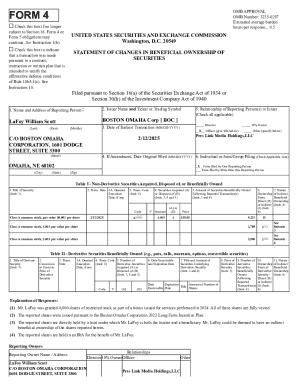
The Form 4 Statement of Changes in Beneficial Ownership is a legal document used by insiders to report changes in securities ownership to the SEC.
pdfFiller scores top ratings on review platforms




Who needs SEC Form 4?
Explore how professionals across industries use pdfFiller.

SEC Form 4 is needed by:
-
Corporate directors and officers
-
Major shareholders owning 10% or more of a company's securities
-
Legal professionals working with insider trading laws
-
Compliance officers in publicly traded companies
-
Accountants managing financial disclosures
-
Investors seeking insights into insider trading activities
Comprehensive Guide to SEC Form 4
What is the Form 4 Statement of Changes in Beneficial Ownership?
Form 4 is a legal document filed with the U.S. Securities and Exchange Commission (SEC) to report changes in beneficial ownership of securities by insiders. This form is essential for directors, officers, and 10% owners who must disclose transactions involving their company's securities under the Securities Exchange Act. Reporting these changes is significant as it promotes transparency and accountability in the financial markets.
Purpose and Benefits of the Form 4 Statement of Changes in Beneficial Ownership
The primary purpose of filing Form 4 is to inform the public about changes in beneficial ownership, ensuring that insider trading activities are disclosed. This form enhances transparency and builds trust among investors by holding insiders accountable for their transactions. Failure to file Form 4 or submitting it late can lead to serious repercussions, including penalties and increased scrutiny from regulators.
Who Needs to File the Form 4 Statement of Changes in Beneficial Ownership?
Filing Form 4 is mandatory for key individuals in a company, specifically directors, officers, and stockholders who own 10% or more of the company's shares. Insiders have significant implications for their organizations; they must be diligent in reporting to maintain compliance with SEC regulations.
How to Fill Out the Form 4 Statement of Changes in Beneficial Ownership Online (Step-by-Step)
To complete Form 4 online, follow these simple steps:
-
Access the SEC’s online filing system.
-
Log in using your credentials.
-
Select Form 4 from the available list of filings.
-
Fill in the required fields, including transaction date and details.
-
Review your entries for accuracy.
-
Sign the document electronically and submit.
Ensure that every key field is filled out accurately to comply with legal requirements. Double-checking details can prevent issues with acceptance of your submission.
Common Errors and How to Avoid Them
Common mistakes while completing Form 4 include incorrect transaction dates, inaccurate ownership percentages, and failure to sign the form. To avoid these pitfalls, consider the following:
-
Verify all transaction details before submission.
-
Review the form for completeness and accuracy.
-
Seek assistance if you are unsure about any fields.
Correcting or amending an already submitted form can be time-consuming and may result in penalties, so it is crucial to ensure accuracy from the start.
Submission Methods and Delivery
After completing Form 4, it must be submitted through the SEC’s online filing system. There are no direct fees associated with the filing itself, but timely submission is essential to avoid fines. Once submitted, you can track the status of your filing and receive confirmation to ensure it was processed correctly.
Security and Compliance for the Form 4 Statement of Changes in Beneficial Ownership
Data protection is vital when filling out Form 4, especially since it involves sensitive information. Using a platform like pdfFiller ensures compliance with regulations such as HIPAA and GDPR, emphasizing stringent privacy measures and data security protocols to protect your information.
Sample or Example of a Completed Form 4 Statement of Changes in Beneficial Ownership
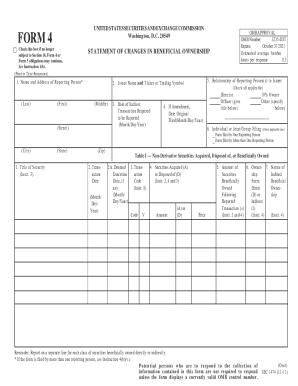
To assist users, a sample of a completed Form 4 is available for reference. Analyzing an example provides clarity on the various components of the form and illustrates best practices for completing it effectively.
How pdfFiller Can Simplify Your Form 4 Experience
pdfFiller offers features designed specifically for users completing Form 4, including the ability to edit and eSign documents easily. Its user-friendly interface simplifies the filing process and enhances security throughout the document management experience.
Next Steps for Filing Your Form 4 Statement of Changes in Beneficial Ownership
Gather all necessary information to prepare for your filing. With pdfFiller’s intuitive tools at your fingertips, you can have a smooth and efficient filing experience. Start the process today for timely compliance with filing requirements.
How to fill out the SEC Form 4
-
1.Access pdfFiller and log in or create an account to open the platform.
-
2.In the search bar, type 'Form 4 Statement of Changes in Beneficial Ownership' to locate the form.
-
3.Click on the form title to open it in the editor interface.
-
4.Review your company’s securities information and transaction details before starting the form.
-
5.Begin filling out the required fields, including the reporting person’s name, the securities details, transaction dates, and prices.
-
6.Utilize pdfFiller's toolbox to easily navigate between sections and add information to each field.
-
7.Make sure to complete all mandatory fields; look out for any asterisks indicating required information.
-
8.After filling in all the necessary details, review the form carefully to ensure accuracy and completeness.
-
9.Use the preview feature to see the final layout of the form before finalization.
-
10.Once confirmed, click on the save button to keep a copy of your completed form.
-
11.Choose to download the form in PDF format or submit electronically as per SEC submission guidelines available on pdfFiller.
-
12.Follow the prompts for submission to ensure compliance with SEC filing requirements.

Who needs to file Form 4?
Form 4 is required to be filed by directors, officers, and individuals owning more than 10% of a company's shares. These insiders must disclose their securities transactions to the SEC to maintain transparency and comply with the Securities Exchange Act.
What is the deadline for filing Form 4?
Form 4 must be filed with the SEC within two business days following the date of the transaction. Being timely is crucial to avoid penalties, so ensure all transactions are reported promptly.
How can I submit Form 4?
Form 4 can be submitted electronically via the SEC's EDGAR system. Alternatively, you can use pdfFiller to complete the form and submit it online, following the submission instructions for SEC filings.
What information do I need before filling out Form 4?
Before filling out Form 4, gather information about the security involved, transaction dates, prices, and your ownership details. This information is crucial for accurately completing the form.
What are common mistakes to avoid when filing Form 4?
Common mistakes include not filing within the required timeframe, incomplete information, or accuracy issues regarding transaction details. Double-check all entries and review the form before submitting to minimize errors.
Are there any fees associated with filing Form 4?
There are no fees required to file Form 4 with the SEC. However, if you use third-party services or legal professionals, there may be associated costs for their services.
How is Form 4 processed by the SEC?
Once submitted, Form 4 is processed by the SEC and made publicly available through their EDGAR database. The processing time can vary, but the regulatory body aims to handle filings promptly to ensure compliance.
Related Forms





Get the latest insights from our blog


If you believe that this page should be taken down, please follow our DMCA take down process
here
.
This form may include fields for payment information. Data entered in these fields is not covered by PCI DSS compliance.