
Last updated on
Oct 6, 2026

Get the free Form 4 Statement of Changes in Beneficial Ownership of Securities
We are not affiliated with any brand or entity on this form

Fill out
Complete the form online in a simple drag-and-drop editor.

eSign
Add your legally binding signature or send the form for signing.

Share
Share the form via a link, letting anyone fill it out from any device.

Export
Download, print, email, or move the form to your cloud storage.
Why pdfFiller is the best tool for your documents and forms


End-to-end document management
From editing and signing to collaboration and tracking, pdfFiller has everything you need to get your documents done quickly and efficiently.
Accessible from anywhere
pdfFiller is fully cloud-based. This means you can edit, sign, and share documents from anywhere using your computer, smartphone, or tablet.
Secure and compliant
pdfFiller lets you securely manage documents following global laws like ESIGN, CCPA, and GDPR. It's also HIPAA and SOC 2 compliant.
What is Form 4
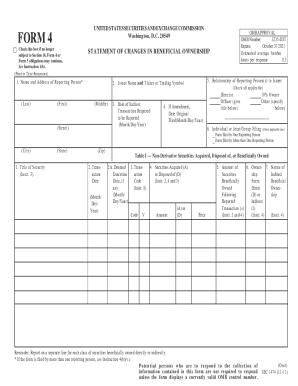
The Form 4 Statement of Changes in Beneficial Ownership of Securities is a SEC document used by company insiders to report changes in their ownership of securities.
pdfFiller scores top ratings on review platforms




Who needs Form 4?
Explore how professionals across industries use pdfFiller.

Form 4 is needed by:
-
Corporate Executives and Officers
-
Major Shareholders
-
Directors of Publicly Traded Companies
-
Investment Fund Managers
-
Compliance Officers
-
Legal Counsel for Companies
Comprehensive Guide to Form 4
What is the Form 4 Statement of Changes in Beneficial Ownership of Securities?
The Form 4, as mandated by SEC regulations, serves as a crucial document for reporting changes in beneficial ownership of securities. It plays a significant role in supporting transparency within securities trading, ensuring that the public is informed of the trading activity of corporate insiders. This form must be filed in compliance with Section 16(a) of the Securities Exchange Act of 1934.
Purpose and Benefits of the Form 4 Statement of Changes in Beneficial Ownership of Securities
The necessity of the Form 4 arises from insider trading regulations, which are designed to uphold market integrity. By maintaining accurate records of beneficial ownership, organizations and individuals can mitigate potential risks associated with insider trading allegations. Proper filings not only protect reputations but also contribute to a more transparent market environment.
Key Features of the Form 4 Statement of Changes in Beneficial Ownership of Securities
This form encompasses several essential features that streamline the reporting process. Required information includes details about the reporting person, the issuer's information, and the specifics of the transactions. Significant aspects also include:
-
Tables for reporting non-derivative and derivative securities.
-
The requirement for a signature from the reporting person or an authorized representative.
Who Needs to Fill Out the Form 4 Statement of Changes in Beneficial Ownership of Securities?
Identifying who must complete the Form 4 is critical under SEC regulations. Primarily, corporate officers, directors, and shareholders owning 10% or more of a company's equity must file this report. However, it's important to recognize that certain individuals may be exempt from these filing requirements.
How to Fill Out the Form 4 Statement of Changes in Beneficial Ownership of Securities Online
Filling out the Form 4 electronically involves clear steps. Users should follow this process:
-
Access the online form through the SEC's EDGAR system.
-
Collect necessary information about the transaction, including the date and transaction type.
-
Fill in the required fields carefully, ensuring accuracy and completeness.
-
Review the entries before submission to avoid common mistakes.
Common Errors and How to Avoid Them When Completing the Form 4
Common mistakes in filling out the Form 4 can lead to complications. Users should be vigilant about:
-
Incorrect dates that may invalidate the filing.
-
Missing signatures, which are essential for the document's legitimacy.
-
Failing to review and validate information against SEC requirements.
Submission Methods for the Form 4 Statement of Changes in Beneficial Ownership of Securities
Understanding submission methods is crucial for compliance. Filers have the option to submit the Form 4 electronically or via paper methods. Key considerations include:
-
Deadlines for filing and how they vary based on submission type.
-
Necessary documentation that accompanies the submission.
-
Any associated fees for processing the form.
Security and Compliance When Filing Form 4 Statement of Changes in Beneficial Ownership of Securities
When handling the Form 4, security and compliance must be prioritized. pdfFiller employs strong encryption and adheres to regulations such as HIPAA and GDPR to protect sensitive information. An effective auditing and tracking system further helps maintain the integrity of the filings.
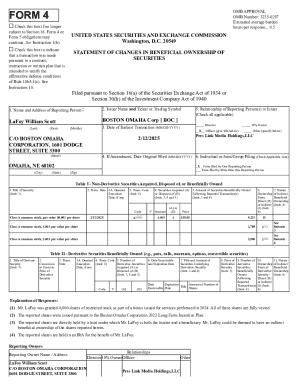
Example of a Completed Form 4 Statement of Changes in Beneficial Ownership of Securities
Visual aids can enhance understanding of the Form 4. Reviewing a sample filled-out form can clarify how to populate each section based on hypothetical transactions. Users should focus on interpreting the data fields accurately to avoid errors in reporting.
Enhance Your Filing Experience with pdfFiller
Utilizing pdfFiller can greatly improve the filing experience for Form 4. With capabilities such as secure storage, easy editing, and eSigning, users can streamline their document management process. Access to fillable forms and templates simplifies the completion of necessary filings.
How to fill out the Form 4
-
1.Access the Form 4 on pdfFiller by visiting their website and using the search bar to find the form. Click on the form title to open it.
-
2.Once the form is open, take time to familiarize yourself with the layout. Use the toolbar to navigate through different sections of the form.
-
3.Before starting to fill out the form, gather necessary information such as your name, address, the issuer's name and ticker symbol, your relationship to the issuer, and details of the transactions.
-
4.Begin completing the required fields on the form, paying attention to fill out the tables for reporting both non-derivative and derivative securities. Make sure to enter accurate details for each transaction.
-
5.After filling in all the necessary fields, review the form carefully to ensure all information is correct and complete, checking for any potential errors or omissions.
-
6.Finalize the form by signing and dating on the designated signature line provided in the form. If needed, consult with an authorized representative to ensure the signing is valid.
-
7.Once the form is complete and you have reviewed it, you can save it on pdfFiller. Use the options to download or submit the form directly through the platform.

Who is eligible to file Form 4?
Corporate insiders such as executive officers, directors, and large shareholders are eligible to file Form 4. These individuals are required to report any changes in beneficial ownership of their company's securities.
What is the deadline for submitting Form 4?
Form 4 must be filed within two business days of the transaction date. It is important to adhere to this timeline to comply with SEC regulations concerning beneficial ownership reporting.
How can I submit Form 4?
Form 4 can be submitted electronically through the SEC's EDGAR filing system, or via pdfFiller, which allows for easy filing and submission after completion.
What supporting documents do I need for Form 4?
Typically, you do not need to include supporting documents with Form 4. However, you should retain records of the transactions you are reporting for personal reference.
What common mistakes should I avoid when filing Form 4?
Be careful to enter accurate security names, quantities, and transaction types. Double-check to avoid errors in your signature and ensure timely filing to avoid penalties.
How long does it take to process Form 4?
Once filed, Form 4 is processed quickly by the SEC, and it usually appears in the public records within a day. However, ensure accuracy to avoid delays or amendments.
What happens if I miss the filing deadline for Form 4?
Failing to meet the filing deadline can result in penalties or fines. It's crucial to submit the form within two business days to remain compliant with SEC regulations.
Related Forms






Get the latest insights from our blog


If you believe that this page should be taken down, please follow our DMCA take down process
here
.
This form may include fields for payment information. Data entered in these fields is not covered by PCI DSS compliance.