
Last updated on
Oct 23, 2026

Get the free SEC Form 4 Statement of Changes in Beneficial Ownership
We are not affiliated with any brand or entity on this form

Fill out
Complete the form online in a simple drag-and-drop editor.

eSign
Add your legally binding signature or send the form for signing.

Share
Share the form via a link, letting anyone fill it out from any device.

Export
Download, print, email, or move the form to your cloud storage.
Why pdfFiller is the best tool for your documents and forms


End-to-end document management
From editing and signing to collaboration and tracking, pdfFiller has everything you need to get your documents done quickly and efficiently.
Accessible from anywhere
pdfFiller is fully cloud-based. This means you can edit, sign, and share documents from anywhere using your computer, smartphone, or tablet.
Secure and compliant
pdfFiller lets you securely manage documents following global laws like ESIGN, CCPA, and GDPR. It's also HIPAA and SOC 2 compliant.
What is SEC Form 4
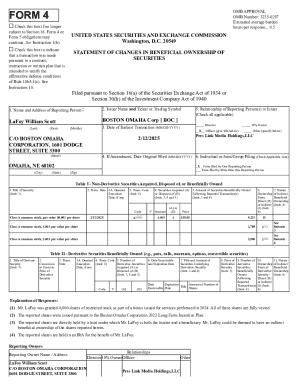
The SEC Form 4 Statement of Changes in Beneficial Ownership is a legal notice form used by officers, directors, or significant shareholders to report changes in their beneficial ownership of securities.
pdfFiller scores top ratings on review platforms




Who needs SEC Form 4?
Explore how professionals across industries use pdfFiller.

SEC Form 4 is needed by:
-
Corporate executives who made stock transactions
-
Company directors or board members
-
Individuals holding over 10% equity in a class of securities
-
Legal or compliance officers within organizations
-
Investors seeking to understand insider trading activities
-
Regulatory bodies monitoring securities transactions
Comprehensive Guide to SEC Form 4
What is the SEC Form 4 Statement of Changes in Beneficial Ownership?
SEC Form 4 is a critical document used to report changes in beneficial ownership of securities by individuals identified as officers, directors, or shareholders owning over 10% of a class of equity securities. This SEC filing is significant as it ensures transparency and accountability in capital markets, allowing investors to make informed decisions based on the reported transactions. It is imperative to report changes in beneficial ownership to comply with regulatory standards established under the Securities Exchange Act.
Purpose and Benefits of the SEC Form 4
The existence of SEC Form 4 serves multiple purposes, primarily affecting corporate officers, directors, and significant shareholders. By filing timely reports, these individuals help maintain market integrity and protect investor interests. Benefits of complying with SEC Form 4 include avoiding penalties and fostering trust with stakeholders through transparent communication about changes in ownership.
Key Features of the SEC Form 4
The SEC Form 4 encompasses various components that detail transaction specifics. Key fields within the form include:
-
Name and Address of Reporting Person
-
Date of Earliest Transaction
-
Nature of the Transaction
-
Amount of Securities Involved
-
Relationship to the Issuer
This structured format ensures compliance with regulations while facilitating accurate reporting of beneficial ownership changes.
Who Needs to File the SEC Form 4?
Those required to file the SEC Form 4 include officers and directors of the company, as well as shareholders who hold more than 10% of any class of equity securities. Responsibilities of these reporting persons include accurately disclosing any changes in ownership status to remain compliant with SEC regulations.
When to File the SEC Form 4 Statement?
The SEC Form 4 must be filed within two business days following a transaction involving changes in beneficial ownership. Failure to adhere to filing deadlines may result in significant consequences, including fines and reputational damage, highlighting the importance of timely compliance.
How to Fill Out the SEC Form 4 Online
Completing the SEC Form 4 is straightforward with digital tools such as pdfFiller. Key steps include:
-
Select the SEC Form 4 template in pdfFiller.
-
Input the required details in the relevant fields.
-
Review the form for accuracy and completeness.
-
eSign the document if required.
-
Save the completed form for your records.
Using pdfFiller simplifies the process of filling out the SEC Form 4 online, ensuring an efficient experience.
Common Errors and How to Avoid Them
While filing SEC Form 4, several common mistakes can occur. These include:
-
Omitting required fields
-
Filing after the deadline
-
Providing inaccurate transaction details
To avoid these pitfalls, carefully review all information before submission, ensuring that every section is filled accurately and timely.
How to Submit the SEC Form 4: Submission Methods and Delivery
There are a couple of methods available for submitting the SEC Form 4, including:
-
Electronic filing via the SEC's EDGAR system
-
Traditional mail submission to the SEC office
It’s essential to track and confirm your submission to ensure that it's received and processed without delay.
What Happens After You Submit the SEC Form 4?
Upon submission of the SEC Form 4, the SEC will review the information provided. Reporting persons can check the status of their filing by accessing the SEC's database to confirm that the filing has been received successfully and processed. Understanding this process helps manage expectations around the reporting duties.
Using pdfFiller to Complete the SEC Form 4
pdfFiller offers robust capabilities for users filing the SEC Form 4. With tools for filling out and eSigning the document, users benefit from a secure platform compliant with necessary regulations. The platform's user-friendly interface makes the filing experience smooth and efficient, encouraging users to leverage pdfFiller for their document management needs.
How to fill out the SEC Form 4
-
1.Access the SEC Form 4 by navigating to pdfFiller and searching for the form within their template library.
-
2.Open the form on pdfFiller to engage with its interactive features.
-
3.Before filling, gather details such as the reporting person's name, address, transaction date, and type of securities.
-
4.Begin filling in the 'Name and Address of Reporting Person' field at the top of the form.
-
5.Continue to complete subsequent fields, including 'Date of Earliest Transaction' and quantities of securities involved, using the data you've compiled.
-
6.Utilize pdfFiller's drafting tools to add your electronic signature in the designated area of the form.
-
7.Review all provided information for accuracy and completeness, ensuring it reflects the necessary transaction details.
-
8.Finalize the document by clicking on the save option, ensuring you select your preferred format—either PDF or other options available on pdfFiller.
-
9.Download the completed form to retain a copy, and following your review, submit it electronically to the SEC, adhering to your firm's submission practices.

Who is eligible to file SEC Form 4?
SEC Form 4 is specifically for individuals defined as reporting persons, which includes officers, directors, and any shareholders owning more than 10% of a company's equity securities.
What is the deadline for filing SEC Form 4?
SEC Form 4 must be filed within two business days of the transaction date to ensure compliance with the SEC regulations. Timeliness is crucial to avoid potential penalties.
How do I submit SEC Form 4 once completed?
After completing SEC Form 4, you can submit it electronically via the SEC’s EDGAR system. Ensure that all necessary details are accurately entered to facilitate a smooth submission process.
What supporting documents are required for SEC Form 4?
Typically, no additional documents are required when submitting SEC Form 4. However, retain any transaction records in case further verification is needed by the SEC.
What are common mistakes to avoid when filing SEC Form 4?
Common mistakes include inaccurate transaction dates, incorrect reporting person details, and failure to file the form within the required time frame. Double-check all entries before submission.
What are the processing times for SEC Form 4?
SEC Form 4 is processed relatively quickly within the EDGAR system, but it’s vital to file on time as delays in reporting can lead to regulatory scrutiny.
Can I amend SEC Form 4 after submission?
Yes, if corrections are necessary after filing, you can file an amended SEC Form 4. Clearly mark it as an amendment to reflect the changes made from the initial submission.
Related Forms




Get the latest insights from our blog


If you believe that this page should be taken down, please follow our DMCA take down process
here
.
This form may include fields for payment information. Data entered in these fields is not covered by PCI DSS compliance.