
Last updated on
Oct 3, 2026

Get the free Form 4 Statement of Changes in Beneficial Ownership
We are not affiliated with any brand or entity on this form

Fill out
Complete the form online in a simple drag-and-drop editor.

eSign
Add your legally binding signature or send the form for signing.

Share
Share the form via a link, letting anyone fill it out from any device.

Export
Download, print, email, or move the form to your cloud storage.
Why pdfFiller is the best tool for your documents and forms


End-to-end document management
From editing and signing to collaboration and tracking, pdfFiller has everything you need to get your documents done quickly and efficiently.
Accessible from anywhere
pdfFiller is fully cloud-based. This means you can edit, sign, and share documents from anywhere using your computer, smartphone, or tablet.
Secure and compliant
pdfFiller lets you securely manage documents following global laws like ESIGN, CCPA, and GDPR. It's also HIPAA and SOC 2 compliant.
What is Form 4
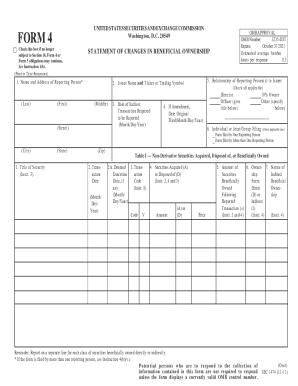
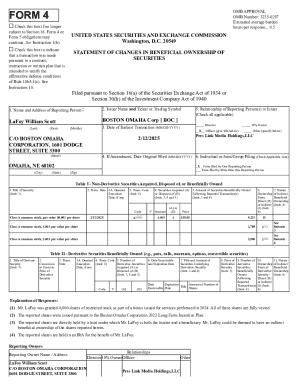
The Form 4 Statement of Changes in Beneficial Ownership is a SEC document used by company insiders to report changes in their beneficial ownership of securities.
pdfFiller scores top ratings on review platforms




Who needs Form 4?
Explore how professionals across industries use pdfFiller.

Form 4 is needed by:
-
Company insiders reporting changes in ownership
-
Securities attorneys assisting clients with filings
-
Compliance professionals in corporations
-
Investors monitoring insider trading activities
-
Accounting professionals handling SEC reports
Comprehensive Guide to Form 4
What is the Form 4 Statement of Changes in Beneficial Ownership?
The Form 4 statement is a U.S. Securities and Exchange Commission (SEC) document used to report changes in beneficial ownership of securities. This form plays a crucial role in preventing insider trading, ensuring transparency in the market. Under Section 16(a) of the Securities Exchange Act, individuals and entities are mandated to adhere to its filing requirements.
The essential information included in the form encompasses the reporting person's details, transaction specifics, and the type of securities involved. Accurate reporting is vital in maintaining market integrity and compliance with regulatory standards.
Purpose and Benefits of the Form 4 Statement of Changes in Beneficial Ownership
The primary purpose of the Form 4 is to foster transparency and accountability in the securities market. By reporting transactions, it plays a significant role in preventing insider trading and ensuring fairness for all investors. This form provides crucial insights for company insiders and investors regarding ownership changes, promoting informed decision-making.
Additionally, it assists U.S. companies in meeting regulatory compliance requirements, further enhancing trust within the financial system.
Who Needs to File the Form 4 Statement of Changes in Beneficial Ownership?
The individuals required to file the Form 4 include reporting persons such as executives, directors, and other insiders of a company. A reporting person is defined as someone who is obligated to disclose their beneficial ownership changes due to their position in the company.
Exemptions may apply in certain cases, but generally, anyone considered a significant insider must adhere to the filing guidelines set forth by the SEC.
When and How to File the Form 4 Statement of Changes in Beneficial Ownership
Filing the Form 4 must occur promptly after a change in beneficial ownership. It is essential to adhere to the filing deadlines, which typically require immediate submission following a transaction. The electronic submission process is the preferred method, and filers can also utilize alternative approaches if necessary.
To ensure compliance, filers should keep important reminders regarding the timing of submissions, as delays can result in regulatory consequences.
How to Fill Out the Form 4 Statement of Changes in Beneficial Ownership Online
Completing the Form 4 via pdfFiller is a straightforward process. Below are steps to guide users through filling out the form:
-
Access the form and familiarize yourself with each fillable section.
-
Enter the reporting person's information, including name and address.
-
Detail the securities involved and transaction specifics accurately.
-
Utilize pre-filled data options if available to streamline the process.
-
eSign the document to finalize your submission.
Common Errors and How to Avoid Them When Filing the Form 4
When completing the Form 4, users should be aware of common pitfalls that could lead to submission issues. Mistakes may include missing signatures, entering incorrect information, or failing to file within the designated time frame.
To mitigate errors, filers should double-check all entries and use a validation checklist before submission. Confirming compliance will help reduce the likelihood of rejections.
What Happens After You Submit the Form 4 Statement of Changes in Beneficial Ownership?
After submission, filers can expect a processing timeline, followed by confirmation from the SEC. It is important to track the status of your submission, as understanding its progress can aid in compliance. Additionally, keeping records of your filings is essential for future reference and regulatory adherence.
Security and Compliance When Handling Form 4
Handling the Form 4 involves dealing with sensitive information, making security a priority. pdfFiller implements robust security measures to protect submitted data, including 256-bit encryption and compliance with regulations such as HIPAA and GDPR.
Users should also adopt best practices for securing personal and financial information during the filing process, further safeguarding their data.
Why Choose pdfFiller for Your Form 4 Filing Needs
pdfFiller enhances the form filing experience by offering an intuitive platform that is user-friendly and accessible. The cloud-based solution does not require any downloads, allowing for easy management of Form 4 online. Users benefit from various features designed to simplify the process.
Testimonials from users highlight improved outcomes and efficiencies when utilizing pdfFiller for their SEC filing needs.
Get Started with Completing Your Form 4 Today!
Starting your Form 4 process with pdfFiller is quick and efficient. The platform simplifies the filing journey while providing the necessary support to ensure all requirements are met.
With a focus on secure handling and compliance, users can confidently manage their Form 4 needs with ease.
How to fill out the Form 4
-
1.Begin by accessing pdfFiller's website and logging into your account or creating a new one if you don't have an account.
-
2.Search for 'Form 4 Statement of Changes in Beneficial Ownership' in the document library to locate the form.
-
3.Once the form is open, familiarize yourself with the structure and layout of the document, including the required fields and sections.
-
4.Gather the necessary information before filling out the form, including the reporting person's name, address, issuer details, transaction dates, and securities information.
-
5.Click on each fillable field in the form and enter the required information clearly and accurately.
-
6.If applicable, use the checkboxes provided to indicate specific options related to the transactions.
-
7.Once all fields are completed, review the entire document for any errors or missing information to ensure accuracy.
-
8.Use pdfFiller's tools to make any edits or adjustments necessary to finalize the document.
-
9.When satisfied with the form, click on 'Save' to store your progress, or choose to 'Download' it as a PDF to your device.
-
10.Finally, submit the form as required to the SEC, either electronically through their portal or by following the preferred submission method.

Who is eligible to file Form 4?
Form 4 is designed for company insiders, such as officers, directors, or significant shareholders, who must report changes in their beneficial ownership of securities.
When is the deadline for submitting Form 4?
Form 4 must be filed within two business days following the execution of a transaction involving the change of beneficial ownership.
How do I submit my completed Form 4?
Once the form is fully completed, it can be submitted electronically via the SEC's EDGAR system or mailed to the SEC if preferred.
What documents do I need to submit with Form 4?
Typically, Form 4 does not require additional documents to be submitted; however, ensure all required fields are accurately filled to avoid common filing errors.
What are some common mistakes to avoid when filing Form 4?
Common mistakes include failing to file on time, not including all required information, or inaccuracies in the reporting person's details or transaction dates.
How long does it take for Form 4 to be processed?
Processing times for Form 4 can vary; however, electronic filings are usually processed more quickly compared to paper submissions.
What should I do if I need assistance with Form 4?
Consider consulting with a legal or financial advisor who specializes in SEC regulations for guidance on filling out Form 4 correctly.
Related Forms






Get the latest insights from our blog


If you believe that this page should be taken down, please follow our DMCA take down process
here
.
This form may include fields for payment information. Data entered in these fields is not covered by PCI DSS compliance.