
Last updated on
Oct 23, 2026

Get the free US Army Payroll Form for Enlisted Personnel
We are not affiliated with any brand or entity on this form

Fill out
Complete the form online in a simple drag-and-drop editor.

eSign
Add your legally binding signature or send the form for signing.

Share
Share the form via a link, letting anyone fill it out from any device.

Export
Download, print, email, or move the form to your cloud storage.
Why pdfFiller is the best tool for your documents and forms


End-to-end document management
From editing and signing to collaboration and tracking, pdfFiller has everything you need to get your documents done quickly and efficiently.
Accessible from anywhere
pdfFiller is fully cloud-based. This means you can edit, sign, and share documents from anywhere using your computer, smartphone, or tablet.
Secure and compliant
pdfFiller lets you securely manage documents following global laws like ESIGN, CCPA, and GDPR. It's also HIPAA and SOC 2 compliant.
What is Army Payroll Form
The US Army Payroll Form for Enlisted Personnel is a government form used by enlisted soldiers to record and disburse payroll. Its primary purpose is to certify and facilitate the payment process through proper documentation.
pdfFiller scores top ratings on review platforms




Who needs Army Payroll Form?
Explore how professionals across industries use pdfFiller.

Army Payroll Form is needed by:
-
Enlisted personnel of the US Army
-
Commanding Officers responsible for payroll certification
-
Human Resources personnel managing military payroll
-
Army finance offices overseeing disbursements
-
Accountants dealing with military government forms
Comprehensive Guide to Army Payroll Form
What is the US Army Payroll Form for Enlisted Personnel?
The US Army Payroll Form for enlisted personnel is a vital document used in military payroll management. Its primary purpose is to record essential data regarding the payment of enlisted soldiers, ensuring that all financial transactions related to their service are accurately captured. This form encompasses various types of information, including allotments, collections, and disbursements, which are crucial for maintaining precise payroll records. The significance of this military payroll form lies in its role in guaranteeing that enlisted personnel receive their compensation in a timely manner.
Purpose and Benefits of the US Army Payroll Form
The US Army Payroll Form is essential for enlisted soldiers as it streamlines their payment processes. This form serves multiple purposes, including maintaining official payroll records and ensuring that all financial transactions are appropriately documented. Key benefits include:
-
Ensuring accurate payment processing for enlisted personnel.
-
Facilitating timely payments to avoid delays in compensation.
-
Providing a clear and organized record of all payroll transactions.
Who Needs the US Army Payroll Form for Enlisted Personnel?
The primary users of the US Army Payroll Form include enlisted personnel and Commanding Officers who oversee the payroll process. Commanding Officers play a crucial role in the completion of this form, as they must verify and sign it to certify the accuracy of the information provided. Eligibility criteria for enlisted personnel typically require that all service members must complete this form to ensure proper payment alignment with military regulations.
How to Fill Out the US Army Payroll Form for Enlisted Personnel Online
Filling out the US Army Payroll Form online is straightforward. Follow these steps to complete the form digitally using pdfFiller:
-
Access the form on the pdfFiller platform.
-
Enter required personal information and military details in the designated fields.
-
Fill in the sections for allotments, collections, and disbursements.
-
Ensure all information is accurate before finalizing the form.
-
Obtain the Commanding Officer's signature electronically.
Key Features of the US Army Payroll Form
The US Army Payroll Form contains various sections and fields essential for capturing payroll details. Notable features include:
-
Different types of allotment fields for various financial needs of enlisted personnel.
-
Specific areas for collections and disbursements to streamline the payment process.
-
A mandatory section requiring the Commanding Officer's signature for process certification.
How to Submit the US Army Payroll Form
Once you've completed the US Army Payroll Form, you can submit it through various methods. Here are the options available:
-
Electronic submission through the designated military payroll portal.
-
Physical delivery to the appropriate payroll office.
Be sure to adhere to any submission deadlines to ensure prompt processing of payroll requests.
Common Errors to Avoid When Completing the US Army Payroll Form
When filling out the US Army Payroll Form, it's crucial to avoid common mistakes that could delay processing. Frequent errors include:
-
Missing required signatures or dates.
-
Incorrect entries in the allotment or disbursement sections.
To enhance accuracy, review all information and validate it before submission.
Security and Compliance for the US Army Payroll Form
Handling the US Army Payroll Form requires attention to security measures, especially given the sensitivity of payroll information. pdfFiller implements robust security features, including:
-
256-bit encryption for data protection.
-
Compliance with SOC 2 Type II, HIPAA, and GDPR standards.
Sample or Example of a Completed US Army Payroll Form
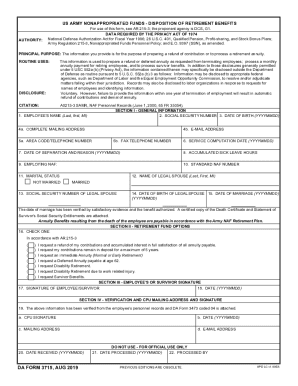
To assist users in completing their forms accurately, a visual example of a filled-out US Army Payroll Form can serve as a valuable reference. This sample will illustrate typical entries and clarify any sections that might be confusing for first-time users.
Begin Your Payroll Process with pdfFiller Today
Utilizing pdfFiller for your US Army Payroll Form is an efficient and secure way to manage your payroll processes. The platform provides essential capabilities such as eSigning, editing, and convenient access to all necessary forms.
How to fill out the Army Payroll Form
-
1.Access the US Army Payroll Form for Enlisted Personnel from the pdfFiller website by searching for the specific form name.
-
2.Open the form in the pdfFiller editor, which provides user-friendly tools for easy navigation.
-
3.Before filling out the form, ensure you have the necessary information such as soldier identification, payment amounts, and appropriate allotment details.
-
4.Begin by filling in the basic soldier details in the designated fields, ensuring accuracy.
-
5.Next, input the allotment, collection, and disbursement information by checking the relevant boxes and entering any numerical amounts as needed.
-
6.If required, refer to military pay guidelines to complete sections related to specific disbursements or deductions.
-
7.Once all fields are filled, review the information for completeness and accuracy to avoid any mistakes.
-
8.After reviewing, seek the signature of the Commanding Officer in the appropriate section to certify the document.
-
9.Finalize the form by saving your work. Use the saving option in pdfFiller to keep a copy, or download the form to your device.
-
10.You may opt to submit the form through pdfFiller’s sharing features or by printing it for physical submission, adhering to your specific submission processes.

Who is eligible to use the US Army Payroll Form for Enlisted Personnel?
The form is specifically designed for enlisted personnel of the US Army who require payroll processing. Commanding Officers who certify the payments also need access to this form.
What details should I prepare before filling out the payroll form?
You should gather soldier identification, payment amounts, specific allotment details, and any necessary supporting documents to ensure accurate and complete entries on the form.
Are there deadlines for submitting the US Army Payroll Form?
Submission deadlines for the payroll form may vary depending on the specific payroll cycles set by the military finance office. It's important to check with your unit's guidelines.
How do I submit the completed form?
Once completed and signed, the US Army Payroll Form can be submitted either electronically through pdfFiller's features or printed for physical submission according to your unit's submission processes.
What common mistakes should I avoid when filling out the payroll form?
Common mistakes include entering incorrect soldier details, failing to secure the Commanding Officer's signature, or not reviewing the form for completeness before submission.
What processing times can I expect after submitting the payroll form?
Processing times for the US Army Payroll Form can vary based on the military’s payroll cycles and the finance office's current workload. Generally, allow sufficient time for processing before expecting payment.
Related Forms


Get the latest insights from our blog


If you believe that this page should be taken down, please follow our DMCA take down process
here
.
This form may include fields for payment information. Data entered in these fields is not covered by PCI DSS compliance.