
Última actualización el
May 25, 2026
Create Teams Gratis
Drop document here to upload
Up to 100 MB for PDF and up to 25 MB for DOC, DOCX, RTF, PPT, PPTX, JPEG, PNG, JFIF, XLS, XLSX or TXT
0
Forms filled
0
Forms signed
0
Forms sent
Comienza aquí. Edita, firma o llena o comparte
Edit PDF
Sign
Request signatures
Share
Merge
Rearrange
Compress
Convert
Discover the simplicity of processing PDFs online

Upload your document in seconds

Fill out, edit, or eSign your PDF hassle-free

Download, export, or share your edited file instantly
Top-rated PDF software recognized for its ease of use, powerful features, and impeccable support






Every PDF tool you need to get documents done paper-free

Create & edit PDFs
Generate new PDFs from scratch or transform existing documents into reusable templates. Type anywhere on a PDF, rewrite original PDF content, insert images or graphics, redact sensitive details, and highlight important information using an intuitive online editor.

Fill out & sign PDF forms
Say goodbye to error-prone manual hassles. Complete any PDF document electronically – even while on the go. Pre-fill multiple PDFs simultaneously or extract responses from completed forms with ease.

Organize & convert PDFs
Add, remove, or rearrange pages inside your PDFs in seconds. Create new documents by merging or splitting PDFs. Instantly convert edited files to various formats when you download or export them.

Collect data and approvals
Transform static documents into interactive fillable forms by dragging and dropping various types of fillable fields on your PDFs. Publish these forms on websites or share them via a direct link to capture data, collect signatures, and request payments.

Export documents with ease
Share, email, print, fax, or download edited documents in just a few clicks. Quickly export and import documents from popular cloud storage services like Google Drive, Box, and Dropbox.

Store documents safely
Store an unlimited number of documents and templates securely in the cloud and access them from any location or device. Add an extra level of protection to documents by locking them with a password, placing them in encrypted folders, or requesting user authentication.
Customer trust by the numbers
64M+
users worldwide
4.6/5
average user rating
4M
PDFs edited per month
9 min
average to create and edit a PDF
Join 64+ million people using paperless workflows to drive productivity and cut costs
Why choose our PDF solution?
Cloud-native PDF editor
Access powerful PDF tools, as well as your documents and templates, from anywhere. No installation needed.
Top-rated for ease of use
Create, edit, and fill out PDF documents faster with an intuitive UI that only takes minutes to master.
Industry-leading customer service
Enjoy peace of mind with an award-winning customer support team always within reach.
What our customers say about pdfFiller
See for yourself by reading reviews on the most popular resources:
Excellent and easy application to use. I use this for military and business situations.
2016-02-19
customer service is good; you get good value for your money; user friendly application
2016-03-29
Helpful once I got used to it. Initially awkward.
2016-07-21
The forms are easy to use and fill. So far, I've been able to find all the forms I need.
2017-12-26
Becoming more comfortable with it the more I use it and learning more ways to let it help me.
2018-09-05
PPT compress is great, reduced 22MB ppt to 2MB easily and fast.
2024-05-20
It's easy to work with. Wish there was a "clear all" button so that I wouldn't have to close and open back up to start a new form, but overall, great product
2023-11-29
easy to navigate
easy to navigate! editing was a breeze.
2021-11-04
Wonderful and fast support team!
I was in need of this service and it worked seamlessly and has a lot of options during the free trial that I had access to. I was not in need of the 1-year subscription that I was charged for. I reached out to their support team when I saw the charge come through and they canceled my subscription as well as fully reversed the charge with no hassle at all. This is a very useful service for those who need to edit pdfs frequently! Anna from their support team did a wonderful job and was very pleasant to work with.
2020-11-18
How to Create a Team
It is quite easy to create a team. Click on the profile icon in the top right corner and select the Create Team option. Name the team and add members in the popup window. Add access permission for team admins to see all documents of team members if needed. If you decide not to allow this, they will see only shared templates.
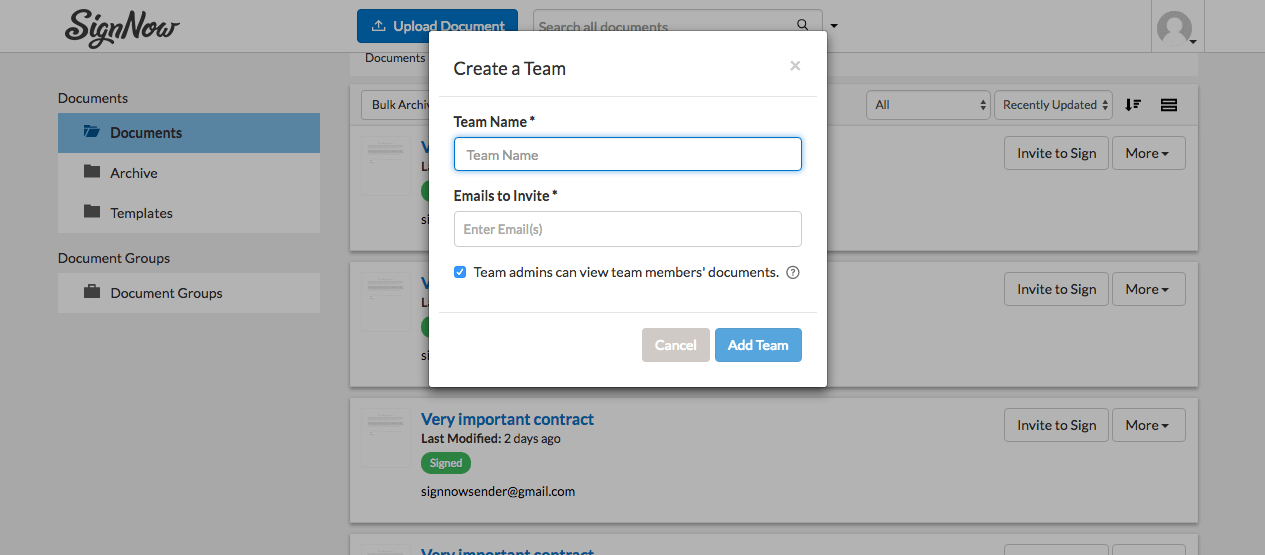
Every department in your company can have its own team. Also, you can create any team with members from different departments. This helps to improve document access. Share restricted templates only with specific people. Distribute generally accessible documents to the whole team.
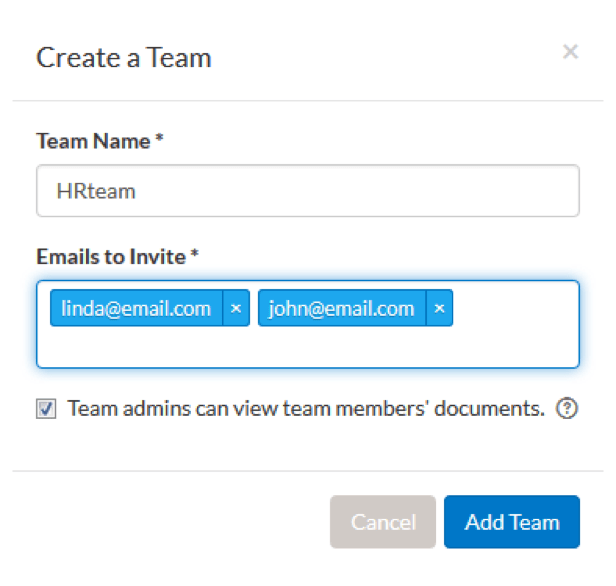
Create one team with a Business Subscription and multiple teams with Business Premium. There are no limitations on administration. There also isn’t any limit to the number of teams you can be a part of. The enterprise subscription level lets teams be applicable for the whole company. Admins can share templates and set up restrictions.
Easily Create Teams Feature
The Easily Create Teams feature helps you form groups quickly and effortlessly. Whether you're managing a project or organizing a community, this tool allows you to assemble your team without any hassle.
Key Features
Simple team setup process
Customizable team roles and permissions
Integration with existing work tools
Real-time collaboration options
User-friendly interface
Potential Use Cases
Launching new projects at work
Organizing events or gatherings
Building dedicated support teams
Creating study groups for educational purposes
Setting up volunteer teams for community service
With this feature, you can reduce the time spent on team organization. It offers a straightforward solution to your team management challenges, allowing you to focus more on collaboration and achieving your goals. Say goodbye to confusion and hello to efficient teamwork.
#1 usability according to G2
Try the PDF solution that respects your time.