
Last updated on
Nov 9, 2026

AR AR1000-DD (Formerly AR1000RC5) 2009 free printable template
pdfFiller is not affiliated with any government organization

Fill out
Complete the form online in a simple drag-and-drop editor.

eSign
Add your legally binding signature or send the form for signing.

Share
Share the form via a link, letting anyone fill it out from any device.

Export
Download, print, email, or move the form to your cloud storage.
Why pdfFiller is the best tool for your documents and forms


End-to-end document management
From editing and signing to collaboration and tracking, pdfFiller has everything you need to get your documents done quickly and efficiently.
Accessible from anywhere
pdfFiller is fully cloud-based. This means you can edit, sign, and share documents from anywhere using your computer, smartphone, or tablet.
Secure and compliant
pdfFiller lets you securely manage documents following global laws like ESIGN, CCPA, and GDPR. It's also HIPAA and SOC 2 compliant.
What is AR AR1000-DD (Formerly AR1000RC5)
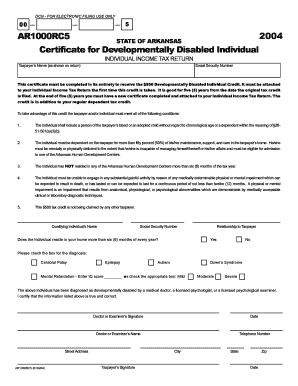
The Arkansas AR1000RC5 Form is a state income tax document used by taxpayers to claim a $500 credit for developmentally disabled individuals.
pdfFiller scores top ratings on review platforms




Wonderful to deal with! I can speak highly enough to their integrity.
Had an unknown charge from pdf filler…
Had an unknown charge from pdf filler on my credit card, contacted them and they were very helpfully clearing up the charge it had been my wife who had subscribed to them but she has since passed away they cancelled subscription and gave full refund
Easy to use and efficient
Easy to use and efficient. It convenient over scanning, printing and then emailing. Saves time and thus money
Good
It's really helpful, totally recomended
Great product
Great and easy to use and navigate your way round.
Great Site
Great Site. Works Excellent!!
Who needs AR AR1000-DD (Formerly AR1000RC5)?
Explore how professionals across industries use pdfFiller.

AR AR1000-DD (Formerly AR1000RC5) is needed by:
-
Taxpayers in Arkansas seeking tax credits for disabilities
-
Parents or guardians of developmentally disabled individuals
-
Medical professionals certifying disabilities
-
Tax advisors or accountants assisting in tax filings
-
Individuals applying for state tax benefits
Comprehensive Guide to AR AR1000-DD (Formerly AR1000RC5)
What is the Arkansas AR1000RC5 Form?
The Arkansas AR1000RC5 form is a specific tax document designed for use within the Arkansas tax system. Its primary purpose is to help taxpayers claim the developmentally disabled tax credit, which is essential for those supporting individuals with developmental disabilities. This form is necessary for qualifying individuals to receive financial relief through the credit implemented by the state.
Taxpayers who have dependents with developmental disabilities are required to use this form to file for the credit effectively. Understanding the implications of the AR1000RC5 form is crucial for ensuring compliance and maximizing potential tax benefits.
Purpose and Benefits of the Arkansas AR1000RC5 Form
The Arkansas AR1000RC5 form offers several significant benefits, notably a $500 tax credit aimed at supporting developmentally disabled individuals and their families. Utilizing this form correctly can alleviate some financial burdens for eligible taxpayers, making it easier to manage financial responsibilities associated with care.
This tax form also has a validity period of five years, which aids in tax planning and smoothens the process for those who will need to reapply within that timeframe. By understanding its benefits, taxpayers can ensure they are taking full advantage of available financial relief options.
Key Features of the Arkansas AR1000RC5 Form
The AR1000RC5 form comprises several significant sections and fillable fields that require detailed information about the qualifying individual. Essential fields include the individual's name, social security number, and diagnosis. Additionally, the form requires signatures from both the taxpayer and a licensed medical professional to validate the accuracy of the information provided.
These features ensure that the form captures all necessary details, allowing for a comprehensive assessment of eligibility for the developmentally disabled tax credit.
Who Needs the Arkansas AR1000RC5 Form?
This tax form is specifically targeted at Arkansas taxpayers who have developmentally disabled dependents. To check eligibility for the credit, taxpayers must adhere to specific criteria, such as the diagnosis details provided on the form and the relationship to the qualifying individual.
By defining the target audience for the AR1000RC5 form, the Arkansas tax authorities can streamline benefits to those who need them the most, enhancing the overall effectiveness of the program.
How to Fill Out the Arkansas AR1000RC5 Form Online (Step-by-Step)
Filling out the Arkansas AR1000RC5 form can be simplified by using tools such as pdfFiller. The following steps outline how to proceed with the online form completion:
-
Access the AR1000RC5 form on the pdfFiller platform.
-
Enter the taxpayer's name and social security number accurately in the respective fields.
-
Provide detailed information about the qualifying individual, ensuring it matches official documentation.
-
Complete the fields regarding the diagnosis and relationship to the taxpayer.
-
Both the taxpayer and a medical professional must review and sign the form.
-
Submit the completed form as instructed on the platform.
Submission Methods and Delivery of the Arkansas AR1000RC5 Form
Taxpayers have several options for submitting the AR1000RC5 form. These methods include online submission via platforms like pdfFiller and traditional mail, allowing for flexibility based on personal preference or technological access.
It is essential to adhere to submission deadlines to ensure that claims are processed timely. After submission, taxpayers can expect to receive confirmation from the tax authority regarding the status of their application.
Common Errors and How to Avoid Them
Many taxpayers encounter common mistakes when filling out the Arkansas AR1000RC5 form. Some frequent errors include incorrect social security numbers, missing signatures, and inaccurate diagnosis details. Here are some tips to avoid these pitfalls:
-
Double-check all entries for accuracy before submission.
-
Ensure both necessary signatures are provided.
-
Follow submission guidelines meticulously to prevent delays.
Timely and accurate submission is crucial for avoiding complications and ensuring that claims are processed without issue.
How to Ensure Security and Compliance with the Arkansas AR1000RC5 Form
Handling sensitive tax documents requires a high level of security. Utilizing platforms like pdfFiller can enhance the safety of the AR1000RC5 form's information. These platforms often feature stringent security measures, including encryption and compliance with regulatory standards.
Taxpayers should prioritize security when dealing with their sensitive documents to protect their personal information and maintain compliance with tax regulations.
Using pdfFiller for Your Arkansas AR1000RC5 Form Needs
pdfFiller simplifies the process of completing the AR1000RC5 form. Its robust platform allows users to edit, sign, and share documents seamlessly without the need for downloads or installations. Taking advantage of these features can significantly enhance users' experience in managing their tax forms.
With tools tailored to streamline document handling, taxpayers can focus more on their claims rather than the complexities of paperwork.
Samples and Resources for the Arkansas AR1000RC5 Form
For reference, a completed example of the Arkansas AR1000RC5 form is available, showcasing how to fill out all required sections correctly. Additional resources, including official guidelines and links to related forms, can further assist taxpayers in navigating the process of claiming their credits successfully.
How to fill out the AR AR1000-DD (Formerly AR1000RC5)
-
1.To access the Arkansas AR1000RC5 Form on pdfFiller, start by visiting the pdfFiller website and using the search bar to locate the form by its name.
-
2.Once you find the form, click on it to open the fillable PDF interface where you can begin entering your information.
-
3.Before you start filling out the form, gather the necessary information including the name, social security number, and diagnosis of the qualifying individual.
-
4.Navigate through the form using your mouse or keyboard. Click on each fillable field such as 'Taxpayer’s Name' to enter the requested data.
-
5.Make sure all entries are complete and accurate, as both the taxpayer and the doctor/examiner will need to sign the form.
-
6.Review the completed form carefully to ensure there are no errors before finalizing it. Double-check your entries for accuracy.
-
7.To save, download, or submit the form, look for the options on the top right corner of the pdfFiller interface. Choose to download or print it for submission or submit directly online if available.

Who is eligible to use the Arkansas AR1000RC5 Form?
Eligibility for the Arkansas AR1000RC5 Form includes taxpayers in Arkansas claiming a credit for developmentally disabled individuals. The qualifying individual must be diagnosed with a developmental disability.
What is the deadline for submitting the AR1000RC5 Form?
The AR1000RC5 Form should be submitted along with your Individual Income Tax Return. The deadline coincides with the general state income tax return deadline, which is typically April 15 each year.
How do I submit the AR1000RC5 Form?
You can submit the AR1000RC5 Form by attaching it to your Arkansas Individual Income Tax Return when filing. Ensure it is submitted by the deadline for processing.
What supporting documents are required with this form?
When submitting the Arkansas AR1000RC5 Form, you need to include documentation certifying the diagnosis of the developmentally disabled individual. This typically includes a letter or certificate from a qualified medical professional.
What common mistakes should I avoid when filling out the form?
Common mistakes include leaving fields blank, incorrect spelling of names, and not obtaining the necessary signatures from both the taxpayer and the medical professional. Always double-check your entries.
How long does it take to process the AR1000RC5 Form?
Processing times for the AR1000RC5 are generally similar to standard tax return processing times, which can vary but typically take several weeks, especially during peak tax season.
Is there a fee associated with filing the AR1000RC5 Form?
There are typically no fees specifically associated with submitting the AR1000RC5 Form, but standard submission and filing fees may apply depending on your tax preparation services.
AR AR1000-DD (Formerly AR1000RC5) Form Versions
Related Content
Related Forms




Get the latest insights from our blog


If you believe that this page should be taken down, please follow our DMCA take down process
here
.
This form may include fields for payment information. Data entered in these fields is not covered by PCI DSS compliance.