
Last updated on
Nov 9, 2026
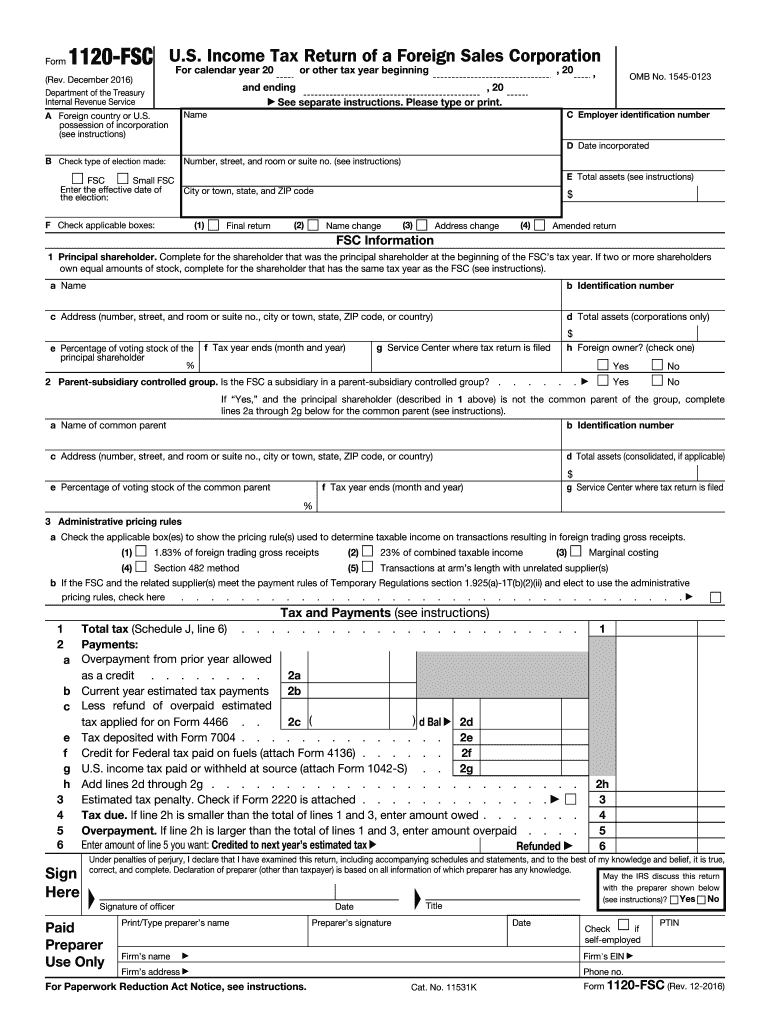
IRS 1120-FSC 2016 free printable template
pdfFiller is not affiliated with IRS

Fill out
Complete the form online in a simple drag-and-drop editor.

eSign
Add your legally binding signature or send the form for signing.

Share
Share the form via a link, letting anyone fill it out from any device.

Export
Download, print, email, or move the form to your cloud storage.
Why pdfFiller is the best tool for your documents and forms


End-to-end document management
From editing and signing to collaboration and tracking, pdfFiller has everything you need to get your documents done quickly and efficiently.
Accessible from anywhere
pdfFiller is fully cloud-based. This means you can edit, sign, and share documents from anywhere using your computer, smartphone, or tablet.
Secure and compliant
pdfFiller lets you securely manage documents following global laws like ESIGN, CCPA, and GDPR. It's also HIPAA and SOC 2 compliant.
What is IRS 1120-FSC
The Form 1120-FSC US Income Tax Return is a federal tax document used by Foreign Sales Corporations to report income, deductions, and tax payments to the IRS.
pdfFiller scores top ratings on review platforms




Who needs IRS 1120-FSC?
Explore how professionals across industries use pdfFiller.

IRS 1120-FSC is needed by:
-
Foreign Sales Corporations operating in the US
-
Preparer professionals handling business tax returns
-
Corporate officers responsible for tax compliance
-
Business owners seeking to file federal taxes
-
Tax consultants assisting with IRS submissions
Comprehensive Guide to IRS 1120-FSC
What is the Form 1120-FSC US Income Tax Return?
The Form 1120-FSC is a federal tax return utilized by Foreign Sales Corporations (FSCs) to report various details to the Internal Revenue Service (IRS). This form plays a crucial role in documenting income, deductions, and tax payments related to FSC activities. To ensure compliance, it is necessary to provide specific information, including details about principal shareholders and any relevant tax payments.
Purpose and Benefits of the Form 1120-FSC US Income Tax Return
Filing Form 1120-FSC is significant for accurately calculating taxable income for Foreign Sales Corporations. The form simplifies reporting processes, helping FSCs avoid potential penalties associated with incorrect filings. Additionally, it clarifies how entities engage in international business operations while ensuring they meet IRS requirements.
Using this form can bolster the credibility of a business by promoting transparency in financial reporting.
Who Needs to File the Form 1120-FSC US Income Tax Return?
The primary requirement to file Form 1120-FSC involves being classified as a Foreign Sales Corporation. This classification encompasses specific stakeholders and businesses engaged in particular international sales activities. To be eligible, a business must meet designated criteria that define it as an FSC, including a thorough understanding of the responsibilities associated with the filing process.
When to File the Form 1120-FSC US Income Tax Return
Filing deadlines for Form 1120-FSC are critical to observe, as tardiness may lead to consequences such as penalties or interest on unpaid taxes. Ensuring timely submission allows for smoother processing by the IRS. It is also important to consider the IRS’s usual processing times for submitted tax returns to manage expectations appropriately.
How to Fill Out the Form 1120-FSC US Income Tax Return Online (Step-by-Step)
To complete Form 1120-FSC efficiently, follow these steps:
-
Access the online version of the form via pdfFiller.
-
Fill out specific fields, including 'Name' and 'Identification number'.
-
Ensure the 'Signature of officer' is completed accurately.
-
Review all entries to prevent common errors, such as missing information or incorrect figures.
This structured approach aids in a smooth filing experience with the IRS.
How to Sign the Form 1120-FSC US Income Tax Return
Understanding the signing requirements for the Form 1120-FSC is essential. There are differences between digital signatures and wet signatures, with each having specific guidelines issued by the IRS. Officers are required to provide their signatures, and platforms like pdfFiller facilitate electronic signing to streamline the process.
What Happens After You Submit the Form 1120-FSC US Income Tax Return?
After submitting Form 1120-FSC, it is advisable to confirm that the application has been successfully received. Tracking the application status can provide insights into potential reviews by the IRS. If there are any issues with the submitted form, proactive steps should be taken to resolve them promptly.
Security and Compliance for the Form 1120-FSC US Income Tax Return
When handling Form 1120-FSC, data security should be a top priority. pdfFiller employs robust security measures, including 256-bit encryption, ensuring the protection of sensitive business data. Maintaining privacy while adhering to compliance standards like HIPAA and GDPR is crucial for businesses managing international sales.
How pdfFiller Can Help with the Form 1120-FSC US Income Tax Return
pdfFiller serves as a valuable tool for those looking to file Form 1120-FSC efficiently. The platform provides features for creating, editing, and eSigning forms, all aimed at simplifying the filing process. With user-friendly capabilities, pdfFiller enhances accessibility, making it easier than ever to manage tax documentation accurately.
How to Fill Out Small Business Tax Forms Online with pdfFiller
Struggling with your Schedule C or not sure how to file business taxes as a sole proprietor, LLC, or self-employed professional? This step-by-step pdfFiller tutorial walks you through completing IRS Schedule C quickly and accurately — no printing, no scanning, no stress. Whether you're handling small business tax deductions, tracking self-employed taxes, or preparing your full business tax return, pdfFiller makes it simple right in your browser.

How to fill out the IRS 1120-FSC
-
1.To access and open the Form 1120-FSC on pdfFiller, visit the pdfFiller website and use the search bar to locate the form by entering 'Form 1120-FSC'. Once found, select it to open in the editor.
-
2.Navigate the pdfFiller interface by using the toolbar options. Click on any blank field to enter information. Use the text boxes to fill in details such as the corporation's name, identification number, and address as prompted.
-
3.Before starting, gather all necessary information including income, deductions, and tax payment records. Ensure you have details about the principal shareholder and any additional schedules that may be needed.
-
4.Review the completed form for accuracy. Double-check that all fields are filled out completely and that the information matches your records to avoid common errors.
-
5.Once you are satisfied with the form, save your progress. pdfFiller allows you to download the completed form or directly submit it online through the platform. Follow the prompts to finalize your submission.

Who is eligible to file Form 1120-FSC?
Eligibility to file Form 1120-FSC is primarily for Foreign Sales Corporations that operate within the United States and need to report their earnings to the IRS.
What is the deadline for filing Form 1120-FSC?
Form 1120-FSC is generally due on the 15th day of the 6th month after the end of the tax year. For corporations with a standard calendar year-end, this typically means a due date of June 15.
How can I submit Form 1120-FSC?
You can submit Form 1120-FSC electronically via authorized e-file providers or by mail. Check with the IRS for the latest submission methods and addresses.
What supporting documents are required for Form 1120-FSC?
You must attach necessary schedules as instructed on the form. This may include documentation supporting income, deductions, and tax payments claimed on the return.
What common mistakes should I avoid when filing Form 1120-FSC?
Ensure that all fields are accurately filled out, especially financial figures. Overlooking required signatures and failing to include supporting schedules are common mistakes that can delay processing.
How long does it take to process Form 1120-FSC?
Processing times for Form 1120-FSC can vary. Generally, it may take several weeks to receive confirmation from the IRS. E-filing can speed up this process.
Is notarization required for Form 1120-FSC?
No, notarization is not a requirement for filing Form 1120-FSC. However, the signatures of the officer and preparer must be provided as per the form's instructions.
IRS 1120-FSC Form Versions
Related Content
Related Forms



Related Catalogs
Get the latest insights from our blog


If you believe that this page should be taken down, please follow our DMCA take down process
here
.
This form may include fields for payment information. Data entered in these fields is not covered by PCI DSS compliance.