
Last updated on
Oct 17, 2026

Associated Bank Direct Deposit 2020-2026 free printable template
pdfFiller is not affiliated with any government organization

Fill out
Complete the form online in a simple drag-and-drop editor.

eSign
Add your legally binding signature or send the form for signing.

Share
Share the form via a link, letting anyone fill it out from any device.

Export
Download, print, email, or move the form to your cloud storage.
Why pdfFiller is the best tool for your documents and forms


End-to-end document management
From editing and signing to collaboration and tracking, pdfFiller has everything you need to get your documents done quickly and efficiently.
Accessible from anywhere
pdfFiller is fully cloud-based. This means you can edit, sign, and share documents from anywhere using your computer, smartphone, or tablet.
Secure and compliant
pdfFiller lets you securely manage documents following global laws like ESIGN, CCPA, and GDPR. It's also HIPAA and SOC 2 compliant.
What is Associated Bank Direct Deposit
The Direct Deposit Authorization Form is a financial document used by employees to authorize their employer to initiate or modify direct deposits for their payments.
pdfFiller scores top ratings on review platforms




Who needs Associated Bank Direct Deposit?
Explore how professionals across industries use pdfFiller.

Associated Bank Direct Deposit is needed by:
-
Employees initiating direct deposit with their employer
-
Joint account holders wanting to authorize deposits
-
HR representatives facilitating payroll processes
-
Employers requiring updated payment info from staff
-
Financial institutions requiring authorization for direct deposits
Comprehensive Guide to Associated Bank Direct Deposit
Understanding the Direct Deposit Authorization Form
The Direct Deposit Authorization Form serves as a crucial document for employees granting permission to their employer or organization to initiate or modify direct deposit payments. This form helps streamline the payment process, ensuring timely and accurate deposit of wages into an employee’s bank account. Employees must provide key information such as their financial institution's name and routing number, as well as their account number. Providing these details helps eliminate delays in payment processing.
In addition to its essential function, this form plays a vital role in facilitating employees' access to their earnings securely and efficiently. Ensuring that the authorization form is completed thoroughly is critical, as incomplete information can lead to payment issues.
Purpose and Benefits of the Direct Deposit Authorization Form
The advantages of using the Direct Deposit Authorization Form are manifold. Firstly, it accelerates the payment process by enabling electronic transactions, which are typically faster than traditional methods. Secondly, both employees and employers benefit from enhanced convenience, as payments are processed without the need for physical checks.
This form also aids in eliminating logistical issues associated with paper checks. By opting for direct deposit, employees reduce the risk of lost checks, while employers decrease administrative overhead costs related to check issuance and processing.
Key Features of the Direct Deposit Authorization Form
The Direct Deposit Authorization Form includes several essential features to ensure comprehensive authorization. Key identification fields require the employee's information alongside the employer's name and address, ensuring clarity from the start.
-
Banking details: Employees must provide their financial institution's name, routing number, and account number.
-
Signature requirements: A signature is mandatory for the employee, with space for a joint account holder's details if applicable.
-
Clarity on electronic submissions: The form might detail procedures for submitting the document electronically or via mail.
Who Needs the Direct Deposit Authorization Form?
Identifying who requires the Direct Deposit Authorization Form is vital for its effective implementation. Typically, employees wishing to set up or modify their direct deposit arrangements need to complete this form. Additionally, joint account holders may also need to provide their consent, ensuring that all parties involved in the account are accurately represented.
Employers are responsible for making this form readily available to their employees, facilitating a smooth transition into a direct deposit system. It is essential for all relevant parties to have access to the necessary instructions accompanying this authorization.
How to Fill Out the Direct Deposit Authorization Form Online (Step-by-Step)
Filling out the Direct Deposit Authorization Form correctly is crucial to prevent delays. Follow these steps to ensure accuracy:
-
Start with the date and write the employer's or organization’s name.
-
Fill in the employer's address, including the city, state, and ZIP code.
-
Provide the financial institution's name, along with the routing number and account number.
-
Enter your personal information, including your name and signature. If applicable, include a joint account holder's name and signature.
For accuracy, double-check each field before submission, and remain cautious of common mistakes such as missing signatures or miswritten numbers.
Submitting the Direct Deposit Authorization Form
Once completed, the Direct Deposit Authorization Form can be submitted through various methods. Users may hand in the form in person, send it through standard mail, or utilize electronic submission options if available. Be aware of any potential fees that might incur based on the submission method chosen.
Deadlines are also critical; it’s important to submit the form promptly to avoid any delays in processing. After submission, individuals should anticipate a certain turnaround time for the processing of their direct deposits.
Security and Compliance with the Direct Deposit Authorization Form
Handling sensitive financial information on the Direct Deposit Authorization Form requires strict adherence to security protocols. Protecting personal and banking details is paramount for both employers and employees alike. Utilizing secure platforms like pdfFiller ensures that data is safeguarded with measures such as 256-bit encryption.
Moreover, being compliant with legal standards, such as HIPAA and GDPR, is essential in the processing of this form. Proper record retention practices should also be followed to maintain data protection and compliance.
Sample or Example of a Completed Direct Deposit Authorization Form
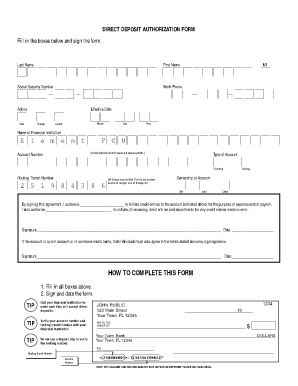
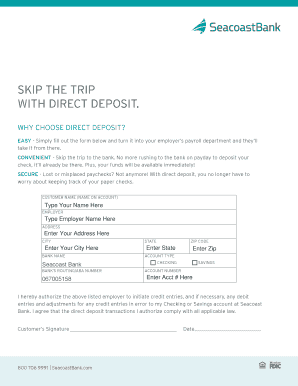
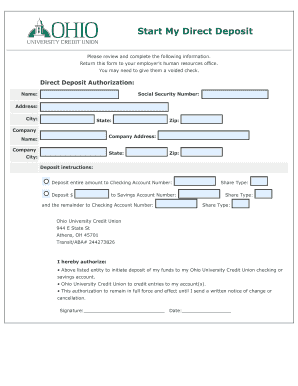
A visual reference can significantly help users comprehend how to complete the Direct Deposit Authorization Form accurately. Here, a filled-out example of the form showcases the necessary fields like date, employer and financial institution information, and employee signature.
Annotated sections will highlight common pitfalls to avoid, enabling users to recognize potential errors before submission. Key sections are emphasized to guide the user effectively through the completion process.
Maximize Your Experience with pdfFiller
pdfFiller provides exceptional support for users navigating the Direct Deposit Authorization Form, offering features tailored to enhance the filling process. Users can benefit from easy editing options, secure eSigning capabilities, and the ability to convert documents as needed.
By utilizing pdfFiller's tools, employees can ensure their forms are filled out accurately and securely, taking advantage of a streamlined experience that saves time and reduces frustration. Experience the convenience of pdfFiller while completing your authorization form confidently.
How to fill out the Associated Bank Direct Deposit
-
1.To begin, access the Direct Deposit Authorization Form on pdfFiller by searching for the form title or navigating directly to the repository where it's stored.
-
2.Open the form and familiarize yourself with the layout, noting the fillable fields provided for your information.
-
3.Before filling out the form, gather necessary details such as your employer's name, address, bank information including routing and account numbers, and your signature.
-
4.Start by entering the current date in the designated 'Date' field at the top of the form.
-
5.Proceed to complete the 'Employer/organization name' and 'Address' fields with accurate details of your workplace, ensuring correct spelling.
-
6.Input your financial institution's name, along with the associated bank routing number and your account number in the specified fields.
-
7.You or any joint account holder must provide your names and signatures where prompted; ensure these match your official ID documents.
-
8.Review the completed form carefully for accuracy, ensuring all fields are filled out appropriately and that there are no typographical errors.
-
9.Once satisfied, save your work on pdfFiller to prevent loss of information, using the save option.
-
10.You can also download the form as a PDF or submit it directly to your employer via the submission features available on pdfFiller.

Who needs to complete the Direct Deposit Authorization Form?
Typically, employees who wish to set up or change their direct deposit for salary or wages need to complete this form. Joint account holders may also be required to sign if they share an account with the employee.
What information do I need to fill out this form?
You will need your employer's name and address, your financial institution's name, routing number, account number, and your signature, along with the date of authorization.
How do I submit the completed Direct Deposit Authorization Form?
After filling out the form, you can either save it on pdfFiller, download it as a PDF, or submit it directly to your employer, as per their submission guidelines.
Are there any deadlines for submitting this form?
Deadlines may vary by employer; it's best to submit the form at least one payroll period in advance of the date you want the new deposit arrangement to take effect.
What common mistakes should I avoid when completing this form?
Ensure that all your entries are accurate, especially your bank routing and account numbers, as incorrect information can lead to payment delays. Also, make sure all required signatures are included.
Is notarization required for this form?
No, the Direct Deposit Authorization Form does not generally require notarization. However, your employer may have specific requirements, so it's best to check before submission.
How long does it take for the direct deposit to start after submitting the form?
Processing times can vary but typically, direct deposits can take one to two payroll cycles to be enacted after your employer receives the completed form.
Associated Bank Direct Deposit Form Versions
Related Forms



Get the latest insights from our blog


If you believe that this page should be taken down, please follow our DMCA take down process
here
.
This form may include fields for payment information. Data entered in these fields is not covered by PCI DSS compliance.