
Last updated on
Oct 19, 2026

Get the free Tax Return Organizer
We are not affiliated with any brand or entity on this form

Fill out
Complete the form online in a simple drag-and-drop editor.

eSign
Add your legally binding signature or send the form for signing.

Share
Share the form via a link, letting anyone fill it out from any device.

Export
Download, print, email, or move the form to your cloud storage.
Why pdfFiller is the best tool for your documents and forms


End-to-end document management
From editing and signing to collaboration and tracking, pdfFiller has everything you need to get your documents done quickly and efficiently.
Accessible from anywhere
pdfFiller is fully cloud-based. This means you can edit, sign, and share documents from anywhere using your computer, smartphone, or tablet.
Secure and compliant
pdfFiller lets you securely manage documents following global laws like ESIGN, CCPA, and GDPR. It's also HIPAA and SOC 2 compliant.
What is Tax Organizer
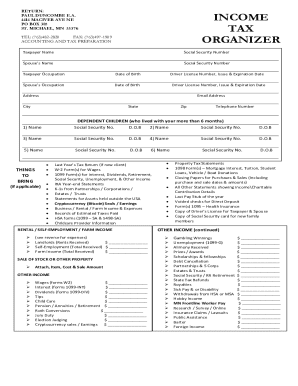
The Tax Return Organizer is a form used by taxpayers to organize their financial information for tax preparation in Minnesota.
pdfFiller scores top ratings on review platforms




Who needs Tax Organizer?
Explore how professionals across industries use pdfFiller.

Tax Organizer is needed by:
-
Individual taxpayers preparing their taxes in Minnesota
-
Tax professionals assisting clients with tax returns
-
Students filing their taxes for the first time
-
Freelancers tracking income and expenses for tax purposes
-
Families wanting to maximize deductions and credits
Comprehensive Guide to Tax Organizer
What is the Tax Return Organizer?
The Tax Return Organizer is a specialized tool used by Minnesota taxpayers to streamline the tax preparation process. Its primary purpose is to ensure that all necessary financial information is gathered systematically, making tax filing easier and more accurate. By using this tax organizer form, taxpayers can enhance their efficiency and reduce potential errors in their returns. This tool is crucial for organizing important details such as income, deductions, and credits.
Purpose and Benefits of the Tax Return Organizer
Utilizing a tax preparation form like the Tax Return Organizer offers numerous advantages for efficient tax filing. It aids in compiling essential information and documents, leading to more accurate and timely submissions. By improving accuracy, taxpayers can not only avoid penalties but also potentially maximize their refunds.
Employing a tax return worksheet or tax preparation template can significantly enhance user experience, ensuring that no critical financial detail is overlooked.
Key Features of the Tax Return Organizer
The Tax Return Organizer encompasses essential sections designed to facilitate seamless completion. Users will find areas for personal information, income details, deductions, and credits, each equipped with fillable fields and checkboxes for user convenience. Furthermore, the organizer addresses specific questions relevant to Minnesota residents, ensuring compliance with state requirements.
-
Personal information section for user identification
-
Income information to capture all sources of earnings
-
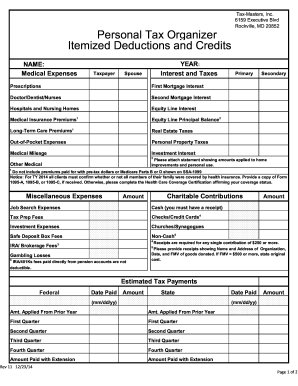
Deductions and credits to maximize tax benefits
-
Fillable fields and checkboxes for easy entry
How to Fill Out the Tax Return Organizer Online
To effectively fill out the Tax Return Organizer online, follow these straightforward steps using pdfFiller:
-
Open the tax organizer template on pdfFiller.
-
Navigate each section using the provided fields and checkboxes.
-
Compile your financial information before starting to facilitate quicker completion.
-
Review the form for accuracy before submission.
Organizing your financial documents in advance will streamline the process and minimize time spent on filling out the form.
Eligibility Criteria and Who Needs the Tax Return Organizer
The Tax Return Organizer is tailored for a broad audience, including individuals, families, and businesses seeking to prepare their taxes efficiently. It is particularly useful for taxpayers within Minnesota, addressing specific eligibility guidelines relevant to the state. Common scenarios where this organizer proves beneficial include first-time filers, families with dependents, or businesses needing detailed reporting.
Common Errors and How to Avoid Them
While filling out tax forms, users often encounter mistakes such as incorrect income reporting or missing crucial deductions. To avoid these pitfalls, double-check all entries for accuracy. A validation checklist is highly recommended to ensure that all required information is submitted correctly before the final submission.
-
Check for missing signatures
-
Ensure all financial figures match supporting documents
-
Review eligibility for specific deductions
How to Submit the Tax Return Organizer
Submitting the Tax Return Organizer can be done in multiple ways, including online through pdfFiller, via mail, or in person at designated locations. Be mindful of any associated fees and deadlines pertaining to submission to avoid complications. Once submitted, users can track their forms and receive confirmation to ensure their documents are processed on time.
Security and Compliance for Your Tax Return Organizer
When using pdfFiller, users can rest assured that robust security measures protect sensitive tax information. This platform employs 256-bit encryption and complies with stringent privacy and data protection protocols, ensuring alignment with federal and state regulations. Users can confidently manage their tax return organizer while safeguarding their personal data.
How to Correct or Amend the Tax Return Organizer
If you need to correct errors after submitting your tax return organizer, follow a systematic approach. Begin by identifying the mistakes and referencing the guidelines for amendments. It’s essential to understand the implications of late or incorrect filings and take timely action to correct any discrepancies.
Discover the Benefits of Using pdfFiller for Your Tax Return Organizer
pdfFiller simplifies the tax preparation process by offering a variety of features such as eSigning, cloud storage, and efficient sharing capabilities. Users can experience an efficient and secure filing experience while using the online tax organizer. Embrace the convenience of pdfFiller for all your tax organization needs.
How to fill out the Tax Organizer
-
1.Access the Tax Return Organizer on pdfFiller by searching for the form name or using a provided link.
-
2.Open the form within the interface, allowing for immediate use of the fillable fields.
-
3.Gather all necessary documentation such as W-2s, 1099s, and receipts before beginning to complete the form.
-
4.Navigate the form using the toolbar to fill in personal information, sources of income, deductions, and credits as applicable.
-
5.Utilize the checkbox options for easy selection of information related to your financial situation.
-
6.Review each completed section to ensure that all entries are accurate and complete.
-
7.Finalize the form by saving your work regularly within pdfFiller to avoid any data loss.
-
8.Download the finished form in your preferred format or submit it electronically through pdfFiller's submission options.

Who should use the Tax Return Organizer?
The Tax Return Organizer is designed for individual taxpayers in Minnesota, tax preparers, freelancers, and families looking to streamline their tax preparation process.
What information do I need to complete the Tax Return Organizer?
Before starting, ensure you have your personal details, income documentation like W-2s and 1099s, and any receipts for deductions or credits you intend to claim.
How can I submit the Tax Return Organizer once I've completed it?
After completing the form on pdfFiller, you can submit it electronically via their platform or download it to print and submit by mail as required.
Is there a deadline for submitting the Tax Return Organizer?
Yes, typically, individual tax returns must be submitted by April 15. Ensure to check official state guidelines for specific deadlines for your situation.
What common mistakes should I avoid while filling out the Tax Return Organizer?
Common mistakes include missing out on filling all relevant sections, not proofreading entries for accuracy, or failing to gather the necessary documentation beforehand.
How long does it take to process my tax return after submission?
Processing times can vary, but generally, e-filed returns are quicker, taking around 21 days. Paper returns may take longer, up to six to eight weeks.
Do I need to notarize the Tax Return Organizer?
No, the Tax Return Organizer does not require notarization. It simply needs to be completed and submitted following the guidelines.
Related Forms



Get the latest insights from our blog


If you believe that this page should be taken down, please follow our DMCA take down process
here
.
This form may include fields for payment information. Data entered in these fields is not covered by PCI DSS compliance.