
Last updated on
Nov 9, 2026
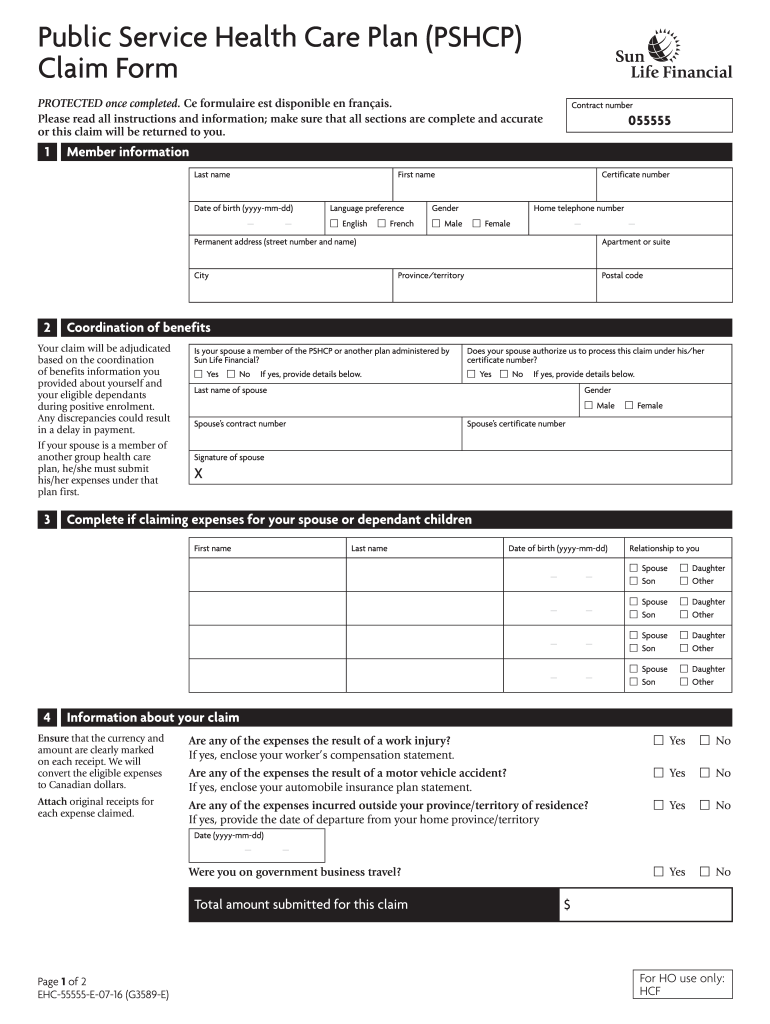
Canada PSHCP EHC-55555-E 2010 free printable template
pdfFiller is not affiliated with any government organization

Fill out
Complete the form online in a simple drag-and-drop editor.

eSign
Add your legally binding signature or send the form for signing.

Share
Share the form via a link, letting anyone fill it out from any device.

Export
Download, print, email, or move the form to your cloud storage.
Why pdfFiller is the best tool for your documents and forms


End-to-end document management
From editing and signing to collaboration and tracking, pdfFiller has everything you need to get your documents done quickly and efficiently.
Accessible from anywhere
pdfFiller is fully cloud-based. This means you can edit, sign, and share documents from anywhere using your computer, smartphone, or tablet.
Secure and compliant
pdfFiller lets you securely manage documents following global laws like ESIGN, CCPA, and GDPR. It's also HIPAA and SOC 2 compliant.
What is Canada PSHCP EHC-55555-E
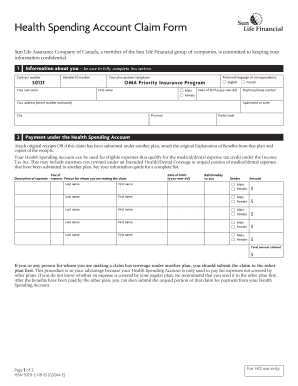
The Public Service Health Care Plan Claim Form is a health insurance claim document used by members and their eligible dependants to submit healthcare expense claims.
pdfFiller scores top ratings on review platforms




Who needs Canada PSHCP EHC-55555-E?
Explore how professionals across industries use pdfFiller.

Canada PSHCP EHC-55555-E is needed by:
-
Public Service Health Care Plan members
-
Eligible dependants of PSHCP members
-
Spouses of PSHCP members
-
Healthcare providers billing PSHCP
-
Insurance coordinators handling claims
Comprehensive Guide to Canada PSHCP EHC-55555-E
What is the Public Service Health Care Plan Claim Form?
The Public Service Health Care Plan (PSHCP) Claim Form is essential for members of the Canadian public service and their eligible dependants to submit claims for healthcare expenses. This form streamlines the claims process, ensuring that expenses are reported accurately and efficiently.
Members and their dependants can utilize this form to access healthcare benefits, making it a pivotal document for maintaining financial well-being. Sun Life plays a crucial role in processing these claims, guiding users through the reimbursement steps.
Purpose and Benefits of the Public Service Health Care Plan Claim Form
The primary advantage of using the PSHCP Claim Form is the timely submission of healthcare claims, which is vital for receiving health coverage. Eligible expenses that can be claimed include medical consultations, prescriptions, and other healthcare services.
By using the claim form effectively, members can enhance their financial security, ensuring that necessary medical expenses are reimbursed promptly and accurately. This process helps mitigate out-of-pocket costs, which can significantly impact a family's budget.
Who Needs the Public Service Health Care Plan Claim Form?
The PSHCP Claim Form is designed for eligible members of the public service and their dependants. Eligible members include those enrolled in the PSHCP and their spouses or children who qualify for benefits.
In scenarios where the member has a spouse, it is essential for the spouse to sign the claim form to validate the request. This requirement ensures that all dependants are properly accounted for, making the claims process smoother and more reliable.
How to Fill Out the Public Service Health Care Plan Claim Form (Step-by-Step)
Filling out the PSHCP Claim Form involves several clear steps to ensure accuracy:
-
Begin by gathering necessary documentation, including receipts for all healthcare expenses.
-
Complete all required fields on the form, providing detailed information about the services received.
-
Ensure all sections of the form are filled accurately and thoroughly, paying special attention to checkboxes and required signatures.
It's advisable to double-check the information before submission to avoid delays in processing your healthcare claims.
Key Features of the Public Service Health Care Plan Claim Form
The PSHCP Claim Form includes several features designed to simplify the claims process:
-
Fillable fields streamline data entry, reducing manual effort.
-
Checkboxes facilitate quick selections, particularly for common procedures.
-
Required signatures are clearly marked to ensure compliance before submission.
Additionally, the form provides explicit instructions for completion, enhancing user experience and minimizing errors.
Common Errors to Avoid When Submitting Your Claim
When submitting your claim, be aware of common mistakes that may cause delays:
-
Inaccurate or incomplete information can result in processing delays.
-
Failing to include necessary documentation, such as receipts, may lead to claim rejection.
Before submitting the form, review all entries carefully to ensure completeness and accuracy, improving the likelihood of a successful claim.
Submission Methods and Timeline for the Public Service Health Care Plan Claim Form
Submitting the PSHCP Claim Form can be done through various methods:
-
Physical submissions can be mailed to the designated address.
-
Digital submissions may be completed through online platforms provided by Sun Life.
Processing times can vary, but members should expect confirmation of receipt once submitted. It’s vital to adhere to submission deadlines for timely reimbursement to ensure that claims are processed within the eligible timeframe.
What Happens After You Submit Your Claim?
Once you submit your PSHCP Claim Form, you can track the status of your submission through available options. Members may receive feedback regarding their claims, including requests for additional information if necessary.
Understanding potential outcomes helps set expectations regarding claim reimbursements, making the experience smoother for all users.
Security and Privacy with Your Public Service Health Care Plan Claim Form
Security measures surrounding the PSHCP Claim Form are critical given the sensitive nature of personal health information. pdfFiller employs robust security protocols, including encryption and compliance with industry standards such as HIPAA and GDPR.
By ensuring data protection throughout the claims process, members can confidently submit their healthcare claims, knowing their personal information is handled with the utmost care and privacy.
Get Started with Filling Out the Public Service Health Care Plan Claim Form Today
pdfFiller simplifies the process of completing the PSHCP Claim Form, offering features that enhance form filling and eSigning. Users can access a range of resources and templates to facilitate a seamless claims experience, ensuring they make the most of their healthcare benefits.
How to fill out the Canada PSHCP EHC-55555-E
-
1.Access the Public Service Health Care Plan Claim Form by visiting pdfFiller and searching for the form name or using a direct link.
-
2.Once the form is open, familiarize yourself with its structure by scrolling through the fields, checkboxes, and sections.
-
3.Gather the necessary information, including personal details of the member and dependant, healthcare expense receipts, and any coordination of benefits details.
-
4.Fill in the member's name, address, and identification details in the designated fields, ensuring accuracy and completeness.
-
5.Continue filling out the details of eligible dependants, if applicable, according to the instructions provided in each section.
-
6.Complete the claims portion by providing specific healthcare expense details, including date of service, provider information, and expense amounts.
-
7.Once all fields are filled, carefully review the entire form to ensure no sections are missing or incorrectly filled.
-
8.Pay attention to the required signatures; ensure the member signs and, if applicable, the spouse's signature is included as well.
-
9.Finalize the form by checking for any errors or omissions. Make sure to adhere to instructions provided on the form.
-
10.Save your completed claim form using pdfFiller's save feature for digital records, or download it in your preferred format.
-
11.To submit, follow the preferred submission method indicated on the form—this may include mailing it directly to the insurance provider.

Who is eligible to use the Public Service Health Care Plan Claim Form?
Members of the Public Service Health Care Plan and their eligible dependants can use this claim form. This includes spouses and children designated as dependants.
What documents do I need to submit with this form?
You will need to provide supporting documents such as receipts for healthcare expenses, any relevant authorization forms, and details for coordination of benefits, if applicable.
How do I submit the completed claim form?
You can submit the completed Public Service Health Care Plan Claim Form by mailing it to the address provided on the form or electronically if permitted by your insurance provider.
What are some common mistakes to avoid when filling out this form?
Common mistakes include incomplete fields, missing receipts, and forgetting signatures. Always double-check instructions and ensure all sections are filled out accurately.
How long does it take to process my healthcare claim?
Processing times can vary but typically range from a few weeks to a couple of months. Check with your insurance provider for more specific timelines.
Are there any deadlines for submitting claims?
Yes, there are usually specific deadlines for submitting claims, often within a few months of receiving the healthcare service. Verify the exact timelines on your insurance policy.
Can I track my claim status after submission?
Many providers offer online tracking features. You should contact your insurance provider to inquire about the specific process for tracking your claim status.
Canada PSHCP EHC-55555-E Form Versions
Related Content
Related Forms


Related Catalogs
Get the latest insights from our blog


If you believe that this page should be taken down, please follow our DMCA take down process
here
.
This form may include fields for payment information. Data entered in these fields is not covered by PCI DSS compliance.