
Last updated on
Nov 10, 2026
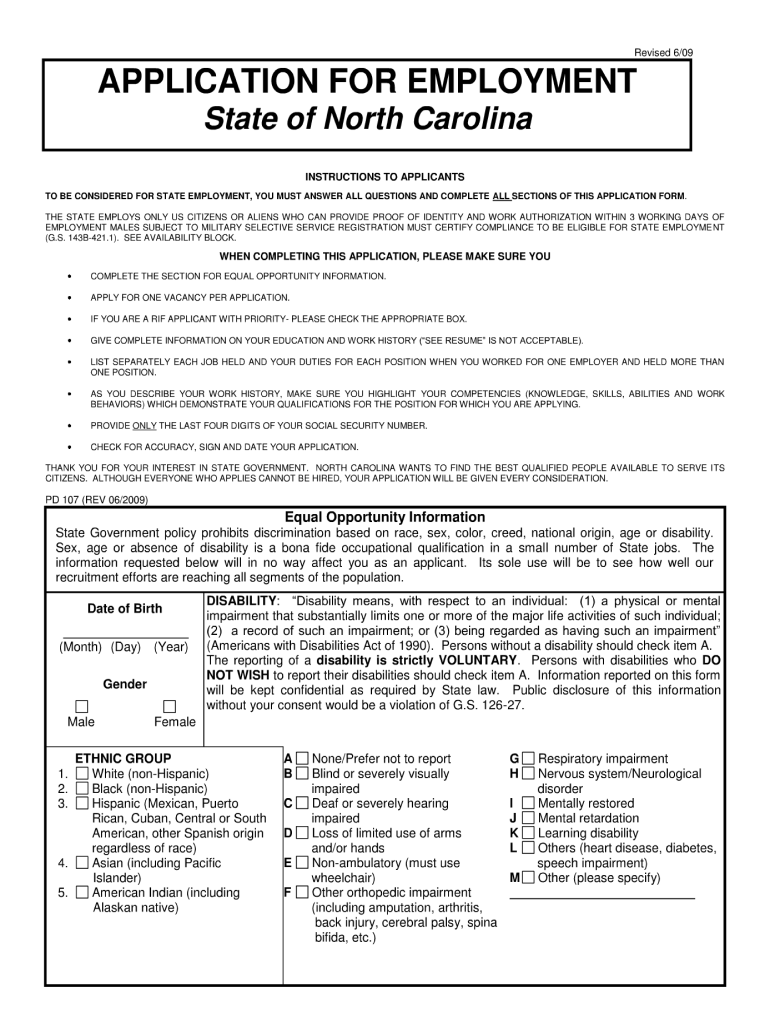
NC Application for Employment 2009 free printable template
pdfFiller is not affiliated with any government organization

Fill out
Complete the form online in a simple drag-and-drop editor.

eSign
Add your legally binding signature or send the form for signing.

Share
Share the form via a link, letting anyone fill it out from any device.

Export
Download, print, email, or move the form to your cloud storage.
Why pdfFiller is the best tool for your documents and forms


End-to-end document management
From editing and signing to collaboration and tracking, pdfFiller has everything you need to get your documents done quickly and efficiently.
Accessible from anywhere
pdfFiller is fully cloud-based. This means you can edit, sign, and share documents from anywhere using your computer, smartphone, or tablet.
Secure and compliant
pdfFiller lets you securely manage documents following global laws like ESIGN, CCPA, and GDPR. It's also HIPAA and SOC 2 compliant.
What is NC Application for Employment
The NC Application for Employment is a document used by job seekers to apply for positions in North Carolina. Its primary purpose is to provide potential employers with the necessary information to assess candidates.
pdfFiller scores top ratings on review platforms




Who needs NC Application for Employment?
Explore how professionals across industries use pdfFiller.

NC Application for Employment is needed by:
-
Job seekers in North Carolina
-
Employers hiring in North Carolina
-
Recruiters assisting candidates in job placement
-
Career services for local job applicants
-
Human resources departments in various organizations
-
Employment agencies representing job seekers
Comprehensive Guide to NC Application for Employment
Understanding the NC Application for Employment
The NC Application for Employment is a formal document that serves as a gateway for job seekers looking to enter the workforce. This application is crucial as it outlines the qualifications and experiences of applicants, streamlining the recruitment process for employers. By completing this form, job seekers can present their credentials effectively, thereby enhancing their chances of securing employment.
This employment application is vital for individuals aiming for positions in both the public and private sectors. Understanding how to navigate the application process can significantly affect job search outcomes.
Benefits of Using the NC Application for Employment
Utilizing the NC Application for Employment comes with several advantages that simplify the job application experience. First, it consolidates essential information required by employers, making it easier for applicants to submit a comprehensive application.
Furthermore, this form can be conveniently completed online, allowing for greater flexibility and accessibility for job seekers. Overall, the process is designed to be efficient and user-friendly, paving the way for a smoother application experience.
Who Should Complete the NC Application for Employment
The NC Application for Employment is intended for a diverse range of job seekers across various industries. It is particularly important for individuals applying for state or federal jobs, where adherence to specific application protocols is essential.
Moreover, anyone seeking to verify their qualifications can benefit from completing this form, ensuring that their applications meet the necessary standards required by potential employers.
Eligibility Criteria for the NC Application for Employment
To complete the NC Application for Employment, candidates must meet several eligibility criteria. These include minimum age requirements, typically set at 18 years, along with relevant experience levels that may be specified for certain positions.
Applicants must also provide necessary documentation, such as identification and previous work records, to support their application. Understanding these requirements is essential for a successful submission.
How to Fill Out the NC Application for Employment Online
Filling out the NC Application for Employment online is a straightforward process. Start by accessing pdfFiller, which offers a user-friendly interface for completing the application.
-
Log into your pdfFiller account.
-
Locate the NC Application for Employment form within the platform.
-
Follow the prompts to fill in each section accurately, referring to guidance provided within the application.
To avoid common mistakes, double-check entries and ensure all required fields are complete before submission.
Review and Submit Your NC Application for Employment
Once you have completed the NC Application for Employment, it’s crucial to review the form for accuracy. This review helps prevent delays or issues during the hiring process.
Applicants can choose between submitting their applications online or delivering physical copies. Tracking the status of the submission is also recommended to ensure timely follow-ups.
Security and Compliance of the NC Application for Employment
The security of applicants' data is a top priority for pdfFiller. The platform employs 256-bit encryption and adheres to HIPAA and GDPR compliance standards, ensuring sensitive information is handled safely.
Understanding these security measures can provide peace of mind for users concerned about data protection during their application process.
Common Errors in the NC Application for Employment and How to Fix Them
Identifying common errors can save applicants time and frustration. Typical mistakes include omitting critical information or providing incorrect formatting in the application form.
-
Carefully review all sections for completeness.
-
Ensure the format aligns with the submission guidelines provided.
In case of errors, applicants should know how to amend their applications promptly to avoid issues during processing.
Sample Completed NC Application for Employment
To assist applicants in understanding how to fill out the NC Application for Employment accurately, a sample completed application can be a valuable resource. This example illustrates proper formatting and completion of each section.
Reviewing a completed application can serve as a guideline to ensure that all necessary information is appropriately presented, enhancing the chances of a successful application.
Experience Seamless Document Management with pdfFiller
pdfFiller simplifies the document management process associated with the NC Application for Employment. Users can benefit from features such as eSigning and editing, making it easier to manage their applications.
By utilizing pdfFiller, applicants can ensure a secure and efficient experience when completing their employment applications, adding further convenience to the process.
How to fill out the NC Application for Employment
-
1.To start, visit pdfFiller and search for the NC Application for Employment form by entering its name in the search bar.
-
2.Once located, click on the form to open it in the pdfFiller editor. Familiarize yourself with the interface for easy navigation.
-
3.Before filling out the form, gather all necessary documents and information, such as personal identification, work history, and references, to ensure accuracy.
-
4.Begin completing the fields by clicking on each section. Follow the prompts to input your personal details, work experience, and any other required information.
-
5.Take advantage of pdfFiller's tools to add or remove sections as needed. Ensure all information is complete and truthful.
-
6.After filling out the form, review your entries thoroughly for any errors or omissions. Use the preview feature for a final check to ensure everything is correct.
-
7.Once satisfied with your application, you can save it to your pdfFiller account or download it in your preferred format.
-
8.Choose to submit the form directly through pdfFiller, or print it out to send by mail or deliver in person to the employer, as required.

What are the eligibility requirements for using the NC Application for Employment?
Anyone seeking employment in North Carolina can use the NC Application for Employment. This includes individuals at any experience level looking for jobs in various sectors.
Is there a deadline for submitting the NC Application for Employment?
The NC Application for Employment does not have a universal deadline; it should be submitted by the employer's specified deadline listed in their job posting.
How can I submit the completed NC Application for Employment?
You can submit the application by using the submission options in pdfFiller, downloading it to send via email, or printing and mailing it to the employer as specified in the job posting.
What supporting documents should I include with my application?
Common supporting documents include a resume, cover letter, and any certifications or references that may enhance your application. Always check the employer's requirements.
What are some common mistakes to avoid while filling out the application?
Avoid leaving blank fields, making spelling errors, or providing inconsistent information. Ensure your contact details are accurate and double-check your work history for accuracy.
How long will it take to process my application once submitted?
Processing times vary by employer. Many organizations review applications within one to two weeks but may take longer during busy hiring periods.
Can I edit the application after I’ve saved it?
Yes, you can return to your saved application in pdfFiller at any time to make additional changes before submitting it to the employer.
NC Application for Employment Form Versions
Related Content
Related Forms






Related Catalogs
Get the latest insights from our blog


If you believe that this page should be taken down, please follow our DMCA take down process
here
.
This form may include fields for payment information. Data entered in these fields is not covered by PCI DSS compliance.