
Last updated on
Nov 9, 2026
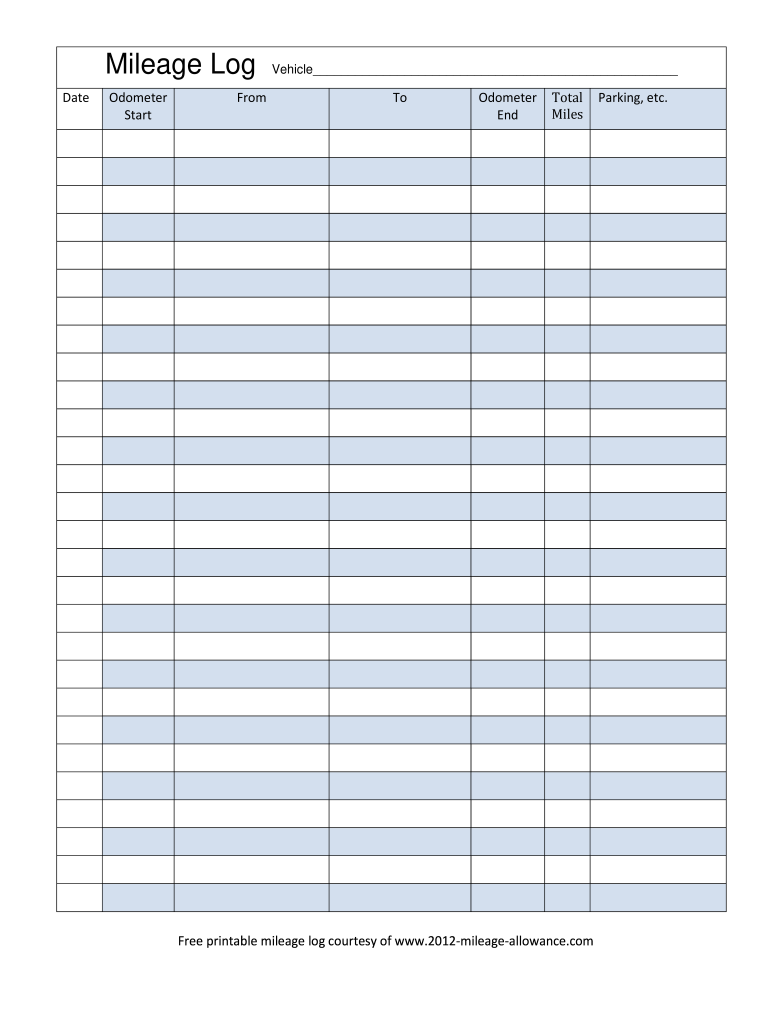
Mileage Allowance Free Printable Mileage Log 2012 free printable template
We are not affiliated with any brand or entity on this form

Fill out
Complete the form online in a simple drag-and-drop editor.

eSign
Add your legally binding signature or send the form for signing.

Share
Share the form via a link, letting anyone fill it out from any device.

Export
Download, print, email, or move the form to your cloud storage.
Why pdfFiller is the best tool for your documents and forms


End-to-end document management
From editing and signing to collaboration and tracking, pdfFiller has everything you need to get your documents done quickly and efficiently.
Accessible from anywhere
pdfFiller is fully cloud-based. This means you can edit, sign, and share documents from anywhere using your computer, smartphone, or tablet.
Secure and compliant
pdfFiller lets you securely manage documents following global laws like ESIGN, CCPA, and GDPR. It's also HIPAA and SOC 2 compliant.
What is Mileage Allowance Free Printable Mileage Log
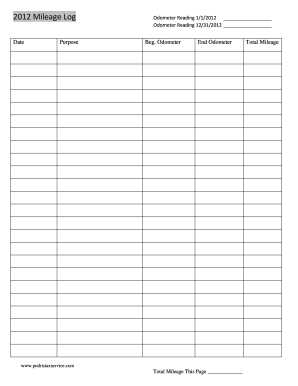
The Mileage Log Form is an expense report template used by individuals or businesses to track vehicle mileage for expense reporting and tax purposes.
pdfFiller scores top ratings on review platforms




It works really well and is user friendly.
very responsive and prompt with chat answers.
Very good customer services prior 1st day of using service.
After using many other PDF editors finally a user-friendly, is fast, does not freeze and gives me any problems login in or crashing after I purchased.
Easy to use. Easy to print. Not crazy about the fact that you have to give credit card info for a 30 day free trial.
I really like the PDFiller. Would like to know more about all of its features.
Who needs Mileage Allowance Free Printable Mileage Log?
Explore how professionals across industries use pdfFiller.

Mileage Allowance Free Printable Mileage Log is needed by:
-
Business owners tracking vehicle expenses
-
Freelancers requiring mileage deduction records
-
Accountants preparing tax returns for clients
-
Employees reimbursing mileage expenses
-
Individuals maintaining personal or business driving logs
Comprehensive Guide to Mileage Allowance Free Printable Mileage Log
What is the Mileage Log Form?
The Mileage Log Form is a crucial template for anyone needing to track vehicle mileage accurately. Its primary function is to serve as a vehicle mileage tracker, helping users record information essential for both business and personal expense reports. Accurate tracking can simplify the process of financial management and ensure that vehicle usage is documented effectively.
Purpose and Benefits of the Mileage Log Form
Using the Mileage Log Form provides various advantages for individuals and businesses alike. One key benefit is its importance in maintaining accurate mileage records, which can lead to considerable tax deductions. Additionally, having organized records simplifies the process of compiling a business expense report, making financial management less cumbersome.
Key Features of the Mileage Log Form
-
Vehicle Name
-
Date of Travel
-
Odometer Readings
-
Miles Traveled
These fields are designed to help users maintain precise records of their journeys. By ensuring that all relevant details are captured, the Mileage Log Form aids in creating a comprehensive vehicle mileage tracker.
Who Needs the Mileage Log Form?
The Mileage Log Form is beneficial for a variety of users, including business owners, freelancers, and employees. Each of these groups can leverage the form to track their mileage effectively, thereby ensuring eligibility for tax deductions related to vehicle usage. This comprehensive approach to expense tracking is essential for financial accountability.
How to Fill Out the Mileage Log Form Online
Filling out the Mileage Log Form online is a straightforward process. Follow these steps:
-
Enter the Vehicle Name in the designated field.
-
Input the Date of Travel accurately.
-
Record the Odometer Reading at the start and end of the journey.
-
Calculate and enter the Miles Traveled.
For enhanced accuracy, double-check your entries to avoid common mistakes. Maintaining accurate records from the outset will streamline your reporting process.
Common Errors and How to Avoid Them
When filling out the Mileage Log Form, users often encounter a few common errors that can jeopardize accuracy:
-
Incorrect odometer readings
-
Missing entries in mandatory fields
To ensure accuracy before submission, carefully review each entry and confirm that all required fields are completed. Implementing these practices can significantly reduce errors.
How to Save and Print the Mileage Log Form
Once you have completed the Mileage Log Form, saving and printing it is simple. To save as a PDF:
-
Click on the download option on your screen.
-
Select the 'Save as PDF' option.
For printing, you can choose to print from home or utilize professional printing services, ensuring your records are available in physical form.
Where to Submit the Mileage Log Form
Submission of the Mileage Log Form typically involves submitting it to your employer or as part of your tax documentation. Be aware of any deadlines and processing times that may apply, as timely submissions are critical for tax compliance and reimbursement processes.
Security and Compliance When Using the Mileage Log Form
When utilizing the Mileage Log Form through pdfFiller, your data remains secure. The platform implements robust security measures, including 256-bit encryption and adheres to GDPR compliance standards. Protecting sensitive information while tracking mileage is paramount.
Utilizing pdfFiller for Your Mileage Log Form Needs
pdfFiller enhances the experience of completing your Mileage Log Form by providing a secure, user-friendly platform. The ease of editing, filling, and signing documents online makes it an ideal choice for managing your mileage records efficiently.
How to fill out the Mileage Allowance Free Printable Mileage Log
-
1.To begin, access the Mileage Log Form on pdfFiller by searching for the form name in the search bar or by navigating through the business forms category.
-
2.Once the form is open, use pdfFiller's user-friendly interface to fill in each field. Click on a blank space and type the required information, such as vehicle name and date.
-
3.Before you start filling out the form, gather all necessary information, including odometer readings from your vehicle and the total miles traveled for each trip.
-
4.As you complete the fields for odometer readings and miles traveled, ensure that the information is accurate and reflects your actual usage to maintain reliable records.
-
5.After filling in all required information, carefully review your entries for accuracy and completeness. Ensure there are no missing or incorrect details that could impact your expense reporting.
-
6.Once you are satisfied with the information provided, finalize the form by looking for the 'Save' button at the top of pdfFiller’s interface. Save the document to your account in pdfFiller for future access.
-
7.Lastly, you can download the completed form to your device in PDF format or use the submit functionality provided in pdfFiller to send it straight to your accountant or for personal records.

Who can use the Mileage Log Form?
The Mileage Log Form is ideal for business owners, freelancers, and employees who need to document vehicle usage for expense claims and tax deductions.
Are there any deadlines for submitting the mileage log?
While the form itself does not impose deadlines, it is advisable to submit your mileage log before tax filing dates to ensure you can claim deductions effectively.
How do I submit the completed Mileage Log Form?
You can submit the completed Mileage Log Form by downloading it from pdfFiller or using the platform’s submission features to email it directly to your accountant or submit it alongside your tax forms.
What supporting documents are needed with the Mileage Log Form?
Typically, it's beneficial to attach any relevant receipts or records related to your vehicle expenses, as these provide necessary backup when claiming deductions.
What common mistakes should I avoid when filling out this form?
Ensure all entries are accurate, particularly odometer readings and dates. Double-check for missing information or incorrect totals that could affect your expense reporting.
How long does it take to process the Mileage Log Form after submission?
Processing times can vary. However, if you submit your log along with tax documents, expect processing to take place when your overall tax return is being reviewed.
Is the Mileage Log Form required to be notarized?
No, the Mileage Log Form does not require notarization. It is primarily an internal document for tracking personal or business vehicle usage.
Mileage Allowance Free Printable Mileage Log Form Versions
Related Content
Related Forms




Related Catalogs
Get the latest insights from our blog


If you believe that this page should be taken down, please follow our DMCA take down process
here
.
This form may include fields for payment information. Data entered in these fields is not covered by PCI DSS compliance.