
Last updated on
Nov 9, 2026
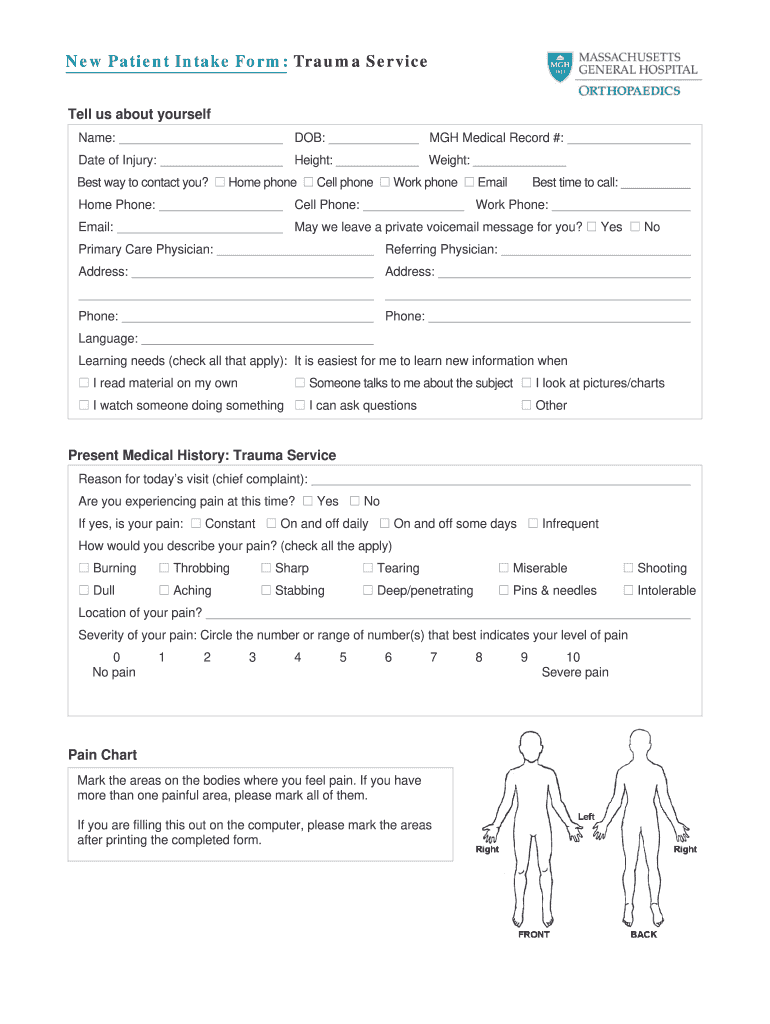
MA General Hospital Orthopaedics New Patient Intake Form: Trauma Service 2012-2026 free printabl...
pdfFiller is not affiliated with any government organization

Fill out
Complete the form online in a simple drag-and-drop editor.

eSign
Add your legally binding signature or send the form for signing.

Share
Share the form via a link, letting anyone fill it out from any device.

Export
Download, print, email, or move the form to your cloud storage.
Why pdfFiller is the best tool for your documents and forms


End-to-end document management
From editing and signing to collaboration and tracking, pdfFiller has everything you need to get your documents done quickly and efficiently.
Accessible from anywhere
pdfFiller is fully cloud-based. This means you can edit, sign, and share documents from anywhere using your computer, smartphone, or tablet.
Secure and compliant
pdfFiller lets you securely manage documents following global laws like ESIGN, CCPA, and GDPR. It's also HIPAA and SOC 2 compliant.
What is MA General Hospital Orthopaedics New Patient Intake Form: Trauma Service
The New Patient Intake Form Trauma Service is a healthcare document used by patients to convey their medical history and current health status to the MGH Trauma Service.
pdfFiller scores top ratings on review platforms




Who needs MA General Hospital Orthopaedics New Patient Intake Form: Trauma Service?
Explore how professionals across industries use pdfFiller.

MA General Hospital Orthopaedics New Patient Intake Form: Trauma Service is needed by:
-
New patients seeking trauma services at Massachusetts General Hospital
-
Physicians requiring patient medical history for treatment evaluation
-
Healthcare administrators handling patient registrations and intake processes
-
Medical staff needing verified patient information for accurate care
-
Insurance companies needing documentation for claims processing
Comprehensive Guide to MA General Hospital Orthopaedics New Patient Intake Form: Trauma Service
What is the New Patient Intake Form Trauma Service?
The New Patient Intake Form Trauma Service is a critical document used by patients to relay their medical history and personal information to the Massachusetts General Hospital (MGH) Trauma Service. Providing accurate details through this form is essential for ensuring a thorough understanding of the patient's health status.
This form plays a significant role in the patient registration process, allowing healthcare providers to prepare for the specific needs of trauma patients. Accurate medical history is vital as it informs treatment pathways and enhances patient care.
Purpose and Benefits of the New Patient Intake Form Trauma Service
Completing the intake form prior to appointments is crucial for establishing effective communication between patients and healthcare providers. This form enables a comprehensive overview of the patient's health status, streamlining the registration process and improving efficiency during appointments.
-
Facilitates timely and informed medical assessments.
-
Enhances communication channels between patient and provider.
-
Increases the accuracy of medical records.
Key Features of the New Patient Intake Form Trauma Service
The New Patient Intake Form includes various sections designed to gather vital information from patients. These sections cover personal information, medical history, medications, and more. Each submission requires signatures from both the patient and the physician, ensuring verification of the provided information.
-
Fillable fields for easy data entry.
-
Checkboxes for clear options.
-
Instructions provided for each section to guide users.
Who Needs to Complete the New Patient Intake Form Trauma Service?
New patients seeking trauma care at MGH are required to complete this intake form. This is particularly important for patients presenting with specific trauma-related injuries, as the form helps healthcare providers assess and address their needs effectively.
The form must be signed by both the patient and the physician, confirming that the information shared is accurate and complete.
How to Fill Out the New Patient Intake Form Trauma Service Online (Step-by-Step)
Filling out the New Patient Intake Form online is a straightforward process using pdfFiller. Before starting, it is advisable to gather relevant information, such as medical history and insurance details.
-
Access the form via pdfFiller's platform.
-
Enter personal and medical information in the designated fields.
-
Follow the instructions provided to complete each section.
-
Check for completeness before submission.
Field-by-Field Instructions for the New Patient Intake Form Trauma Service
Each section of the New Patient Intake Form requires careful attention. Important fields include the Date of Injury, current medications, and prior surgeries. To avoid common mistakes, it's essential to review all entries thoroughly before submission.
-
Ensure all personal information is accurate.
-
Double-check medical history entries to prevent omissions.
-
Validate signatures for both patient and physician sections.
Submission Methods for the New Patient Intake Form Trauma Service
Patients can submit the New Patient Intake Form through multiple channels. Options include online submission via pdfFiller or delivering a printed copy in person at the hospital.
For proper handling of the submitted form, ensure that it is sent to the correct department and keep track of submission confirmation to verify receipt.
Security and Compliance When Using the New Patient Intake Form Trauma Service
User security is a priority when utilizing the New Patient Intake Form Trauma Service. pdfFiller employs advanced security measures, including 256-bit encryption and compliance with HIPAA regulations, to protect sensitive medical information.
By ensuring data privacy and confidentiality, pdfFiller commits to maintaining user trust while handling personal health information.
Why Use pdfFiller for Your New Patient Intake Form Trauma Service?
Using pdfFiller offers several advantages for completing the New Patient Intake Form. The platform features tools that enhance user experience, such as eSigning and convenient editing options.
Numerous users have found pdfFiller's interface intuitive and efficient, making the form completion process easier and less time-consuming.
Next Steps After Completing the New Patient Intake Form Trauma Service
Once the New Patient Intake Form is submitted, it is essential to understand the subsequent steps. You may check the application status or make any necessary corrections by staying in touch with the healthcare provider.
Maintaining open lines of communication after submission ensures that any issues are promptly addressed, further assisting in your care.
How to fill out the MA General Hospital Orthopaedics New Patient Intake Form: Trauma Service
-
1.Start by accessing the New Patient Intake Form Trauma Service on pdfFiller's website. You can find the form by searching its name in the search bar or navigating through healthcare forms.
-
2.Once the form is open, use the toolbar on the right side of the interface to navigate between different sections of the document. This includes fields for personal information, medical history, and health status.
-
3.Before filling in the form, collect all necessary information. This includes your personal details, medical history, current medications, and any surgical history you might have.
-
4.Begin by filling in your personal information at the top of the form. Enter your name, date of birth, and contact information in the designated fields.
-
5.Proceed to the medical history section. Here, you will check the boxes or fill out the text fields regarding your past medical conditions and treatments.
-
6.In the medications section, list any prescription or over-the-counter medications you are currently taking. Make sure to include dosages and duration if possible.
-
7.Next, provide information about your surgical history, family health history, and your social history in the respective sections. Take your time to ensure accuracy.
-
8.After completing all sections, review the form thoroughly. Use pdfFiller's review feature to check for any incomplete fields or errors before signing.
-
9.Once satisfied with the form, sign it electronically where indicated. Both the patient and physician signatures may be required for verification.
-
10.Finally, save your completed form. You can download it to your device or submit it directly through pdfFiller if you want to send it to MGH Trauma Service electronically.

What are the eligibility requirements to fill out the New Patient Intake Form Trauma Service?
The form is designed for new patients seeking treatment from the Massachusetts General Hospital Trauma Service. Any individual in need of trauma care can complete it, ensuring they provide detailed medical history.
Is there a deadline for submitting this intake form?
While there is no fixed deadline for submitting the New Patient Intake Form, it is advisable to complete it before your first appointment for efficient processing and care.
How can I submit the completed intake form?
You can submit the completed form electronically through pdfFiller or print it and hand it over at the reception during your first visit to the MGH Trauma Service.
What supporting documents do I need to provide with the intake form?
Typically, you should have your insurance information ready along with any past medical records or documents relevant to your treatment that may be requested during the intake process.
What are some common mistakes to avoid when filling out the form?
Ensure all fields are completed accurately, particularly medical history and current medications. Avoid leaving any sections blank, and double-check that both signatures are provided where required.
How long does it take to process the New Patient Intake Form?
Processing times can vary, but typically, forms are reviewed by the medical staff before the first appointment. Prompt and accurate completion helps ensure timely processing.
What should I do if I have concerns about specific sections of the form?
If you have specific concerns about any section, consult with the medical staff at MGH or your physician. They can assist you in understanding and completing each part accurately.
Related Content
Related Forms



Related Catalogs
Get the latest insights from our blog


If you believe that this page should be taken down, please follow our DMCA take down process
here
.
This form may include fields for payment information. Data entered in these fields is not covered by PCI DSS compliance.