
Last updated on
Nov 6, 2026
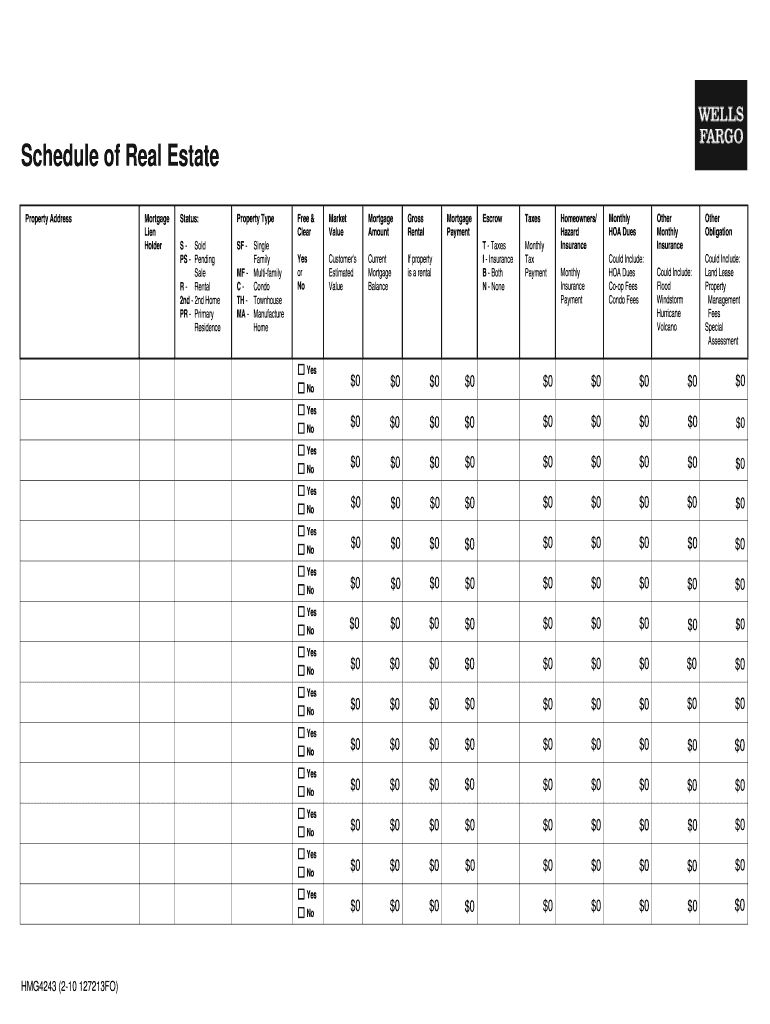
Wells Fargo HMG4243 2010-2026 free printable template
pdfFiller is not affiliated with any government organization

Fill out
Complete the form online in a simple drag-and-drop editor.

eSign
Add your legally binding signature or send the form for signing.

Share
Share the form via a link, letting anyone fill it out from any device.

Export
Download, print, email, or move the form to your cloud storage.
Why pdfFiller is the best tool for your documents and forms


End-to-end document management
From editing and signing to collaboration and tracking, pdfFiller has everything you need to get your documents done quickly and efficiently.
Accessible from anywhere
pdfFiller is fully cloud-based. This means you can edit, sign, and share documents from anywhere using your computer, smartphone, or tablet.
Secure and compliant
pdfFiller lets you securely manage documents following global laws like ESIGN, CCPA, and GDPR. It's also HIPAA and SOC 2 compliant.
What is Wells Fargo HMG4243
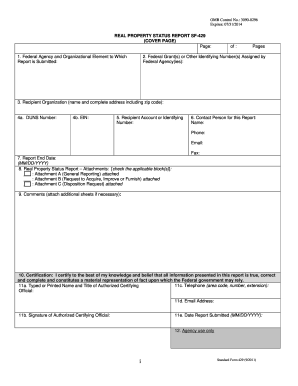
The Real Estate Mortgage Status Schedule is a property disclosure form used by property owners and financial stakeholders to document mortgage status and associated financial details of a property.
pdfFiller scores top ratings on review platforms




Who needs Wells Fargo HMG4243?
Explore how professionals across industries use pdfFiller.

Wells Fargo HMG4243 is needed by:
-
Property Owners looking to disclose financial information
-
Real Estate Buyers evaluating property obligations
-
Lenders assessing mortgage status and risk
-
Real Estate Agents assisting clients in transactions
-
Accountants managing real estate financial records
-
Homeowners needing to track property expenses
Comprehensive Guide to Wells Fargo HMG4243
What is the Real Estate Mortgage Status Schedule?
The Real Estate Mortgage Status Schedule is a critical document designed to provide clarity on the financial status of a property. Its primary purpose is to document mortgage information and financial obligations associated with a property. This schedule is vital for accurately recording financial details, which aids all parties involved in real estate transactions.
Maintaining up-to-date records through a property disclosure form ensures that buyers, lenders, and owners are all informed about the financial health of the property they are dealing with.
Purpose and Benefits of the Real Estate Mortgage Status Schedule
This form is essential for property owners, buyers, and lenders as it serves various purposes. It helps users assess financial obligations tied to a property and provides transparency regarding mortgage conditions. This clarity is particularly important in real estate transactions where financial accuracy can influence purchasing decisions.
Moreover, having documented real estate financial details can facilitate smoother negotiations and aid in the overall property evaluation process.
Key Features of the Real Estate Mortgage Status Schedule
-
Includes fields for property address and mortgage status
-
Provides details on financial obligations such as taxes, insurance, and homeowners association dues
-
Utilizes a fillable form format that enhances user experience
-
Designed for clarity, showcasing a user-friendly layout
These features ensure that users can easily navigate the document while filling in necessary information, making the process more efficient.
Who Should Use the Real Estate Mortgage Status Schedule?
The primary users of this form include property owners, prospective buyers, and lenders. Each group may need to complete the form under different circumstances, such as during a property sale, financing, or refinancing processes.
Understanding when and why to use this schedule can lead to enhanced financial transparency and alignment among all parties involved.
How to Fill Out the Real Estate Mortgage Status Schedule Online (Step-by-Step)
-
Access pdfFiller and locate the Real Estate Mortgage Status Schedule.
-
Input the property type and address in the designated fields.
-
Detail financial obligations, including taxes, insurance, and HOA dues.
-
Double-check all entered information for accuracy.
-
Save and submit the completed form according to your needs.
Filling out the mortgage status template online streamlines the process, allowing for easy adjustments and quick submission.
Common Errors to Avoid When Completing the Real Estate Mortgage Status Schedule
-
Forgetting to include important financial obligations
-
Miswriting property addresses or mortgage statuses
-
Neglecting to review the document before submission
To ensure accurate completion, create a review checklist that includes all fields to cross-verify before finalizing the form.
Security and Compliance When Dealing with the Real Estate Mortgage Status Schedule
Handling sensitive documents like the Real Estate Mortgage Status Schedule requires attention to security. It is crucial to protect personal and financial information during the process.
pdfFiller employs robust security measures, including 256-bit encryption, to safeguard users' data, along with compliance with HIPAA and GDPR regulations. These features help maintain the confidentiality of real estate financial details.
How to Submit the Real Estate Mortgage Status Schedule
There are multiple submission options available for the Real Estate Mortgage Status Schedule. Users can opt to submit via email, print and send, or directly through lenders’ portals.
Be sure to check for any associated fees or deadlines that may apply to your chosen submission method to ensure timely processing.
Utilizing pdfFiller for Your Real Estate Mortgage Status Schedule Needs
pdfFiller significantly enhances the process of filling, eSigning, and sharing the completed form. Its range of features, including editing and annotation tools, are designed to make document management straightforward and efficient.
This user-friendly platform is ideal for anyone needing quick access to create or modify their real estate mortgage status schedule.
Next Steps After Completing the Real Estate Mortgage Status Schedule
After filling out the form, users can track their submission status to ensure that their documents are processed. Retaining a copy of the completed document for future reference is also advisable to keep essential records organized.
How to fill out the Wells Fargo HMG4243
-
1.Access pdfFiller and search for the Real Estate Mortgage Status Schedule form using the search bar.
-
2.Once located, click on the form to open it in the pdfFiller editor.
-
3.Review the form layout and familiarize yourself with the fields available for completion.
-
4.Gather necessary information such as the property address, mortgage details, and any associated costs like taxes and insurance before you start filling in details.
-
5.Begin with entering the property address in the designated field, ensuring accuracy in spelling and numerical values.
-
6.In the mortgage status section, select the appropriate option that reflects your current mortgage situation by using checkboxes or dropdown menus.
-
7.Fill in the property type field and any other required fields describing the financial obligations you need to report.
-
8.If applicable, provide information related to HOA dues and insurance costs in their respective spaces.
-
9.After filling all the required fields, review your entries for correctness and completeness in each section of the form.
-
10.Utilize the 'Preview' option in pdfFiller to check how the completed form appears.
-
11.Once satisfied with the information, save the form by clicking the 'Save' button in the editor.
-
12.After saving, choose the 'Download' option if you wish to keep a copy for your records.
-
13.Alternatively, you can submit the form electronically through the designated submission options in pdfFiller.

Who is eligible to use the Real Estate Mortgage Status Schedule?
The Real Estate Mortgage Status Schedule is primarily for property owners, buyers, lenders, and real estate professionals who need to provide detailed mortgage and financial information about properties.
What information is required to complete the form?
To complete the form, you will need information regarding the property address, mortgage status, property type, details of financial obligations like taxes, insurance, and HOA dues to ensure accurate completion.
How can I submit the completed form?
Once you have filled out the Real Estate Mortgage Status Schedule on pdfFiller, you can either download it for your records or use the submission options provided within the platform to send it directly to relevant parties.
What common mistakes should I avoid when completing the form?
Common mistakes include entering incorrect property addresses, omitting details about financial obligations, and failing to review the form for accuracy before submission. Always double-check your entries.
Is notarization required for this form?
No, the Real Estate Mortgage Status Schedule does not require notarization, making it easier for property owners to complete and submit without additional validation.
What are the processing times for the submitted form?
Processing times may vary depending on the organization receiving the form. Typically, it can take a few days to a few weeks, so always check with the recipient for specific timelines.
Can I save my progress on pdfFiller and complete the form later?
Yes, pdfFiller allows you to save your progress on the form. You can return to complete or edit your entries at a later time, ensuring that you have ample opportunity to gather all necessary information.
Related Forms


Related Catalogs
Get the latest insights from our blog


If you believe that this page should be taken down, please follow our DMCA take down process
here
.
This form may include fields for payment information. Data entered in these fields is not covered by PCI DSS compliance.