
Last updated on
Oct 31, 2026
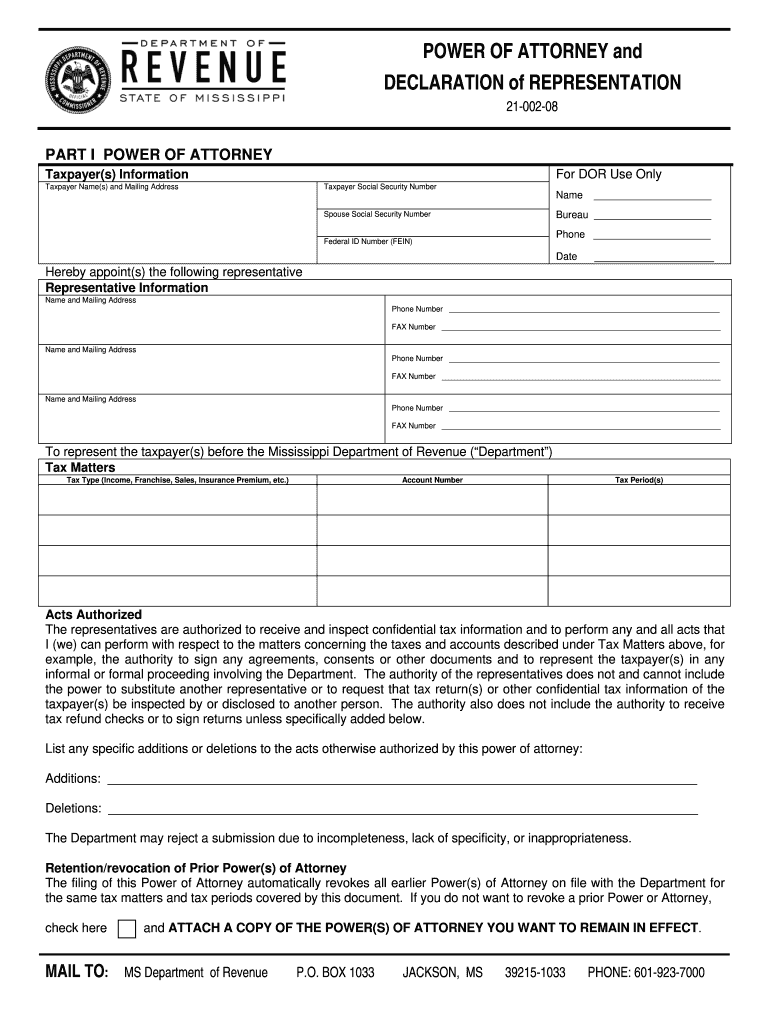
MS DOR 21-002 2008 free printable template
pdfFiller is not affiliated with any government organization

Fill out
Complete the form online in a simple drag-and-drop editor.

eSign
Add your legally binding signature or send the form for signing.

Share
Share the form via a link, letting anyone fill it out from any device.

Export
Download, print, email, or move the form to your cloud storage.
Why pdfFiller is the best tool for your documents and forms


End-to-end document management
From editing and signing to collaboration and tracking, pdfFiller has everything you need to get your documents done quickly and efficiently.
Accessible from anywhere
pdfFiller is fully cloud-based. This means you can edit, sign, and share documents from anywhere using your computer, smartphone, or tablet.
Secure and compliant
pdfFiller lets you securely manage documents following global laws like ESIGN, CCPA, and GDPR. It's also HIPAA and SOC 2 compliant.
What is MS DOR 21-002
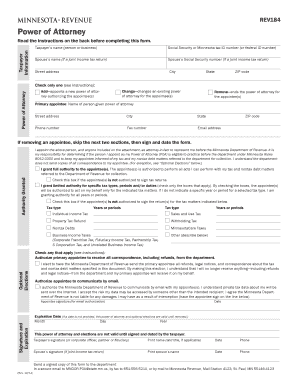
The Mississippi Power of Attorney Form 21-002 is a legal document used by taxpayers in Mississippi to appoint a representative for tax matters before the Mississippi Department of Revenue.
pdfFiller scores top ratings on review platforms




Who needs MS DOR 21-002?
Explore how professionals across industries use pdfFiller.

MS DOR 21-002 is needed by:
-
Taxpayers in Mississippi needing to authorize representation for tax issues
-
Individuals seeking to manage tax-related matters through an authorized agent
-
Attorneys representing clients in tax-related cases in Mississippi
-
Certified public accountants (CPAs) assisting clients with tax representations
-
Businesses in Mississippi handling tax affairs requiring a representative
Comprehensive Guide to MS DOR 21-002
What is the Mississippi Power of Attorney Form 21-002?
The Mississippi Power of Attorney Form 21-002 is a crucial legal document enabling taxpayers in Mississippi to appoint a representative to handle tax matters on their behalf. This form is significant as it allows individuals to choose a trusted representative to navigate interactions with the Mississippi Department of Revenue, facilitating smoother handling of tax obligations.
Key requirements for executing this form include obtaining the necessary signatures from the taxpayer, as well as notarization to ensure its legal validity. The form provides an effective means of Mississippi taxpayer representation.
Purpose and Benefits of the Mississippi Power of Attorney Form 21-002
The primary purpose of the Mississippi Power of Attorney Form 21-002 is to represent taxpayers in communications with the Mississippi Department of Revenue. By using this form, taxpayers can simplify complex tax processes while ensuring they have professional representation.
Benefits of utilizing this form include:
-
Simplification of tax processes.
-
Effective representation at meetings and hearings.
-
Legal protections when the form is completed correctly.
Who Needs the Mississippi Power of Attorney Form 21-002?
This form is essential for individuals seeking tax representation, especially in scenarios where they may not attend meetings or hearings. Situations may include medical emergencies or scheduling conflicts, where a representative will serve as the taxpayer's voice.
Potential representatives can include tax professionals or trusted individuals who understand the associated responsibilities and can effectively advocate for the taxpayer’s interests.
How to Fill Out the Mississippi Power of Attorney Form 21-002 Online (Step-by-Step)
To complete the Mississippi Power of Attorney Form 21-002 electronically, follow these detailed steps:
-
Access the form through a reliable PDF editing platform, such as pdfFiller.
-
Fill in the required fields for both taxpayer and representative information.
-
Utilize the form’s fillable features to streamline data entry.
-
Review each section carefully to ensure all details are accurate.
-
Save or export the form as needed once completed.
These steps leverage the powerful tools available through pdfFiller for effective form management.
Field-by-Field Instructions for the Mississippi Power of Attorney Form 21-002
Each field on the Mississippi Power of Attorney Form 21-002 requires specific information. Here’s a breakdown:
-
**Taxpayer Name(s):** Clearly print the names of the taxpayer(s).
-
**Signature:** Must be signed by the taxpayer for validity.
-
**Date:** Notate the date when the form is signed.
Common mistakes to avoid include leaving fields blank or providing incorrect details, as these errors can lead to complications or rejections of the form.
How to Sign and Notarize the Mississippi Power of Attorney Form 21-002
Signing the Mississippi Power of Attorney Form 21-002 can be done either digitally or through a wet signature. Digital signatures must meet specific requirements to be considered valid.
The notarization process involves a notary public verifying the taxpayer's identity and witnessing the signing of the document, and is necessary for the form to be legally enforceable. Tips for notarization include locating local notary services and considering options for electronic notarization, if available.
Submitting the Mississippi Power of Attorney Form 21-002
The completed Mississippi Power of Attorney Form 21-002 can be submitted through various methods:
-
Online submission via the Mississippi Department of Revenue’s designated portal.
-
Physical submission via mail or delivery to the appropriate office.
Make sure to check for any associated fees, deadlines, and processing times relevant to your submission method.
What Happens After You Submit the Mississippi Power of Attorney Form 21-002?
Upon submission, the taxpayer will receive confirmation receipts indicating that the form has been received. Expected timelines for processing may vary, and taxpayers can check the status of their submission through available channels.
Common outcomes include approvals or, in some cases, rejections. Understanding potential reasons for rejection is essential to resolve any issues promptly.
Security and Compliance when Using the Mississippi Power of Attorney Form 21-002
When handling sensitive documents like the Mississippi Power of Attorney Form 21-002, security measures such as 256-bit encryption are implemented to protect user data. Compliance with regulations including HIPAA and GDPR ensures that user information remains confidential and secure.
It is vital to securely store and manage completed forms to prevent unauthorized access or data breaches.
Leverage pdfFiller for Your Mississippi Power of Attorney Form 21-002
Utilizing pdfFiller can significantly enhance the experience of completing the Mississippi Power of Attorney Form 21-002. The platform offers a range of tools that simplify form completion and management.
In addition to form-filling capabilities, pdfFiller provides additional resources and support to ensure users can successfully navigate the filling process.
How to fill out the MS DOR 21-002
-
1.To access the Mississippi Power of Attorney Form 21-002 on pdfFiller, search for the form name in the platform's search bar.
-
2.Once located, click on the form to open it within the pdfFiller editor interface.
-
3.Before filling in, gather all necessary information such as your taxpayer details, your representative’s info, and specifics on tax matters.
-
4.Begin completing the form by filling in your name and contact information in the designated fields.
-
5.Next, provide your representative’s name and details, ensuring correct spelling and accuracy for effective representation.
-
6.Continue by specifying the tax matters for which the representative will act on your behalf, selecting options carefully.
-
7.Each checkbox should be reviewed for intended authorization to ensure you grant the correct powers.
-
8.When all fields are filled, closely review all information for any possible errors or omissions.
-
9.If you've used any checkboxes, confirm that you’ve signed the form where indicated to validate your authorization.
-
10.Also, ensure to follow any prompts to notarize the document as required.
-
11.After final review, proceed to save your work by selecting the save feature in the pdfFiller toolbar. Choose your location preference.
-
12.You can also download the completed form as a PDF or submit it directly to the Mississippi Department of Revenue based on the provided instructions.

Who is eligible to use the Mississippi Power of Attorney Form 21-002?
Any taxpayer located in Mississippi can use this form to designate a representative for tax-related matters, provided they are the one signing and authorizing representation.
Is there a deadline for submitting the form?
While there is no specific deadline for submitting the Mississippi Power of Attorney Form 21-002, it is advisable to submit it promptly to ensure your representative can act on your behalf without delays.
How should I submit the completed form?
You can submit the completed Mississippi Power of Attorney Form 21-002 by mailing it directly to the Mississippi Department of Revenue or handing it to your representative for submission.
Are there any required supporting documents?
Typically, you may need to provide a copy of your identification or any previously filed forms related to your tax matters alongside the Power of Attorney form.
What are common mistakes made when filling out this form?
Common errors include failing to sign the form, not notarizing it, or providing incorrect information regarding the representative or tax matters. Carefully review the form before submission to avoid these mistakes.
How long does processing take once the form is submitted?
Processing times can vary. Generally, allow 4-6 weeks for the Mississippi Department of Revenue to process your Power of Attorney form.
Can I revoke the power of attorney after signing this form?
Yes, you can revoke the power of attorney at any time by submitting a formal revocation notice to the Mississippi Department of Revenue, and informing your representative.
MS DOR 21-002 Form Versions
Related Content
Related Forms




Related Catalogs
Get the latest insights from our blog


If you believe that this page should be taken down, please follow our DMCA take down process
here
.
This form may include fields for payment information. Data entered in these fields is not covered by PCI DSS compliance.