
Last updated on
Nov 6, 2026
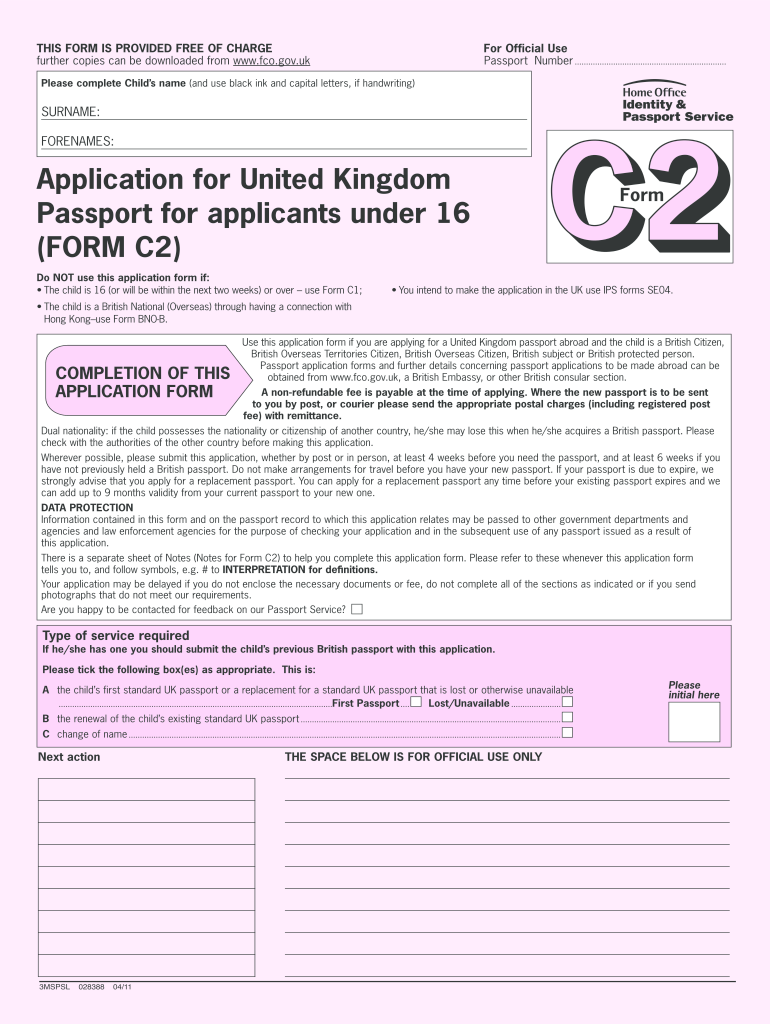
UK C2 2011 free printable template
We are not affiliated with any brand or entity on this form

Fill out
Complete the form online in a simple drag-and-drop editor.

eSign
Add your legally binding signature or send the form for signing.

Share
Share the form via a link, letting anyone fill it out from any device.

Export
Download, print, email, or move the form to your cloud storage.
Why pdfFiller is the best tool for your documents and forms


End-to-end document management
From editing and signing to collaboration and tracking, pdfFiller has everything you need to get your documents done quickly and efficiently.
Accessible from anywhere
pdfFiller is fully cloud-based. This means you can edit, sign, and share documents from anywhere using your computer, smartphone, or tablet.
Secure and compliant
pdfFiller lets you securely manage documents following global laws like ESIGN, CCPA, and GDPR. It's also HIPAA and SOC 2 compliant.
What is UK C2
The UK C2 form is a supplementary declaration used by individuals and businesses to report additional information during customs procedures.
pdfFiller scores top ratings on review platforms




It's extremely efficient and very helpful
So far I am satisfied with the program.
Who needs UK C2?
Explore how professionals across industries use pdfFiller.

UK C2 is needed by:
-
UK importers requiring additional declarations
-
Businesses involved in international trade
-
Customs brokers assisting clients with imports
-
Freight forwarders managing shipment paperwork
-
Individuals claiming relief on customs duties
Comprehensive Guide to UK C2
What is the UK C2?
The UK C2 form is a vital document within the framework of UK regulations. It serves as a means of documentation that individuals and businesses may need to comply with legal standards. Typically, this form is required for those involved in specific professional activities that necessitate formal reporting or compliance with regulatory obligations.
-
The UK C2 form is relevant for various legal and procedural contexts.
-
Its main purpose revolves around compliance and regulatory submissions.
-
Individuals such as business owners, healthcare providers, and legal practitioners might need to fill out this form.
Purpose and Benefits of the UK C2
Understanding the purpose and benefits of the UK C2 form is crucial for potential users. This form not only facilitates compliance but also offers various advantages upon submission.
-
Key functions include simplifying record-keeping and ensuring adherence to regulations.
-
Timely submission of the UK C2 can lead to smoother processing and fewer complications.
-
Users may benefit from reduced legal risks and streamlined operations.
Who Needs to Fill Out the UK C2?
Certain groups or individuals find themselves in need of the UK C2 form. Recognizing the target audience helps in understanding its application.
-
Businesses in regulated industries often require submission of this form.
-
Healthcare professionals may need it for compliance with medical reporting standards.
-
Individuals in legal sectors typically have scenarios that mandate the use of this form.
How to Fill Out the UK C2 Online: A Step-by-Step Guide
Filling out the UK C2 form online is straightforward when you follow a clear process. Here’s how you can complete it effectively using pdfFiller.
-
Access the UK C2 form on pdfFiller’s platform.
-
Fill in the required fields with accurate information.
-
Review each section to ensure completeness and correctness.
-
Utilize pdfFiller's features to avoid common submission errors.
-
Submit the completed form via the provided options.
Key Features of the UK C2
The UK C2 form includes several essential elements that users should be aware of when completing it. Familiarity with these features can enhance the submission process.
-
Sections clearly delineate required information, aiding clarity.
-
Typical fields include personal identification details and purpose-related queries.
-
Different versions of the UK C2 may exist, depending on the specific requirements or updates in regulations.
How to Sign or Notarize the UK C2
Understanding the signing and notarization requirements for the UK C2 form is pivotal for ensuring its validity. Various signing methods can be utilized based on user preferences and regulatory stipulations.
-
Digital signatures are accepted alongside traditional wet signatures.
-
Regulations around notarization specify when this step is necessary.
-
pdfFiller provides guidance for e-signatures, making the process seamless.
Where and How to Submit the UK C2
Submitting the UK C2 form correctly requires understanding the available methods and compliance with jurisdiction-specific rules. This ensures that submissions are timely and properly handled.
-
Options for submitting the completed form include online and physical delivery methods.
-
Jurisdiction-specific rules may dictate special submission guidelines.
-
Be aware of submission timelines to avoid delays in processing.
Common Errors and How to Avoid Them
Many users encounter pitfalls when filling out the UK C2 form. Being aware of common errors can significantly enhance the accuracy of submissions.
-
Frequent mistakes include incorrect personal details and missing signatures.
-
Strategies for double-checking entries before submission can prevent errors.
-
Thoroughness is vital in the application process to ensure compliance.
The Role of pdfFiller in Completing Your UK C2 Form
pdfFiller plays an integral role in simplifying the form-filling process for users seeking to complete the UK C2 form efficiently. Its features can significantly enhance overall user experience.
-
Key features include eSigning capabilities and cloud-based access for easy editing.
-
Robust security measures, such as 256-bit encryption, protect user information during the process.
-
Many users have reported improved outcomes when utilizing pdfFiller’s tools for form completion.
Next Steps After Completing the UK C2 Form
After filling out the UK C2 form, users have specific actions to take to ensure their submissions are processed correctly. Being mindful of next steps can save time and complications.
-
Confirmation of submission status is important for tracking purposes.
-
In case of errors, users should know how to amend or correct their applications promptly.
-
It is recommended to save a copy of the submission for personal records and reference.
How to fill out the UK C2
-
1.Start by navigating to pdfFiller and log in to your account or create a new one if necessary.
-
2.Use the search bar to find the UK C2 form by typing 'UK C2' and select it from the dropdown results.
-
3.Open the form by clicking on the appropriate link to start filling it out in pdfFiller's editor.
-
4.Before filling in any information, gather all necessary data such as import details, transaction documents, and any relevant identification numbers.
-
5.Carefully read through each section of the form and begin filling in the required fields, ensuring accuracy to avoid processing delays.
-
6.Utilize pdfFiller's tools to add text, checkboxes, or signatures as necessary, using the menu options to navigate through the fields.
-
7.Once all fields are completed, review the information thoroughly to confirm all entries are correct and complete as per the guidelines.
-
8.Finalize the form by saving your changes, which can be done by clicking on the 'Save' button located at the top right of the editor.
-
9.To submit the form, choose the desired submission method: download it for electronic or physical submission, or use any available online submission features.
-
10.If submitting electronically, follow the prompts to complete the submission process, and ensure to keep a copy for your records.

Who needs to complete the UK C2 form?
The UK C2 form is required for individuals and businesses involved in customs declarations, particularly those who have additional details to report during import procedures. This includes importers, customs brokers, and freight forwarders.
What documents do I need to complete the UK C2 form?
To complete the UK C2 form, you should have documentation related to your import shipment, such as invoices, transaction records, and any permissions or licenses associated with your goods or services.
What is the deadline for submitting the UK C2 form?
You should fill out and submit the UK C2 form as soon as possible once your goods arrive in the UK to prevent delays in customs processing. Ensure you check any specific timelines applicable to your situation.
How do I submit the UK C2 form?
You can submit the UK C2 form by downloading it and mailing it to the relevant customs office or by using online submission options if available through platforms like pdfFiller. Ensure to follow the specific submission guidelines provided.
What are common mistakes to avoid when completing the UK C2 form?
Common mistakes include misinformation, missing fields, and unclear handwriting. Always double-check for accuracy and completeness to avoid processing issues with customs.
How long does it take to process the UK C2 form?
Processing times can vary depending on the customs office and the nature of your submission. Typically, you should expect a few days to a couple of weeks, so plan accordingly.
Is notarization required for the UK C2 form?
No, the UK C2 form does not require notarization. However, all declarations must be accurate and truthful to avoid penalties or complications.
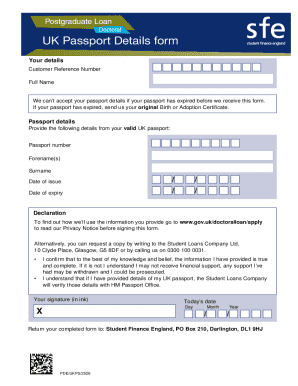
UK C2 Form Versions
Related Content
Related Forms



Get the latest insights from our blog


If you believe that this page should be taken down, please follow our DMCA take down process
here
.
This form may include fields for payment information. Data entered in these fields is not covered by PCI DSS compliance.