
Last updated on
Oct 2, 2026

Get the free Employment Verification Letter
We are not affiliated with any brand or entity on this form

Fill out
Complete the form online in a simple drag-and-drop editor.

eSign
Add your legally binding signature or send the form for signing.

Share
Share the form via a link, letting anyone fill it out from any device.

Export
Download, print, email, or move the form to your cloud storage.
Why pdfFiller is the best tool for your documents and forms


End-to-end document management
From editing and signing to collaboration and tracking, pdfFiller has everything you need to get your documents done quickly and efficiently.
Accessible from anywhere
pdfFiller is fully cloud-based. This means you can edit, sign, and share documents from anywhere using your computer, smartphone, or tablet.
Secure and compliant
pdfFiller lets you securely manage documents following global laws like ESIGN, CCPA, and GDPR. It's also HIPAA and SOC 2 compliant.
What is NIV Employment Letter
The Employment Verification Letter is a document used by employers to confirm a beneficiary's employment status for visa purposes.
pdfFiller scores top ratings on review platforms




Who needs NIV Employment Letter?
Explore how professionals across industries use pdfFiller.

NIV Employment Letter is needed by:
-
Employers needing to verify an employee's status for visa applications.
-
Employees applying for non-immigrant visas requiring proof of employment.
-
Companies assisting employees in their visa processes.
-
Individuals seeking re-admission to the US for employment.
-
HR departments managing employee documentation for visa compliance.
Comprehensive Guide to NIV Employment Letter
What is an Employment Verification Letter?
An Employment Verification Letter is a formal document that confirms an individual’s employment status with a company. It serves the essential purpose of providing proof of employment for various processes, including visa applications. The importance of this letter is underscored during visa procedures, where it verifies the beneficiary's employment status and assists in their re-admission into the United States.
Why You Need an Employment Verification Letter
This letter is crucial when applying for visas or seeking re-admission into the U.S. without it, applicants may face legal issues or delays in their immigration processes. Not having this document can lead to complications in employment verification, especially when dealing with authorities like the U.S. Embassy.
Key Features of the Employment Verification Letter
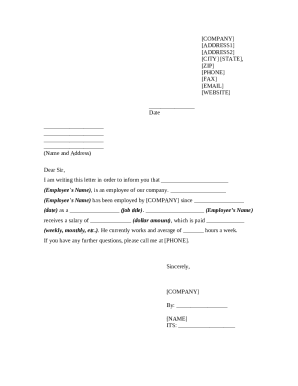
Key elements of an employment verification letter include:
-
The company's letterhead for authenticity
-
Specific dates indicating the employment duration
-
A signature from an authorized company representative
-
The beneficiary's details, including name and role
-
A description of job duties performed during employment
Who Requires an Employment Verification Letter?
Various individuals and organizations require this letter. Primarily, it is needed by visa applicants who need to verify their employment status. Employers or third-party services may also request it to confirm employment details for background checks.
How to Fill Out the Employment Verification Letter Online
Filling out an Employment Verification Letter online can be accomplished in a few simple steps:
-
Access the fillable template through your preferred document management platform.
-
Enter the date of the request at the top of the form.
-
Fill in the beneficiary's personal details including full name and job title.
-
Include employment start and end dates, ensuring accuracy to avoid mistakes.
-
List the primary job duties clearly to reflect the beneficiary’s responsibilities.
-
Sign off with the company representative's name, title, and provide the necessary signature.
Filing and Submission Guidelines for the Employment Verification Letter
After completing the letter, proper submission is key. Submission should be made to the respective embassy or organization requesting the letter. Be aware of deadlines to ensure timely processing, and inquire about any fees that may be associated with submission.
Signing the Employment Verification Letter: Digital vs. Wet Signatures
When completing the Employment Verification Letter, it's essential to understand the signing requirements. Traditional wet signatures and electronic signatures (eSignatures) both have different legal implications, and choosing the right method is critical for acceptance. Both options can validate the document, but specific contexts may dictate the preferred choice.
What Happens After Submission of the Employment Verification Letter?
Once submitted, the document undergoes processing, which may take several days. It’s essential to keep track of the submission to follow up promptly if any additional information is requested. Be prepared for possible delays by anticipating communication from the reviewing authority.
Security and Compliance with the Employment Verification Process
When handling sensitive documents like Employment Verification Letters, security is paramount. Platforms like pdfFiller implement robust security measures, including 256-bit encryption. Compliance with regulations such as HIPAA and GDPR ensures that users’ personal data and the document content are protected throughout the verification process.
Leverage pdfFiller for Your Employment Verification Letter Needs
Utilizing pdfFiller can greatly enhance the efficiency of managing your Employment Verification Letter. The platform's user-friendly features allow for easy editing and filling of forms. With pdfFiller, users can experience a seamless process for document management while maintaining trust in the platform's security protocols.
How to fill out the NIV Employment Letter
-
1.Access the Employment Verification Letter form by navigating to pdfFiller's website and searching for the form name in the search bar.
-
2.Once located, open the form to enter the required information in the appropriate fields.
-
3.Before completing the form, gather necessary information such as the beneficiary's name, employment dates, and job duties, as well as the company representative’s name and title.
-
4.Use the user-friendly interface to fill out fields like 'date', 'Beneficiary', 'employee's job description', ensuring all information is accurate and up-to-date.
-
5.After filling in all mandatory information, review the completed form to avoid any errors, ensuring that every required field is filled and all data is correct.
-
6.Finalize the form by adding the company representative's signature in the designated area, making sure that their title is also included.
-
7.Once everything is complete, proceed to save the document. You can download it as a PDF or submit it directly through pdfFiller's submission options.

What information is required to complete the Employment Verification Letter?
To complete the Employment Verification Letter, you will need the beneficiary's full name, employment dates, hours worked, job duties, and the company representative's name and title. Ensure all information is accurate for submission.
Who needs to sign the Employment Verification Letter?
The Employment Verification Letter must be signed by a company representative who holds an authoritative position. Their title must be included for validation.
Is notarization required for the Employment Verification Letter?
No, notarization is not required for the Employment Verification Letter. However, it must be printed on company letterhead and signed by an authorized representative.
How is the Employment Verification Letter submitted?
The Employment Verification Letter can be submitted by printing it and delivering it physically to the relevant parties or by sending it electronically if allowed by the institution requesting the document.
What is the primary purpose of the Employment Verification Letter?
The primary purpose of the Employment Verification Letter is to confirm a beneficiary's employment status when applying for non-immigrant visas, facilitating their re-admission to the US for work.
What common mistakes should be avoided when filling out the Employment Verification Letter?
Common mistakes include missing required fields, inaccuracies in employment details, and failing to include the company representative’s signature and title. Always double-check before submission.
How long does it take to process the Employment Verification Letter?
Processing times for the Employment Verification Letter can vary based on internal company procedures. Ensure you allow sufficient time for gathering information and obtaining necessary signatures.
Related Forms




Related Catalogs
Get the latest insights from our blog


If you believe that this page should be taken down, please follow our DMCA take down process
here
.
This form may include fields for payment information. Data entered in these fields is not covered by PCI DSS compliance.