
Last updated on
Nov 6, 2026
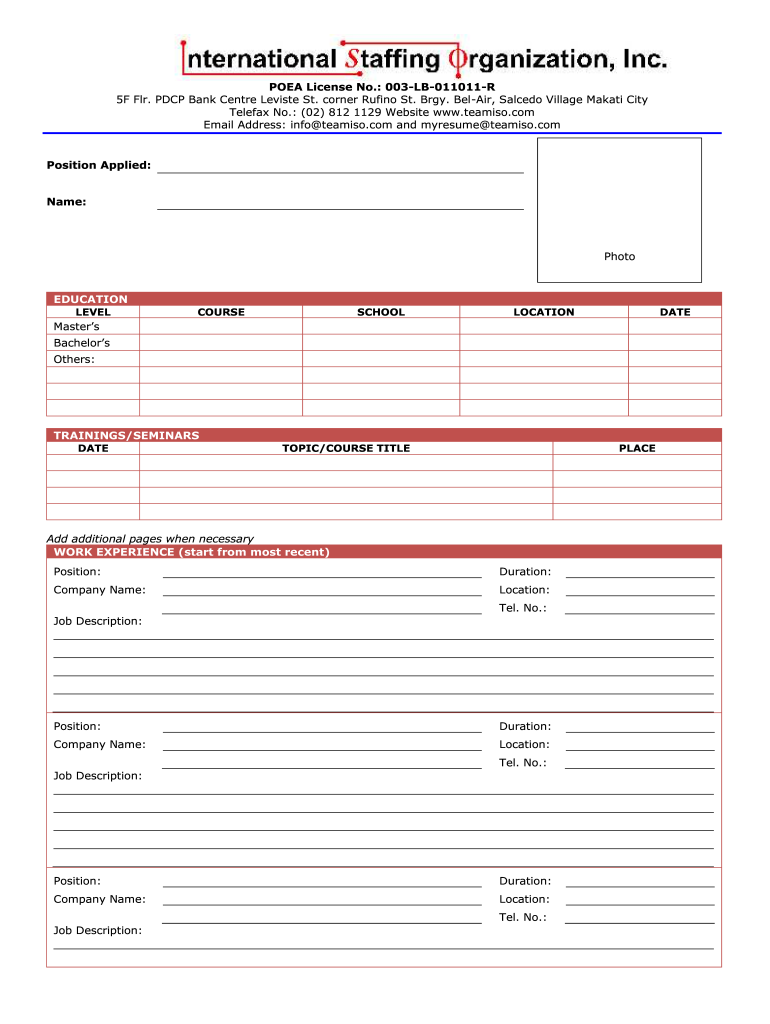
PH ISO POEA License No 003-LB-011011-R free printable template
We are not affiliated with any brand or entity on this form

Fill out
Complete the form online in a simple drag-and-drop editor.

eSign
Add your legally binding signature or send the form for signing.

Share
Share the form via a link, letting anyone fill it out from any device.

Export
Download, print, email, or move the form to your cloud storage.
Why pdfFiller is the best tool for your documents and forms


End-to-end document management
From editing and signing to collaboration and tracking, pdfFiller has everything you need to get your documents done quickly and efficiently.
Accessible from anywhere
pdfFiller is fully cloud-based. This means you can edit, sign, and share documents from anywhere using your computer, smartphone, or tablet.
Secure and compliant
pdfFiller lets you securely manage documents following global laws like ESIGN, CCPA, and GDPR. It's also HIPAA and SOC 2 compliant.
What is PH ISO POEA License No 003-LB-011011-R
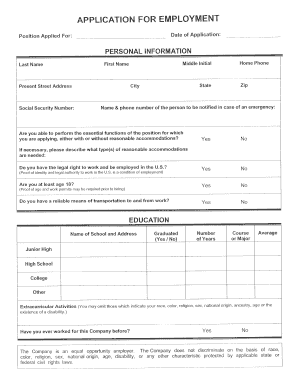
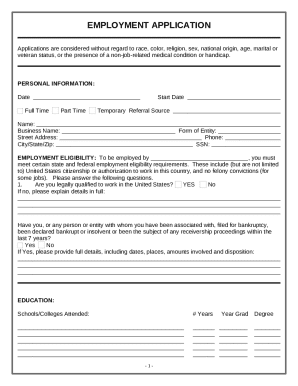
The Employment Application Form is a document used by job applicants to provide their personal and professional background to potential employers.
pdfFiller scores top ratings on review platforms




easy to use and needed for a desperate situation. Thanks
I like the fact I can print it off my computer than typing the old fashion way.
Who needs PH ISO POEA License No 003-LB-011011-R?
Explore how professionals across industries use pdfFiller.

PH ISO POEA License No 003-LB-011011-R is needed by:
-
Job seekers looking for employment opportunities
-
HR personnel processing applications
-
Recruiters sourcing candidates for positions
-
Educational institutions requesting applicant information
-
Companies conducting background checks
Comprehensive Guide to PH ISO POEA License No 003-LB-011011-R
What is the Employment Application Form?
The Employment Application Form is a critical document used by job seekers to formally present their personal, educational, and professional backgrounds to potential employers. This form is designed to collect organized information that aids both applicants and hiring managers in assessing qualifications for a role.
Including accurate background details, such as work history and educational achievements, is vital for applicants. By providing thorough information, candidates enhance their chances of making a positive impression, helping employers make informed decisions during the hiring process.
Key Features of the Employment Application Form
The Employment Application Form consists of several essential sections that ensure comprehensive applicant information is captured effectively. Key sections typically include:
-
Name
-
Education
-
Work Experience
-
References
-
Legal History
Within these sections, certain fields may be marked as required while others remain optional. Understanding which fields are necessary helps applicants prepare a complete and compliant submission, increasing their likelihood of being considered for employment.
Benefits of Using the Employment Application Form
Employing a structured employment form provides several significant benefits to both job applicants and employers. Firstly, it standardizes the information gathered, making it simpler for hiring teams to compare candidates’ qualifications effectively. This consistency streamlines the hiring process significantly.
Additionally, applicants can present their qualifications clearly and comprehensively, which may facilitate a more expedited review process by employers. An organized document can specifically highlight an applicant’s strengths, allowing for a thorough evaluation that is less prone to oversight.
Who Needs the Employment Application Form?
The Employment Application Form is pertinent for both job seekers looking to present their qualifications and employers seeking an efficient way to gather applicant information. Job seekers may need this form in various scenarios, including applying for positions across diverse industries or participating in recruitment events.
Employers, on the other hand, require this document to ensure they have a reliable means to assess candidates uniformly, helping to maintain fairness and transparency throughout the hiring process.
How to Fill Out the Employment Application Form Online
Filling out the Employment Application Form online is simple with tools like pdfFiller. Here’s a step-by-step guide to ensure accuracy:
-
Open the Employment Application Form in pdfFiller.
-
Begin with the Name section; ensure spelling is correct.
-
Continue to fill in the Education and Work Experience sections, providing specific details and dates.
-
Add your references; include full contact information for each individual.
-
Review the Legal History section carefully, ensuring all disclosures are accurate.
-
Sign the form digitally when prompted, confirming the truthfulness of your information.
Taking the time to verify the information in each section can significantly benefit your submission.
Common Errors to Avoid When Completing the Employment Application Form
Many applicants make common mistakes while completing the Employment Application Form that can hinder their chances of success. To maximize your effectiveness, avoid these pitfalls:
-
Omitting required fields, which can lead to incomplete submissions.
-
Providing inaccurate contact information, making it challenging for employers to reach you.
-
Neglecting to proofread for spelling and grammatical errors.
-
Failing to be consistent in employment and educational dates.
Taking care to address these common errors can enhance the quality of your application and improve your chances of being considered for the role.
How to Sign the Employment Application Form
The act of signing your Employment Application Form is significant, as it serves to validate the authenticity of the information provided. Employers rely on the signature as a confirmation of the applicant's honesty.
Signatures can be either digital or wet, depending on the submission method and employer's preferences. It's essential to verify which type is acceptable to ensure compliance with the employer's requirements.
Submission Methods for the Employment Application Form
After completing the Employment Application Form, various submission methods are available to send it to potential employers. The primary methods include:
-
Digital submission via platforms like pdfFiller, allowing for instant delivery.
-
Traditional mail options, which require printing and postage of the completed form.
Being aware of these methods can help applicants choose the appropriate route based on employer guidelines and personal preferences.
What Happens After You Submit the Employment Application Form?
Once you submit your Employment Application Form, several typical steps occur in the application process. First, employers will usually review the applications to shortlist candidates for interviews based on criteria outlined in the form.
Employers might follow up with applicants to clarify any uncertainties or request additional information. Understanding this process aids applicants in preparing for potential interviews and in knowing how to appropriately follow up on their application status.
Why Use pdfFiller for Your Employment Application Form Needs?
pdfFiller offers robust tools to assist users in filling out, editing, and submitting their Employment Application Forms effectively. Its features allow users to manage their forms from any browser, eliminating the need for software downloads.
Alongside its utility, pdfFiller prioritizes security measures for sensitive information, employing 256-bit encryption along with HIPAA and GDPR compliance standards. This assurance of safety is crucial when handling personal data within employment applications.
How to fill out the PH ISO POEA License No 003-LB-011011-R
-
1.Access the Employment Application Form by visiting pdfFiller and searching for the form by name.
-
2.Open the form in pdfFiller's editor after locating it in your documents or templates.
-
3.Before filling out the form, gather your personal data, educational background, work history, and references to ensure you have all necessary information.
-
4.Begin filling in the form by entering your name in the designated field at the start of the document.
-
5.Upload a recent photo if the form requires it, using the 'Upload' button for easy access to your files.
-
6.In the EDUCATION section, select or type your educational qualifications, ensuring accuracy.
-
7.Move to the WORK EXPERIENCE section and list your previous jobs, including positions held and dates, in the provided fields.
-
8.Complete the WORK REFERENCES section by providing names and contact information for your references.
-
9.Fill out the LEGAL HISTORY section honestly, using the checkboxes and blank spaces as required.
-
10.Once all fields are completed, review the form for accuracy, ensuring all information is truthful and complete.
-
11.Add your electronic signature where indicated to confirm the legitimacy of your submission.
-
12.Save your completed form by clicking the save option in pdfFiller, which will allow you to store it in your account.
-
13.Download the completed form as a PDF file for easy submission via email or print it for physical submission.

Who is eligible to use the Employment Application Form?
Anyone seeking employment can use the Employment Application Form. It is primarily designed for job applicants providing personal and professional information to potential employers.
What documents do I need to complete the Employment Application Form?
To successfully complete the Employment Application Form, you should have your identification, educational certificates, work history details, and reference contacts ready.
How do I submit the Employment Application Form?
Once completed, you can submit the Employment Application Form by emailing it to prospective employers, or you may print and deliver it in person, depending on their application guidelines.
Is there a deadline for submitting the Employment Application Form?
Submission deadlines vary by employer. It's crucial to check the specific job posting for any stated deadlines to ensure timely application submission.
What should I avoid when filling out the Employment Application Form?
Avoid providing inaccurate or misleading information, as this may disqualify you from job consideration. Also, ensure your references are aware they will be contacted.
How long does processing take after submitting the Employment Application Form?
Processing times can vary by employer. Some may respond within a week, while others may take longer due to the number of applications received.
What common mistakes should I look out for when completing the form?
Common mistakes include typos, inconsistent information, forgetting to sign the form, and failing to include required fields. Always proofread before submission.
Related Forms
Related Catalogs
Get the latest insights from our blog


If you believe that this page should be taken down, please follow our DMCA take down process
here
.
This form may include fields for payment information. Data entered in these fields is not covered by PCI DSS compliance.