
Last updated on
Nov 6, 2026

CA PTA Toolkit 2013-2026 free printable template
pdfFiller is not affiliated with any government organization

Fill out
Complete the form online in a simple drag-and-drop editor.

eSign
Add your legally binding signature or send the form for signing.

Share
Share the form via a link, letting anyone fill it out from any device.

Export
Download, print, email, or move the form to your cloud storage.
Why pdfFiller is the best tool for your documents and forms


End-to-end document management
From editing and signing to collaboration and tracking, pdfFiller has everything you need to get your documents done quickly and efficiently.
Accessible from anywhere
pdfFiller is fully cloud-based. This means you can edit, sign, and share documents from anywhere using your computer, smartphone, or tablet.
Secure and compliant
pdfFiller lets you securely manage documents following global laws like ESIGN, CCPA, and GDPR. It's also HIPAA and SOC 2 compliant.
What is CA PTA Toolkit
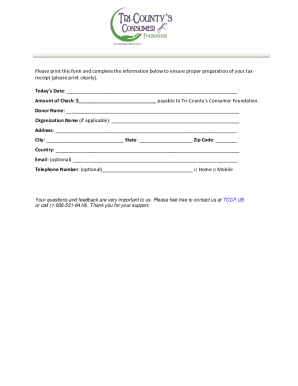
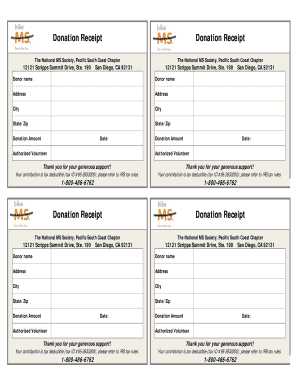
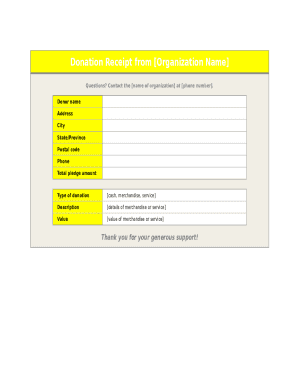
The Donation Receipt Template is a receipt document used by nonprofit organizations to provide a record of donor contributions for tax purposes.
pdfFiller scores top ratings on review platforms




Love being able to fill out forms on computer vs printing out and handwriting in info that is sloppy and messy.
So far I have used it little, but it has proven useful
Who needs CA PTA Toolkit?
Explore how professionals across industries use pdfFiller.

CA PTA Toolkit is needed by:
-
Nonprofit organizations issuing receipts
-
Donors seeking tax deductions
-
California State PTA members
-
Individuals contributing to charitable causes
-
Accountants managing nonprofit finances
-
Fundraising coordinators documenting donations
Comprehensive Guide to CA PTA Toolkit
What is the Donation Receipt Template?
The Donation Receipt Template is a crucial document used by nonprofit organizations including the California State PTA to track and manage donor contributions. This template is significant as it provides tax-deductible receipts for donors, enabling them to claim deductions during tax filing. Furthermore, it serves the essential function of documenting cash contributions and in-kind donations, which is vital for maintaining transparency between nonprofit organizations and their donors.
In essence, the donation receipt template is structured to meet IRS standards for receipt documentation, ensuring both the organization and the donor remain compliant with regulations while fostering trust and accountability.
Purpose and Benefits of Using a Donation Receipt Template
Utilizing a donation receipt template offers numerous advantages for nonprofit organizations. First and foremost, it promotes transparency in the relationship between nonprofits and their donors by clearly documenting the contributions made. This clarity aids in simplifying record-keeping for tax purposes, ensuring that both parties can easily track financial contributions.
Additionally, the template assists organizations in meeting IRS regulations regarding documentation of charitable donations, thus reducing potential legal complications. Overall, the donation receipt template serves as both a practical tool for organizations and an assurance to donors that their contributions are being adequately recorded.
Key Features of the Donation Receipt Template
The donation receipt template encompasses essential elements that ensure comprehensive documentation. Standard fields typically included are:
-
Date of the donation
-
Donor's name
-
Amount of cash contributions
-
Descriptions of any in-kind contributions
Moreover, it features a section for Quid Pro Quo contributions, detailing any goods or services received in exchange for the donation. Notably, the template also integrates the California State PTA’s IRS EIN, which is crucial for tax records.
Who Needs the Donation Receipt Template?
The target users of the donation receipt template primarily include nonprofit organizations that need to document contributions for their supporters. Additionally, individuals making charitable contributions seeking tax deductions will benefit from using the template. Specifically, California-based nonprofits, such as PTAs, play a significant role in utilizing this document to maintain proper records for their donors.
By ensuring that recipients have valid documentation, these organizations can facilitate claims for tax deductions while reinforcing their accountability to the community.
How to Fill Out the Donation Receipt Template Online
Filling out the donation receipt template online using pdfFiller is straightforward. Follow these steps for completion:
-
Access the receipt template on pdfFiller.
-
Enter the required fields, including the date, donor's name, and contribution details.
-
Double-check entries for accuracy and completeness.
-
Save the document to ensure it is retained for future use.
This process not only ensures that the template is filled out correctly but also highlights the efficiency and ease provided by pdfFiller for managing important documentation.
Common Errors to Avoid When Using the Donation Receipt Template
User errors can detract from the effectiveness of the donation receipt template. Common mistakes include leaving out necessary information or entering incorrect details. It is crucial to pay particular attention to the section detailing Quid Pro Quo contributions, ensuring that all received goods or services are accurately documented.
To avoid potential pitfalls, users should implement a validation checklist before submission, confirming that all required fields are filled out correctly.
Security and Compliance for the Donation Receipt Template
When dealing with sensitive donation documents, security is paramount. pdfFiller ensures document security through robust encryption measures, safeguarding data against unauthorized access. Compliance with privacy regulations such as HIPAA and GDPR further reinforces the platform's commitment to protecting user information.
Best practices for maintaining data protection while using the donation receipt template include regularly updating security settings and utilizing secure networks for document management.
How to Download and Save the Donation Receipt Template as a PDF
Downloading and saving the donation receipt template as a PDF is a simple process. Here’s how to do it:
-
Complete the donation receipt on pdfFiller.
-
Select the download option to save the completed form.
-
Choose the PDF format for saving your document.
-
Organize the saved document in a dedicated folder for easy access.
This straightforward method allows users to efficiently share the receipt with donors and maintain organized records for future reference.
Next Steps After Completing Your Donation Receipt Template
Once you have filled out the donation receipt template, certain best practices should be followed. First, deliver the receipt to the donor promptly to ensure they have the necessary documentation for tax purposes. Additionally, it is important to maintain records of all issued receipts to comply with nonprofit regulations.
Utilizing pdfFiller’s tools can further streamline the management of documentation, ensuring that your organization remains organized and complies with all necessary record-keeping requirements.
Maximizing Use of pdfFiller for Your Document Needs
Engaging with pdfFiller extends beyond just managing donation receipts. The platform offers a variety of tools for editing and managing documents effectively. Some of the notable capabilities include eSigning, annotating, and converting documents to multiple formats.
These features enhance user productivity and facilitate document organization, making pdfFiller a valuable resource for nonprofits and other document management needs.
How to fill out the CA PTA Toolkit
-
1.To access the Donation Receipt Template, visit pdfFiller and search for the form by its name.
-
2.Open the downloaded template within pdfFiller's interface for easy editing.
-
3.Typically, you will see fields for the date, donor's name, contribution amounts (cash and non-cash), and descriptions for any goods or services provided.
-
4.Before filling out the form, gather all necessary information such as the donor's details, contribution amount, and a description of in-kind items.
-
5.Begin filling out the date field followed by the donor’s name and address to ensure accurate documentation.
-
6.Next, input the cash contribution amount in the specified field, ensuring it aligns with donations received.
-
7.For in-kind contributions, provide detailed descriptions and estimated values for any items donated.
-
8.If there were any goods or services provided in exchange for donations, list these in the Quid Pro Quo section and specify their value.
-
9.Review all entries for accuracy and completeness before finalizing your document and ensure each section is filled out as per instructions.
-
10.Once completed, save your filled template by clicking the save option and download it for your records or email it directly to the donor.

Who is eligible to receive a donation receipt?
Any donor who has made a financial contribution or provided in-kind support to a nonprofit organization can receive a donation receipt. It's essential that the organization is registered as a 501(c)(3) entity to issue valid receipts.
Are there deadlines for issuing donation receipts?
While there are no strict deadlines for issuing donation receipts, it is best practice to provide them promptly after a donation is made, ideally within the calendar year for tax deductible purposes.
What supporting documents are needed with the donation receipt?
Typically, no additional documents are required aside from the receipt itself. However, it's advisable for donors to keep a record of their donation and any correspondence with the organization as proof.
What are common mistakes to avoid when filling out the receipt?
Ensure that all donor details, including name and address, are correct. Also, clearly document the contributions and avoid any ambiguities regarding the value of non-cash donations.
How should I submit the completed donation receipt?
Once completed, you can either print the donation receipt for physical delivery or send it electronically via email to the donor. Make sure to ensure the donor receives their copy promptly.
What happens if I lose my donation receipt?
In case of a lost receipt, contact the nonprofit organization that issued it. They can reissue a new receipt based on their donation records if you can provide your donation details.
How long does it take to process donation receipts?
Processing times for donation receipts are generally immediate once the non-profit completes the document. However, if issued electronically, it may depend on email delivery times.
CA PTA Toolkit Form Versions
Related Content
Related Forms



Related Catalogs
Get the latest insights from our blog


If you believe that this page should be taken down, please follow our DMCA take down process
here
.
This form may include fields for payment information. Data entered in these fields is not covered by PCI DSS compliance.