
Last updated on
Oct 2, 2026

Get the free Annual Withholding Reconciliation Statement REV-1667
We are not affiliated with any brand or entity on this form

Fill out
Complete the form online in a simple drag-and-drop editor.

eSign
Add your legally binding signature or send the form for signing.

Share
Share the form via a link, letting anyone fill it out from any device.

Export
Download, print, email, or move the form to your cloud storage.
Why pdfFiller is the best tool for your documents and forms


End-to-end document management
From editing and signing to collaboration and tracking, pdfFiller has everything you need to get your documents done quickly and efficiently.
Accessible from anywhere
pdfFiller is fully cloud-based. This means you can edit, sign, and share documents from anywhere using your computer, smartphone, or tablet.
Secure and compliant
pdfFiller lets you securely manage documents following global laws like ESIGN, CCPA, and GDPR. It's also HIPAA and SOC 2 compliant.
What is Withholding Reconciliation 1667
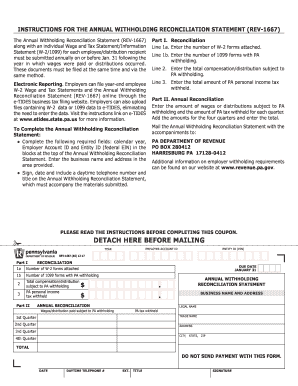
The Annual Withholding Reconciliation Statement REV-1667 is a tax form used by employers in Pennsylvania to reconcile total compensation and personal income tax withheld from employees' wages.
pdfFiller scores top ratings on review platforms




Who needs Withholding Reconciliation 1667?
Explore how professionals across industries use pdfFiller.

Withholding Reconciliation 1667 is needed by:
-
Employers in Pennsylvania
-
Payroll professionals
-
Tax preparers handling Pennsylvania state taxes
-
Accountants managing employee withholding
-
Business owners with employees
Comprehensive Guide to Withholding Reconciliation 1667
What is the Annual Withholding Reconciliation Statement REV-1667?
The Annual Withholding Reconciliation Statement (REV-1667) is a critical form utilized by employers in Pennsylvania to reconcile the taxes withheld from employees' compensation. Its primary function is to accurately report the total compensation paid and the personal income tax withheld during the year. Filling out this form correctly is essential for maintaining compliance with Pennsylvania tax regulations.
This form serves as a mechanism for employers to ensure that the amount of taxes withheld aligns with the actual wages paid, thus avoiding any discrepancies that could lead to penalties or audits. It is an essential document for ensuring proper tax management and record keeping.
Purpose and Benefits of the Annual Withholding Reconciliation Statement REV-1667
The Annual Withholding Reconciliation Statement REV-1667 is indispensable for employers due to its various benefits. Accurate reconciliation of employee compensation and taxes withheld is crucial for avoiding tax liabilities and ensuring compliance with state laws.
-
Timely submission ensures compliance with Pennsylvania tax regulations.
-
Avoids penalties associated with late or inaccurate filings.
-
Provides a clear record of employee earnings and withholdings for future reference.
Who Needs the Annual Withholding Reconciliation Statement REV-1667?
The Annual Withholding Reconciliation Statement must be submitted by all employers who withhold Pennsylvania personal income tax from their employees. This includes businesses of various sizes, regardless of the number of employees.
Employers are responsible for ensuring that this form is completed and submitted by the required deadline to maintain compliance with Pennsylvania state law. Understanding who is required to file is the first step in the process for employers.
Eligibility Criteria and Filing Requirements for the Annual Withholding Reconciliation Statement REV-1667
Certain criteria determine the filing obligations for the Annual Withholding Reconciliation Statement REV-1667. Generally, any employer who withheld state taxes during the previous year is required to file this form. Key prerequisites include:
-
Number of employees who received compensation subject to withholding.
-
Data needed includes total wages paid and taxes withheld.
-
Submission deadlines are mandated by Pennsylvania tax laws.
How to Fill Out the Annual Withholding Reconciliation Statement REV-1667 Online (Step-by-Step)
Filling out the Annual Withholding Reconciliation Statement REV-1667 online involves several steps. Follow this step-by-step guide for accurate completion:
-
Access the REV-1667 form through the provided online platform.
-
Enter the calendar year for the reconciliation.
-
Provide your PA DEPARTMENT Of REVENUE Employer Account ID and Entity ID (federal EIN).
-
Input the number of W-2 forms attached and the total compensation paid.
-
Complete any additional fields as instructed, ensuring all information is correct.
-
Sign and date the form before submission.
Common Errors and How to Avoid Them When Submitting the Annual Withholding Reconciliation Statement REV-1667
To submit an accurate Annual Withholding Reconciliation Statement REV-1667, it is crucial to avoid common mistakes. Frequent errors include:
-
Incorrect reporting of W-2 forms.
-
Filing with missing or incorrect tax identification numbers.
-
Submitting without appropriate signatures or dates.
Implementing best practices, such as double-checking entries and keeping detailed records, can significantly enhance the accuracy of your submission.
Where to Submit the Annual Withholding Reconciliation Statement REV-1667?
Employers have options for submitting the Annual Withholding Reconciliation Statement REV-1667, either electronically or via paper mail. When considering the submission method, note the following:
-
Electronic submission is often faster and typically preferred.
-
Paper submissions must be mailed to the appropriate Pennsylvania Department of Revenue address.
-
Verify the current address for paper submissions in case of updates in regulations.
Security and Compliance for the Annual Withholding Reconciliation Statement REV-1667
When handling sensitive information on the Annual Withholding Reconciliation Statement REV-1667, data security is paramount. pdfFiller employs robust security protocols, including:
-
256-bit encryption for all documents.
-
Compliance with HIPAA and GDPR regulations for privacy protection.
-
Regular security audits to ensure ongoing compliance.
Employers can confidently manage their sensitive tax documents knowing that security measures are in place.
Using pdfFiller for Your Annual Withholding Reconciliation Statement REV-1667
Utilizing pdfFiller to manage your Annual Withholding Reconciliation Statement REV-1667 presents multiple advantages. Key features include:
-
Easy-to-use form filling capabilities.
-
Secure storage of completed forms with encryption.
-
Options for eSigning directly within the platform.
Employers can benefit from an efficient process for creating, filling out, and submitting their forms.
Next Steps After Filing the Annual Withholding Reconciliation Statement REV-1667
After submitting the Annual Withholding Reconciliation Statement REV-1667, there are several important subsequent steps to consider. Employers should:
-
Monitor submission status to confirm receipt by the Pennsylvania Department of Revenue.
-
Be prepared to correct or amend the form if discrepancies are identified.
-
Keep copies for personal records and future audits.
Staying proactive after filing is essential to ensure ongoing compliance with tax regulations.
How to fill out the Withholding Reconciliation 1667
-
1.To begin, access pdfFiller and search for 'Annual Withholding Reconciliation Statement REV-1667'. Open the form in the editor.
-
2.Familiarize yourself with the fillable fields, including needed sections like W-2 forms and total tax withheld.
-
3.Before filling out the form, gather necessary documents such as W-2s and 1099s which detail compensation and tax amounts.
-
4.Use the interface to fill in the required fields such as the number of W-2 forms and total compensation subject to PA withholding.
-
5.Follow the explicit instructions provided for each line item, ensuring that you fill in your PA DEPARTMENT Of REVENUE Employer Account ID and Entity ID accurately in the designated blocks.
-
6.Once all fields are completed, review the form for any errors and ensure all required information is provided.
-
7.Finalize your form by checking that it is signed and dated by the employer as required.
-
8.Finally, you can save your completed form, download it for submission, or submit directly through pdfFiller depending on your preference.

What are the eligibility requirements for filing the REV-1667 form?
Employers in Pennsylvania who withhold personal income tax from employee wages are required to file the Annual Withholding Reconciliation Statement REV-1667 annually.
When is the deadline for submitting the REV-1667 form?
The REV-1667 form must be submitted on or before January 31 following the year in which wages were paid to ensure compliance with Pennsylvania state tax regulations.
How do I submit the Annual Withholding Reconciliation Statement?
The form can be submitted directly through the Pennsylvania Department of Revenue or downloaded and mailed. Ensure you comply with submission guidelines noted on the form.
What supporting documents are required when filing the REV-1667?
Support documents required include W-2 forms for all employees and any 1099 forms for contractors, detailing the total compensation and tax withheld.
What common mistakes should I avoid when filling out the REV-1667 form?
Common mistakes include failing to sign the form, omitting required fields such as the Employer Account ID and Entity ID, and miscalculating total compensation or withheld taxes.
What is the processing time for the REV-1667 form?
Processing times can vary, but typically, once submitted correctly, you can expect confirmation of filing from the Pennsylvania Department of Revenue within a few weeks.
What should I do if I realize I made a mistake after submitting the form?
If you discover an error post-submission, contact the Pennsylvania Department of Revenue immediately to discuss possible correction procedures and avoid penalties.
Related Forms



Get the latest insights from our blog


If you believe that this page should be taken down, please follow our DMCA take down process
here
.
This form may include fields for payment information. Data entered in these fields is not covered by PCI DSS compliance.