
Last updated on
Nov 9, 2026

IN DoR WH-3 2009 free printable template
pdfFiller is not affiliated with any government organization

Fill out
Complete the form online in a simple drag-and-drop editor.

eSign
Add your legally binding signature or send the form for signing.

Share
Share the form via a link, letting anyone fill it out from any device.

Export
Download, print, email, or move the form to your cloud storage.
Why pdfFiller is the best tool for your documents and forms


End-to-end document management
From editing and signing to collaboration and tracking, pdfFiller has everything you need to get your documents done quickly and efficiently.
Accessible from anywhere
pdfFiller is fully cloud-based. This means you can edit, sign, and share documents from anywhere using your computer, smartphone, or tablet.
Secure and compliant
pdfFiller lets you securely manage documents following global laws like ESIGN, CCPA, and GDPR. It's also HIPAA and SOC 2 compliant.
What is IN DoR WH-3
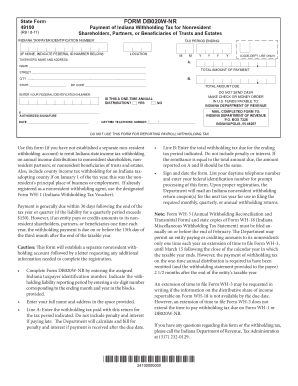
The Indiana Annual Withholding Tax Form WH-3 is a state income tax document used by withholding agents to report taxes withheld from employees and contractors in Indiana.
pdfFiller scores top ratings on review platforms




VERY easy to use, exactly what I was needing
I have had a good experience. When something did not work, the support personnel assisted me.
ES MI PRIMERA EXPERIENCIA Y ES MUY FACIL DE USAR. GRACIAS.
Very simple and incredibly useful. This is my secret weapon as I can change, modify or update any PDF document and have it ready to go within minutes. Probably my most useful app.
It really is very easy to use
It really is very easy to use. Thanks!
Easy to use with user friendly steps and information.
Who needs IN DoR WH-3?
Explore how professionals across industries use pdfFiller.

IN DoR WH-3 is needed by:
-
Employers withholding taxes from employee wages
-
Nonresident contractors receiving payments in Indiana
-
Partners and shareholders in partnerships and corporations
-
Tax preparers handling state income tax
-
Beneficiaries of trusts reporting withheld taxes
Comprehensive Guide to IN DoR WH-3
What is the Indiana Annual Withholding Tax Form WH-3?
The Indiana Annual Withholding Tax Form WH-3 is essential for reporting withholding taxes, ensuring compliance with state tax regulations. This form is primarily used by withholding agents to track taxes withheld from employees as well as non-resident contractors. Proper completion of the Indiana withholding tax return is vital for accurate reporting and accountability.
Fill out the form with attention to detail, as it includes specific instructions for reporting various sections. Required information encompasses taxpayer identification, employer details, and figures representative of withheld taxes.
Purpose and Benefits of the Indiana WH-3 Form
The Indiana WH-3 form plays a critical role in tax compliance for both employees and independent contractors. By accurately reporting withheld taxes, businesses can avoid penalties and ensure transparency with the Indiana Department of Revenue. Furthermore, precise reporting benefits all parties involved, clarifying tax obligations and contributions.
-
Facilitates state compliance and adherence to tax regulations.
-
Enhances transparency between withholding agents and the department.
-
Helps mitigate risks associated with inaccurate reporting.
Eligibility Criteria for Using the Indiana WH-3
Eligibility to file the WH-3 form is generally limited to organizations and individuals acting as withholding agents. This designation includes various entities such as corporations, partnerships, and sole proprietors. Particular attention should be paid to unique cases, such as non-resident contractors, who may be required to file under specific regulations.
Indiana law also dictates certain exceptions pertaining to the filing of the WH-3 form. Ensure that you understand the requirements to avoid compliance issues.
When to File the Indiana Annual WH-3 Form
The Indiana Annual WH-3 Form must be submitted by the last working day in February. Missing this deadline may result in penalties, which can affect your standing with tax authorities. If circumstances warrant it, filing extensions or amendments can be requested, but it is crucial to know the proper procedures involved.
-
Annual filing deadline: last working day in February.
-
Penalties for late submissions can escalate quickly.
-
Know the process for amendments and extensions.
How to Fill Out the Indiana WH-3 Form Online
Completing the WH-3 form electronically streamlines the reporting process, offering a step-by-step guide for users. Take advantage of the fillable PDF format, which simplifies data entry and ensures that all necessary fields are addressed. Particular emphasis should be placed on the Authorized Signature line, as failure to include this may void the submission.
-
Access a fillable PDF form for convenience.
-
Follow each prompt carefully to ensure accurate completion.
-
Sign the form electronically to finalize your submission.
Field-by-Field Instructions for the WH-3 Form
Each section of the WH-3 form requires careful attention, especially fields like taxpayer ID, address, and county tax breakdowns. Ensure to review common areas prone to confusion, aiming to minimize mistakes that could lead to rejection. Supporting materials may also be needed for certain fields, so gather all relevant documents in advance.
-
Provide your taxpayer ID accurately.
-
Double-check the address entered to avoid errors.
-
Include detailed breakdowns for county tax withheld.
Submission Methods for the Indiana WH-3
Submissions of the completed WH-3 form can occur through various methods, including electronic filing options. Electronic submissions often come with advantages such as speed of processing and confirmation of submissions. Be mindful of any associated fees or requirements that may accompany electronic filing.
-
Submit electronically for faster processing.
-
Keep a record of submission confirmations.
-
Follow up with the Indiana Department of Revenue as necessary.
Security and Compliance When Filing the WH-3
Data protection during the filing of the WH-3 form is essential. Utilizing services like pdfFiller ensures that your information is safeguarded with advanced security measures, including 256-bit encryption. Take steps to protect sensitive information as you complete the filing process to maintain compliance with regulations.
-
Opt for platforms with security certifications.
-
Maintain confidentiality of sensitive data.
-
Verify that your submission method meets security standards.
Use pdfFiller to Simplify Completing Your WH-3 Form
pdfFiller enhances the process of filling out, signing, and submitting the WH-3 form. Key features, such as editable fields and electronic signature capabilities, make it user-friendly. Experience the convenience of managing your tax forms seamlessly, reducing the burden often associated with filing.
-
Edit fields easily within the platform.
-
Utilize electronic signature features for quicker submissions.
-
Share documents with stakeholders if needed.
Check Your Submission Status and Correcting Errors
Once you submit your WH-3 form, tracking the submission status becomes vital. This step enables you to confirm that your filing was received successfully. If any errors are discovered after submission, understanding the rectification procedures will help you avoid complications in future filings.
-
Use available tracking systems to monitor submission status.
-
Know the process for correcting errors post-filing.
-
Keep copies of all related documents for your records.
How to fill out the IN DoR WH-3
-
1.To access the Indiana Annual Withholding Tax Form WH-3 on pdfFiller, visit the pdfFiller website and search for the form using its name.
-
2.Once found, open the form in pdfFiller’s editor. Familiarize yourself with the interface where you will find tools for filling your form.
-
3.Gather all necessary information including your Taxpayer ID Number, business address, and details about taxes withheld. Have any prior year forms handy for reference.
-
4.Begin filling out the form by clicking on the designated fields. Use the 'Click to Type' feature to enter text efficiently.
-
5.Ensure you fill out each section accurately, including any county breakdowns required for withholding amounts. Use checkboxes where applicable for options such as claiming advance earned income credit.
-
6.Review each section of the form thoroughly to confirm that all data is accurate and complete before finalizing.
-
7.Once completed, use the Save option to keep your filled form, or the Download button to save it in your desired format.
-
8.If submitting electronically, follow pdfFiller's submission process to directly send the form to the Indiana Department of Revenue.

Who needs to file the Indiana Annual Withholding Tax Form WH-3?
Employers, nonresident contractors, partners, shareholders, and beneficiaries who withhold taxes must file the WH-3 form annually.
What is the deadline for submitting the WH-3 form?
The Annual Withholding Tax Form WH-3 must be filed by the last working day in February each year.
Can I submit the Indiana WH-3 form electronically?
Yes, you may submit the WH-3 form electronically through pdfFiller. Make sure to follow the specific steps within the platform to ensure proper submission.
What supporting documents are needed when filing the WH-3 form?
You typically need documentation related to withheld taxes, including records of payments made to employees and contractors throughout the year.
What are common mistakes to avoid when filling out the WH-3 form?
Common mistakes include incorrect reporting of withheld amounts, missing signatures, and failing to include required county breakdowns.
How long does it take for the Indiana WH-3 form to be processed?
Processing times can vary. Generally, it's advisable to submit your WH-3 form as soon as possible and allow a few weeks for processing.
Are there any penalties for late filing of the WH-3 form?
Yes, late filings may incur penalties and interest on the amounts owed. It's important to file on time to avoid these additional fees.
IN DoR WH-3 Form Versions
Related Content
Related Forms







Related Catalogs
Get the latest insights from our blog


If you believe that this page should be taken down, please follow our DMCA take down process
here
.
This form may include fields for payment information. Data entered in these fields is not covered by PCI DSS compliance.