
Last updated on
Nov 9, 2026
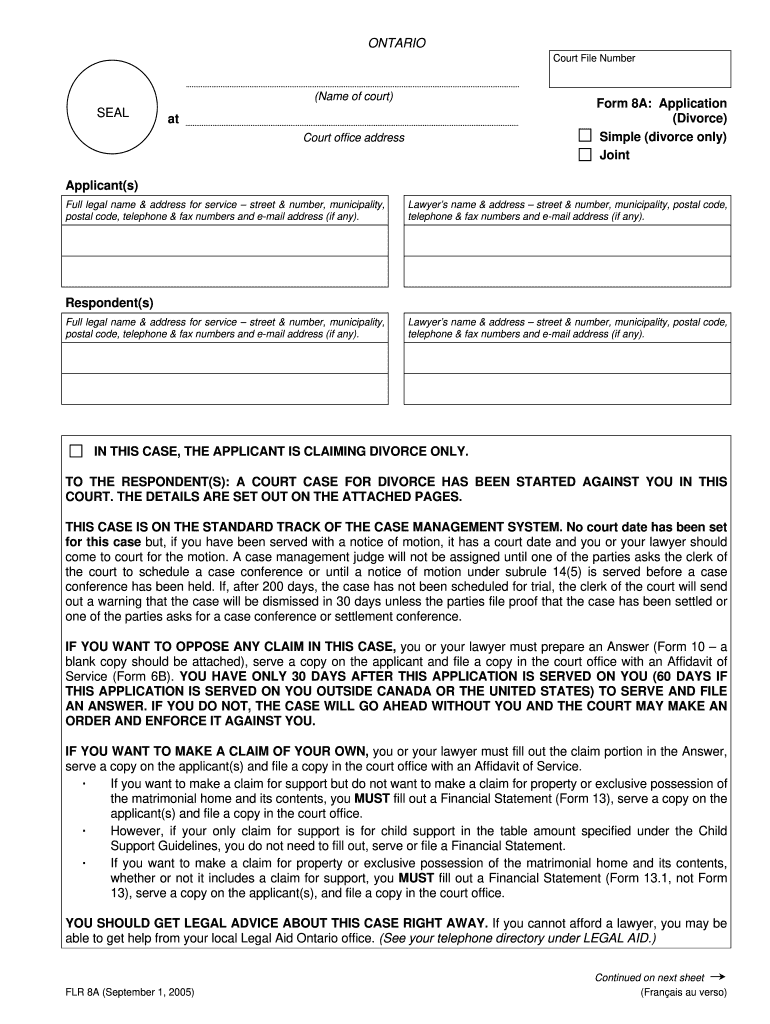
Ontario Form 8A 2005 free printable template
We are not affiliated with any brand or entity on this form

Fill out
Complete the form online in a simple drag-and-drop editor.

eSign
Add your legally binding signature or send the form for signing.

Share
Share the form via a link, letting anyone fill it out from any device.

Export
Download, print, email, or move the form to your cloud storage.
Why pdfFiller is the best tool for your documents and forms


End-to-end document management
From editing and signing to collaboration and tracking, pdfFiller has everything you need to get your documents done quickly and efficiently.
Accessible from anywhere
pdfFiller is fully cloud-based. This means you can edit, sign, and share documents from anywhere using your computer, smartphone, or tablet.
Secure and compliant
pdfFiller lets you securely manage documents following global laws like ESIGN, CCPA, and GDPR. It's also HIPAA and SOC 2 compliant.
What is Ontario Form 8A
The Ontario Form 8A: Divorce Application is a legal document used by individuals to initiate a divorce case in the Ontario court system.
pdfFiller scores top ratings on review platforms




I just starting using this. It has helped me create better appearing documents.
VERY EASY TO USE
VERY EASY TO USE
I liked this software. Very easy to use, great tools available.
A bit confusing at first, but I was able to get it done.
I love this document editor
Well-designed and functional, user-friendly
I use pdfFiller almost every day for my business proofreading for court reporters.
It's been invaluable, whether I need to save a PDF in a different format (.docx, .xlsx, etc.), combine hundreds of pages or PDFs into one PDF, or quickly edit a PDF.
I searched long and hard to find this program, which unlike other PDF programs I tried (including Adobe), consistently delivers on what I need it to do, is well-designed, functional, and user-friendly.
And on top of all that, support responds almost magically quickly to questions or issues, like I had today, which in a deadline-driven business like mine is invaluable.
Who needs Ontario Form 8A?
Explore how professionals across industries use pdfFiller.

Ontario Form 8A is needed by:
-
Individuals seeking a divorce in Ontario
-
Applicants filing for divorce
-
Respondents responding to a divorce application
-
Legal professionals assisting clients with divorce
-
Family law practitioners in Ontario
-
Individuals needing standard divorce papers
Comprehensive Guide to Ontario Form 8A
What is Ontario Form 8A: Divorce Application?
Ontario Form 8A serves as a legal document essential for initiating divorce proceedings within the Ontario court system. This Ontario divorce application form enables applicants and respondents to furnish critical personal and legal information necessary for the divorce process. Utilizing the correct Ontario Form 8A is vital, as it not only legitimizes the divorce request but also ensures adherence to procedural norms in the court.
The form demands a detailed definition of married parties, encompassing names and addresses, alongside relevant data related to children, marriage duration, and any existing agreements or arrangements.
Purpose and Benefits of the Ontario Form 8A: Divorce Application
The Ontario Form 8A streamlines the divorce application process, simplifying what can often be a complex legal journey. By ensuring that comprehensive information is included, this form minimizes the potential for delays and errors that could hinder the legal proceedings.
For both applicants and respondents, this form formalizes the initial steps of the divorce, fostering clarity and direction in the process. Applicants can efficiently outline their circumstances, while respondents are given the opportunity to understand and respond effectively.
Key Features of the Ontario Form 8A: Divorce Application
The Ontario Form 8A boasts several key features crucial for its effective use. It includes specific fillable fields which require vital information, such as:
-
Full legal names and addresses of both parties
-
Details regarding family dynamics and children
-
Information about prior marriages or agreements
Moreover, the form requires the submission of essential documents like Form 10 (Answer) and Form 6B (Affidavit of Service), which accompany the divorce application. These elements contribute significantly to a comprehensive overview of the parties' familial situations and recent agreements.
Eligibility Criteria for the Ontario Form 8A: Divorce Application
To apply using the Ontario Form 8A, specific eligibility criteria must be met by both applicants and respondents. Key considerations include:
-
Age: Applicants must be at least 18 years old
-
Residency: At least one party must be a resident of Ontario
-
Marital Status: The parties must be legally married
Compliance with local jurisdictional regulations is critical to ensure the filing is valid and recognized by the court.
How to Fill Out the Ontario Form 8A: Divorce Application Online (Step-by-Step)
Filling out the Ontario Form 8A accurately is essential. Here are the sequential steps to complete the form online:
-
Access the Form 8A on the official platform.
-
Enter the full legal names and contact details of both parties.
-
Provide data on marriage history, including date and place of marriage.
-
Include specific information regarding any dependent children.
-
Review each section for completeness before final submission.
Be mindful of common mistakes, such as omitting required signatures or accurate detail entries, as these can delay processing times.
Required Documents and Supporting Materials
When submitting the Ontario Form 8A, applicants must prepare several supporting documents to accompany their application. This includes:
-
Form 10 (Answer) for the respondent
-
Form 6B (Affidavit of Service) to confirm service
-
Any previous agreements or legal documents related to the marriage
Ensuring that all documentation is accurate and complete is crucial to avoid unnecessary delays in processing the divorce application.
Submission Methods and Delivery for the Ontario Form 8A: Divorce Application
Completed Ontario Form 8A can be submitted through various methods. Options include:
-
Online submissions via the court's designated platform
-
In-person submissions at local Ontario courthouses
It is important to note the specific addresses or platforms for submission, as well as any timelines and deadlines that apply to responding parties following submission.
What Happens After You Submit the Ontario Form 8A: Divorce Application?
After submitting the Ontario Form 8A, applicants can expect a series of procedural steps. This includes:
-
Receiving confirmation of application filing
-
Participation in court conferences and hearings
-
Being informed of the next steps based on processing outcomes
Keeping track of the application status is vital to ensure timely responses and necessary actions during subsequent legal proceedings.
How pdfFiller Simplifies the Ontario Form 8A Process
pdfFiller enhances the Ontario Form 8A experience with its user-friendly features. The platform provides fillable fields and eSignature capabilities, making form completion straightforward. Security is paramount, as pdfFiller uses encryption for protecting sensitive documents, ensuring compliance with legal standards.
Users can easily edit and share the completed form or its variants, streamlining the process of document management.
Secure Your Divorce Application with pdfFiller
Utilizing pdfFiller for the Ontario Form 8A guarantees data privacy and document security throughout the filling process. The platform’s support features also ensure users can access assistance when needed while filling out the form. Start simplifying your Ontario divorce application today with the reliable tools provided by pdfFiller.
How to fill out the Ontario Form 8A
-
1.Access the Ontario Form 8A: Divorce Application on pdfFiller by searching for its name in the pdfFiller search bar.
-
2.Once the form is open, familiarize yourself with the layout which includes various fillable fields, instructions, and checkboxes.
-
3.Gather necessary information such as your full legal name, address, marriage details, and any relevant information regarding children.
-
4.Begin filling out the form by entering your full legal name and address for service in the designated fields.
-
5.Provide the respondent's information in the required fields, including whether they will be represented by a lawyer.
-
6.Follow the instructions to complete sections on family history and relationship dates, ensuring all entries are accurate and complete.
-
7.Be mindful to check any applicable box where instructed, and refer to additional notes for specific details if necessary.
-
8.Once all fields are filled, review the complete form to ensure there are no mistakes or incomplete sections.
-
9.Use the preview function on pdfFiller to check that formatting appears correct before finalizing your document.
-
10.Save your form, download it in your preferred format, or submit electronically as per your needs using pdfFiller’s submission options.

Who is eligible to use the Ontario Form 8A?
Any individual residing in Ontario seeking to file for divorce can use the Ontario Form 8A. Both applicants and respondents are involved in the filing process.
What is the deadline for the respondent to reply to this application?
The respondent has 30 days from being served with the application to complete and submit an Answer (Form 10) and Affidavit of Service (Form 6B).
How do I submit the completed Form 8A?
The completed Form 8A can be submitted electronically through the court's online system, or it can be printed and submitted directly to the courthouse.
What supporting documents are needed with the divorce application?
While the primary document is the Form 8A, you may need to attach other related documentation, such as proof of marriage and information about any children involved.
What are common mistakes to avoid when filling out the form?
Common mistakes include incorrect personal information, failing to provide complete details about the marriage or children, or missing the deadline for submission.
How long does it take to process the divorce application after submission?
The processing time for a divorce application can vary, but it generally takes several weeks to months depending on the court's schedule and any additional requirements.
Is notarization required for the Form 8A?
No, notarization is not required for the Ontario Form 8A: Divorce Application. However, ensure all information is accurate before submission.
Ontario Form 8A Form Versions
Related Content
Related Forms



Related Catalogs
Get the latest insights from our blog


If you believe that this page should be taken down, please follow our DMCA take down process
here
.
This form may include fields for payment information. Data entered in these fields is not covered by PCI DSS compliance.