
Last updated on
Oct 2, 2026

Get the free Truth-in-Savings Worksheet
We are not affiliated with any brand or entity on this form

Fill out
Complete the form online in a simple drag-and-drop editor.

eSign
Add your legally binding signature or send the form for signing.

Share
Share the form via a link, letting anyone fill it out from any device.

Export
Download, print, email, or move the form to your cloud storage.
Why pdfFiller is the best tool for your documents and forms


End-to-end document management
From editing and signing to collaboration and tracking, pdfFiller has everything you need to get your documents done quickly and efficiently.
Accessible from anywhere
pdfFiller is fully cloud-based. This means you can edit, sign, and share documents from anywhere using your computer, smartphone, or tablet.
Secure and compliant
pdfFiller lets you securely manage documents following global laws like ESIGN, CCPA, and GDPR. It's also HIPAA and SOC 2 compliant.
What is Truth-in-Savings Worksheet
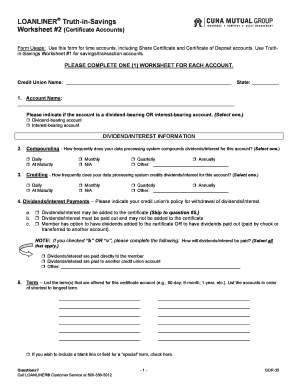
The Truth-in-Savings Worksheet is a financial disclosure document used by credit unions to inform members about their savings and transaction accounts.
pdfFiller scores top ratings on review platforms




Who needs Truth-in-Savings Worksheet?
Explore how professionals across industries use pdfFiller.

Truth-in-Savings Worksheet is needed by:
-
Credit union members seeking information about their accounts.
-
Financial institutions ensuring regulatory compliance.
-
Consumers comparing savings account options.
-
Account managers overseeing account transparency.
-
Regulatory bodies monitoring financial disclosures.
Comprehensive Guide to Truth-in-Savings Worksheet
What is the Truth-in-Savings Worksheet?
The Truth-in-Savings Worksheet is a crucial financial disclosure form used by credit unions to communicate important savings and transaction account information to members. This worksheet ensures that financial institutions comply with the Truth-in-Savings regulations, promoting transparency and clarity in financial communications. Primarily utilized by credit unions, this form aids account holders in understanding the specifics of their accounts.
Purpose and Benefits of the Truth-in-Savings Worksheet
The Truth-in-Savings Worksheet offers significant advantages, enhancing transparency for account holders. By clearly stating interest and dividend rates, this form allows users to make informed financial decisions. Additionally, it assists credit unions in adhering to state and federal compliance requirements, ensuring proper financial practices.
Key Features of the Truth-in-Savings Worksheet
This worksheet includes vital fields such as the credit union name, types of accounts (dividend-bearing versus interest-bearing), and balance requirements. The significance of these components are paramount, as they help clarify any limitations or requirements associated with the accounts. The form is designed to be user-friendly, featuring fillable fields that simplify the completion process.
Who Needs the Truth-in-Savings Worksheet?
The target audience for the Truth-in-Savings Worksheet encompasses both new members and existing account holders of credit unions. Eligibility criteria typically include those seeking to understand their account’s details better or looking to open new accounts. Financial institutions play an essential role in providing this form, ensuring that all users receive the necessary information tailored to their specific situations.
How to Complete the Truth-in-Savings Worksheet Online
To complete the Truth-in-Savings Worksheet online, follow these steps:
-
Access the form via pdfFiller.
-
Enter the 'Credit Union Name' in the designated field.
-
Select the appropriate account type, either dividend-bearing or interest-bearing.
-
Fill in additional required fields, ensuring accuracy throughout.
-
Review the completed form for correctness before finalizing.
Submitting Your Truth-in-Savings Worksheet
Once the Truth-in-Savings Worksheet is complete, submission is straightforward. Users should submit the form directly to their credit union, either online or in person. It's important to be aware of any potential fees involved and understand the processing time for submissions. Additionally, tracking submission status can be beneficial for confirming that the credit union received the completed form without issue.
Common Mistakes and How to Avoid Them
When completing the Truth-in-Savings Worksheet, users often make errors in certain key fields. Common mistakes include incorrect credit union names and inaccurate account type selections. To ensure compliance and accuracy, double-check all entries and keep a copy of the completed form for personal records. This practice can prevent future misunderstandings or issues.
Security and Compliance Considerations
Users can feel reassured about the security of their information while filling out the Truth-in-Savings Worksheet online. pdfFiller employs robust security measures, including 256-bit encryption, to protect sensitive data. Moreover, the platform complies with HIPAA and GDPR regulations, ensuring that all personal information remains confidential and secure throughout the process.
Experience the Convenience of pdfFiller for Your Truth-in-Savings Worksheet
pdfFiller simplifies the experience of creating and managing the Truth-in-Savings Worksheet. With features that allow users to easily create, fill, and eSign documents, pdfFiller streamlines the entire process. Its additional functionalities, such as secure storage and sharing options, enhance the management of financial forms, making it a reliable choice for users.
How to fill out the Truth-in-Savings Worksheet
-
1.Access pdfFiller and search for the Truth-in-Savings Worksheet using the search bar.
-
2.Open the form by clicking on its title in the search results.
-
3.Gather necessary information such as your credit union name, account type, dividend/interest rates, and any required balance information.
-
4.Navigate to the first field marked 'Credit Union Name' and type in your credit union's official name.
-
5.Proceed to the question regarding account type and select either 'dividend-bearing' or 'interest-bearing' by clicking the corresponding checkbox.
-
6.Continue filling in the blank fields with any additional required account information, including balance requirements and limitations outlined in your account documentation.
-
7.After entering all the information, review each section to ensure accuracy and completeness.
-
8.Utilize the 'Preview' option in pdfFiller to visualize the completed form and check for any potential errors.
-
9.Once satisfied, save the form using the 'Save' button, or download it in your preferred format using the download options.
-
10.Follow the submission guidelines provided by your credit union for further processing, whether that involves printing and mailing or submitting via email.

Who should use the Truth-in-Savings Worksheet?
Credit union members and financial institutions that need to disclose account details should use the Truth-in-Savings Worksheet to ensure compliance and transparency about dividend and interest rates.
What information do I need to complete the worksheet?
Before completing the worksheet, gather your credit union name, account numbers, balance requirements, and rates associated with your accounts to fill the form accurately.
Can this form be submitted digitally?
While the Truth-in-Savings Worksheet can be filled out using pdfFiller, check with your credit union for their preferred submission method, as it may vary.
What are common mistakes to avoid when filling out this form?
Avoid common mistakes such as failing to check the correct account type, leaving fields blank, or providing incorrect credit union information to ensure compliance and accuracy.
How long does it take to process the Truth-in-Savings Worksheet?
Processing times can vary by credit union, so it's best to check directly with your institution regarding how quickly they process submitted forms.
Is notarization required for this form?
No, the Truth-in-Savings Worksheet does not require notarization, making it easier to complete and submit directly to your credit union.
What if I have questions while filling out the form?
If you have questions while completing the form, refer to your credit union's resources or contact customer service for assistance with specific sections.
Related Content
Related Forms



Related Catalogs
Get the latest insights from our blog


If you believe that this page should be taken down, please follow our DMCA take down process
here
.
This form may include fields for payment information. Data entered in these fields is not covered by PCI DSS compliance.