
Last updated on
Nov 6, 2026

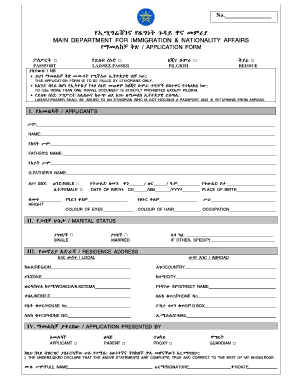
NO Foreign Ministry of form Islamic Republic free printable template
We are not affiliated with any brand or entity on this form

Fill out
Complete the form online in a simple drag-and-drop editor.

eSign
Add your legally binding signature or send the form for signing.

Share
Share the form via a link, letting anyone fill it out from any device.

Export
Download, print, email, or move the form to your cloud storage.
Why pdfFiller is the best tool for your documents and forms


End-to-end document management
From editing and signing to collaboration and tracking, pdfFiller has everything you need to get your documents done quickly and efficiently.
Accessible from anywhere
pdfFiller is fully cloud-based. This means you can edit, sign, and share documents from anywhere using your computer, smartphone, or tablet.
Secure and compliant
pdfFiller lets you securely manage documents following global laws like ESIGN, CCPA, and GDPR. It's also HIPAA and SOC 2 compliant.
What is NO Foreign Ministry of form Islamic Republic
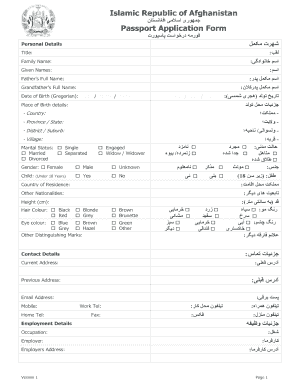
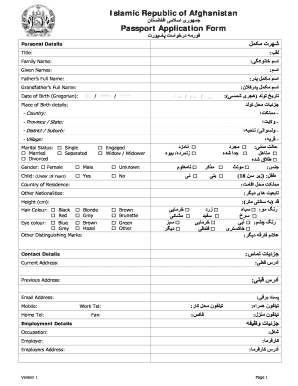
The Afghanistan Passport Application Form is a government document used by individuals to apply for an Afghan passport from the Embassy of Afghanistan in Oslo, Norway.
pdfFiller scores top ratings on review platforms




Easy to use - always pops up when I need it!
Sloppy Documents No More!
It's extremely easy to use and affordable. Worth every penny for our Real Estate team. We go through a ton of documents and PDFfiller keeps us looking professional and not sloppy like some agents we do business with. Professionalism is everything in our line of work.
The ease of use and the finished product! We get contracts from agents who *don't* use PDFfiller and it's hard to take them seriously. Their documents look very unprofessional.
Nothing. It's easy to use and produces perfect results every time. PDFfiller enables us to take pride in our work- which is a direct reflection of our brand as a Real Estate team.
Who needs NO Foreign Ministry of form Islamic Republic?
Explore how professionals across industries use pdfFiller.

NO Foreign Ministry of form Islamic Republic is needed by:
-
Afghan citizens living in Norway
-
Individuals applying for dual nationality
-
Travelers needing a passport for international travel
-
Families requesting passports for children
-
Residents in Oslo seeking embassy services
Comprehensive Guide to NO Foreign Ministry of form Islamic Republic
What is the Afghanistan Passport Application Form?
The Afghanistan Passport Application Form is a critical document used by individuals seeking to apply for an Afghan passport from the Embassy of Afghanistan located in Oslo, Norway. This form requires various personal details, including your name, family information, and employment details, to facilitate the application process. Accurate submission of the form is imperative, as it directly influences the efficiency of your application processing.
Purpose and Benefits of the Afghanistan Passport Application Form
This form serves multiple purposes, chiefly enabling individuals to obtain an Afghan passport, which holds considerable significance for travel and identity verification. Using the Afghanistan Passport Application Form streamlines and organizes the application process, reducing the likelihood of missing information that can lead to delays. Completing this form with precision is essential to avert any potential setbacks during the application review.
Who Should Use the Afghanistan Passport Application Form?
The Afghanistan Passport Application Form is intended for any individual in need of an Afghan passport, whether they are first-time applicants or seeking to renew a passport. Eligibility criteria typically encompass Afghan citizens residing or temporarily located in Norway. Specific circumstances, such as family status or recent changes in personal details, may also necessitate the use of this form.
How to Fill Out the Afghanistan Passport Application Form Online
To fill out the Afghanistan Passport Application Form online, follow these steps:
-
Access the form via pdfFiller.
-
Carefully read the instructions provided.
-
Fill out each field accurately, using examples as a guide.
-
Double-check for common errors, such as typos and incomplete sections.
-
Sign the form inside the designated box.
Avoiding pitfalls during completion is crucial for ensuring your application is processed promptly.
Required Documents and Supporting Materials
When submitting your Afghanistan Passport Application Form, it is vital to include the following documents:
-
A valid form of identification.
-
Recent passport-sized photographs.
-
Proof of residency in Norway.
Additional documentation may be necessary based on your individual circumstances, such as family information, which can further support your application. Including all required supporting documents helps to mitigate potential delays.
Submission Methods and Delivery for the Afghanistan Passport Application Form
Once your form is completed, you have a couple of submission options available:
-
In-person submission at the Embassy of Afghanistan.
-
Mail submission to the embassy with the necessary fee.
After submission, you can expect to receive confirmation of your application status along with details on processing times. Be sure to understand the delivery methods and tracking options to monitor your application’s progress effectively.
Managing Your Application: What Happens Next?
After submitting your Afghanistan Passport Application Form, you'll receive notifications regarding your application's status. To check the status, you can contact the embassy directly for updates. Be aware of common reasons for processing delays, such as missing documentation, and be proactive in addressing any issues that may arise.
Security and Compliance When Submitting Your Form
Submitting your Afghanistan Passport Application Form requires attention to the security of your personal information. pdfFiller employs stringent security measures, including 256-bit encryption, to protect sensitive data. Compliance with regulations such as GDPR ensures that your information is handled with the utmost care. It is advisable to manage and store your submitted applications securely to safeguard your privacy.
Simplify Your Application Process with pdfFiller
Utilizing pdfFiller can greatly enhance your experience in filling out and managing the Afghanistan Passport Application Form. This platform offers various tools to create, edit, and submit your application seamlessly. With features like eSignatures and user-friendly templates, applicants can streamline their application process, making it a more efficient experience.
How to fill out the NO Foreign Ministry of form Islamic Republic
-
1.To access the Afghanistan Passport Application Form, visit pdfFiller's website and search for the document by name or category. Once located, click on the form to open it in the editing interface.
-
2.Navigate through the form using the intuitive layout. Use the zoom feature if necessary to clearly view the fields you need to complete.
-
3.Before starting to fill out the form, gather essential information including your personal details, family information, and employment details.
-
4.Begin filling in your information as instructed in the form, ensuring that each field is completed accurately. Use pdfFiller's tips and guidance for assistance with specific sections.
-
5.After completing the form, review all entries for accuracy and completeness. Check each field twice to avoid common errors.
-
6.Once satisfied with your form, use pdfFiller's save option to store a copy of your completed application. You can choose to download the form in PDF format for your records.
-
7.If required, submit the finished form through pdfFiller's submission options, which may include direct email transmission to the embassy or printing for mailing.

Who is eligible to apply for the Afghanistan Passport Application Form?
Eligibility generally applies to Afghan citizens and those with a clear connection to Afghanistan, including children of Afghan nationals. You should verify specific eligibility requirements with the Embassy of Afghanistan.
What is the typical processing time for the Afghanistan passport application?
Processing times vary but can generally take several weeks. It's advisable to apply well in advance of any planned travel to ensure timely receipt of your passport.
What supporting documents are required to apply for an Afghan passport?
Key documents typically include proof of identity, such as a national ID, medical certificate, photographs, and any previous passports. Refer to the embassy for the complete list.
What are common mistakes applicants should avoid when filling out this form?
Common mistakes include missing signatures, incorrect personal details, or omitting required documents. Double-check your entries and ensure you gather all necessary documentation.
How can I submit the completed Afghanistan Passport Application Form?
You may submit your application either by mailing a printed copy of the completed form along with required documents to the embassy or directly through any digital submission portals provided by the embassy.
Are there any fees associated with the passport application process?
Yes, there are typically fees for processing passport applications, which can vary based on the type of service requested. Check with the embassy for the latest fee schedule.
Can I apply for someone else using the Afghanistan Passport Application Form?
Yes, you can assist others, such as family members, in applying for their passports, but ensure that you have their consent and necessary information to complete the form accurately.
Related Content
Related Forms

Related Catalogs
Get the latest insights from our blog


If you believe that this page should be taken down, please follow our DMCA take down process
here
.
This form may include fields for payment information. Data entered in these fields is not covered by PCI DSS compliance.