
Last updated on
Oct 2, 2026

Get the free After Action Report Form
We are not affiliated with any brand or entity on this form

Fill out
Complete the form online in a simple drag-and-drop editor.

eSign
Add your legally binding signature or send the form for signing.

Share
Share the form via a link, letting anyone fill it out from any device.

Export
Download, print, email, or move the form to your cloud storage.
Why pdfFiller is the best tool for your documents and forms


End-to-end document management
From editing and signing to collaboration and tracking, pdfFiller has everything you need to get your documents done quickly and efficiently.
Accessible from anywhere
pdfFiller is fully cloud-based. This means you can edit, sign, and share documents from anywhere using your computer, smartphone, or tablet.
Secure and compliant
pdfFiller lets you securely manage documents following global laws like ESIGN, CCPA, and GDPR. It's also HIPAA and SOC 2 compliant.
What is AAR Form
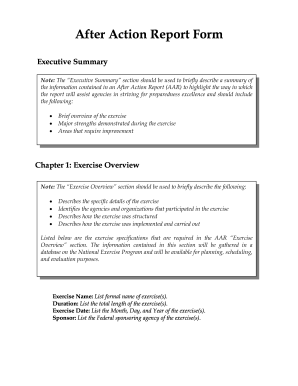
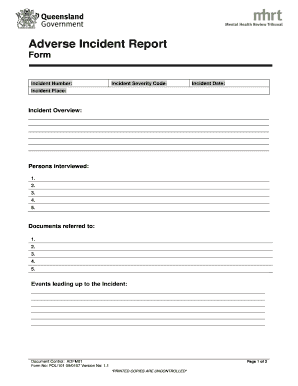
The After Action Report Form is a government document used by agencies to document and evaluate the outcomes of preparedness exercises and incident responses.
pdfFiller scores top ratings on review platforms




Who needs AAR Form?
Explore how professionals across industries use pdfFiller.

AAR Form is needed by:
-
Emergency management agencies
-
Local government officials
-
Public safety organizations
-
Disaster response teams
-
Training coordinators
-
Non-profit disaster relief organizations
Comprehensive Guide to AAR Form
What is the After Action Report Form?
The After Action Report Form serves as a critical tool for agencies involved in emergency management. Its primary purpose is to document and assess the outcomes of preparedness exercises and response actions. By utilizing this form, agencies can evaluate their preparedness levels and response effectiveness, facilitating improvement in future exercises and operations. This report form is vital for organizations looking to enhance their emergency management practices.
Purpose and Benefits of the After Action Report Form
This form offers numerous benefits to agencies by providing a structured approach to documenting exercise outcomes. It helps agencies identify strengths and weaknesses in their response capabilities, ultimately improving preparedness excellence. Moreover, thorough documentation supports the enhancement of future exercises and response strategies. Utilizing a preparedness report template can streamline the evaluation process and promote accountability.
Key Features of the After Action Report Form
The After Action Report Form includes several main sections, each designed to capture crucial information about the exercise. Key sections include:
-
Overview of the exercise
-
Goals and objectives
-
Outcome summaries
This form is applicable for various exercises and evaluations, ensuring its versatility for different emergency scenarios. Users will also find it easy to navigate and complete the form using pdfFiller’s platform, which enhances accessibility for all users.
Who Needs the After Action Report Form?
The After Action Report Form is essential for a wide range of stakeholders, including government agencies, emergency response teams, and other organizations involved in incident management. Specific jurisdictions may have eligibility criteria that mandate the use of this form. Additionally, it plays a crucial role in ensuring compliance with local and federal regulations, further underscoring its significance in emergency management practices.
How to Fill Out the After Action Report Form Online (Step-by-Step)
Filling out the After Action Report Form online using pdfFiller is a straightforward process. Follow these steps:
-
Access the form through the pdfFiller platform.
-
Complete essential fields, including "Exercise Name", "Duration", and "Exercise Date".
-
Ensure that all relevant sections are filled out comprehensively.
-
Review all entered information for accuracy before submission.
Pay attention to details in responses to ensure a thorough evaluation of the exercise outcomes.
Common Errors and How to Avoid Them
When completing the After Action Report Form, users may encounter common pitfalls. Typical mistakes include:
-
Leaving sections incomplete
-
Failing to provide sufficient detail in descriptions
To avoid these errors, thoroughly review the form, recheck for accuracy, and ensure that all required information is consistently provided. Taking the time to double-check details can improve the filing process significantly.
Submission Methods and Delivery
Submitting the completed After Action Report Form can be accomplished via multiple methods, ensuring flexibility for users. Available submission options include:
-
Online submission through pdfFiller
-
Mailing a physical copy
It is essential to be aware of any deadlines related to submissions and to track confirmations of submission to ensure proper delivery of the report.
Security and Compliance for the After Action Report Form
Data security is paramount when handling sensitive documents such as the After Action Report Form. pdfFiller employs advanced security measures that ensure compliance with regulations like HIPAA and GDPR, protecting users' information. Users can have confidence in the confidentiality and integrity of their submitted documents, as security features are designed to safeguard against unauthorized access.
How to Download and Save the After Action Report Form PDF
To keep a completed copy of the After Action Report Form, follow these instructions:
-
Download the form directly from pdfFiller.
-
Save the file in your preferred format (PDF recommended) for future reference or audits.
Having a digital copy is beneficial for documentation and allows for easy access during evaluations.
Ready to Get Started?
Utilize pdfFiller to fill out and submit your After Action Report Form effortlessly. The platform provides editing and sharing features that cater to your needs, making it an excellent choice for your emergency management documentation. Explore other related tools and templates available to enhance your preparedness efforts.
How to fill out the AAR Form
-
1.Access the After Action Report Form by navigating to pdfFiller. Search for 'After Action Report Form' in the document repository.
-
2.Open the form in the pdfFiller interface. Familiarize yourself with each section, ensuring you understand where to input your information.
-
3.Before starting, gather necessary information such as the exercise name, duration, date, and sponsoring agency. Having these details at hand will streamline the filling process.
-
4.Begin completing the form by entering the exercise name in the designated field. Follow the prompts to fill out the duration and date of the exercise.
-
5.Proceed through each section methodically, entering details as instructed. Don’t forget to provide a synopsis of the events, goals, and mission outcomes.
-
6.Once all fields are filled, take a moment to review the information provided. Ensure that all data is complete and accurate to avoid mistakes.
-
7.After reviewing, finalize the document by clicking the save option to store your changes. You can also download a copy for your records.
-
8.Submit the completed form directly through pdfFiller by following the on-screen submission instructions or save it for later submission.

Who is eligible to use the After Action Report Form?
The After Action Report Form is designed for use by authorized personnel in government agencies, emergency management, and organizations involved in preparedness exercises and incident response.
What kind of information must I provide on this form?
You will need to provide details such as the exercise name, duration, date, objectives, mission outcomes, and performance assessments to effectively document the exercise.
How do I submit the After Action Report Form?
You can submit the After Action Report Form through pdfFiller by following the in-platform submission process, which may include emailing a copy to the relevant authority or downloading for manual submission.
Is there a deadline for submitting the After Action Report Form?
Deadlines may vary depending on the specific exercise or agency requirements. It is recommended to submit the form as soon as evaluations are complete to ensure timely feedback.
What common mistakes should I avoid when filling out this form?
Common mistakes include leaving sections incomplete, failing to clarify exercise details adequately, and submitting the form without a review for accuracy and completeness.
How long does it take to process the After Action Report Form?
Processing times can vary depending on the agency involved and their review procedures. Generally, allow several weeks for feedback after submission.
Are there any fees associated with submitting this form?
Typically, there are no fees for submitting the After Action Report Form, as it is often part of governmental or agency evaluations. Check with your agency for specifics.
Related Forms

Related Catalogs
Get the latest insights from our blog


If you believe that this page should be taken down, please follow our DMCA take down process
here
.
This form may include fields for payment information. Data entered in these fields is not covered by PCI DSS compliance.