
Last updated on
Nov 7, 2026
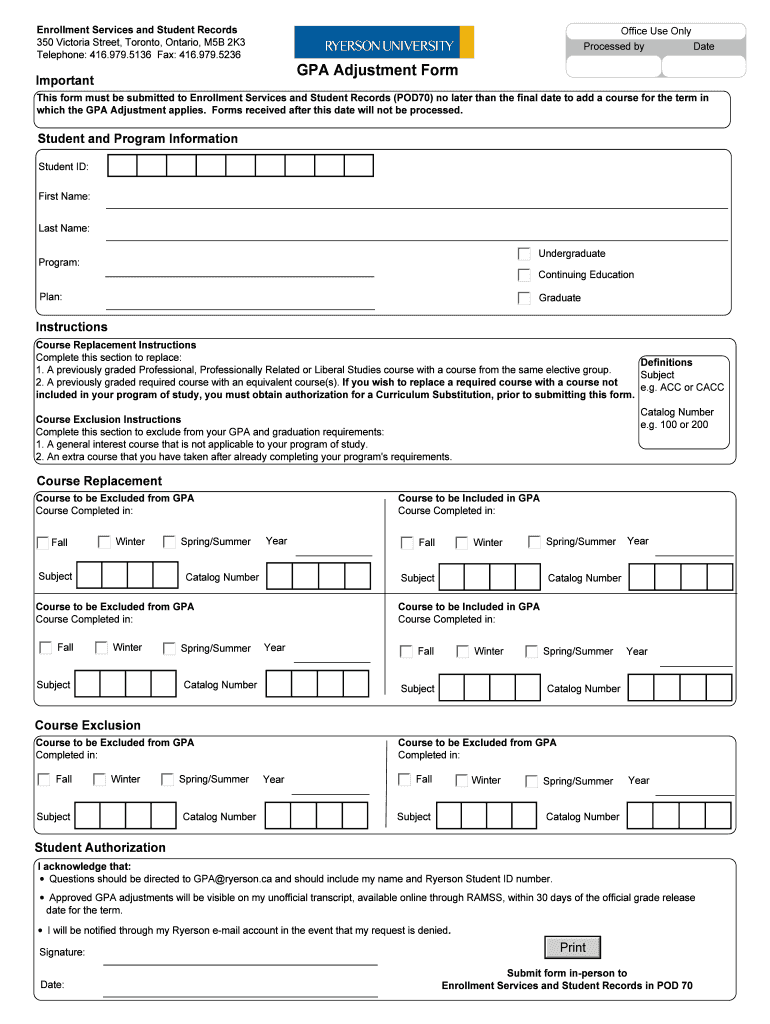
Canada Toronto Metropolitan University GPA Adjustment Request Form 2010 free printable template
We are not affiliated with any brand or entity on this form

Fill out
Complete the form online in a simple drag-and-drop editor.

eSign
Add your legally binding signature or send the form for signing.

Share
Share the form via a link, letting anyone fill it out from any device.

Export
Download, print, email, or move the form to your cloud storage.
Why pdfFiller is the best tool for your documents and forms


End-to-end document management
From editing and signing to collaboration and tracking, pdfFiller has everything you need to get your documents done quickly and efficiently.
Accessible from anywhere
pdfFiller is fully cloud-based. This means you can edit, sign, and share documents from anywhere using your computer, smartphone, or tablet.
Secure and compliant
pdfFiller lets you securely manage documents following global laws like ESIGN, CCPA, and GDPR. It's also HIPAA and SOC 2 compliant.
What is Canada Toronto Metropolitan University GPA Adjustment Request Form
The GPA Adjustment Form is a document used by students to request adjustments to their Grade Point Average (GPA) through course replacement or exclusion.
pdfFiller scores top ratings on review platforms




Who needs Canada Toronto Metropolitan University GPA Adjustment Request Form?
Explore how professionals across industries use pdfFiller.

Canada Toronto Metropolitan University GPA Adjustment Request Form is needed by:
-
Current Ryerson University students seeking GPA adjustments
-
Academic advisors assisting students with academic records
-
Enrollment Services staff handling student requests
-
Registrars managing academic documentation
-
Students considering course changes within Ontario educational institutions
Comprehensive Guide to Canada Toronto Metropolitan University GPA Adjustment Request Form
What is the GPA Adjustment Form?
The GPA Adjustment Form is a critical document for students at Ryerson University seeking adjustments to their Grade Point Average (GPA). This form facilitates the process of requesting changes by allowing students to replace or exclude specific courses that may negatively impact their academic performance.
Designed specifically for students at Ryerson University, this Ontario student form plays a significant role in maintaining accurate academic records.
Purpose and Benefits of the GPA Adjustment Form
The GPA Adjustment Form serves several essential purposes for students. First, it provides a means for academic record adjustments, allowing students to enhance their GPA by excluding courses where their performance was unsatisfactory.
Key benefits of this form include:
-
Improving overall GPA by replacing or excluding underperforming courses.
-
Ensuring a fair representation of academic achievement on transcripts.
Who Needs the GPA Adjustment Form?
Students who are struggling with specific courses or experiencing extenuating circumstances may need to submit the GPA Adjustment Form. This includes those who believe that certain grades are not reflective of their true capabilities.
Common scenarios for utilizing this form include:
-
Struggling to meet expected academic standards in a specific course.
-
Experiencing personal or medical issues that impacted academic performance.
Eligibility Criteria for the GPA Adjustment Form
To utilize the GPA Adjustment Form, students must meet specific eligibility criteria. Typically, these include requirements related to course status and students’ overall academic standing.
Students should be aware of the following prerequisites:
-
Only courses taken within a designated timeframe can be considered for replacement or exclusion.
-
Students must be in good academic standing to submit the form.
How to Fill Out the GPA Adjustment Form Online (Step-by-Step)
Filling out the GPA Adjustment Form online requires attention to detail. Follow these step-by-step instructions to ensure accurate completion:
-
Begin by entering your Student ID and personal information, including your first and last name.
-
Provide details about the courses you wish to replace or exclude.
-
Check the appropriate boxes for course replacement or exclusion as applicable.
-
Review all information for accuracy before submission.
Common Errors and How to Avoid Them
While filling out the GPA Adjustment Form, students may encounter common errors that could lead to delays or rejections. Being aware of these can help ensure a smoother submission process.
Common mistakes include:
-
Omitting required signatures from the form.
-
Providing incorrect course details, which can lead to processing complications.
To avoid these errors, double-check all entries and ensure all required fields are properly filled.
Submission Methods and Delivery
Students can submit the GPA Adjustment Form through multiple methods. Understanding these options ensures that the form reaches the correct destination without issue.
-
Online submission through the Ryerson University portal.
-
In-person submission to Enrollment Services and Student Records.
What Happens After You Submit the GPA Adjustment Form?
After submitting the GPA Adjustment Form, students can expect a confirmation of receipt. The processing time may vary, so staying informed about the status of the request is advisable.
Once processed, any approved adjustments will be reflected in the student's academic records, ensuring that the transcript accurately represents their achievements.
Security and Compliance for the GPA Adjustment Form
Security is a paramount concern when submitting sensitive information. The GPA Adjustment Form is designed with robust data protection measures, including 256-bit encryption.
Students should be assured that their information is handled in compliance with relevant privacy and data protection policies.
Streamline Your Submission with pdfFiller
To enhance the process of completing and submitting the GPA Adjustment Form, consider using pdfFiller. This platform offers a variety of features aimed at making the form-filling experience more efficient.
With pdfFiller, students can:
-
Edit text and images directly on the form.
-
eSign for quick approval and submission.
-
Manage forms in one convenient location for easy access.
How to fill out the Canada Toronto Metropolitan University GPA Adjustment Request Form
-
1.To access the GPA Adjustment Form on pdfFiller, visit the pdfFiller website and use the search bar to find 'GPA Adjustment Form.' Click on the form title to open it.
-
2.Once the form is open, navigate through the first few fields where you'll need to fill in your personal details, including 'Student ID,' 'First Name,' 'Last Name,' and 'Program.'
-
3.Before starting, gather all necessary information, such as details of the courses you wish to replace or exclude. Have your academic records handy to ensure accuracy.
-
4.Use pdfFiller's fillable fields to enter the required information clearly and legibly. You can click on each field and type directly, ensuring no sections are left blank.
-
5.Take advantage of checkboxes within the form to indicate if you're requesting course replacement or exclusion. Make sure to check all relevant options that apply to your situation.
-
6.Review all filled information for correctness and ensure that your signature is added in the designated space at the end of the form.
-
7.Once you have completed the form and confirmed all details, utilize the 'Save' feature to keep a copy for your records.
-
8.You can download the form as a PDF or submit it directly through pdfFiller, following the prompts provided in the interface.

Who is eligible to use the GPA Adjustment Form?
The GPA Adjustment Form is intended for current students enrolled at Ryerson University who seek to adjust their GPA by replacing or excluding certain courses.
What information do I need to complete the form?
You will need your Student ID, personal information including first and last name, program details, and specifics of the courses you wish to replace or exclude.
How do I submit the GPA Adjustment Form?
After completing the form, you can submit it directly through the pdfFiller platform or save and send it to the Enrollment Services and Student Records office at Ryerson University.
Are there any deadlines for submitting the GPA Adjustment Form?
While the exact deadline may vary, it's advisable to submit your form as soon as possible to ensure timely processing ahead of grading periods or program deadlines.
What are common mistakes to avoid when filling out the form?
Ensure that all personal details are accurate, avoid leaving any required fields blank, and double-check your selection for course replacement or exclusion to prevent delays.
How long does it take to process the GPA Adjustment Form?
Processing times may vary, but it typically takes several weeks. It is best to check with Enrollment Services for the current processing timeline.
Is notarization required for the GPA Adjustment Form?
No, notarization is not required for the GPA Adjustment Form, simplifying the submission process for students.
Canada Toronto Metropolitan University GPA Adjustment Request Form Form Versions
Related Forms





Get the latest insights from our blog


If you believe that this page should be taken down, please follow our DMCA take down process
here
.
This form may include fields for payment information. Data entered in these fields is not covered by PCI DSS compliance.