
Last updated on
Nov 10, 2026

WA GroupHealth DA-2776 2015-2026 free printable template
pdfFiller is not affiliated with any government organization

Fill out
Complete the form online in a simple drag-and-drop editor.

eSign
Add your legally binding signature or send the form for signing.

Share
Share the form via a link, letting anyone fill it out from any device.

Export
Download, print, email, or move the form to your cloud storage.
Why pdfFiller is the best tool for your documents and forms


End-to-end document management
From editing and signing to collaboration and tracking, pdfFiller has everything you need to get your documents done quickly and efficiently.
Accessible from anywhere
pdfFiller is fully cloud-based. This means you can edit, sign, and share documents from anywhere using your computer, smartphone, or tablet.
Secure and compliant
pdfFiller lets you securely manage documents following global laws like ESIGN, CCPA, and GDPR. It's also HIPAA and SOC 2 compliant.
What is WA GroupHealth DA-2776
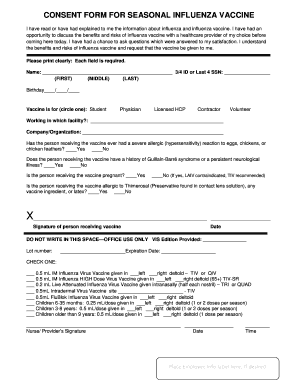
The FluMist Adult Vaccine Consent Form is a patient consent document used by healthcare providers in the US to obtain approval from adults aged 19 and older for the FluMist vaccine.
pdfFiller scores top ratings on review platforms




Who needs WA GroupHealth DA-2776?
Explore how professionals across industries use pdfFiller.

WA GroupHealth DA-2776 is needed by:
-
Adults aged 19 and older receiving the FluMist vaccine.
-
Healthcare providers administering the FluMist vaccine.
-
Clinics and hospitals offering flu vaccinations.
-
Public health organizations distributing flu vaccinations.
-
Parents or guardians of adult patients seeking consent.
Comprehensive Guide to WA GroupHealth DA-2776
What is the FluMist Adult Vaccine Consent Form?
The FluMist Adult Vaccine Consent Form is a crucial document used by healthcare providers to obtain consent from adults aged 19 and over for the administration of the FluMist (Intranasal) vaccine. This form plays a significant role in healthcare settings, ensuring patients understand the implications of receiving the vaccine. The consent form is required for one’s participation in this vaccination process, emphasizing patient rights and safety during healthcare procedures.
Purpose and Benefits of the FluMist Adult Vaccine Consent Form
The necessity of a consent form prior to vaccination cannot be overstated. It ensures that individuals are informed about the health implications related to the vaccine, thus promoting safety and legality in medical practices. Patients are encouraged to thoroughly review the Vaccine Information Statements (VIS) provided by the CDC, which are essential for understanding potential risks and benefits associated with the vaccine.
Possessing a well-structured vaccine authorization form enhances patient awareness and supports informed consent, ultimately ensuring that individuals make educated decisions regarding their health.
Who Needs the FluMist Adult Vaccine Consent Form?
This form is specifically designed for patients receiving the adult flu vaccine along with healthcare providers administering it. It is crucial for patients to complete this form prior to receiving the FluMist vaccine. Certain health conditions may affect eligibility, emphasizing the need for clear communication regarding health status and vaccination requirements.
Individuals should inquire about specific circumstances in which this consent form is required, as it safeguards both the patient's and provider's responsibilities in vaccination procedures.
How to Fill Out the FluMist Adult Vaccine Consent Form Online
-
Access the form on pdfFiller and select the option to fill it out electronically.
-
Carefully complete all health-related questions to ensure accurate information is provided.
-
Sign in the designated consent signature section to indicate your acceptance.
-
Review the completed form for accuracy before submission.
Accuracy is paramount while providing health information, as it affects eligibility and safety when receiving the vaccine. A digital format streamlines this process for ease of completion.
Field-by-Field Instructions for Completing the FluMist Form
The FluMist consent form comprises several sections, including health questions and the consent agreement. Each section has critical information that must be completed accurately. Common pitfalls include overlooking health-related questions or misunderstanding signature requirements, such as the difference between a digital signature and a wet signature.
Understanding these requirements is essential to ensure the form is completed correctly, thus preventing delays in your vaccination process.
How to Submit the FluMist Adult Vaccine Consent Form
Once completed, the FluMist Adult Vaccine Consent Form can be submitted through various methods. Acceptable submission methods include online uploads or print and mail options. It is essential to verify the instructions on where to send the completed form to ensure timely processing.
Patients should also be aware that there may be associated fees and expected processing times, which can vary based on the submission method selected.
What Happens After You Submit the FluMist Form?
After submission of the FluMist consent form, a follow-up process is in place to ensure everything is in order. Patients may want to track their submission to confirm its acceptance and address any issues. In the event of a rejection, it is vital to know how to amend the form to correct any errors, ensuring a smooth transition to receiving the vaccine.
Security and Compliance for the FluMist Adult Vaccine Consent Form
When utilizing pdfFiller for the FluMist Adult Vaccine Consent Form, document security is a top priority. pdfFiller employs 256-bit encryption and adheres to both SOC 2 Type II and HIPAA regulations to ensure compliance with data protection standards.
Safe handling of health-related documents is paramount, and understanding the security measures in place fosters trust between patients and healthcare providers.
How pdfFiller Supports You in Completing the FluMist Adult Vaccine Consent Form
pdfFiller offers various features designed to streamline the form completion process, including editing, signing, and sharing capabilities. This digital platform provides significant advantages over traditional methods, making the creation and management of healthcare consent forms much more efficient.
Using a reliable PDF editor like pdfFiller simplifies the completion of necessary forms while prioritizing user convenience and document security.
A Sample Completed FluMist Adult Vaccine Consent Form
For reference, a filled sample of the FluMist Adult Vaccine Consent Form can serve as a useful guide for individuals looking to complete their own forms. This example breaks down each section clearly, helping users to interpret the requirements effectively.
By examining a sample form, patients can better understand how to fill out their own forms correctly, ensuring they meet all necessary conditions for vaccination.
How to fill out the WA GroupHealth DA-2776
-
1.Start by accessing the FluMist Adult Vaccine Consent Form on pdfFiller. Visit the pdfFiller website and use the search function to locate the form quickly.
-
2.Once the form is opened, familiarize yourself with the layout. Navigate through the document, which features multiple checkboxes and blank fields for your input.
-
3.Before filling out the form, gather all necessary health-related information, including any relevant medical conditions or medications currently being used. This will help you answer the eligibility questions accurately.
-
4.Begin filling in your personal information in the designated fields. Make sure to enter your full name, date of birth, and any other required data.
-
5.As you reach the health-related questions, carefully read each item and select the appropriate options using the checkboxes. If any health conditions apply to you, ensure they are marked accurately.
-
6.Proceed to the section requiring your signature. It’s crucial to indicate your consent clearly, as this finalizes your agreement to receive the FluMist vaccine.
-
7.After completing all fields, double-check your entries for accuracy and completeness. Reviewing ensures you haven't missed any important details.
-
8.Finally, save your completed form. Use the option to download or directly submit the form through pdfFiller, depending on your healthcare provider’s instructions.

What are the eligibility requirements for the FluMist vaccine?
Eligibility for the FluMist vaccine typically includes adults aged 19 and older who do not have contraindicating health conditions. Ensure to review the checklist on the consent form to understand any specific health questions.
Are there deadlines to submit the FluMist consent form?
While there is no strict deadline, it’s advised to submit the FluMist consent form before your scheduled vaccination appointment to ensure a smooth process.
How should I submit the completed FluMist consent form?
You can submit the completed consent form either by downloading it and bringing it to your vaccination appointment or by submitting it directly through the pdfFiller platform if your provider allows.
What supporting documents do I need to provide with the consent form?
Typically, no additional supporting documents are required, but checking with your healthcare provider is wise, especially if you have specific health conditions or are on certain medications.
What common mistakes should I avoid when completing this form?
Common mistakes include failing to provide complete answers to health questions or not signing the document. Ensure each section is thoroughly checked before finalizing.
How long does it take to process the submitted consent form?
Processing times for the consent form can vary based on the healthcare provider's policies. Generally, it is processed quickly, especially if submitted through pdfFiller.
What should I do if I have concerns about the FluMist vaccine?
For concerns about the FluMist vaccine, consult your healthcare provider before signing the consent form. They can provide information on benefits, risks, and address specific health questions.
Related Forms

Related Catalogs
Get the latest insights from our blog



If you believe that this page should be taken down, please follow our DMCA take down process
here
.
This form may include fields for payment information. Data entered in these fields is not covered by PCI DSS compliance.