
Last updated on
Nov 9, 2026
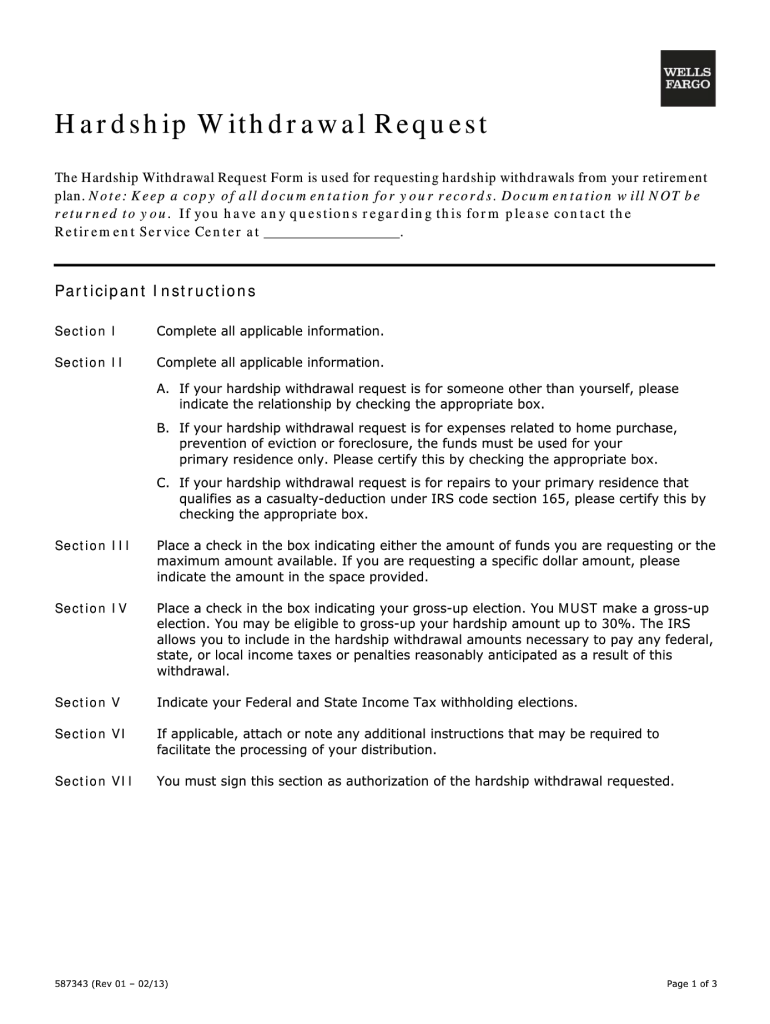
Wells Fargo 587343 2013 free printable template
pdfFiller is not affiliated with any government organization

Fill out
Complete the form online in a simple drag-and-drop editor.

eSign
Add your legally binding signature or send the form for signing.

Share
Share the form via a link, letting anyone fill it out from any device.

Export
Download, print, email, or move the form to your cloud storage.
Why pdfFiller is the best tool for your documents and forms


End-to-end document management
From editing and signing to collaboration and tracking, pdfFiller has everything you need to get your documents done quickly and efficiently.
Accessible from anywhere
pdfFiller is fully cloud-based. This means you can edit, sign, and share documents from anywhere using your computer, smartphone, or tablet.
Secure and compliant
pdfFiller lets you securely manage documents following global laws like ESIGN, CCPA, and GDPR. It's also HIPAA and SOC 2 compliant.
What is Wells Fargo 587343
The Wells Fargo 587343 is a financial document used by individuals or businesses to manage and document banking transactions efficiently.
pdfFiller scores top ratings on review platforms




It's great! It makes the court submission very professional!
This is my first time using PDF filler, but I like the ability to work with PDF documents this program has given me so far. I would really like the ability to highlight and possibly copy the PDF over to a word or excel document. But being able to highlight and put a sticky is excellent!!!
Who needs Wells Fargo 587343?
Explore how professionals across industries use pdfFiller.

Wells Fargo 587343 is needed by:
-
Individuals seeking to track personal banking activities
-
Small business owners needing to reconcile accounts
-
Financial advisors preparing statements for clients
-
Accounting professionals managing transaction records
-
Tax preparation services compiling financial data
Comprehensive Guide to Wells Fargo 587343
What is the Wells Fargo 587343?
The Wells Fargo 587343 form serves as an essential document used in various banking processes. This form primarily functions to collect necessary information from clients, helping streamline service delivery. Established within the context of banking, the form has evolved to play a significant role in facilitating transactions and ensuring compliance with regulatory requirements. Understanding its definition and purpose is vital for users looking to navigate banking processes efficiently.
Benefits of Using the Wells Fargo 587343
Properly completing the Wells Fargo 587343 can yield significant advantages for users. By filling out the form accurately, individuals can avoid delays in processing, ultimately leading to faster service. Some potential financial implications include qualification for loans or other banking products that depend on correctly submitted documentation. A comprehensive understanding of the benefits highlights the importance of attention to detail when utilizing this form.
Who Needs the Wells Fargo 587343?
The Wells Fargo 587343 is primarily designed for individuals and businesses engaged in banking activities that require detailed documentation. Common users of this form include:
-
Personal account holders applying for loans.
-
Businesses requesting financial services.
-
Clients updating personal or business information.
Additionally, situations such as moving to a new address or changing account information often necessitate filling out the Wells Fargo 587343.
How to Fill Out the Wells Fargo 587343 Online
Filling out the Wells Fargo 587343 online can be a straightforward process when following these steps:
-
Access the Wells Fargo 587343 form on pdfFiller.
-
Enter personal information in the required fields.
-
Review for accuracy and completeness.
-
Save your progress frequently.
-
Submit the form when all details are filled out correctly.
Make sure to include all common fields like personal identification and account numbers to ensure thorough completion.
Common Errors and How to Avoid Them
Users often encounter mistakes while completing the Wells Fargo 587343. To enhance accuracy, be aware of these common pitfalls:
-
Omitting required information.
-
Filling out sections with incorrect details.
-
Failure to review the document before submission.
To avoid these errors, double-check each field and utilize pdfFiller’s editing features to ensure compliance and accuracy.
How to Submit the Wells Fargo 587343 Form
Submitting the Wells Fargo 587343 form can be done through various methods, including:
-
Online submission via pdfFiller.
-
Mailing the completed form to a designated address.
Be mindful of important deadlines and processing times associated with each submission method to ensure timely processing.
Security and Compliance When Using the Wells Fargo 587343
When dealing with sensitive information, security and compliance are critical. The Wells Fargo 587343 form adheres to high standards, including:
-
256-bit encryption for data protection.
-
Compliance with HIPAA and GDPR regulations.
pdfFiller prioritizes data protection, assuring users of the safety of their information during the form-filling process.
How to Track Your Submission Status for the Wells Fargo 587343
Tracking the status of your Wells Fargo 587343 submission is straightforward. Users can confirm their submission through the following methods:
-
Checking online within the pdfFiller platform.
-
Contacting customer service for specific status updates.
Common reasons for delays may include processing backlogs or missing information, so ensure to follow up if the status remains unchanged.
What Happens After You Submit the Wells Fargo 587343?
After submitting the Wells Fargo 587343, users can expect several outcomes. Typically, you will receive:
-
A confirmation of your submission.
-
Information on any additional steps required.
Understanding this post-submission process can alleviate concerns about the status and effectiveness of your application.
Experience Effortless Form Filling with pdfFiller
Utilizing pdfFiller for completing the Wells Fargo 587343 form significantly simplifies the experience. The platform offers unique features that facilitate user-friendly form filling, including:
-
Easy text and image editing capabilities.
-
Secure eSigning functions.
The practical design and security measures make pdfFiller a reliable choice for managing form submission efficiently.
How to fill out the Wells Fargo 587343
-
1.To begin, access pdfFiller and search for the Wells Fargo 587343 form using the search bar.
-
2.Once located, click on the form to open it within pdfFiller's editing interface.
-
3.Review the form to understand which fields you need to complete.
-
4.Before filling out the form, gather necessary information like transaction dates, amounts, and account details to ensure accuracy.
-
5.Navigate to each field on the form and click to start typing your information.
-
6.Use pdfFiller's tools to adjust the text size or style as needed for clarity.
-
7.Once you've filled in all necessary fields, take a moment to review your entries for any errors or omissions.
-
8.After confirming that the information is correct, you can finalize your form by saving it directly from pdfFiller.
-
9.Choose your preferred option to download the completed form or submit it via email through pdfFiller.

What are the eligibility requirements for using the Wells Fargo 587343 form?
There are no specific eligibility requirements; anyone with banking transactions can use the Wells Fargo 587343 form to document their financial activities.
Is there a deadline for completing the Wells Fargo 587343 form?
While there is no specific deadline for this form, it is recommended to complete it promptly after transactions to ensure accurate record-keeping for budgeting or tax purposes.
How can I submit the Wells Fargo 587343 form once completed?
You can submit the Wells Fargo 587343 form through electronic means by using pdfFiller to email it directly, or by downloading it and sending it through physical mail as needed.
Are there any required supporting documents needed with this form?
No additional supporting documents are typically required when using the Wells Fargo 587343 form; however, having transaction receipts may be helpful for accurate entry.
What common mistakes should I avoid when filling out the Wells Fargo 587343 form?
Common mistakes include entering incorrect transaction amounts, missing dates, or omitting necessary account details, so double-check all entries before finalizing.
What is the processing time for transaction entries in the Wells Fargo 587343 form?
Processing times vary, but data entries are typically immediate once recorded in electronic format. However, it may take a few days for bank reconciliation.
Can I edit the Wells Fargo 587343 form after saving it?
Yes, you can reopen and edit the Wells Fargo 587343 form any time in pdfFiller before final submission or archiving.
Wells Fargo 587343 Form Versions
Related Content
Related Forms



Related Catalogs
Get the latest insights from our blog


If you believe that this page should be taken down, please follow our DMCA take down process
here
.
This form may include fields for payment information. Data entered in these fields is not covered by PCI DSS compliance.