

Get the free UK Jobseeker’s Allowance Change of Circumstances Form
We are not affiliated with any brand or entity on this form

Fill out
Complete the form online in a simple drag-and-drop editor.

eSign
Add your legally binding signature or send the form for signing.

Share
Share the form via a link, letting anyone fill it out from any device.

Export
Download, print, email, or move the form to your cloud storage.
Why pdfFiller is the best tool for your documents and forms


End-to-end document management
From editing and signing to collaboration and tracking, pdfFiller has everything you need to get your documents done quickly and efficiently.
Accessible from anywhere
pdfFiller is fully cloud-based. This means you can edit, sign, and share documents from anywhere using your computer, smartphone, or tablet.
Secure and compliant
pdfFiller lets you securely manage documents following global laws like ESIGN, CCPA, and GDPR. It's also HIPAA and SOC 2 compliant.
What is JSA460 Form
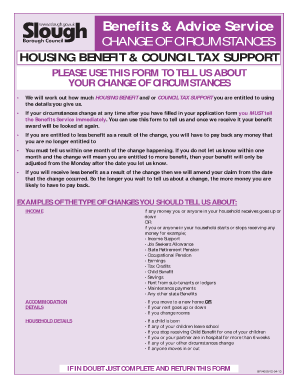
The UK Jobseeker’s Allowance Change of Circumstances Form is a government document used by individuals receiving Jobseeker’s Allowance to report relevant changes in their circumstances.
pdfFiller scores top ratings on review platforms




Who needs JSA460 Form?
Explore how professionals across industries use pdfFiller.

JSA460 Form is needed by:
-
Individuals currently receiving Jobseeker’s Allowance
-
Partners of Jobseeker’s Allowance claimants
-
Anyone experiencing changes that may impact their benefits
-
Citizens reporting changes in marital status or address
-
Job seekers needing to update their financial situation
-
Individuals submitting benefits change notifications
How to fill out the JSA460 Form
-
1.Begin by accessing the JSA460 form on pdfFiller. Visit the pdfFiller website and use the search function to find the UK Jobseeker’s Allowance Change of Circumstances Form.
-
2.Once displayed, click on the form to open it. Familiarize yourself with the various sections and fields that need to be completed.
-
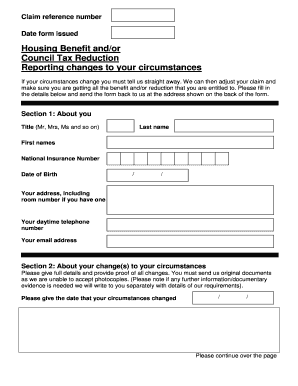
3.Before starting, gather all necessary documentation. This includes your National Insurance number, details on any changes to your circumstances, and any relevant supporting documents.
-
4.Navigate through the form by clicking on each field to enter your information. Fill in required fields such as your surname, date of birth, and income details as prompted.
-
5.Check any applicable checkboxes and provide answers in the designated blank spaces according to the instructions provided within the form.
-
6.Review the completed form thoroughly. Ensure all information is accurate and that you have attached any necessary supporting documents as instructed.
-
7.After thoroughly reviewing, finalize your form by signing and dating the declaration section. Make sure to check that both you and your partner (if applicable) have signed the form where required.
-
8.Once finalized, save your work on pdfFiller. You can download the completed form as a PDF or choose to submit it directly through pdfFiller, following their submission instructions.

Who is eligible to use the UK Jobseeker’s Allowance Change of Circumstances Form?
The form is intended for any individuals currently receiving Jobseeker’s Allowance, including their partners, who need to report changes that may affect their benefits, such as alterations in income or marital status.
What type of changes must be reported using this form?
Changes that affect your Jobseeker’s Allowance, such as change of address, marital status, or income, must be reported with this form to ensure your benefits are accurately adjusted.
What supporting documents are required when submitting the form?
You may need to provide documentation that supports your reported changes, such as pay slips, proof of marriage or divorce, utility bills, or any correspondence regarding your benefits.
How do I submit the completed JSA460 form?
You can submit the completed JSA460 form by mailing it to the issuing office or electronically through pdfFiller after completing it. Make sure to confirm submission methods as per your local guidelines.
Are there any common mistakes to avoid when filling out the form?
Common mistakes include leaving required fields blank, not providing necessary supporting documents, or failing to sign the form. Double-check all entries for accuracy before submission.
How long does it take to process changes after submitting this form?
Processing times can vary, but expect it to take a few weeks for the relevant office to review the changes. It's advisable to keep track of your submission and follow up if necessary.
When is the form required to be submitted?
The form should be submitted as soon as any change occurs that affects your Jobseeker’s Allowance eligibility or amount. Delaying submission can lead to errors in your benefits.
Related Content
Related Forms




Get the latest insights from our blog


If you believe that this page should be taken down, please follow our DMCA take down process
here
.
This form may include fields for payment information. Data entered in these fields is not covered by PCI DSS compliance.