
Last updated on
Oct 31, 2026

India Canara HSBC Life Insurance Policy Servicing Form (D) 2013-2026 free printable template
We are not affiliated with any brand or entity on this form

Fill out
Complete the form online in a simple drag-and-drop editor.

eSign
Add your legally binding signature or send the form for signing.

Share
Share the form via a link, letting anyone fill it out from any device.

Export
Download, print, email, or move the form to your cloud storage.
Why pdfFiller is the best tool for your documents and forms


End-to-end document management
From editing and signing to collaboration and tracking, pdfFiller has everything you need to get your documents done quickly and efficiently.
Accessible from anywhere
pdfFiller is fully cloud-based. This means you can edit, sign, and share documents from anywhere using your computer, smartphone, or tablet.
Secure and compliant
pdfFiller lets you securely manage documents following global laws like ESIGN, CCPA, and GDPR. It's also HIPAA and SOC 2 compliant.
What is India Canara HSBC Life Insurance Policy Servicing Form (D)
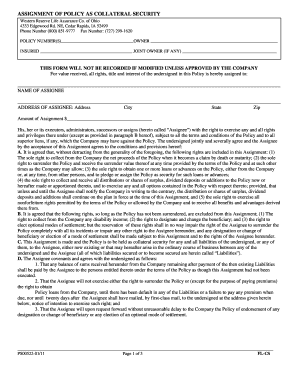
The Policy Assignment Form is a business document used by policyholders to transfer ownership of an insurance policy to another party.
pdfFiller scores top ratings on review platforms




Customer support was very helpful not to mention 24/7. They were able to remotely take over my computer and trouble shoot all my problems.
Easy to use and is very intuitive form to fill out, save, print & email
Who needs India Canara HSBC Life Insurance Policy Servicing Form (D)?
Explore how professionals across industries use pdfFiller.

India Canara HSBC Life Insurance Policy Servicing Form (D) is needed by:
-
Current policyholders looking to assign their policy
-
New policyholders acquiring an insurance policy
-
Insurance agents facilitating transfers
-
Legal representatives managing insurance transactions
-
Administrators in insurance companies handling document processes
Comprehensive Guide to India Canara HSBC Life Insurance Policy Servicing Form (D)
What is the Policy Assignment Form?
The Policy Assignment Form is a critical document used to transfer ownership of an insurance policy from the current policyholder, known as the Assignor, to another party referred to as the Assignee. This form plays a vital role in legally executing the transfer of rights and responsibilities associated with an insurance policy.
In this process, the Assignor must provide specific details, such as their intent for the assignment and the identity of the Assignee. The form also includes essential signatures and complies with the Insurance Act, 1938, ensuring legal validity and adherence to regulatory standards.
Purpose and Benefits of the Policy Assignment Form
The primary purpose of the Policy Assignment Form is to facilitate the legal transfer of ownership of an insurance policy. It offers several advantages for both parties involved in the transaction.
-
This form provides clarity by outlining the responsibilities of both the Assignor and the Assignee.
-
It enhances security during the transaction process, safeguarding both parties' interests.
-
Situations such as transferring policies for estate planning or sale of a policy illustrate when this form becomes necessary.
Who Needs the Policy Assignment Form?
Various individuals and businesses may find themselves needing the Policy Assignment Form based on their circumstances. Understanding the target audience is essential for proper utilization of this document.
-
Individuals who are transferring policies to family members or beneficiaries.
-
Businesses that need to transfer ownership of corporate insurance policies.
-
Anyone involved in estate planning or selling insurance policies.
The relationship between the Assignor and Assignee also plays a crucial role in determining the necessity of this form.
Key Features of the Policy Assignment Form
The Policy Assignment Form includes several key features that enhance its functionality and user-friendliness.
-
Essential sections require the identity proof of the Assignee and the reason for the assignment.
-
It comprises fillable fields ensuring all necessary information is collected.
-
There are mandatory signature fields for both the Assignor and Assignee, which must be completed for the form to be valid.
Additionally, the document includes authorization for the insurance company to dispatch policy documents to the Assignee post-registration.
How to Fill Out the Policy Assignment Form Online (Step-by-Step)
Completing the Policy Assignment Form using pdfFiller is straightforward when following a step-by-step approach. Here is how to effectively fill out the form:
-
Access the Policy Assignment Form through pdfFiller.
-
Provide the required information, including the names and contact details of both the Assignor and Assignee.
-
Complete the sections specifying the reason for the assignment and any additional relevant details.
-
Ensure that all required fields are filled and confirm correctness in the entries.
-
Utilize user-friendly features in pdfFiller to simplify your experience, such as auto-fill options.
Common Errors and How to Avoid Them
When filling out the Policy Assignment Form, users often encounter various pitfalls. Awareness of these common errors can help streamline the process.
-
Incomplete information can lead to processing delays; always ensure all fields are properly filled.
-
Signature discrepancies can also cause problems; verify that both parties have signed where required.
-
Utilizing eSign features reduces the chances of errors in signing and enhances document security.
How to Sign the Policy Assignment Form
Signing the Policy Assignment Form involves understanding specific requirements regarding both digital and wet signatures.
-
Both the Assignor and Assignee are required to provide their signatures for the form to be valid.
-
Digital signatures serve the same purpose as traditional ink signatures, with added convenience and security.
-
When signing electronically through pdfFiller, users benefit from enhanced security features designed to protect sensitive information.
Where to Submit the Policy Assignment Form
After completing the Policy Assignment Form, users must follow the correct submission procedures to ensure proper processing.
-
Forms can be submitted online via pdfFiller, through traditional mail, or in-person, depending on the insurance provider's requirements.
-
Be aware of any relevant fees associated with submission, as well as deadlines and processing times.
-
Once filed, users can track their submission status for peace of mind.
Security and Compliance for the Policy Assignment Form
Handling sensitive documents requires a strong focus on security and compliance. pdfFiller implements several measures to ensure data protection.
-
Data security is enforced through 256-bit encryption, making it difficult for unauthorized users to access your information.
-
The platform is compliant with privacy regulations such as HIPAA and GDPR, ensuring user data is handled responsibly.
-
Users can rest assured that document handling and storage practices are both secure and reliable.
Experience Effortless Form Management with pdfFiller
pdfFiller provides a comprehensive solution for managing the Policy Assignment Form. Users can enjoy a seamless experience in filling, editing, and signing documents online.
With robust security measures in place, pdfFiller prioritizes user peace of mind. It is an excellent choice for anyone looking to manage their Policy Assignment Form efficiently.
Start utilizing pdfFiller today to create your Policy Assignment Form effortlessly.
How to fill out the India Canara HSBC Life Insurance Policy Servicing Form (D)
-
1.To access the Policy Assignment Form on pdfFiller, visit the pdfFiller website and use the search bar to enter 'Policy Assignment Form'. Select the document from the results.
-
2.Once the form opens, familiarize yourself with the layout. Navigate through the fillable areas using your mouse or keyboard. Click on each field to enter specific information.
-
3.Before completing the form, gather necessary details such as the policy number, reason for assignment, and contact details for both the Assignor and Assignee. This information is crucial for accurate completion.
-
4.Fill out the required fields, making sure to follow any on-screen instructions. Provide the reason for the assignment, relationship of the Assignee, and ensure all signatures are included where indicated.
-
5.After filling out the form, review all entered information for accuracy. Check if all required fields are completed and that the signatures of both parties are present.
-
6.Once you are satisfied with the information provided, you can save the form by clicking the 'Save' button. To download it as a PDF, select 'Download' from the options available.
-
7.Finally, if submission is needed, follow the prompts for emailing or submitting the completed form directly from pdfFiller. Ensure to check for any specific submission guidelines set by the insurance provider.

Who is eligible to use the Policy Assignment Form?
The Policy Assignment Form can be used by current policyholders (Assignors) transferring their policy to another individual or party (Assignees). Ensuring all parties meet the insurance company's requirements is important.
What details are required to fill out this form?
Essential details include the policyholder's information, the reason for the assignment, the relationship with the Assignee, contact information, and the required signatures from both parties.
How do I submit the completed form?
Once the form is completed, you can submit it by either emailing the document to the insurance provider or following specific submission guidelines provided by them. Check with the company for any preferences.
Are any supporting documents required?
Yes, typically you might need proof of identity for the Assignee and possibly the Assignor. It's advisable to check with your insurance provider for their specific document requirements.
What are common mistakes to avoid when filling out this form?
Common mistakes include incomplete signatures, missing information in the required fields, and not providing necessary supporting documents. Double-check all sections before submission.
What is the processing time for the assignment?
Processing times can vary by insurance provider. Generally, you can expect a few days to a couple of weeks for the assignment to be processed after submission, but confirm with your provider for specifics.
Is notarization required for the Policy Assignment Form?
No, notarization is not required for this form as per the provided information. However, it is a good idea to verify this with your insurance provider in case they have specific policies.
Related Content
Related Forms





Related Catalogs
Get the latest insights from our blog


If you believe that this page should be taken down, please follow our DMCA take down process
here
.
This form may include fields for payment information. Data entered in these fields is not covered by PCI DSS compliance.