
Last updated on
Nov 6, 2026
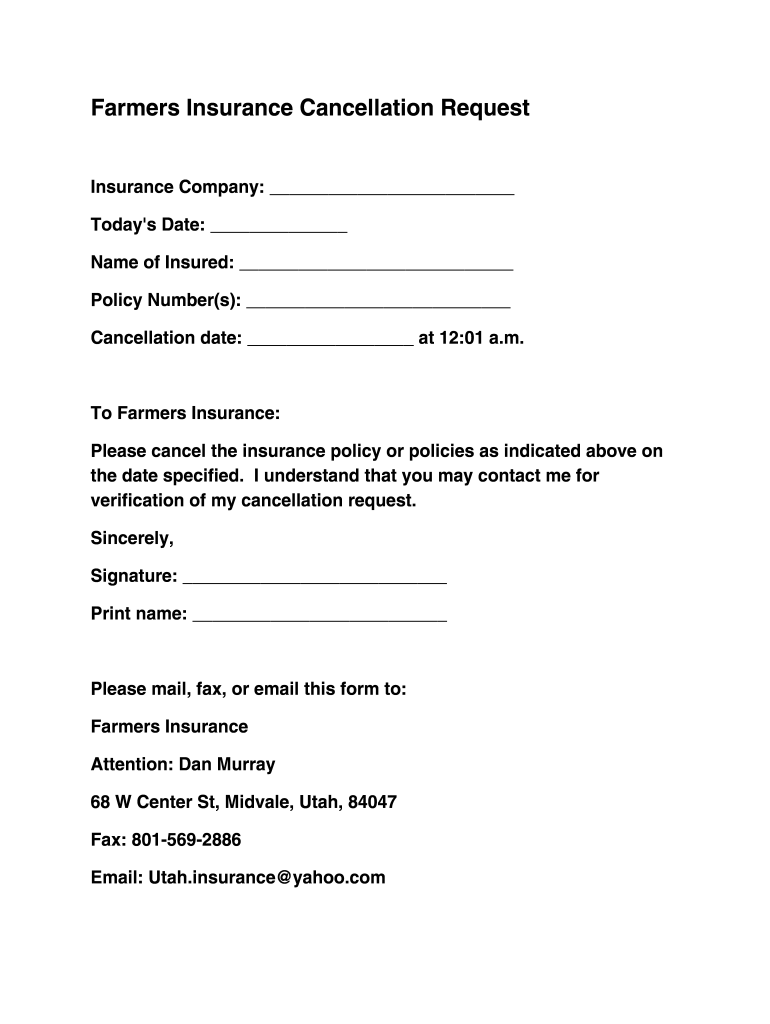
Farmers Insurance Cancellation Request free printable template
pdfFiller is not affiliated with any government organization

Fill out
Complete the form online in a simple drag-and-drop editor.

eSign
Add your legally binding signature or send the form for signing.

Share
Share the form via a link, letting anyone fill it out from any device.

Export
Download, print, email, or move the form to your cloud storage.
Why pdfFiller is the best tool for your documents and forms


End-to-end document management
From editing and signing to collaboration and tracking, pdfFiller has everything you need to get your documents done quickly and efficiently.
Accessible from anywhere
pdfFiller is fully cloud-based. This means you can edit, sign, and share documents from anywhere using your computer, smartphone, or tablet.
Secure and compliant
pdfFiller lets you securely manage documents following global laws like ESIGN, CCPA, and GDPR. It's also HIPAA and SOC 2 compliant.
What is Farmers Insurance Cancellation Request
The Farmers Insurance Cancellation Request is a business form used by policyholders to request the cancellation of their insurance policy with Farmers Insurance.
pdfFiller scores top ratings on review platforms




It is convenient, ensures legibility and a professional appearance, and is easy to use. I have used it only for basic functions - i.e. filling in blank lines. I still need to explore what else it can do.
I still don't know about all the features, but so far it has been a great help with my health insurance billing!
Who needs Farmers Insurance Cancellation Request?
Explore how professionals across industries use pdfFiller.

Farmers Insurance Cancellation Request is needed by:
-
Individuals insured by Farmers Insurance seeking to cancel their policy.
-
Businesses needing to terminate their insurance coverage with Farmers.
-
Clients updating or changing their insurance status in Utah.
-
Policyholders planning to switch to a different insurance provider.
-
Representatives or agents assisting clients with policy cancellations.
Comprehensive Guide to Farmers Insurance Cancellation Request
What is the Farmers Insurance Cancellation Request?
The Farmers Insurance Cancellation Request is a crucial form for policyholders in Utah looking to cancel their insurance policy. This document formally initiates the cancellation process, ensuring that the request is recorded and acknowledged by Farmers Insurance. By utilizing the farmers insurance cancellation form, individuals can efficiently manage their policy cancellation, reflect their intentions clearly, and avoid potential misunderstandings.
Why Use the Farmers Insurance Cancellation Form?
Utilizing the farmers insurance cancellation request streamlines the cancellation process for users. This form not only provides legal protection but also serves as an official record of the cancellation request. By filling out the insurance cancellation form, policyholders ensure that their intentions are clearly expressed and documented, safeguarding their rights throughout the process.
Who Needs the Farmers Insurance Cancellation Request?
The target audience for the farmers insurance cancellation request includes any current policyholders in Utah who wish to terminate their insurance coverage. Individuals considering a cancellation must meet specific eligibility criteria, which typically includes having an active policy and fulfilling any required notice periods. By identifying the right users, Farmers Insurance ensures efficient processing of requests.
How to Fill Out the Farmers Insurance Cancellation Request Online
Completing the farmers insurance cancellation form online through pdfFiller is a straightforward process. Follow these steps:
-
Access the form on pdfFiller's platform.
-
Input your insurance company name and today’s date in the designated fields.
-
Enter your full name as the insured.
-
Provide your policy number(s) accurately.
-
Specify the desired cancellation date.
-
Sign the document digitally or print it for a wet signature.
This detailed breakdown clarifies the requirements for each field, making the completion of forms for cancellation requests efficient and user-friendly.
Important Information Required for Completing the Cancellation Request
Before initiating the cancellation request, policyholders should gather key information:
-
Policy number
-
Desired cancellation date
-
Current address and contact information
-
Signature of the insured
-
Today's date
Using a pre-filing checklist ensures that all necessary information is collected, minimizing the risk of errors during submission.
How to Sign and Submit the Farmers Insurance Cancellation Request
The signing process for the farmers insurance cancellation request includes options for both digital and wet signatures. Policyholders can use pdfFiller to apply a secure digital signature. Once signed, the submission can be accomplished through the following methods:
-
Directly uploading the form via pdfFiller
-
Emailing it to the designated Farmers Insurance address
-
Mailing the completed form to the appropriate office location
Adhering to these instructions is essential for ensuring a smooth submission of the cancellation request.
What Happens After You Submit the Farmers Insurance Cancellation Form?
After submitting the farmers insurance cancellation form, policyholders can expect a standard processing timeline. Generally, they should allow a few days for acknowledgement of receipt and further communication from Farmers Insurance regarding their request. To track the progress of the cancellation, users may be able to check their account on the Farmers Insurance website or contact customer service directly.
Common Mistakes to Avoid When Submitting Your Cancellation Request
Several common errors can occur when filling out the insurance cancellation form. To prevent these mistakes, consider the following:
-
Double-check that all fields are completed accurately.
-
Ensure that the policy number is correct.
-
Review the cancellation date to avoid unwanted overlaps.
-
Confirm that the signature matches the name of the insured.
Employing a review and validation checklist can significantly reduce the chances of errors, leading to a smoother cancellation process.
How pdfFiller Supports Your Farmers Insurance Cancellation Request
pdfFiller enhances the process of completing the farmers insurance cancellation form with its numerous features. Users benefit from fillable forms, easy eSigning capabilities, and secure document handling. With 256-bit encryption and compliance with HIPAA and GDPR, pdfFiller assures users that their sensitive information is well-protected throughout the cancellation process.
Transform Your Insurance Cancellation Process with pdfFiller
By utilizing pdfFiller's tools, users can efficiently fill out, submit, and manage their Farmers Insurance cancellation request. The platform's user-friendly design and robust features help simplify the cancellation process, ensuring that policyholders can complete their requests with confidence and ease.
How to fill out the Farmers Insurance Cancellation Request
-
1.To begin, navigate to pdfFiller and search for the Farmers Insurance Cancellation Request form using the search function.
-
2.Once the form is displayed, click on it to open it in the pdfFiller editor, which provides an interactive interface for completion.
-
3.Before filling out the form, gather all necessary details such as your policy number(s), today's date, the exact cancellation date, and your printed name to ensure a smooth process.
-
4.In the form's interactive fields, start by entering the name of the insurance company, which should be 'Farmers Insurance'.
-
5.Next, fill in 'Today's Date' using the date selection tool or typing it manually in the format required.
-
6.Proceed to the 'Name of Insured' field; this should be filled with the name registered on the policy.
-
7.Enter your 'Policy Number(s)' accurately; ensure all numbers are correct as this will facilitate a seamless cancellation process.
-
8.Fill in the 'Cancellation Date', indicating when you would like the policy to be officially canceled.
-
9.The form also includes a 'Signature' field that requires your digital signature. Utilize pdfFiller's signature tool if you haven’t signed previously.
-
10.Lastly, print your name in the designated field to verify your identity as the insured party.
-
11.Once all the fields are completed, carefully review the form for any errors or missing information. Ensure that all details are accurate.
-
12.To finalize, choose to save your document, download it for your records, or submit it directly to Farmers Insurance through pdfFiller’s submission options.

Who is eligible to use the Farmers Insurance Cancellation Request form?
Any current policyholder who has an insurance policy with Farmers Insurance can use this cancellation request form to officially cancel their coverage.
Are there any deadlines for submitting the cancellation request?
It is advisable to submit your cancellation request as soon as possible, ideally before your next premium payment due date, to avoid being charged for the next billing cycle.
What methods are available for submitting the cancellation request?
You can submit the completed Farmers Insurance Cancellation Request form by mailing it directly to Farmers Insurance or by using any electronic submission methods provided by the company through pdfFiller.
What information do I need to provide with the cancellation request?
You will need to provide your policy number(s), the name of the insured, today's date, cancellation date, and your signature to ensure proper processing of your cancellation request.
What common mistakes should I avoid when filling out the form?
Common mistakes include omitting your policy number, entering incorrect dates, or failing to sign the form. Double-check all information before submitting.
How long does it take for Farmers Insurance to process the cancellation request?
Processing times can vary but typically, once submitted, the cancellation request is processed within a few business days. Always confirm receipt with Farmers Insurance for updates.
Is notarization required for submitting the cancellation form?
No, notarization is not required for the Farmers Insurance Cancellation Request. Simply complete and submit the form as outlined.
Related Forms





Related Catalogs
Get the latest insights from our blog


If you believe that this page should be taken down, please follow our DMCA take down process
here
.
This form may include fields for payment information. Data entered in these fields is not covered by PCI DSS compliance.