
Last updated on
Oct 31, 2026
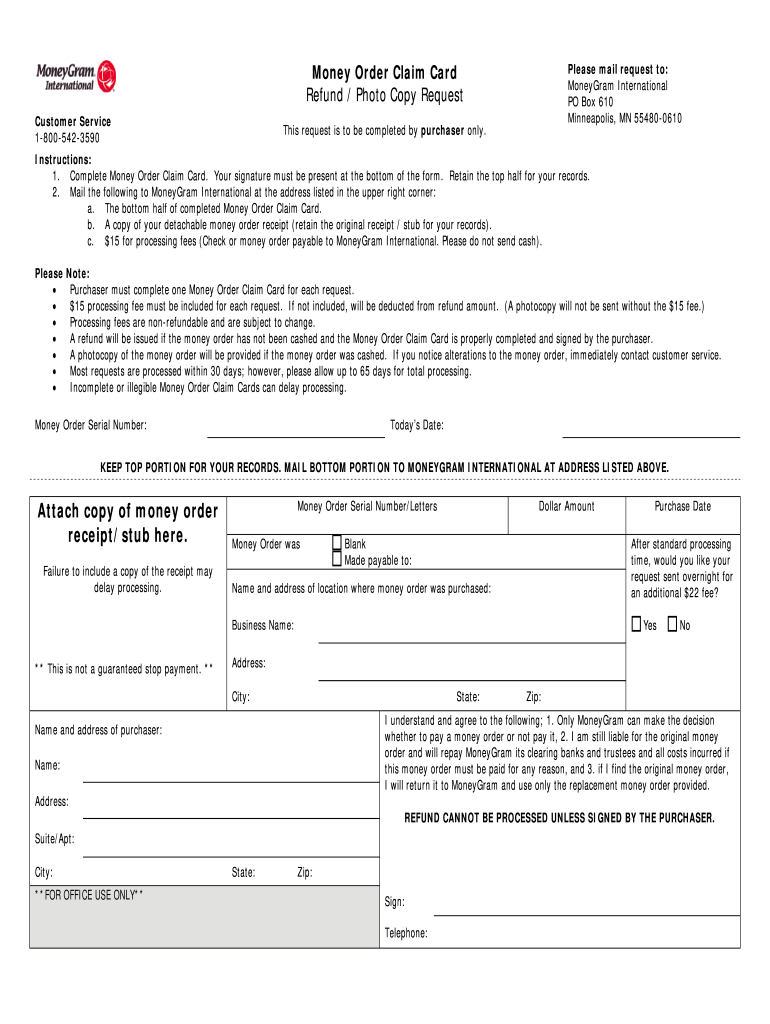
MoneyGram Money Order Claim Card RefundPhoto free printable template
pdfFiller is not affiliated with any government organization

Fill out
Complete the form online in a simple drag-and-drop editor.

eSign
Add your legally binding signature or send the form for signing.

Share
Share the form via a link, letting anyone fill it out from any device.

Export
Download, print, email, or move the form to your cloud storage.
Why pdfFiller is the best tool for your documents and forms


End-to-end document management
From editing and signing to collaboration and tracking, pdfFiller has everything you need to get your documents done quickly and efficiently.
Accessible from anywhere
pdfFiller is fully cloud-based. This means you can edit, sign, and share documents from anywhere using your computer, smartphone, or tablet.
Secure and compliant
pdfFiller lets you securely manage documents following global laws like ESIGN, CCPA, and GDPR. It's also HIPAA and SOC 2 compliant.
What is MoneyGram Money Order Claim Card RefundPhoto
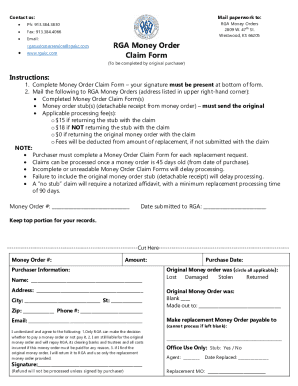
The MoneyGram Money Order Claim Card is a business form used by purchasers to request a refund or a photocopy of a money order.
pdfFiller scores top ratings on review platforms




Who needs MoneyGram Money Order Claim Card RefundPhoto?
Explore how professionals across industries use pdfFiller.

MoneyGram Money Order Claim Card RefundPhoto is needed by:
-
Individuals who have purchased a MoneyGram money order
-
People seeking refunds for lost or stolen money orders
-
Users needing a photocopy of a money order for record-keeping
-
Business owners handling money order transactions
-
Accountants managing financial documentation
-
Customer service representatives assisting clients with claims
Comprehensive Guide to MoneyGram Money Order Claim Card RefundPhoto
What Is the MoneyGram Money Order Claim Card?
The MoneyGram Money Order Claim Card is a specific form used for requesting refunds or obtaining photocopies of money orders. This card serves as a crucial tool for purchasers seeking to rectify issues with their transactions. To ensure the process is smooth, it’s essential to include the money order serial number along with purchase details when submitting the claim.
Moreover, the purchaser must take responsibility for signing and submitting this form to initiate the claim process effectively. Accurate completion of the form is vital for a successful outcome.
Why You Need to Use the MoneyGram Money Order Claim Card
Utilizing the MoneyGram Money Order Claim Card is beneficial for several reasons. First, it allows individuals to request refunds or photocopies of money orders, which can be vital in case of lost or stolen orders. Without this claim card, users may face significant delays or complications, emphasizing its necessity in the refund process.
Additionally, a $15 processing fee accompanies claims submitted using the form, making it imperative to understand the fees involved. This ensures that users are prepared for the costs related to processing their requests.
Who Can Use the MoneyGram Money Order Claim Card?
The MoneyGram Money Order Claim Card is primarily intended for the original purchaser of the money order. This individual holds specific responsibilities, including accurately completing and signing the form. It’s important to note that certain limitations may exist based on U.S. state laws, particularly in Minnesota.
Moreover, it’s crucial for the purchaser to meet all requirements for eligibility to avoid issues with the claim process. The requirement of a signature further emphasizes the importance of the purchaser’s role in this procedure.
How to Fill Out the MoneyGram Money Order Claim Card Online
To complete the MoneyGram Money Order Claim Card online, follow these steps:
-
Gather essential information, including the money order serial number and details of the original purchase.
-
Access the online form and enter the required information accurately in each designated field.
-
If applicable, use a digital signature to sign the form electronically before submission.
Ensuring all fields are filled out correctly is crucial for a seamless submission process and to avoid delays in processing your claim.
Common Mistakes When Submitting the MoneyGram Money Order Claim Card
Several common errors can occur when users submit the MoneyGram Money Order Claim Card:
-
Failing to include the money order serial number, which is essential for tracking.
-
Omitting required information or providing inaccurate details.
-
Not reviewing all entered information prior to submission, leading to discrepancies.
Reviewing the form thoroughly can prevent issues, such as delays or unexpected claims rejections.
Submitting the MoneyGram Money Order Claim Card
Once the MoneyGram Money Order Claim Card is filled out, it must be submitted to MoneyGram for processing. There are several options for submission, including mailing the completed form to the appropriate address.
Tracking the submission is also critical, as it helps users know when to expect a response. Additionally, be aware of processing times and any potential fees associated with submitting the form.
What Happens After You Submit the MoneyGram Money Order Claim Card?
After submission, users can expect to receive confirmation of their claim and updates regarding its status. If issues arise, such as a rejected claim, knowing how to handle them is essential for resolution.
If corrections or amendments are necessary, users should be prepared to provide additional information or re-submit their claims according to the guidance given during the claims process.
Using pdfFiller to Complete Your MoneyGram Money Order Claim Card
pdfFiller offers an efficient solution for users looking to complete the MoneyGram Money Order Claim Card. This platform enables users to edit, fill, and eSign forms securely online, ensuring that sensitive information remains protected throughout the process.
Utilizing pdfFiller can provide a streamlined and hassle-free experience for submitting your claim while maintaining high security standards.
Example of a Completed MoneyGram Money Order Claim Card
To assist users in completing their forms correctly, here is an example of a filled MoneyGram Money Order Claim Card. This example highlights critical areas such as the signature field and instructions for attaching any necessary supporting documents.
Having a visual reference can aid users in understanding how to accurately complete the form, increasing the likelihood of a successful claim submission.
How to fill out the MoneyGram Money Order Claim Card RefundPhoto
-
1.Access the MoneyGram Money Order Claim Card from the pdfFiller website or your account dashboard.
-
2.Open the form on pdfFiller by clicking on it to view the interactive fields.
-
3.Gather necessary information including the money order serial number, purchase date, and any receipts.
-
4.Begin filling in your personal details in the designated fields on the form.
-
5.Input the money order serial number and purchase date into the correct sections.
-
6.Ensure to attach a copy of the money order receipt as required.
-
7.Review the entire form for accuracy and completeness before proceeding.
-
8.Once satisfied with the information provided, sign the document electronically within pdfFiller.
-
9.Finalize your form by selecting the save option to keep a copy.
-
10.Choose whether to download the form for personal records or submit it directly to MoneyGram through pdfFiller.

Who is eligible to use the MoneyGram Money Order Claim Card?
Any purchaser of a MoneyGram money order can use the Money Order Claim Card to request a refund or a photocopy of their money order.
What is the processing fee for the claim request?
A $15 processing fee is required when submitting the MoneyGram Money Order Claim Card along with your form.
How do I submit the completed form?
The completed Money Order Claim Card must be mailed to MoneyGram International along with the required supporting documents.
What supporting documents do I need to submit?
You will need to provide a copy of the money order receipt along with the completed claim card when submitting your request.
How long does it take to process my claim?
Processing times for claims can vary but typically take a few weeks. Check with MoneyGram for any updates or specific timelines.
What should I do if I submitted the form incorrectly?
If you realize there's an error after submission, contact MoneyGram customer service immediately for guidance on correcting your claim.
Can I access the form in different languages?
Currently, the MoneyGram Money Order Claim Card is available only in English. Ensure to complete it accurately using the provided details.
Related Forms



Related Catalogs
Get the latest insights from our blog


If you believe that this page should be taken down, please follow our DMCA take down process
here
.
This form may include fields for payment information. Data entered in these fields is not covered by PCI DSS compliance.