
Last updated on
Oct 31, 2026
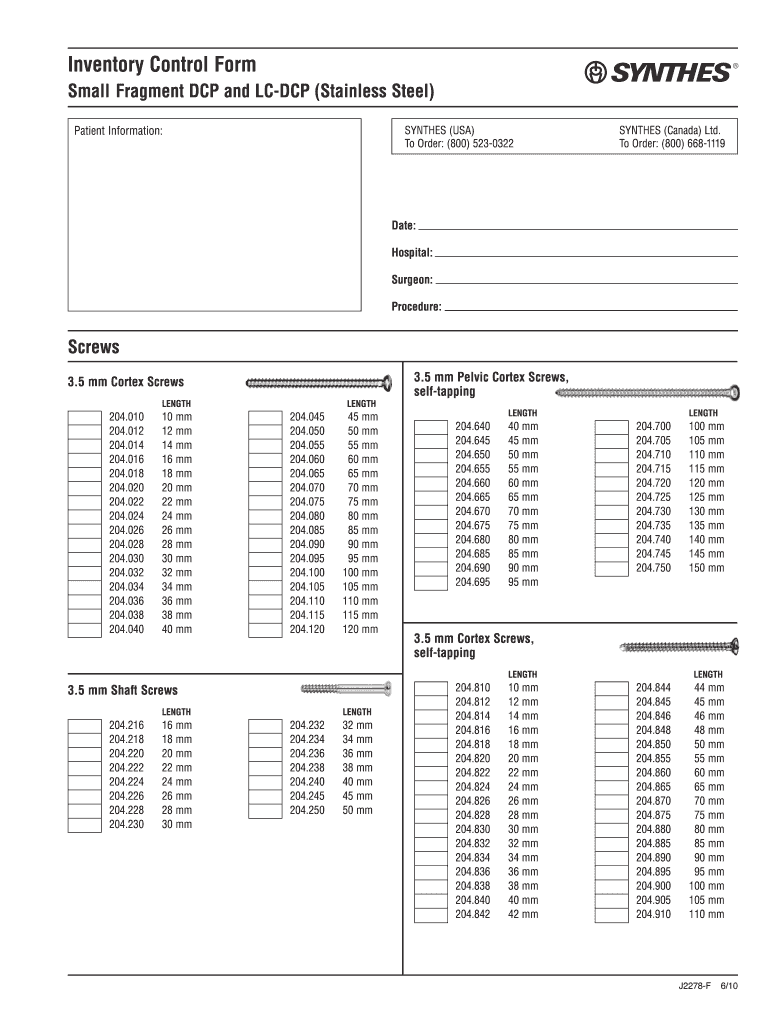
Synthes J2278-F 2010-2026 free printable template
We are not affiliated with any brand or entity on this form

Fill out
Complete the form online in a simple drag-and-drop editor.

eSign
Add your legally binding signature or send the form for signing.

Share
Share the form via a link, letting anyone fill it out from any device.

Export
Download, print, email, or move the form to your cloud storage.
Why pdfFiller is the best tool for your documents and forms


End-to-end document management
From editing and signing to collaboration and tracking, pdfFiller has everything you need to get your documents done quickly and efficiently.
Accessible from anywhere
pdfFiller is fully cloud-based. This means you can edit, sign, and share documents from anywhere using your computer, smartphone, or tablet.
Secure and compliant
pdfFiller lets you securely manage documents following global laws like ESIGN, CCPA, and GDPR. It's also HIPAA and SOC 2 compliant.
What is Synthes J2278-F
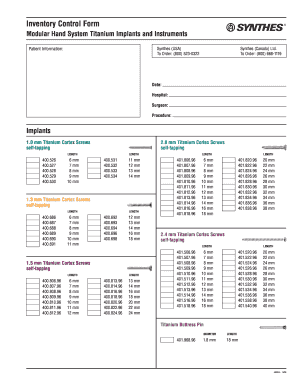
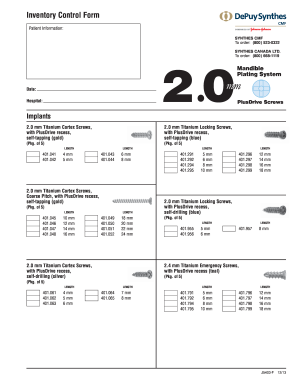
The Inventory Control Form is a specialized document used by healthcare professionals to manage and track the inventory of medical screws, plates, and surgical instruments.
pdfFiller scores top ratings on review platforms




I am so pleased with the cost and features of PDFfiller. Today, I just learned that it has an online search function as well! Quite enthused about this!
I found it easy to use. I would like to learn more about the esoteric features of the service.
Who needs Synthes J2278-F?
Explore how professionals across industries use pdfFiller.

Synthes J2278-F is needed by:
-
Surgeons managing surgical instrument inventory
-
Healthcare administrators overseeing materials management
-
Hospital inventory managers responsible for orthopedic supplies
-
Surgical teams requiring precise tracking of implants
-
Medical device procurement officers
-
Orthopedic clinics ensuring inventory accuracy
Comprehensive Guide to Synthes J2278-F
What is the Inventory Control Form?
The Inventory Control Form is a vital tool used to manage and track medical device inventory, particularly in healthcare settings. This form holds significant relevance in ensuring that surgical teams have access to the necessary supplies, like orthopedic implants. It typically includes detailed sections outlining various types of instruments and their specifications to facilitate accurate inventory management.
Purpose and Benefits of the Inventory Control Form
The primary purpose of the Inventory Control Form is to support hospital inventory management by allowing accurate tracking of essential items such as medical screws and surgical instruments. By employing this form, healthcare facilities can greatly enhance their efficiency, particularly in surgical environments.
-
Improves the accuracy of surgical instruments tracking.
-
Facilitates easy updates to the hospital inventory template.
-
Ensures that orthopedic implants are readily available for surgical procedures.
Key Features of the Inventory Control Form
One of the key aspects of the Inventory Control Form is its specific sections and fields designed for usability. This includes detailed tables that track various screws and plates, highlighting critical information such as lengths and hole counts. The form is designed to be fillable, allowing real-time updates during inventory checks.
-
Comprehensive sections for screw and plate inventory.
-
Fillable fields for medical screws inventory.
-
Usability in surgical inventory template scenarios.
Who Needs the Inventory Control Form?
Primary users of the Inventory Control Form include hospitals, surgical teams, and anyone involved in the management of medical equipment. Roles such as surgeons and inventory managers benefit significantly from this form, especially in situations where maintaining an accurate orthopedic inventory control is crucial.
How to Fill Out the Inventory Control Form Online (Step-by-Step)
Completing the Inventory Control Form online is straightforward. Below is a step-by-step guide:
-
Gather necessary information: hospital, surgeon's name, procedure details, and date.
-
Access the form online through a compatible platform.
-
Fill out the specific tables, ensuring all fields are grouped by category.
This structured approach aids in ensuring that the medical device inventory form is correctly completed.
Common Errors and How to Avoid Them
Users may encounter several errors when completing the Inventory Control Form. Common mistakes include incomplete entries and incorrect data input. To avoid these issues, consider the following tips:
-
Double-check all entries before submitting the form.
-
Use a validation checklist to ensure all fields are filled out correctly.
Staying attentive to these details improves the accuracy of the orthopedic implants form.
How to Submit the Inventory Control Form
Submitting the Inventory Control Form requires understanding available methods for submission. Timely filing is critical, as there may be deadlines associated with the inventory management process.
-
Options for electronic submission via secure platforms.
-
Tracking confirmation or submission statuses once filed.
Security and Compliance for the Inventory Control Form
Protecting sensitive patient and hospital data is paramount when utilizing the Inventory Control Form. Compliance with HIPAA and other regulations is essential to safeguard this information. Additionally, platforms like pdfFiller implement robust security measures, such as 256-bit encryption, ensuring the integrity of data handling.
Utilizing pdfFiller for Inventory Control Form Management
pdfFiller can significantly improve the management process for the Inventory Control Form. It offers a variety of features that facilitate complex document handling, such as eSigning, editing, and secure sharing.
-
Streamlined document processing for effective inventory management.
-
Ability to efficiently share and collaborate on forms.
Get Started with Your Inventory Control Form Today!
Engage with pdfFiller to utilize the online tools for completing your Inventory Control Form. The platform is designed for user convenience and efficiency, allowing for easy management of all your forms, including the critical medical screws inventory.
How to fill out the Synthes J2278-F
-
1.To access the Inventory Control Form on pdfFiller, visit the platform and search for this specific form in the form library or upload it if you have a local copy.
-
2.Open the form and familiarize yourself with pdfFiller's editing features. The page will display fields ready for entry, along with interactive tables.
-
3.Before filling out the form, gather all necessary information, including the date of inventory, hospital details, surgeon names, and specifics of each screw or plate, including their lengths and hole counts.
-
4.Click on each labeled input field to enter information. Utilize the table sections for categorical entries of screws, plates, and other devices. Be sure to fill in all required fields accurately.
-
5.As you complete each section, consistently review your entries for accuracy and completeness. Ensure the details match the physical inventory you are managing.
-
6.Once all fields are completed, utilize pdfFiller’s review tools to double-check for any missing information or mistakes that could hinder processing.
-
7.After the final review, you can save your document, download it in your preferred format, or submit it directly through pdfFiller if there’s an electronic submission option available.

Who is eligible to use the Inventory Control Form?
The Inventory Control Form is intended for healthcare professionals, including surgeons, hospital inventory managers, and surgical teams, responsible for tracking and managing medical screws and orthopedic implants.
Are there deadlines for submitting the Inventory Control Form?
While specific deadlines may depend on the context of use, it’s best to complete and submit the Inventory Control Form promptly to ensure the accuracy of inventory management during surgical procedures.
What methods can be used to submit the form?
The Inventory Control Form can typically be submitted electronically through pdfFiller, via email, or printed and delivered physically to the relevant department within the healthcare facility depending on the institution's submission policies.
What supporting documents are required with the Inventory Control Form?
Common supporting documents include inventory logs, purchase orders, or manifest records that corroborate the information entered into the Inventory Control Form regarding medical devices and instruments.
What are some common mistakes to avoid when filling out this form?
Ensure all fields are filled out accurately, paying special attention to details like the lengths and hole counts of screws and plates. Double-check hospital and surgeon information to avoid processing delays.
How long does it take to process the Inventory Control Form?
Processing times can vary based on the healthcare facility's protocols, but timely completion and accurate submissions typically expedite the review stage significantly.
Is notarization required for the Inventory Control Form?
No, notarization is not required for the Inventory Control Form. It is designed as a fillable inventory tracking tool for internal use within healthcare settings.
Related Forms





Get the latest insights from our blog


If you believe that this page should be taken down, please follow our DMCA take down process
here
.
This form may include fields for payment information. Data entered in these fields is not covered by PCI DSS compliance.