
Last updated on
Oct 23, 2026

Get the free UPS Capital Cargo Claim Form
We are not affiliated with any brand or entity on this form

Fill out
Complete the form online in a simple drag-and-drop editor.

eSign
Add your legally binding signature or send the form for signing.

Share
Share the form via a link, letting anyone fill it out from any device.

Export
Download, print, email, or move the form to your cloud storage.
Why pdfFiller is the best tool for your documents and forms


End-to-end document management
From editing and signing to collaboration and tracking, pdfFiller has everything you need to get your documents done quickly and efficiently.
Accessible from anywhere
pdfFiller is fully cloud-based. This means you can edit, sign, and share documents from anywhere using your computer, smartphone, or tablet.
Secure and compliant
pdfFiller lets you securely manage documents following global laws like ESIGN, CCPA, and GDPR. It's also HIPAA and SOC 2 compliant.
What is UPS Cargo Claim
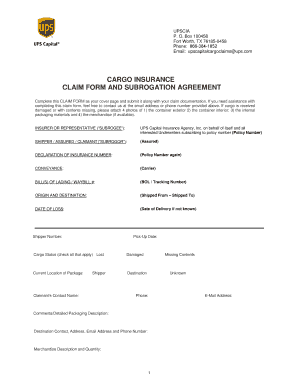
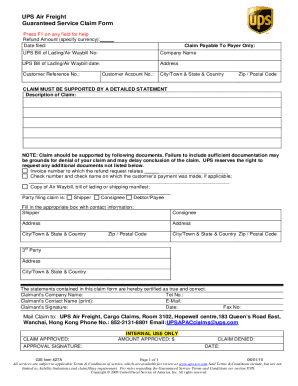
The UPS Capital Cargo Claim Form is a business document used by customers to file claims for non-delivery, shortage, damage, or delay of cargo.
pdfFiller scores top ratings on review platforms




Who needs UPS Cargo Claim?
Explore how professionals across industries use pdfFiller.

UPS Cargo Claim is needed by:
-
Small business owners using UPS for shipping
-
Individuals needing to claim cargo insurance
-
Logistics managers responsible for cargo deliveries
-
E-commerce businesses shipping products
-
Freight forwarders handling shipping logistics
Comprehensive Guide to UPS Cargo Claim
What is the UPS Capital Cargo Claim Form?
The UPS Capital Cargo Claim Form is a vital document used by individuals and businesses to file claims regarding non-delivery, shortages, damages, or delays in their cargo shipments. This form plays a crucial role in ensuring that claimants can receive compensation for issues related to their insured cargo. By utilizing the UPS Capital Cargo Claim Form, users can streamline the claims process and accurately report the details necessary for proper evaluation.
The form's relevance extends to various shipping scenarios, significantly impacting how claims for damaged or missing cargo are processed. As such, it becomes an essential tool in managing shipping-related financial risks effectively.
Purpose and Benefits of the UPS Cargo Claim Form
The UPS Capital Cargo Claim Form serves a critical purpose for businesses leveraging UPS Capital services. It facilitates the claims process, which is essential for protecting against financial losses incurred from damaged or undelivered cargo. By ensuring that claims are filed promptly using the UPS cargo insurance claim, businesses can mitigate potential financial impacts.
Utilizing this claim form helps businesses navigate the complexities of shipping claims efficiently, leading to quicker resolutions and compensation. This can play a significant role in maintaining cash flow and operational stability, demonstrating the importance of timely claims in the logistics industry.
Who Needs the UPS Capital Cargo Claim Form?
The UPS Capital Cargo Claim Form is designed for both businesses and individuals involved in shipping goods. Various scenarios necessitate its use, especially when there is a concern regarding the security or integrity of shipped items. Users in Texas, in particular, may find unique regional nuances related to this form, which can influence their filing process.
Anyone who encounters issues with cargo deliveries, such as lost items or damages, will benefit from utilizing the UPS cargo claim form Texas to ensure that their concerns are officially documented and processed.
Key Features of the UPS Capital Cargo Claim Form
This claim form includes several important fields that must be completed for a successful submission. Key sections such as Claim Amount, Date Filed, and Claimant Signature require accurate information to facilitate the claims process. Furthermore, the necessity for detailed merchandise descriptions and supporting documents underscores the form's thoroughness.
-
Claim Amount
-
Date Filed
-
Claimant Signature
-
Detailed merchandise descriptions
-
Supporting document requirements
Additionally, the claim form is designed with user-friendly aspects, allowing for convenient online submissions. This ease of use is a significant feature that enhances the overall experience of filing a claim.
How to Fill Out the UPS Capital Cargo Claim Form Online
To complete the UPS Capital Cargo Claim Form online using pdfFiller, follow these step-by-step instructions to ensure accuracy:
-
Access the form through pdfFiller's platform.
-
Fill in the Claim Amount field accurately.
-
Enter the Date Filed correctly.
-
Provide necessary merchandise descriptions.
-
Ensure your Claimant Signature is included.
When filling out the form, keep in mind common pitfalls to avoid, such as missing signature fields or incorrect data entries. This attention to detail can prevent delays in the processing of your claim.
Required Documents and Supporting Materials
When submitting the UPS Capital Cargo Claim Form, certain essential documents must accompany it to validate the claim. Key documents include:
-
Bill of Lading
-
Commercial invoices
-
Proof of delivery
Each of these documents plays a critical role in substantiating the claim. To facilitate a smoother submission, consider using a pre-filing checklist to prepare your documents thoroughly.
Submission Methods and What Happens After You Submit
There are various methods to submit the UPS Capital Cargo Claim Form, including online submissions via pdfFiller or traditional mailing options. Once the form is submitted, it typically undergoes a processing period where the claim is evaluated.
-
Online submission through pdfFiller
-
Mailing the form to UPS Capital Claims Department
Following submission, claimants can track the status of their claims to stay informed about the processing stage and any additional steps that may be required.
Security and Compliance in Submitting Claims
When handling sensitive documents related to cargo claims, security is paramount. The use of pdfFiller ensures that proper data protection measures are in place, which include 256-bit encryption and compliance with regulatory standards such as HIPAA and GDPR.
This commitment to privacy and data security allows claimants to submit their forms confidently, knowing that their information is handled securely throughout the claim process.
Leveraging pdfFiller for Your UPS Capital Cargo Claim Form
pdfFiller simplifies the process of completing the UPS Capital Cargo Claim Form, making it a practical choice for users. Key features of pdfFiller enhance the user experience, including eSignature capabilities and easy document sharing options.
Utilizing pdfFiller can lead to a more efficient claim process, allowing users to focus on their core business operations while ensuring that their claims are handled effectively.
Sample Completed UPS Cargo Claim Form
To aid in understanding the completion of the UPS Capital Cargo Claim Form, reviewing a sample completed form can be extremely beneficial. The sample should reflect all key elements required for accurate submission.
By familiarizing yourself with the example, you can ensure clarity and completeness in your own filing, helping to facilitate a smoother claims process.
How to fill out the UPS Cargo Claim
-
1.Access pdfFiller's website and search for the 'UPS Capital Cargo Claim Form' using the search bar.
-
2.Once located, click on the form to open it in the pdfFiller editor.
-
3.Before beginning, gather all necessary information such as claim amount, merchandise details, and supporting documents like the Bill of Lading.
-
4.Navigate through the form filling in each field. Start with the 'Claim Amount' and provide specific details about items lost or damaged, including quantities and valuation.
-
5.Fill in the 'Date filed' by selecting the respective date from the calendar provided.
-
6.Input the 'Claim Payable to' section correctly to ensure accurate processing.
-
7.Make sure to sign in the designated 'Claimant Signature' field. Use pdfFiller's signing tools if you need to electronically sign.
-
8.Review all filled sections thoroughly to confirm accuracy and completeness. Ensure all requirements are met.
-
9.Once reviewed, you can save the form directly in your pdfFiller account or download it for your records.
-
10.To submit, either use the upload feature to send it directly to the UPS Capital Claims Department or print and send it by mail based on your preference.

Who is eligible to file a claim using this form?
Any customer with cargo insured under UPS Capital can use this form to file a claim for issues such as non-delivery, damage, or delay of their shipments.
What documents are required to submit a cargo claim?
You must include supporting documents such as the Bill of Lading, commercial invoices, and proof of delivery when submitting your claim using the UPS Capital Cargo Claim Form.
Is there a deadline to submit the UPS Capital Cargo Claim Form?
Yes, it is critical to submit your claim as soon as possible. Check UPS’s policies for specific deadlines to avoid any potential delays in processing your claim.
How do I submit the completed claim form?
You can submit the completed UPS Capital Cargo Claim Form electronically via pdfFiller, or print it and mail it directly to the UPS Capital Claims Department as instructed.
What common mistakes should I avoid when filling out this form?
Ensure that all fields are accurately filled out and that you've included all required supporting documents. Double-check spelling in your signatures and claims to avoid processing delays.
How long does it take to process a cargo claim?
Processing times for cargo claims can vary. Typically, you can expect a resolution within a few weeks, depending on the complexity of the claim and completeness of documentation.
Can I file a claim for lost items online?
Yes, the UPS Capital Cargo Claim Form can be filled out and submitted online using pdfFiller, making it convenient to complete your claim from anywhere.
Related Content
Related Forms





Get the latest insights from our blog



If you believe that this page should be taken down, please follow our DMCA take down process
here
.
This form may include fields for payment information. Data entered in these fields is not covered by PCI DSS compliance.