
Last updated on
Oct 31, 2026

MVPT Physical Therapy Prescription Form 2015-2026 free printable template
pdfFiller is not affiliated with any government organization

Fill out
Complete the form online in a simple drag-and-drop editor.

eSign
Add your legally binding signature or send the form for signing.

Share
Share the form via a link, letting anyone fill it out from any device.

Export
Download, print, email, or move the form to your cloud storage.
Why pdfFiller is the best tool for your documents and forms


End-to-end document management
From editing and signing to collaboration and tracking, pdfFiller has everything you need to get your documents done quickly and efficiently.
Accessible from anywhere
pdfFiller is fully cloud-based. This means you can edit, sign, and share documents from anywhere using your computer, smartphone, or tablet.
Secure and compliant
pdfFiller lets you securely manage documents following global laws like ESIGN, CCPA, and GDPR. It's also HIPAA and SOC 2 compliant.
What is MVPT Physical Therapy Prescription Form
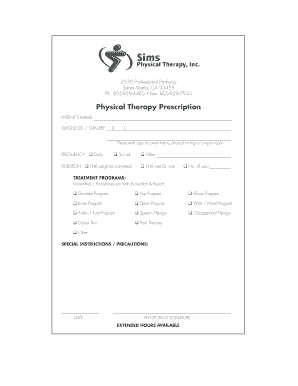
The Physical Therapy Evaluation Form is a healthcare document used by medical providers to assess and treat patients requiring physical therapy.
pdfFiller scores top ratings on review platforms




Who needs MVPT Physical Therapy Prescription Form?
Explore how professionals across industries use pdfFiller.

MVPT Physical Therapy Prescription Form is needed by:
-
Physical therapists
-
Medical providers
-
Healthcare administrators
-
Insurance companies
-
Patients seeking treatment
-
Medical institutions in New Hampshire
Comprehensive Guide to MVPT Physical Therapy Prescription Form
What is the Physical Therapy Evaluation Form?
The Physical Therapy Evaluation Form serves a vital role in healthcare by enabling practitioners to assess patients' needs comprehensively. This form includes essential patient information, treatment details, and a section for the medical provider's signature, which is crucial for the document's validity. It acts not only as a record of evaluation but also as a necessary medical treatment form for guiding therapeutic interventions.
Purpose and Benefits of the Physical Therapy Evaluation Form
The main purpose of the Physical Therapy Evaluation Form is to ensure thorough evaluations of patients' needs, which can lead to more effective treatment planning. For patients, this form facilitates personalized care tailored to their specific conditions. Medical providers benefit by having a structured approach to organize treatment plans and ensure compliance with regulatory standards that govern patient care.
Key Features of the Physical Therapy Evaluation Form
This form contains several vital sections, including:
-
Diagnosis of the patient's condition.
-
Details on treatment frequency and duration.
-
Precautions that may need to be taken during treatment.
The structure of the form is designed for both clarity and ease of use, enabling healthcare professionals to navigate it effortlessly. In addition, many forms may include digital features, such as fillable fields, making them more accessible for online use.
Who Needs the Physical Therapy Evaluation Form?
This evaluation form is primarily used by healthcare providers, including physical therapists, doctors, and other medical professionals. Patients typically need this form completed when undergoing evaluations that require a structured assessment of their physical capabilities and treatment possibilities. Different practitioners may leverage the form in unique ways to fit their specific treatment methodologies.
How to Fill Out the Physical Therapy Evaluation Form Online (Step-by-Step)
Completing the Physical Therapy Evaluation Form online can be straightforward if you follow these steps:
-
Gather necessary information such as personal details, medical history, and treatment history.
-
Access the form online and ensure your browser is compatible.
-
Fill in each section attentively, ensuring accuracy of the data.
-
Review the completed form for any errors or missing information.
-
Submit the form through the designated process outlined.
Common challenges include technical issues or unfamiliarity with digital forms, which can be mitigated by reviewing instructions carefully before starting.
Common Errors and How to Avoid Them in the Physical Therapy Evaluation Form
Many users encounter common errors when filling out the Physical Therapy Evaluation Form. Some of these mistakes include:
-
Incomplete patient information.
-
Incorrect diagnosis entries.
-
Failure to provide a valid signature.
To avoid these issues, it's advisable to validate all provided information before submission. Utilizing validation methods available in platforms like pdfFiller can further enhance accuracy and compliance.
How to Sign or Notarize the Physical Therapy Evaluation Form
Proper signing of the Physical Therapy Evaluation Form can be done using either digital signatures or wet signatures. If opting for a digital signature, follow these steps:
-
Open the form in pdfFiller.
-
Select the signature feature and choose to add your digital signature.
-
Ensure that all signature requirements specific to New Hampshire are met.
It is important to understand the implications of each signing method, especially in the context of compliance and legal validity.
Where to Submit the Physical Therapy Evaluation Form and Processing Time
Once the Physical Therapy Evaluation Form is completed, it can be submitted through various methods such as:
-
Online submission through designated healthcare portals.
-
Mailing the form to the appropriate medical office or facility.
Expected processing times may vary, but it's essential to follow up according to the established procedures. Be aware that some submissions may incur fees, which should be confirmed in advance.
Security and Compliance When Using the Physical Therapy Evaluation Form
When dealing with the Physical Therapy Evaluation Form, users can be assured of data protection. Platforms like pdfFiller implement robust security protocols, including:
-
256-bit encryption to safeguard personal information.
-
Compliance with healthcare regulations, including HIPAA and GDPR.
Handling sensitive documents requires care, and understanding data retention and privacy practices is essential for protecting patient information.
Start Using the Physical Therapy Evaluation Form with pdfFiller Today!
Choosing pdfFiller to work with the Physical Therapy Evaluation Form offers numerous benefits. The platform provides user-friendly editing options and e-signing capabilities, enhancing the overall experience. Additionally, pdfFiller's cloud-based storage allows access from various devices, making it easy to manage your forms.
How to fill out the MVPT Physical Therapy Prescription Form
-
1.To access the Physical Therapy Evaluation Form on pdfFiller, visit the platform and log in or create an account if you don't have one.
-
2.Once logged in, use the search bar to find the 'Physical Therapy Evaluation Form.' Click on it to open.
-
3.Before starting, gather necessary information such as the patient's personal details, medical history, and specific treatment needs.
-
4.Navigate through the form using pdfFiller's interface. Click on each field to enter data, using the prepared information.
-
5.Be sure to fill in all required fields, including patient diagnosis and proposed treatment frequency.
-
6.Review the form carefully before finalizing. Ensure all information is complete and accurate.
-
7.Once satisfied, save your changes by clicking the 'Save' or 'Download' option on the platform.
-
8.You can also submit the form directly through pdfFiller by following the submission prompts.

Who needs to sign the Physical Therapy Evaluation Form?
The Physical Therapy Evaluation Form must be signed by the medical provider. This signature certifies the patient's need for treatment.
Is notarization required for this form?
No, notarization is not required for the Physical Therapy Evaluation Form, making it easier for medical providers to complete.
Are there specific deadlines for submitting this form?
While there are no strict deadlines indicated, it is advisable to submit the Physical Therapy Evaluation Form as soon as possible to avoid delays in treatment.
What supporting documents might be needed with this form?
Typically, you may need to provide the patient's medical records or prior evaluations along with the Physical Therapy Evaluation Form.
How can I avoid common mistakes when completing the form?
To avoid mistakes, double-check all entries for accuracy, ensure all required fields are filled, and review the form before submission.
How long does it take to process the Physical Therapy Evaluation Form?
Processing times can vary, but generally, it will depend on the healthcare provider's schedule and the insurance company's requirements.
Can this form be submitted electronically?
Yes, the Physical Therapy Evaluation Form can be submitted electronically through pdfFiller, which streamlines the submission process.
Related Forms



Related Catalogs
Get the latest insights from our blog



If you believe that this page should be taken down, please follow our DMCA take down process
here
.
This form may include fields for payment information. Data entered in these fields is not covered by PCI DSS compliance.