
Last updated on
Oct 31, 2026

Get the free Wedding Reception Timeline Form
We are not affiliated with any brand or entity on this form

Fill out
Complete the form online in a simple drag-and-drop editor.

eSign
Add your legally binding signature or send the form for signing.

Share
Share the form via a link, letting anyone fill it out from any device.

Export
Download, print, email, or move the form to your cloud storage.
Why pdfFiller is the best tool for your documents and forms


End-to-end document management
From editing and signing to collaboration and tracking, pdfFiller has everything you need to get your documents done quickly and efficiently.
Accessible from anywhere
pdfFiller is fully cloud-based. This means you can edit, sign, and share documents from anywhere using your computer, smartphone, or tablet.
Secure and compliant
pdfFiller lets you securely manage documents following global laws like ESIGN, CCPA, and GDPR. It's also HIPAA and SOC 2 compliant.
What is Wedding Timeline
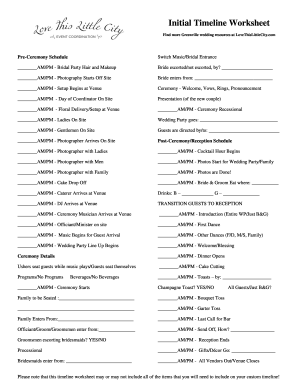
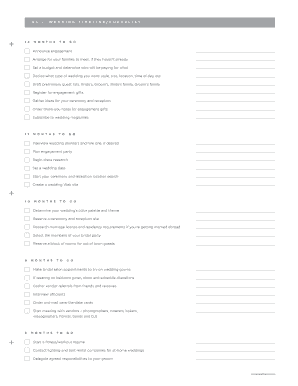
The Wedding Reception Timeline Form is a personal document used by clients and event planners to outline the schedule and specific details of a wedding reception.
pdfFiller scores top ratings on review platforms




Who needs Wedding Timeline?
Explore how professionals across industries use pdfFiller.

Wedding Timeline is needed by:
-
Wedding planners looking to organize events
-
Couples planning their wedding reception
-
Event coordinators managing timelines
-
Catering services needing schedule clarity
-
Venue managers coordinating event details
-
Family members assisting in planning
Comprehensive Guide to Wedding Timeline
What is the Wedding Reception Timeline Form?
The Wedding Reception Timeline Form is a crucial tool in wedding planning, designed to help clients and event planners outline the schedule and essential details of a wedding reception. This form plays an important role in ensuring a smooth and organized event, allowing all parties to be on the same page regarding the timeline of activities, such as the ceremony start time and other key moments throughout the evening.
Purpose and Benefits of the Wedding Reception Timeline Form
The Wedding Reception Timeline Form streamlines the planning process for both clients and event planners. It allows for the clear outlining of significant details, improving communication and collaboration among all parties involved. Key benefits of using this form include:
-
Enhanced communication between clients and planners
-
Better time management for the event
-
Reduction of stress on the wedding day
Key Features of the Wedding Reception Timeline Form
This form includes several essential components to facilitate effective event management. Notable features include:
-
A space for ceremony start time
-
Client information section
-
Specific event details like those for cocktail music, dinner, and toasts
The fillable fields and checkboxes are designed for clarity and ease of use, making it straightforward for users to complete the form accurately.
Who Needs the Wedding Reception Timeline Form?
The primary users of the Wedding Reception Timeline Form include clients, such as brides and grooms, as well as event planners. This form is particularly useful in scenarios involving large weddings or multi-part events, ensuring that all details are coordinated effectively to avoid any mishaps on the big day.
How to Fill Out the Wedding Reception Timeline Form Online (Step-by-Step)
Completing the Wedding Reception Timeline Form online is simple and efficient. Follow these steps to ensure all necessary information is captured:
-
Access the form on pdfFiller.
-
Fill in the ceremony start time and basic client information.
-
Specify event details such as cocktail arrangements, introduction of the wedding party, and more.
-
Review all fields for accuracy.
-
Obtain client signatures electronically.
Common Errors and How to Avoid Them
When filling out the Wedding Reception Timeline Form, users may encounter common mistakes such as forgetting to specify event times or not completing all required sections. To avoid these errors, consider the following best practices:
-
Double-check all entries for completeness.
-
Ensure accurate spelling of names and locations.
-
Review the form with an event planner to confirm details.
How to Sign the Wedding Reception Timeline Form
Signing the Wedding Reception Timeline Form is an essential step in the process. Both the client and the timeline preparer must provide their signatures. It is important to understand the differences between digital signatures and wet signatures, particularly regarding security and authenticity. Digital signatures offer enhanced protection and are often preferred for document management.
How to Download and Save the Wedding Reception Timeline Form PDF
After completing the Wedding Reception Timeline Form, you may wish to save your document securely using pdfFiller. To do so, follow these steps:
-
Click the save option within pdfFiller.
-
Select the desired format, such as PDF.
-
Consider printing a physical copy if needed for in-person distribution.
Security and Compliance for the Wedding Reception Timeline Form
Security is a top priority when handling the Wedding Reception Timeline Form. pdfFiller implements robust measures, such as 256-bit encryption, to protect user data. Furthermore, the platform ensures compliance with regulations like HIPAA and GDPR, safeguarding sensitive information throughout the planning process.
Get Started with Your Wedding Reception Timeline Form Today
To enhance your wedding planning experience, visit pdfFiller to seamlessly complete your Wedding Reception Timeline Form. With a user-friendly interface, exceptional security, and dedicated support, you can confidently manage every detail of your special day.
How to fill out the Wedding Timeline
-
1.To begin, access the Wedding Reception Timeline Form on pdfFiller by searching for it by name in the platform's search bar.
-
2.Once you've located the form, click on it to open and view the fillable template within pdfFiller’s interface.
-
3.Familiarize yourself with the available fields and checkboxes designed for various details related to the reception.
-
4.Before filling out the form, gather essential information such as the ceremony start time, client names, location, reception date and specific scheduled events.
-
5.Start filling in the required fields, including the names of the clients and the specific details about the wedding events like cocktail music, dinner type, toasts, and dances.
-
6.Utilize the text boxes for lengthy information and the checkboxes to streamline your entries for easier navigation.
-
7.Once all fields are correctly filled and double-checked, review the form carefully to ensure all information is accurate and complete.
-
8.After reviewing, use pdfFiller’s tools to save and download the completed form or confidently submit it directly through the platform.
-
9.If needed, share the form via email or save it to your device for future reference.

Who needs to sign the Wedding Reception Timeline Form?
The Wedding Reception Timeline Form requires signatures from both the client and the timeline preparer to ensure agreement on the reception schedule and arrangements.
Is there a deadline for submitting this form?
While specific deadlines may vary, it is advisable to complete the Wedding Reception Timeline Form at least several weeks before the wedding date to ensure all details are organized and communicated.
How can I submit the form once completed?
You can either download the filled Wedding Reception Timeline Form and submit it via email or provide it directly to your event planner or venue manager through the pdfFiller submission feature.
What information do I need to fill out the form?
You will need details such as the ceremony start time, client names, venue location, reception date, and planned events like meals, dances, and toasts to properly fill out the Wedding Reception Timeline Form.
Can I modify the Wedding Reception Timeline Form once it's completed?
Yes, you can edit the Wedding Reception Timeline Form on pdfFiller as long as it is saved in an editable format before final submission. Make sure to save any changes.
What are common mistakes to avoid when filling out this form?
Common mistakes include incomplete fields, incorrect times or dates, and failing to gather all necessary information beforehand. Always double-check your entries for accuracy.
How is the Wedding Reception Timeline Form different from other wedding forms?
This form is specifically designed to create a detailed schedule for the wedding reception, focusing solely on the sequence and timing of events, unlike other forms that may address general wedding planning.
Related Forms



Related Catalogs
Get the latest insights from our blog


If you believe that this page should be taken down, please follow our DMCA take down process
here
.
This form may include fields for payment information. Data entered in these fields is not covered by PCI DSS compliance.