
Last updated on
Oct 31, 2026
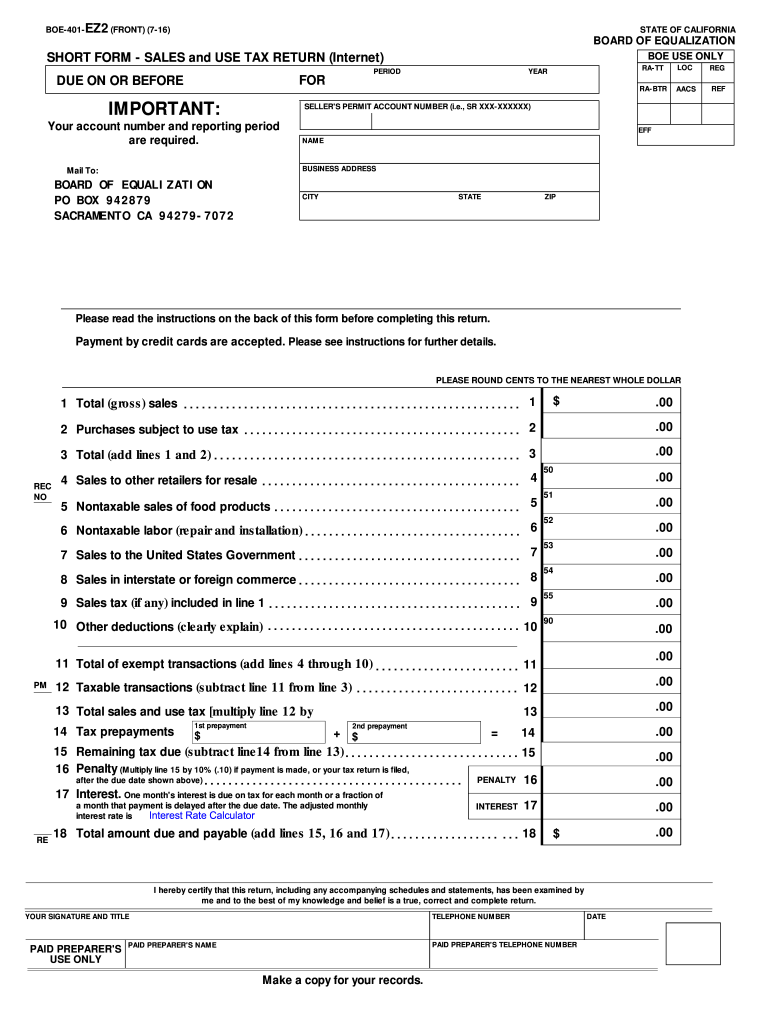
CA BOE-401-EZ2 2016-2026 free printable template
pdfFiller is not affiliated with any government organization

Fill out
Complete the form online in a simple drag-and-drop editor.

eSign
Add your legally binding signature or send the form for signing.

Share
Share the form via a link, letting anyone fill it out from any device.

Export
Download, print, email, or move the form to your cloud storage.
Why pdfFiller is the best tool for your documents and forms


End-to-end document management
From editing and signing to collaboration and tracking, pdfFiller has everything you need to get your documents done quickly and efficiently.
Accessible from anywhere
pdfFiller is fully cloud-based. This means you can edit, sign, and share documents from anywhere using your computer, smartphone, or tablet.
Secure and compliant
pdfFiller lets you securely manage documents following global laws like ESIGN, CCPA, and GDPR. It's also HIPAA and SOC 2 compliant.
What is CA BOE-401-EZ2
The California Short Form Sales and Use Tax Return is a state tax document used by businesses to report and pay sales and use tax in California.
pdfFiller scores top ratings on review platforms




Who needs CA BOE-401-EZ2?
Explore how professionals across industries use pdfFiller.

CA BOE-401-EZ2 is needed by:
-
California business owners filing sales tax returns
-
Companies with taxable sales or purchases in California
-
Businesses seeking to report exempt transactions
-
Entrepreneurs needing to track sales tax liabilities
-
Accountants assisting clients with California tax compliance
Comprehensive Guide to CA BOE-401-EZ2
What is the California Short Form Sales and Use Tax Return?
The California Short Form Sales and Use Tax Return, officially known as the BOE-401-EZ2 form, is a specific document used by businesses in California. This form is essential for reporting and paying the sales and use tax owed to the state. Timely reporting and payment are crucial for maintaining compliance and avoiding penalties associated with late submissions.
Purpose and Benefits of the California Sales and Use Tax Return
Completing the California Short Form Sales and Use Tax Return accurately is vital for business owners. The BOE-401-EZ2 form simplifies the tax compliance process, helping businesses avoid penalties and legal issues. Proper filing can significantly impact a company’s financial health and enhance its credibility with stakeholders.
Eligibility Criteria for the California Short Form Sales and Use Tax Return
Not all businesses are required to use the BOE-401-EZ2 form; specific eligibility criteria must be met. Eligible business types typically have distinct sales and purchase thresholds. If a business exceeds these thresholds, alternative tax reporting forms may be necessary for compliance.
How to Fill Out the California Short Form Sales and Use Tax Return Online
Filling out the California Short Form Sales and Use Tax Return online can streamline the process. Follow these steps to complete the form:
-
Enter your account number and specify the reporting period.
-
Detail financial information, including total sales, purchases subject to use tax, and exempt transactions.
-
Review each section carefully to prevent common errors.
Ensure all fields are filled out accurately to avoid any processing delays.
Submission Methods for the California Short Form Sales and Use Tax Return
You can submit your completed California Short Form Sales and Use Tax Return through various methods. Options include:
-
Online submission via the official California Board of Equalization website.
-
Mailing the form to the appropriate address.
-
Submitting in-person at local Board of Equalization offices.
Be aware of submission deadlines to avoid penalties linked to late filings.
Common Errors and How to Avoid Them
While filling out the California Short Form Sales and Use Tax Return, some errors frequently occur. Common pitfalls include:
-
Incorrect account number entry.
-
Forecasting sales or tax calculations inaccurately.
-
Failing to sign the form where required.
Utilizing checklists and double-checking entries can greatly reduce these mistakes.
Security and Compliance When Filing the California Short Form Sales and Use Tax Return
pdfFiller ensures that your tax filing experience is secure. The platform features robust security measures, including 256-bit encryption, to protect sensitive data. Compliance with significant regulations ensures that user information remains confidential, providing peace of mind when filing taxes online.
Using pdfFiller to Simplify Your Tax Filing Process
pdfFiller offers numerous advantages for users filling out tax forms. Some key benefits include:
-
User-friendly interface for easy form filling.
-
Cloud-based access allows for filing from anywhere.
-
eSigning capabilities streamline submission processes.
Additionally, many users have shared positive feedback about their experiences using pdfFiller for tax documentation.
What Happens After You Submit the California Short Form Sales and Use Tax Return?
Upon submission of the California Short Form Sales and Use Tax Return, you can expect the following:
-
Processing times may vary; check with the Board of Equalization for specific timeframes.
-
A confirmation of submission will be sent, along with any potential follow-up actions required.
-
In case of errors, be informed about the amendment process to correct submissions.
Examples and Resources for the California Short Form Sales and Use Tax Return
To support users filing the California Short Form Sales and Use Tax Return, resources are available. Consider utilizing:
-
A sample completed form to guide you through proper submission.
-
Official resources and guides provided by the California Board of Equalization.
-
Tools offered by pdfFiller to facilitate easy form access and filling.
How to fill out the CA BOE-401-EZ2
-
1.Begin by visiting pdfFiller and log into your account or create a new one if you don’t have an account yet.
-
2.Use the search function to find the 'California Short Form Sales and Use Tax Return' or 'BOE-401-EZ2 form'.
-
3.Once located, click on the form to open it in the pdfFiller editor.
-
4.Before filling in the form, gather necessary financial information, including your business account number, sales totals, and details on any purchases subject to use tax.
-
5.Utilize the fillable fields in pdfFiller to input relevant information such as the business account number, reporting period, total sales, and purchases subject to use tax.
-
6.Ensure to check boxes for exempt transactions if applicable, and input any additional required information, like financial details.
-
7.After completing all fields, take a moment to review the form for any omissions or errors.
-
8.You can use pdfFiller’s tools to sign the document digitally, ensuring compliance with the requirement that the business owner must sign the form.
-
9.Once reviewed and signed, choose the option to save the form on pdfFiller or download it for your records.
-
10.To submit the form, follow the submission instructions provided, which typically involve sending it to the Board of Equalization by the due date.

Who needs to file the California Short Form Sales and Use Tax Return?
California business owners who engage in taxable sales or purchases must file the California Short Form Sales and Use Tax Return to report and remit their sales tax liabilities.
What is the deadline for submitting the California sales tax return?
The due date for the California Short Form Sales and Use Tax Return is typically the last day of the month following the end of the reporting period. Ensure you check for any specific deadlines associated with your business’s sales tax reporting frequency.
What payment methods are accepted for submitting sales tax?
Payments for the California sales tax return can be made online via credit card. Follow the payment instructions provided with the form to ensure timely payment and avoid penalties.
What supporting documents do I need for this form?
While the California Short Form Sales and Use Tax Return does not typically require supporting documentation, it's advisable to keep detailed records of sales, purchases, and exempt transactions in case of audits.
What common mistakes should I avoid when completing this form?
Common mistakes include failing to sign the form, skipping sections, or misreporting sales and tax amounts. Double-check all entries for accuracy to prevent delays or penalties.
How long does it take to process the California sales tax return?
Processing times for the California Short Form Sales and Use Tax Return can vary, but typically, the California State Board of Equalization processes returns within a few weeks after submission, provided all information is complete.
Can I amend my sales tax return after submitting?
Yes, if you discover an error after submitting your California Short Form Sales and Use Tax Return, you can file an amended return. It's essential to correct any discrepancies to avoid penalties.
Related Forms




Related Catalogs
Get the latest insights from our blog


If you believe that this page should be taken down, please follow our DMCA take down process
here
.
This form may include fields for payment information. Data entered in these fields is not covered by PCI DSS compliance.