
Last updated on
Nov 9, 2026

UK Fitness Doctor Exercise Confirmation Letter 2011-2026 free printable template
We are not affiliated with any brand or entity on this form

Fill out
Complete the form online in a simple drag-and-drop editor.

eSign
Add your legally binding signature or send the form for signing.

Share
Share the form via a link, letting anyone fill it out from any device.

Export
Download, print, email, or move the form to your cloud storage.
Why pdfFiller is the best tool for your documents and forms


End-to-end document management
From editing and signing to collaboration and tracking, pdfFiller has everything you need to get your documents done quickly and efficiently.
Accessible from anywhere
pdfFiller is fully cloud-based. This means you can edit, sign, and share documents from anywhere using your computer, smartphone, or tablet.
Secure and compliant
pdfFiller lets you securely manage documents following global laws like ESIGN, CCPA, and GDPR. It's also HIPAA and SOC 2 compliant.
What is UK Fitness Doctor Exercise Confirmation Letter
The Doctor's Consent Form is a medical consent document used by fitness instructors to obtain medical clearance for patients before participating in aerobic classes.
pdfFiller scores top ratings on review platforms




The best solution I have found for editing and working with .pdf documents. Great Product!!
Good experience so far, but just started using.
Who needs UK Fitness Doctor Exercise Confirmation Letter?
Explore how professionals across industries use pdfFiller.

UK Fitness Doctor Exercise Confirmation Letter is needed by:
-
Fitness instructors seeking medical clearance for clients
-
Patients with potential health conditions
-
Doctors providing recommendations for fitness activities
-
Healthcare facilities managing fitness programs
-
Sports organizations requiring consent forms for participants
Comprehensive Guide to UK Fitness Doctor Exercise Confirmation Letter
What is the Doctor's Consent Form?
The Doctor's Consent Form is a crucial document used by fitness instructors to secure medical clearance for participants engaging in fitness activities, particularly in aerobic and body conditioning classes. This form serves to confirm the health status of individuals, ensuring their safety during workouts. It is particularly important for those with pre-existing health conditions to obtain a doctor's signature, validating their suitability for participation.
This form is commonly utilized in the UK, and it is essential for instructors to ensure compliance with health regulations when managing classes.
Purpose and Benefits of the Doctor's Consent Form
The primary purpose of the Doctor's Consent Form is to ensure the safety of participants. By requiring a doctor's signature, fitness instructors can confirm the health status of individuals before they participate in any physical activities. This process not only protects the health of the participants but also mitigates liability risks for fitness instructors.
Additionally, the form streamlines the medical clearance process, making it easier for instructors to obtain the necessary approvals. This benefits both instructors and participants by facilitating smoother class operations.
Key Features of the Doctor's Consent Form
The Doctor's Consent Form includes several essential components designed for thoroughness and compliance. Key features of the form are as follows:
-
Patient information fields, including name, address, and health details.
-
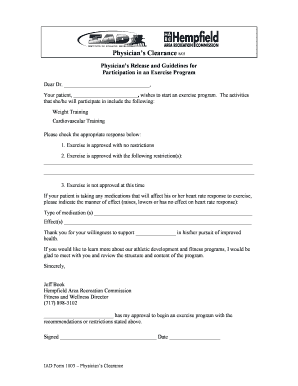
Checkboxes for the doctor's recommendations, allowing options such as approve, disapprove, or indicate restrictions.
-
A designated signature section for the doctor, along with the date of approval.
These elements ensure that the form captures all necessary information accurately, contributing to a more effective health clearance process.
Who Needs the Doctor's Consent Form?
Various groups and individuals are required to use the Doctor's Consent Form. Fitness instructors and gyms mandate this document to ensure medical clearance from participants. It is particularly critical for individuals with pre-existing health conditions who wish to engage in aerobic classes.
The presentation of this form is essential under specific circumstances, ensuring that all participants are cleared to partake in physical activities safely.
How to Fill Out the Doctor's Consent Form Online (Step-by-Step)
Filling out the Doctor's Consent Form online is straightforward. Here are the steps to follow:
-
Gather necessary information such as patient details and health history before accessing the form.
-
Log in to pdfFiller and select the Doctor's Consent Form.
-
Input all required patient information into the form fields accurately.
-
Check the appropriate boxes for the doctor's recommendations.
-
Ensure the doctor’s signature is included, either digitally or in print.
By following these steps, users can ensure the form is completed accurately and efficiently.
How to Sign the Doctor's Consent Form
The signing process for the Doctor's Consent Form is flexible, offering both digital and wet signature options. It is crucial to ensure the doctor's signature is valid and meets the necessary requirements for acceptance.
Digital signatures can be easily implemented using pdfFiller, ensuring secure eSign. To sign the document:
-
Select the eSign option on pdfFiller.
-
Follow the prompts to place a digital signature on the form.
-
Alternatively, print the form for a wet signature if preferred.
Making sure the signature is correctly applied prevents any issues during submission.
Submission Methods and Where to Send the Doctor's Consent Form
Once the Doctor's Consent Form is completed, various submission methods are available. Fitness instructors and facilities can receive the form through:
-
Online submission via email or secured cloud storage.
-
Printed copy sent through traditional mail.
It's important to adhere to any specific instructions provided by the institution regarding where to send the form and to note any relevant deadlines for processing. Adhering to these guidelines ensures smooth acceptance of the document.
Security and Compliance for the Doctor's Consent Form
When handling the Doctor's Consent Form, security and data protection are critical. pdfFiller employs 256-bit encryption to safeguard sensitive information contained within the form. Furthermore, compliance with HIPAA and GDPR regulations ensures that patient data is handled with the utmost privacy and care.
Users can rest assured that their information is protected during the completion and submission process, maintaining the integrity of confidential health details.
Example of a Completed Doctor's Consent Form
An example of a completed Doctor's Consent Form can serve as a helpful guide for users. This includes a visual representation or a detailed description highlighting:
-
The patient information entered across the various fields.
-
Annotations explaining each section of the form.
-
Common mistakes to avoid when filling out the form to ensure accuracy.
Understanding how to properly complete the form will aid in preventing errors that could delay the approval process.
Get Started with pdfFiller to Complete Your Doctor's Consent Form
pdfFiller makes it easy to complete your Doctor's Consent Form online, providing users with an intuitive platform for editing and filling documents. With features like secure storage and sharing, users can manage their forms with convenience.
To begin utilizing pdfFiller, simply visit the website where you can access the Doctor's Consent Form and experience the benefits of efficient document management.
How to fill out the UK Fitness Doctor Exercise Confirmation Letter
-
1.Start by accessing pdfFiller and search for 'Doctor's Consent Form' in the template library.
-
2.Once located, click on the form to open it in the pdfFiller interface.
-
3.Gather the required information, including the patient's name, address, and medical history, to fill in the details accurately.
-
4.Begin filling in the blank fields, entering the patient's details as prompted on the form.
-
5.Use the checkboxes to indicate the doctor's recommendation, such as approve, disapprove, or approve with restrictions.
-
6.Ensure all sections are complete, providing clear and accurate information, as this is crucial for the form's validity.
-
7.After filling in all necessary fields, review the form carefully for any errors or missing information.
-
8.Once you confirm that all details are accurate, you can finalize the form with the doctor’s signature, including the date.
-
9.After finalizing the form, save your work on pdfFiller by using the save option. You can also choose to download the form in your desired format.
-
10.Finally, submit the form according to your needs, whether it be by email, printing it for physical submission, or further instructions specific to your organization.

Who is eligible to use the Doctor's Consent Form?
The Doctor's Consent Form is designed for patients seeking to obtain medical clearance for aerobic classes, and it is also used by fitness instructors and healthcare professionals involved in overseeing fitness activities.
What supporting documents do I need to fill out this form?
Generally, you need the patient’s medical history and a doctor’s recommendation. Ensure all relevant medical details are available to fill out the form accurately.
Are there any deadlines for submitting the Doctor's Consent Form?
While specific deadlines can vary, it's essential to complete and submit the form before the patient starts any fitness program or activity requiring medical clearance.
How do I submit the Doctor's Consent Form?
You can submit the form directly through pdfFiller by email, downloading it for physical submission, or following specific instructions provided by your fitness organization or healthcare facility.
What are common mistakes to avoid when filling out this form?
Ensure that you double-check all entered information for accuracy, especially patient details and doctor's signatures. Missing information can delay processing or invalid the form.
How long does it typically take to process the Doctor's Consent Form?
Processing times can vary depending on the healthcare provider, but it generally takes a few days to a week. It’s advisable to check with the issuing doctor for specific timelines.
Does the Doctor's Consent Form need notarizing?
No, the Doctor's Consent Form does not require notarization. It mainly needs the patient’s and doctor’s signatures to be valid.
Related Forms





Related Catalogs
Get the latest insights from our blog


If you believe that this page should be taken down, please follow our DMCA take down process
here
.
This form may include fields for payment information. Data entered in these fields is not covered by PCI DSS compliance.